Bluetooth streaming very choppy

jmm

New member
Member
VIP
Local time
12:35 PM
Messages
107
Hello, for some months now, streaming music to my BT-connected HiFi has occasionally become very choppy. It happens mainly when I'm doing stuff on the laptop such as browsing Internet or using a word processor. The breaks may increase when the fan noise increases, indicating perhaps insufficient CPU ressources, but not necessarily, i.e. it can happen when the fan is off. Aware of issues between Intel BT drivers and recent Windows updates, I have uninstalled KB3133977, 3161608 and 3172605, without success.
I have Windows 7 SP 1 running on a 2.2 GHz, 2 GB RAM system.
My BT radio is Intel® Wireless WiFi Link 4965AGN on Intel(R) Centrino(R) Wireless Bluetooth(R) 3.0 + High Speed Adapter, and no driver update is available as it probably is too old (2006).
I had always been able to stream radios without any problem. What could happen?
I'm desperate, can you please suggest any fix?
 

My Computer

Computer type
Laptop
Computer Manufacturer/Model Number
Dell Latitude E7240
OS
Microsoft Windows 7 Professionnel 64 bits 7601 Multiprocessor Free Service Pack 1
CPU
Intel(R) Core(TM) i5-4310U CPU @ 2.00GHz
Motherboard
Dell Inc. 08YF01
Memory
8,00 GB
Graphics Card(s)
Intel(R) HD Graphics Family
Sound Card
(1) Bluetooth Audio (2) Périphérique High Definition Audio
Monitor(s) Displays
Mobile Intel 965
Screen Resolution
1366 x 768 x 32 bits (4294967296 colors) @ 59 Hz
Hard Drives
SK hynix SH920 mSATA 128
Hello jmm mate have you ever thought of adding more RAM? as you don't have a lot installed and it helps to have as much as you can because your system runs based on what is installed in the RAM on boot up. Plus if you had two sticks in it makes use of the empty channel the new stick would use so in theory making data transfer faster.

Now it may also depend on what other devices are being used in your house Blu tooth usually runs at 2.4GHz and that is precisely what a lot of other devices use - cordless phones, microwaves, etc etc so they could be causing interference in your case.

Another thing that caught my eye is the fan noise increasing when things are being used a lot so can you let us know what the temps on the machine are please? Us this Speccy - Free Download - Piriform and post back

If you are concerned that updates may be something to do with it a system restore may clear that up but try the other stuff first.
 

My Computer

Computer type
PC/Desktop
Computer Manufacturer/Model Number
Own build (new) Desk1 / Asus ROG Win 7 / Desk2 1st build
OS
Desk1 7 Home Prem / Desk2 10 Pro / Main lap Asus ROG 10 Pro 2 laptop Toshiba 7 Pro Asus P2520 7 & 10
CPU
Desk1 i5 3750K / Laptop i7 GTX 860M / Desk2 i5 2500
Motherboard
Desk1 Asus P877-V / Desk2 Gigabyte H67 UD3H / Laptop ?
Memory
Desk1 8GB (1866) / Desk2 16GB (1333) / Laptop 8Gb DDR3
Graphics Card(s)
Desk 1& 2NVidia GTX 650 & Laptops on board Intel
Sound Card
Desk 1 & 2 -XONAR DG Realtek High Def audio Laptop
Monitor(s) Displays
Desk 1 Benq HD 2450 / Desk2 Philips 24" / Laptop 17.5"
Screen Resolution
1920x1080 D1 & D2 & Laptop 1
Hard Drives
Desk1 Samsung 120GB 830 SSD
Asus ROG 256GB 850 Pro SSD
Desk2 Samsung 840 256 SSD
Toshiba 120GB EVO
PSU
Desk 1 Corsair HX 1050/ Laptop ? / Desk 2 Corsair HX 650
Case
Desk 1 Cooler HAF XM ? Toshiba laptop / Desk2 Coolermaster
Cooling
Fans on all Desk1 -2 Desk2 - all Coolermasters 5 Laptop ?
Keyboard
Desk 1 MS Sidewinder X6 Desk 2 MS Sidewinder X 4
Mouse
Desk 1&2 - Gigabyte MS 900 gamer - laptop - Logitec wireless
Internet Speed
ADSL2+
Other Info
One other Desktop (tester) and spare Toshba laptop both with SSD's
Running Kaspersky 2016 ISS on all machines config'd identically
Logitec audio stereo systems on each machine (x3)
Canon MG5250MFC
Router/modem TP-Link running WPA2SK
thanks for your input!
temp is ~40°C when quiet, can go to 60 with a google search, and up to 80 when e.g. searching for a BT device. However, there may be no streaming breaks and drops at 60°C and there may be some at 45...so it looks like the breaks are somehow related to cpu use but not entirely so (no strict correlation), really puzzling!
I do have a BT device in the surroundings but I turned it off and the problem persisted...
I might think of increasing the RAM but I still don't see why my BT streaming had been working neatly before and suddenly became choppy... It seems something happened either with hardware or software...
 

My Computer

Computer type
Laptop
Computer Manufacturer/Model Number
Dell Latitude E7240
OS
Microsoft Windows 7 Professionnel 64 bits 7601 Multiprocessor Free Service Pack 1
CPU
Intel(R) Core(TM) i5-4310U CPU @ 2.00GHz
Motherboard
Dell Inc. 08YF01
Memory
8,00 GB
Graphics Card(s)
Intel(R) HD Graphics Family
Sound Card
(1) Bluetooth Audio (2) Périphérique High Definition Audio
Monitor(s) Displays
Mobile Intel 965
Screen Resolution
1366 x 768 x 32 bits (4294967296 colors) @ 59 Hz
Hard Drives
SK hynix SH920 mSATA 128
ps : intuitively it sounds more like an IRQ issue because the breaks often occur when I start something, even something as simple as opening windows explorer, like right now @ 40°C...
 

My Computer

Computer type
Laptop
Computer Manufacturer/Model Number
Dell Latitude E7240
OS
Microsoft Windows 7 Professionnel 64 bits 7601 Multiprocessor Free Service Pack 1
CPU
Intel(R) Core(TM) i5-4310U CPU @ 2.00GHz
Motherboard
Dell Inc. 08YF01
Memory
8,00 GB
Graphics Card(s)
Intel(R) HD Graphics Family
Sound Card
(1) Bluetooth Audio (2) Périphérique High Definition Audio
Monitor(s) Displays
Mobile Intel 965
Screen Resolution
1366 x 768 x 32 bits (4294967296 colors) @ 59 Hz
Hard Drives
SK hynix SH920 mSATA 128
Jmm mate could you post the details of the CPU please because those temps are in my view are a tad too high for what you are using at the time - 60C for Googling and 80C seems rather extreme just searching for a Blu tooth device. I personally I would be looking doing something about the cooling whatever the cause of your issue.
Now one simple test is this before you go pulling that machine apart (if you are familiar with that)
For more specific info on what I can see is a machine of some vintage please do this System Info - See Your System Specs

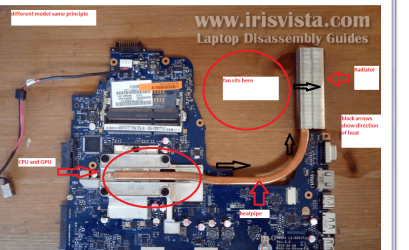
CLEANING A LAPTOP FAN & COOLER RAD
The thing you do is to turn over the laptop and shine a very bright light into the air intake aperture (you will see the fan there) and then while doing that look at the outlet vent on the end of the laptop you should see the light quite clearly shining through the cooling " radiator" if not it is clogged and will need cleaning as will probably the fan opening.
You can do this by blowing it out using a compressed air can in short bursts.
BUT ONE WORD OF WARNING DO NOT blow the air into the fan opening without inserting say a plastic rod or large cable tie to stop the fan from spinning as the air blast will spin the fan at a very high speed that it is not designed to take and may wreck the bearing!!
To clean the “rad” use one of those pipe cleaners / chenille craft wires – see pics - these will not be as the same as your machine but give you a rough idea of what you are looking for - just remember please use something to stop the fan from spinning if you use a compressed air can.
 

Attachments

  • LAPTOP VENTING.PNG
    LAPTOP VENTING.PNG
    171.1 KB · Views: 0
  • CHINELLE.PNG
    CHINELLE.PNG
    65.6 KB · Views: 18
  • FAN2.PNG
    FAN2.PNG
    288.5 KB · Views: 0

My Computer

Computer type
PC/Desktop
Computer Manufacturer/Model Number
Own build (new) Desk1 / Asus ROG Win 7 / Desk2 1st build
OS
Desk1 7 Home Prem / Desk2 10 Pro / Main lap Asus ROG 10 Pro 2 laptop Toshiba 7 Pro Asus P2520 7 & 10
CPU
Desk1 i5 3750K / Laptop i7 GTX 860M / Desk2 i5 2500
Motherboard
Desk1 Asus P877-V / Desk2 Gigabyte H67 UD3H / Laptop ?
Memory
Desk1 8GB (1866) / Desk2 16GB (1333) / Laptop 8Gb DDR3
Graphics Card(s)
Desk 1& 2NVidia GTX 650 & Laptops on board Intel
Sound Card
Desk 1 & 2 -XONAR DG Realtek High Def audio Laptop
Monitor(s) Displays
Desk 1 Benq HD 2450 / Desk2 Philips 24" / Laptop 17.5"
Screen Resolution
1920x1080 D1 & D2 & Laptop 1
Hard Drives
Desk1 Samsung 120GB 830 SSD
Asus ROG 256GB 850 Pro SSD
Desk2 Samsung 840 256 SSD
Toshiba 120GB EVO
PSU
Desk 1 Corsair HX 1050/ Laptop ? / Desk 2 Corsair HX 650
Case
Desk 1 Cooler HAF XM ? Toshiba laptop / Desk2 Coolermaster
Cooling
Fans on all Desk1 -2 Desk2 - all Coolermasters 5 Laptop ?
Keyboard
Desk 1 MS Sidewinder X6 Desk 2 MS Sidewinder X 4
Mouse
Desk 1&2 - Gigabyte MS 900 gamer - laptop - Logitec wireless
Internet Speed
ADSL2+
Other Info
One other Desktop (tester) and spare Toshba laptop both with SSD's
Running Kaspersky 2016 ISS on all machines config'd identically
Logitec audio stereo systems on each machine (x3)
Canon MG5250MFC
Router/modem TP-Link running WPA2SK
sorry, i was away on vacation...
i did the system specs thing, but it doesnt seem like this will help more than what i initially posted...
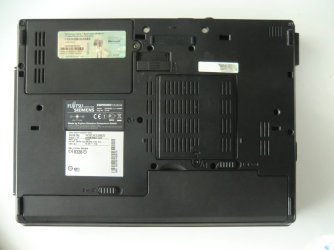
my laptop's bottom looks very different from the toshiba's (the air-out vent is to the right on the attached pic), so i couldnt do the "light through" thing...
i did blow air through the vent and that seemed to have improved temps: googling or device searching now yields peaks at 50°C but runs mostly around 45 - i think i may be able to still improve this as the can i used had little air left in it...
will let you know (couple days) whether that has anything to do with the BT issue...
 

Attachments

  • CIMG6531.JPG
    CIMG6531.JPG
    165.6 KB · Views: 2

My Computer

Computer type
Laptop
Computer Manufacturer/Model Number
Dell Latitude E7240
OS
Microsoft Windows 7 Professionnel 64 bits 7601 Multiprocessor Free Service Pack 1
CPU
Intel(R) Core(TM) i5-4310U CPU @ 2.00GHz
Motherboard
Dell Inc. 08YF01
Memory
8,00 GB
Graphics Card(s)
Intel(R) HD Graphics Family
Sound Card
(1) Bluetooth Audio (2) Périphérique High Definition Audio
Monitor(s) Displays
Mobile Intel 965
Screen Resolution
1366 x 768 x 32 bits (4294967296 colors) @ 59 Hz
Hard Drives
SK hynix SH920 mSATA 128
Yep it doesn't look like such a good set up as the Toshiba one maybe shining the light back through the external vert may be worth a try. Now you could also try blowing a with a compressed air can "backwards" through that vent too and see id crud comes out of any of the many in vents there seems to be in that back panel. If there is a cloud of rubbish come out then he only thing I can suggest is that you then disassemble the machine but in the video linked below it would be a real task if you are not used to doing stuff like that.
That is what I would do because it looks to be only removing the battery, the hard drive and RAM covers/panels taking them (hard drive and RAM sticks out and then try a blow with the air and if that didn't allow much to come out well I think it may be quite a job to access the inside see this Youtube it is in Russian but you can see about a quarter way into it what cooling system looks like - from the top for heavens sake
Замена батарейки CMOS в ноутбуке Fujitsu Siemens Esprimo mobile U 9200 - YouTube so I would be hoping that any crud might be blown somehow though and into the hard drive and RAM covers openings because going in through the top is or looks to be a pain.
Personally the machine - I see it came originally with Vista (if you ever send pics of activation codes like that best cover up the code ;)) and that there is only 2GB RAM in your specs and I suspect it may well support 3-4GB RAM which would be better for you.
Now easy for me to say but the best thing to do is update your machine to something a bit "newer" although it depends on your budget.
Just for the record my brother in the UK has been working on a couple of these Fujitsu machines and has nothing but headaches because they are a little on the old side and parts and taking them apart such a pain.
Sorry about the bad news but just maybe the blow back may work only again remebver not to give that cooling fan too much of a blast.
 

My Computer

Computer type
PC/Desktop
Computer Manufacturer/Model Number
Own build (new) Desk1 / Asus ROG Win 7 / Desk2 1st build
OS
Desk1 7 Home Prem / Desk2 10 Pro / Main lap Asus ROG 10 Pro 2 laptop Toshiba 7 Pro Asus P2520 7 & 10
CPU
Desk1 i5 3750K / Laptop i7 GTX 860M / Desk2 i5 2500
Motherboard
Desk1 Asus P877-V / Desk2 Gigabyte H67 UD3H / Laptop ?
Memory
Desk1 8GB (1866) / Desk2 16GB (1333) / Laptop 8Gb DDR3
Graphics Card(s)
Desk 1& 2NVidia GTX 650 & Laptops on board Intel
Sound Card
Desk 1 & 2 -XONAR DG Realtek High Def audio Laptop
Monitor(s) Displays
Desk 1 Benq HD 2450 / Desk2 Philips 24" / Laptop 17.5"
Screen Resolution
1920x1080 D1 & D2 & Laptop 1
Hard Drives
Desk1 Samsung 120GB 830 SSD
Asus ROG 256GB 850 Pro SSD
Desk2 Samsung 840 256 SSD
Toshiba 120GB EVO
PSU
Desk 1 Corsair HX 1050/ Laptop ? / Desk 2 Corsair HX 650
Case
Desk 1 Cooler HAF XM ? Toshiba laptop / Desk2 Coolermaster
Cooling
Fans on all Desk1 -2 Desk2 - all Coolermasters 5 Laptop ?
Keyboard
Desk 1 MS Sidewinder X6 Desk 2 MS Sidewinder X 4
Mouse
Desk 1&2 - Gigabyte MS 900 gamer - laptop - Logitec wireless
Internet Speed
ADSL2+
Other Info
One other Desktop (tester) and spare Toshba laptop both with SSD's
Running Kaspersky 2016 ISS on all machines config'd identically
Logitec audio stereo systems on each machine (x3)
Canon MG5250MFC
Router/modem TP-Link running WPA2SK
well, unfortunately the BT issue is still there - i blew more air through the vent from a fresh can, and that greatly improved the cooling issue - i still get peaks around 50°C, but that seems to have nothing to do with BT streaming, as drops and breaks may occur even at 35°C... i still have the impression it's an irq issue - unfortunately i couldnt mark the post as solved...
still hoping for a fix...
 

My Computer

Computer type
Laptop
Computer Manufacturer/Model Number
Dell Latitude E7240
OS
Microsoft Windows 7 Professionnel 64 bits 7601 Multiprocessor Free Service Pack 1
CPU
Intel(R) Core(TM) i5-4310U CPU @ 2.00GHz
Motherboard
Dell Inc. 08YF01
Memory
8,00 GB
Graphics Card(s)
Intel(R) HD Graphics Family
Sound Card
(1) Bluetooth Audio (2) Périphérique High Definition Audio
Monitor(s) Displays
Mobile Intel 965
Screen Resolution
1366 x 768 x 32 bits (4294967296 colors) @ 59 Hz
Hard Drives
SK hynix SH920 mSATA 128
Ok now it still sounds like a driver issue too to me and I would suggest you use this software - I don't like using aftermarket stuff but this one I have used on occasions when everything seems to be unavailable, and it does get drivers from vallid sites ie Intel for example.
Slimware Utilities - Download SlimDrivers FREE

Now just a tip if you decide to use this software always uninstall it after use (terrible nagger) and download and use ONLY the Slim Driver it will prompt on the way other softwares ie registry cleaners - always leave those alone and similar utilities.

Now if this doesn't work then another possibility is a loose joint to the network card whether that is a dry soldered joint or one that fixes the card in place could cause an intermittent connection. But try the driver option first because locating the card may take some work.
 

My Computer

Computer type
PC/Desktop
Computer Manufacturer/Model Number
Own build (new) Desk1 / Asus ROG Win 7 / Desk2 1st build
OS
Desk1 7 Home Prem / Desk2 10 Pro / Main lap Asus ROG 10 Pro 2 laptop Toshiba 7 Pro Asus P2520 7 & 10
CPU
Desk1 i5 3750K / Laptop i7 GTX 860M / Desk2 i5 2500
Motherboard
Desk1 Asus P877-V / Desk2 Gigabyte H67 UD3H / Laptop ?
Memory
Desk1 8GB (1866) / Desk2 16GB (1333) / Laptop 8Gb DDR3
Graphics Card(s)
Desk 1& 2NVidia GTX 650 & Laptops on board Intel
Sound Card
Desk 1 & 2 -XONAR DG Realtek High Def audio Laptop
Monitor(s) Displays
Desk 1 Benq HD 2450 / Desk2 Philips 24" / Laptop 17.5"
Screen Resolution
1920x1080 D1 & D2 & Laptop 1
Hard Drives
Desk1 Samsung 120GB 830 SSD
Asus ROG 256GB 850 Pro SSD
Desk2 Samsung 840 256 SSD
Toshiba 120GB EVO
PSU
Desk 1 Corsair HX 1050/ Laptop ? / Desk 2 Corsair HX 650
Case
Desk 1 Cooler HAF XM ? Toshiba laptop / Desk2 Coolermaster
Cooling
Fans on all Desk1 -2 Desk2 - all Coolermasters 5 Laptop ?
Keyboard
Desk 1 MS Sidewinder X6 Desk 2 MS Sidewinder X 4
Mouse
Desk 1&2 - Gigabyte MS 900 gamer - laptop - Logitec wireless
Internet Speed
ADSL2+
Other Info
One other Desktop (tester) and spare Toshba laptop both with SSD's
Running Kaspersky 2016 ISS on all machines config'd identically
Logitec audio stereo systems on each machine (x3)
Canon MG5250MFC
Router/modem TP-Link running WPA2SK
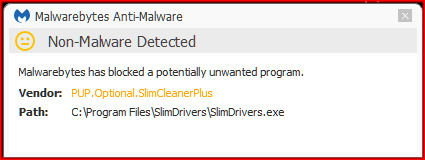
my anti-malware prevents me from using that software - i dont think i want to disable it, so i'll wait for another approach - yes, probably finding a better BT driver would help - the question is which driver...
 

Attachments

  • Image2.png
    Image2.png
    3.7 KB · Views: 6

My Computer

Computer type
Laptop
Computer Manufacturer/Model Number
Dell Latitude E7240
OS
Microsoft Windows 7 Professionnel 64 bits 7601 Multiprocessor Free Service Pack 1
CPU
Intel(R) Core(TM) i5-4310U CPU @ 2.00GHz
Motherboard
Dell Inc. 08YF01
Memory
8,00 GB
Graphics Card(s)
Intel(R) HD Graphics Family
Sound Card
(1) Bluetooth Audio (2) Périphérique High Definition Audio
Monitor(s) Displays
Mobile Intel 965
Screen Resolution
1366 x 768 x 32 bits (4294967296 colors) @ 59 Hz
Hard Drives
SK hynix SH920 mSATA 128
Sorry late reply mate have been quite sick for a bit.

Now my Kaspersky also gives me the pip with that message too but I do use it all the same as I think it carries all the addon stuff with it and the AV sees that as not exactly malware but stuff you do not need to clutter your machine with. But the choice is yours of course and as long as you do like I do and use only the driver software and then remove it afterwards you should be ok you just need to be vigilant at each step of installing it to get just the driver search. .
 

My Computer

Computer type
PC/Desktop
Computer Manufacturer/Model Number
Own build (new) Desk1 / Asus ROG Win 7 / Desk2 1st build
OS
Desk1 7 Home Prem / Desk2 10 Pro / Main lap Asus ROG 10 Pro 2 laptop Toshiba 7 Pro Asus P2520 7 & 10
CPU
Desk1 i5 3750K / Laptop i7 GTX 860M / Desk2 i5 2500
Motherboard
Desk1 Asus P877-V / Desk2 Gigabyte H67 UD3H / Laptop ?
Memory
Desk1 8GB (1866) / Desk2 16GB (1333) / Laptop 8Gb DDR3
Graphics Card(s)
Desk 1& 2NVidia GTX 650 & Laptops on board Intel
Sound Card
Desk 1 & 2 -XONAR DG Realtek High Def audio Laptop
Monitor(s) Displays
Desk 1 Benq HD 2450 / Desk2 Philips 24" / Laptop 17.5"
Screen Resolution
1920x1080 D1 & D2 & Laptop 1
Hard Drives
Desk1 Samsung 120GB 830 SSD
Asus ROG 256GB 850 Pro SSD
Desk2 Samsung 840 256 SSD
Toshiba 120GB EVO
PSU
Desk 1 Corsair HX 1050/ Laptop ? / Desk 2 Corsair HX 650
Case
Desk 1 Cooler HAF XM ? Toshiba laptop / Desk2 Coolermaster
Cooling
Fans on all Desk1 -2 Desk2 - all Coolermasters 5 Laptop ?
Keyboard
Desk 1 MS Sidewinder X6 Desk 2 MS Sidewinder X 4
Mouse
Desk 1&2 - Gigabyte MS 900 gamer - laptop - Logitec wireless
Internet Speed
ADSL2+
Other Info
One other Desktop (tester) and spare Toshba laptop both with SSD's
Running Kaspersky 2016 ISS on all machines config'd identically
Logitec audio stereo systems on each machine (x3)
Canon MG5250MFC
Router/modem TP-Link running WPA2SK
Back
Top