Solved Bluetooth won't work

KRETEN

New member
Local time
5:30 PM
Messages
4
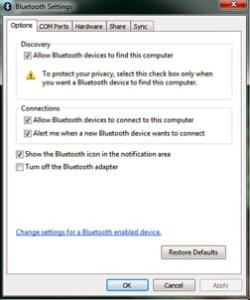
Hi. I just registered on forum and sorry about my poor english. Actually i visit this forum for years and i'm thankful for many times i getting help on it. Now why i registered. First, recently i purchased ACER AO722 C68bb (i believe this version is for eastern markets), with preinstalled Windows7 starter. Bluetooth connectivity has work.On back is written that device has installed Atheros bluetooth module AR5BBU22. Shortly after purchasing, i installed Windows 7 Home premium x64. Everything was fine, since i decided to connect my netbook with my phone by bluetooth connection. Almost one week after i couldn't manage to do that. I will insert 3 pictures to explain (i hope) where is problem. As you can see on first picture ''allow device to connect'' is greyed out. I've searched on different forums, including this one, without solving. I believe that I will find solution here. Drivers are ok (i believe). System did "see" bluetooth network, but is not connected because neither my phone "sees" netbook, or other way around. I manage to establish bluetooth connection with usb dongle, but that doesn't makes me happy. If you can, please help me !
 

Attachments
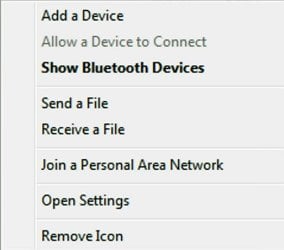
  • Bluetooth menu.jpg
    Bluetooth menu.jpg
    30.7 KB · Views: 50
  • Bluetooth settings.jpg
    Bluetooth settings.jpg
    22.4 KB · Views: 2,736
  • Bluetooth services.jpg
    Bluetooth services.jpg
    29.5 KB · Views: 92

My Computer

OS
Windows 7 Home Premium x64
Hello and welcome. :)
Well, your English was not that bad. I could still follow you basically.

Since you were able to connect the phone to the USB dongle, (correct?) then that means everything should be alright with the phone.

I believe the first thing you may need to do is click "Add a Device" to let them detect & identify each other. Once there is a profile created, then the next time you want to connect maybe click "Allow a Device to Connect." Try that and see if it works.
 

My Computer

Computer type
PC/Desktop
OS
Windows 7 Pro x64 SP1
CPU
AMD Phenom II x6 1090T Black Edition 3.2GHz
Motherboard
ASUS M4A88TD-V EVO/USB3
Memory
Patriot G ‘Sector 5’ Edition 8GB (2 x 4GB) 1600MHz
Sound Card
(onboard) Realtek® ALC 892 8-Channel High Definition Audio
Monitor(s) Displays
ViewSonic VX2253 22"
Screen Resolution
1920x1080
Hard Drives
Transcend SSD720 2.5" SATAIII 64GB SSD; Western Digital Caviar Green WD20EARS 2TB 64MB 3.5" HDD
LG WH10LS30 10X Blu-ray Burner with LightScribe
PSU
CORSAIR TX Series 950W ATX12V 80 Plus Bronze
Case
Cooler Master HAF X NVidia Edition; 5 Green LED Fans!
Cooling
CORSAIR A70 120mm Dual-Fan
Keyboard
Verbatim 97472 Mini Wireless Slim
Mouse
bundled Verbatim 97472 Wireless
Antivirus
Avast
Browser
Chrome
Other Info
Ultraportable/Desktop Replacement Laptop:
circa Oct 2006,
Dell XPS M1210,
Windows 7 Professional 32-bit,
Intel Core 2 Duo T7200 2.0GHz,
3.25 (4) GB of RAM,
NVidia GeForce Go 7400,
500GB Seagate Momentus 7200RPM HDD
First thanx for answering. Second, thanx for accepting my english (then my daughter was with me). I tried to "Add a Device" hundred times , as i mentioned up, neither my netbook "sees" phone, neither my phone "sees" netbook. In mean time assuming is OS problem, i've installed W7 Ultimate. Does not work. Any way Thank You All 250 people who open and read my post.
 

My Computer

OS
Windows 7 Home Premium x64
My ignorant mind think that all trouble is in windows Bluetooth Device (Personal Area Network). But i can't fix it. Greetings !
 

My Computer

OS
Windows 7 Home Premium x64
Finally solved. With installing latest driver from acer support. Bluetooth_Atheros_7.4.0.96_W7x86W7x64_A.
 

My Computer

OS
Windows 7 Home Premium x64
Bluetooth Not Detecting in Windows 7 Acer

I have all bluetooth drivers installed.
But my bluetooth devices are not detected by my laptop.

I have Atheros QCWR335 Bluetooth. Please Help me
 

My Computer

Computer type
Laptop
Computer Manufacturer/Model Number
Acer
OS
Windows 7 64 bit
CPU
Intel i5
Memory
4gb
Back
Top