Blurry Wallpaper

stephen65

New member
Local time
4:19 PM
Messages
16
Location
Huntsville, Alabama
I got this new computer with Windows 7 about 3 weeks ago and I've never been able to get a clear wallpaper picture other than with what was already loaded on the system.

Anything I try and load on there is just very blurry.

Also with Windows 7 are the icons on the desktop supposed to be much larger than with XP?
 

My Computer

OS
Windows 7 Home Premium 64 Bit
CPU
Dell Studio XPS
Graphics Card(s)
ATI Mobility Radeon HD 5470
Monitor(s) Displays
Samsung 2443BWT-1
Screen Resolution
1920 x 1080
Hiya pal and welcome to the forums

Any chance you could take a screen grab and post it in here .... if the images are to small and low in quality they will look poor when "stretched" or set to "fit" ;)
 

My Computer

Computer type
PC/Desktop
Computer Manufacturer/Model Number
Self Built
OS
Windows 7 Ultimate 64bit
CPU
AMD Phenom Quad core 9950 black edition
Motherboard
Gigabyte
Memory
16Gb
Graphics Card(s)
2x XFX Radeon 5850
Sound Card
PCI Express X-Fi Titanium / Logitech G35
Monitor(s) Displays
2x HP 2410i
Screen Resolution
1920x1080
Hard Drives
2x 500Gb Seagate
1x 300Gb Seagate
1x 1Tb Seagate
2x 1Tb Hitatchi
PSU
Jean Tech Storm 700W
Case
Cooler Master COSMOS S
Cooling
Akasa Evo Blue Pro
Keyboard
Logitech G15
Mouse
Mad Catz M.M.O. 7
Internet Speed
12mb
Hello Stephen. To fix the icon problem, right click the desktop, go to view in the menu, and options will appear next to original context menu. Select small icons.

For the wallpaper problem, what is the resolution of your screen? What is the resolution of the wallpapers you are using? If you use a wallpaper with a resolution that does not match that of the screen, it will enlarge, shrink, or stretch the wallpaper to fit the screen, which may result in blurriness.
 
Last edited:

My Computer

Computer type
Laptop
Computer Manufacturer/Model Number
Toshiba P775-S7100
OS
Windows 7 Professional SP1 64-bit
CPU
Intel Core i5-2450M @2.5 GHz
Memory
6 GB DDR3 1333MHz
Graphics Card(s)
Intel HD 3000
Monitor(s) Displays
Built-in 17.3" LED; 22" Insignia NS-L22Q-10A
Screen Resolution
1600x900; 1360x768
Hard Drives
750 GB Hitachi
1TB Seagate FreeAgent External
Internet Speed
Verizon DSL Speed(Down/Up): 3360 Kbps / 800 Kbps
Antivirus
MSE and MBAM Pro
Browser
IE10
As said, it is probably a smaller picture than the resolution you have on there now.

~Lordbob
 

My Computer

Computer Manufacturer/Model Number
Hera
OS
Windows 7 Ultimate x64, Mint 9
CPU
Intel i5-2500k
Motherboard
ASUS P8P67 Pro
Memory
2x 4Gb Corsair VENGEANCE DDR3-1600
Graphics Card(s)
NVidia GeForce N260GTX Twin Frozr
Sound Card
Realtek HD OnBoard Audio
Monitor(s) Displays
ASUS 24" Monitor
Screen Resolution
1920x1080
Hard Drives
G.SKILL Phoenix Series 60GB SATA II MLC Internal Solid State Drive (SSD)
SAMSUNG Spinpoint F3R 1TB 7200 RPM 32MB Cache SATA II
PSU
Cooler Master Real Power Pro 750W
Case
Cooler Master Haf 932
Cooling
Fans
Keyboard
Razer Tarantula
Mouse
Razer Lachesis
Internet Speed
not fast enough
Hiya pal and welcome to the forums

Any chance you could take a screen grab and post it in here .... if the images are to small and low in quality they will look poor when "stretched" or set to "fit" ;)

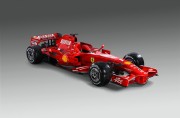
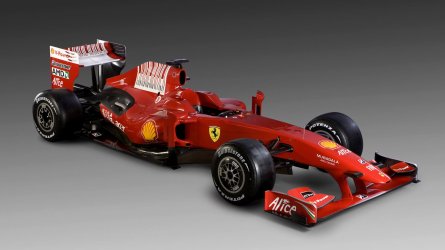
This is what I'm using now.


This is what I was using with XP. I've also tried it here and it's blurry as well.
 

My Computer

OS
Windows 7 Home Premium 64 Bit
CPU
Dell Studio XPS
Graphics Card(s)
ATI Mobility Radeon HD 5470
Monitor(s) Displays
Samsung 2443BWT-1
Screen Resolution
1920 x 1080
Those pictures are kind of small (1280x839). Plus the images are most likely being stretched. The pictures have an aspect ratio of 1:1.525...
1920x1080 is aspect ratio of 1:1.77777... (16:9). The aspect ratio of the pictures don't match that of any computer monitor/tv (16:9 or 16:10 [1:1.6]).

One option you have is right clicking the desktop and going to personalize. Go to the menu to change the wallpaper. I believe the "fill" option is the one to zoom into the picture, instead of stretching it one way or the other.
 

My Computer

Computer type
Laptop
Computer Manufacturer/Model Number
Toshiba P775-S7100
OS
Windows 7 Professional SP1 64-bit
CPU
Intel Core i5-2450M @2.5 GHz
Memory
6 GB DDR3 1333MHz
Graphics Card(s)
Intel HD 3000
Monitor(s) Displays
Built-in 17.3" LED; 22" Insignia NS-L22Q-10A
Screen Resolution
1600x900; 1360x768
Hard Drives
750 GB Hitachi
1TB Seagate FreeAgent External
Internet Speed
Verizon DSL Speed(Down/Up): 3360 Kbps / 800 Kbps
Antivirus
MSE and MBAM Pro
Browser
IE10
Those pictures are kind of small (1280x839). Plus the images are most likely being stretched. The pictures have an aspect ratio of 1:1.525...
1920x1080 is aspect ratio of 1:1.77777... (16:9). The aspect ratio of the pictures don't match that of any computer monitor/tv (16:9 or 16:10 [1:1.6]).

One option you have is right clicking the desktop and going to personalize. Go to the menu to change the wallpaper. I believe the "fill" option is the one to zoom into the picture, instead of stretching it one way or the other.

But why did they work with XP? I tried the fill option but that left too much black screen. It didn't look very good.
 

My Computer

OS
Windows 7 Home Premium 64 Bit
CPU
Dell Studio XPS
Graphics Card(s)
ATI Mobility Radeon HD 5470
Monitor(s) Displays
Samsung 2443BWT-1
Screen Resolution
1920 x 1080
Okay, where was the black? Fill shouldn't leave any black bars.
 

My Computer

Computer type
Laptop
Computer Manufacturer/Model Number
Toshiba P775-S7100
OS
Windows 7 Professional SP1 64-bit
CPU
Intel Core i5-2450M @2.5 GHz
Memory
6 GB DDR3 1333MHz
Graphics Card(s)
Intel HD 3000
Monitor(s) Displays
Built-in 17.3" LED; 22" Insignia NS-L22Q-10A
Screen Resolution
1600x900; 1360x768
Hard Drives
750 GB Hitachi
1TB Seagate FreeAgent External
Internet Speed
Verizon DSL Speed(Down/Up): 3360 Kbps / 800 Kbps
Antivirus
MSE and MBAM Pro
Browser
IE10
Hello Stephen, any image below your screen resolution is going to degrade, pixelate, blur, whatever you want to call it!!
I have posted one of the images at your screen resolution 1920*1080, Let us know if its still 'Blurry'

Thanks.
 

Attachments

  • ferrari-f60-wallpaper-2009-1.jpg
    ferrari-f60-wallpaper-2009-1.jpg
    186 KB · Views: 77

My Computer

Computer type
PC/Desktop
Computer Manufacturer/Model Number
Self Build
OS
MS Windows 7 Professional 64-bit SP1
CPU
AMD FX(tm)-6100 Six-Core Processor Socket AM3+ (942)
Motherboard
ASUSTeK COMPUTER INC. SABERTOOTH 990FX (AM3r2)
Memory
8.00 GB Dual-Channel DDR3 @ 802MHz (11-11-11-36) 1.5Volts
Graphics Card(s)
NVIDIA GeForce GTX 560 Ti
Sound Card
Onboard Realtek HD
Monitor(s) Displays
shimian (1920x1080@60Hz)
Screen Resolution
1920*1080
Hard Drives
OCZ-AGIL ITY3 SATA Disk Device 120GB
PSU
Corsair TX 750
Case
Corsair
Cooling
WaterCooled
Keyboard
Microsoft Wired
Mouse
Logitech USB Optical TiltWheel Mouse
Internet Speed
Realtek PCIe GBE Family Controller 20MB*1MB
Antivirus
Avast
Browser
Firefox
Other Info
150GB Internal Hard Drive for Backing Up Important Files -
Hauppauge Nova-DT Dual DVB-T Tuner Device (+IR) -
USB PC Camera with Mic (SN9C105)
Okay, where was the black? Fill shouldn't leave any black bars.

My bad, it was Fit that left black bars on the sides. Fill is what it's set on now.
 

My Computer

OS
Windows 7 Home Premium 64 Bit
CPU
Dell Studio XPS
Graphics Card(s)
ATI Mobility Radeon HD 5470
Monitor(s) Displays
Samsung 2443BWT-1
Screen Resolution
1920 x 1080
Hello Stephen, any image below your screen resolution is going to degrade, pixelate, blur, whatever you want to call it!!
I have posted one of the images at your screen resolution 1920*1080, Let us know if its still 'Blurry'

Thanks.

No that is not blurry. But that is also below my screen resolution of 1920 x 1200.

Is this just a change from XP to Windows 7? Because I never had any trouble picking a wallpaper picture with XP.
 

My Computer

OS
Windows 7 Home Premium 64 Bit
CPU
Dell Studio XPS
Graphics Card(s)
ATI Mobility Radeon HD 5470
Monitor(s) Displays
Samsung 2443BWT-1
Screen Resolution
1920 x 1080
Hello Stephen, any image below your screen resolution is going to degrade, pixelate, blur, whatever you want to call it!!
I have posted one of the images at your screen resolution 1920*1080, Let us know if its still 'Blurry'

Thanks.

No that is not blurry. But that is also below my screen resolution of 1920 x 1200.

Is this just a change from XP to Windows 7? Because I never had any trouble picking a wallpaper picture with XP.

Sorry Stephen, In your system Spec's it says 1920*1080?

I do know that when you use a png (high quality) wallpaper as a background Windows 7 converts it to a jpeg (lower quality) wallpaper.
I have no idea what WinXP used to do with Wallpaper images.
 

My Computer

Computer type
PC/Desktop
Computer Manufacturer/Model Number
Self Build
OS
MS Windows 7 Professional 64-bit SP1
CPU
AMD FX(tm)-6100 Six-Core Processor Socket AM3+ (942)
Motherboard
ASUSTeK COMPUTER INC. SABERTOOTH 990FX (AM3r2)
Memory
8.00 GB Dual-Channel DDR3 @ 802MHz (11-11-11-36) 1.5Volts
Graphics Card(s)
NVIDIA GeForce GTX 560 Ti
Sound Card
Onboard Realtek HD
Monitor(s) Displays
shimian (1920x1080@60Hz)
Screen Resolution
1920*1080
Hard Drives
OCZ-AGIL ITY3 SATA Disk Device 120GB
PSU
Corsair TX 750
Case
Corsair
Cooling
WaterCooled
Keyboard
Microsoft Wired
Mouse
Logitech USB Optical TiltWheel Mouse
Internet Speed
Realtek PCIe GBE Family Controller 20MB*1MB
Antivirus
Avast
Browser
Firefox
Other Info
150GB Internal Hard Drive for Backing Up Important Files -
Hauppauge Nova-DT Dual DVB-T Tuner Device (+IR) -
USB PC Camera with Mic (SN9C105)
Is this just a change from XP to Windows 7? Because I never had any trouble picking a wallpaper picture with XP.

Did you have the same monitor when using Windows XP?
Ie. a screen with a resolution of 1920x1080?
 

My Computer

Computer type
PC/Desktop
Computer Manufacturer/Model Number
Alienware Aurora ALX R4
OS
Windows 10 Pro (x64)
CPU
Intel Core i7-3930K (3.2GHz - 4.5GHz)
Motherboard
Alienware Aurora-R4 x79
Memory
4x Samsung 4GB PC3-12800 DDR3 (16GB 1600MHz)
Graphics Card(s)
Nvidia Geforce GTX 690
Sound Card
SteelSeries Siberia Elite
Monitor(s) Displays
Dell UltraSharp U3011
Screen Resolution
2560x1600
Hard Drives
Samsung 850 Pro 256 GB, Seagate 1TB Desktop Hybrid HDD, 2x Western Digital 4TB Green HDD
PSU
875W Some Dell PSU <.<
Case
Alienware Aurora ALX
Cooling
Custom Liquid Cooling (EK CPU & GPU blocks) dual EK 480RAD
Keyboard
Logitech G710+ Mechanical
Mouse
Logitech G700s
Internet Speed
Verizon Fios (50 mbps average)
Other Info
Server: Intel NUC D54250WYK: i5-4250U, 16GB, 256 GB mSATA, Windows Server 2012 R2

My Computer

Computer type
Laptop
Computer Manufacturer/Model Number
Toshiba P775-S7100
OS
Windows 7 Professional SP1 64-bit
CPU
Intel Core i5-2450M @2.5 GHz
Memory
6 GB DDR3 1333MHz
Graphics Card(s)
Intel HD 3000
Monitor(s) Displays
Built-in 17.3" LED; 22" Insignia NS-L22Q-10A
Screen Resolution
1600x900; 1360x768
Hard Drives
750 GB Hitachi
1TB Seagate FreeAgent External
Internet Speed
Verizon DSL Speed(Down/Up): 3360 Kbps / 800 Kbps
Antivirus
MSE and MBAM Pro
Browser
IE10
Is this just a change from XP to Windows 7? Because I never had any trouble picking a wallpaper picture with XP.

Did you have the same monitor when using Windows XP?
Ie. a screen with a resolution of 1920x1080?

Yes this is the same monitor I was using with XP.
 

My Computer

OS
Windows 7 Home Premium 64 Bit
CPU
Dell Studio XPS
Graphics Card(s)
ATI Mobility Radeon HD 5470
Monitor(s) Displays
Samsung 2443BWT-1
Screen Resolution
1920 x 1080

My Computer

OS
Windows 7 Home Premium 64 Bit
CPU
Dell Studio XPS
Graphics Card(s)
ATI Mobility Radeon HD 5470
Monitor(s) Displays
Samsung 2443BWT-1
Screen Resolution
1920 x 1080
Back
Top