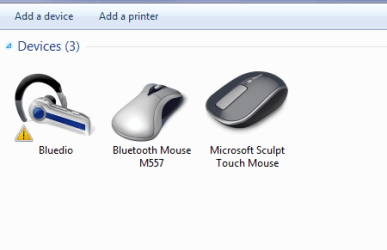
Have got myself some Bluedio Blu tooth headphones to save the cables etc however all attempts at getting these phones to connect is proving to be really annoying, and I have followed the manufacturers instructions to the letter.
Thing is it shows in added in Devices and Printers and the Blu tooth window but just no go
I have a Blu tooth mouse which works flawlessly and have searched for a driver but apparently there is not one .
Any ideas on how to get these phones to play please.
My Computer
Computer type
PC/Desktop
Computer Manufacturer/Model Number
Own build (new) Desk1 / Asus ROG Win 7 / Desk2 1st build
OS
Desk1 7 Home Prem / Desk2 10 Pro / Main lap Asus ROG 10 Pro 2 laptop Toshiba 7 Pro Asus P2520 7 & 10
One other Desktop (tester) and spare Toshba laptop both with SSD's
Running Kaspersky 2016 ISS on all machines config'd identically
Logitec audio stereo systems on each machine (x3)
Canon MG5250MFC
Router/modem TP-Link running WPA2SK
The obvious, are the batteries fully charged? Can you try them on a different PC? May be they are defective.
I'm not a Bluetooth expert, but I recall seeing a post about the version of Bluetooth. If the PC has one version and the headset is expecting another version they will not pair and work.
Jack
My Computer
Computer type
PC/Desktop
Computer Manufacturer/Model Number
My Own Build
OS
Windows 10 64 bit
CPU
Intel i7 6700K
Motherboard
ASUS ROG Maximus VIII Hero
Memory
16GB Corsair Dominator
Graphics Card(s)
Intel CPU Graphics
Sound Card
RealTek
Monitor(s) Displays
27" Dell S2719dgf
Screen Resolution
2560X1440
Hard Drives
1 TB Samsung 850 EVO SSD for Win 10 Pro
500GB Samsung 850 EVO SSD for Win 10 Insider
2 TB drive for backup
PSU
EVGA Supernova 750G2
Case
BeQuiet Silent Base 600
Cooling
Deepcool Captain 120EX
Keyboard
Microsoft Wireless 2000
Mouse
Microsoft wireless
Internet Speed
100 MB/sec (Cable)
Antivirus
Microsoft Defender and Malwarebytes
Browser
Edge/Firefox
Other Info
Cakewalk (Sonar) by BandLab and Studio One 4.1 Pro recording studio software. MOTU 896Mk3 Hybrid recording interface, Frontier Tranzport wireless control unit, Behringer X-Touch Control Surface.
Five USB connected optical drives for CD Audio production using Nero BurningROM
Yes to your first query Jack I charged these for the recommended two hours (this gives about 42 hours listening time and a heap of standby time) and to when the charge light turned blue - yes Blue?? :sarc:
Now I think I read recently somewhere that Blutooth is a system designed by Seimens originally and that it is supposed to operate between 2.4 and 2.48GHz which I think you might agree is a very tight tolerance.
I have tried it on my smaller laptop and it shows it without the triangle as in my pic but setup also tells me it is disconnected and I thought it would do that automatically
I think what I find rather odd is that the mice work ok on both machines and that I cannot find any driver for it on the net - Windows did search for one but came up none.
By the by the phones work with a plug in cable so I know they work and the quality really quite acceptable.
Attachments
PHONES.PNG
9.3 KB
· Views: 20
My Computer
Computer type
PC/Desktop
Computer Manufacturer/Model Number
Own build (new) Desk1 / Asus ROG Win 7 / Desk2 1st build
OS
Desk1 7 Home Prem / Desk2 10 Pro / Main lap Asus ROG 10 Pro 2 laptop Toshiba 7 Pro Asus P2520 7 & 10
One other Desktop (tester) and spare Toshba laptop both with SSD's
Running Kaspersky 2016 ISS on all machines config'd identically
Logitec audio stereo systems on each machine (x3)
Canon MG5250MFC
Router/modem TP-Link running WPA2SK
If it works with a cable, that bypasses the RF section of the headset, so there could still be an issue.
That the mice work just says they have proper drivers and interface.
It may still be an issue between the version of Bluetooth on the PC(s) and what the headset requires.
My Computer
Computer type
PC/Desktop
Computer Manufacturer/Model Number
My Own Build
OS
Windows 10 64 bit
CPU
Intel i7 6700K
Motherboard
ASUS ROG Maximus VIII Hero
Memory
16GB Corsair Dominator
Graphics Card(s)
Intel CPU Graphics
Sound Card
RealTek
Monitor(s) Displays
27" Dell S2719dgf
Screen Resolution
2560X1440
Hard Drives
1 TB Samsung 850 EVO SSD for Win 10 Pro
500GB Samsung 850 EVO SSD for Win 10 Insider
2 TB drive for backup
PSU
EVGA Supernova 750G2
Case
BeQuiet Silent Base 600
Cooling
Deepcool Captain 120EX
Keyboard
Microsoft Wireless 2000
Mouse
Microsoft wireless
Internet Speed
100 MB/sec (Cable)
Antivirus
Microsoft Defender and Malwarebytes
Browser
Edge/Firefox
Other Info
Cakewalk (Sonar) by BandLab and Studio One 4.1 Pro recording studio software. MOTU 896Mk3 Hybrid recording interface, Frontier Tranzport wireless control unit, Behringer X-Touch Control Surface.
Five USB connected optical drives for CD Audio production using Nero BurningROM
Sorry late reply Jack yes mate I just connected the cable to see if they would work.
But I think you are right in that it is down to the version of Blu tooth on the machines though I think I have (will check) that I have installed updates for Broadcom Realtek and Intel blu tooth set ups on this machine.
The mouse that works is a Microsoft Sculpt but a Logitec M557 will not but I have an idea there is something amiss in the internals in that one.
Thing is I bought a very cheap BT mouse at a local store (Walmart type of store) and it works perfectly on my small laptop but the Sculpt won't
My Computer
Computer type
PC/Desktop
Computer Manufacturer/Model Number
Own build (new) Desk1 / Asus ROG Win 7 / Desk2 1st build
OS
Desk1 7 Home Prem / Desk2 10 Pro / Main lap Asus ROG 10 Pro 2 laptop Toshiba 7 Pro Asus P2520 7 & 10
One other Desktop (tester) and spare Toshba laptop both with SSD's
Running Kaspersky 2016 ISS on all machines config'd identically
Logitec audio stereo systems on each machine (x3)
Canon MG5250MFC
Router/modem TP-Link running WPA2SK
Hiyya Jack mate go onto the sellers and they replied that the phones were intended to work with smart phones - android stuff etc .
Now it sounds like a bit of a cop out because surely Blu tooth like I said works on set frequencies and to me 2.4GHz form a blu tooth device a or a cordless phone or a microwave oven is 2.4GHz. Now I know that radio uses a carrier wave and that is the only thing that I can possibly think of that would explain what they have told me - that the 2.4GHz is the carrier wave and the signal or content on that carrier wave/frequency for want of a better term is not able to be used by the machines .
Thing is now the device is recognised by the machines yet will not connect although both device and machine use version 4.0 blu tooth technology - so back to sorting one out this time I shall specify for use with computers
My Computer
Computer type
PC/Desktop
Computer Manufacturer/Model Number
Own build (new) Desk1 / Asus ROG Win 7 / Desk2 1st build
OS
Desk1 7 Home Prem / Desk2 10 Pro / Main lap Asus ROG 10 Pro 2 laptop Toshiba 7 Pro Asus P2520 7 & 10
One other Desktop (tester) and spare Toshba laptop both with SSD's
Running Kaspersky 2016 ISS on all machines config'd identically
Logitec audio stereo systems on each machine (x3)
Canon MG5250MFC
Router/modem TP-Link running WPA2SK
Just an update with a bit of fiddling around with the Blu tooth and audio settings on the main laptop I have got the phones to go. There was a lot of Windows updating going on as well which might explain what the issue was all about.
My Computer
Computer type
PC/Desktop
Computer Manufacturer/Model Number
Own build (new) Desk1 / Asus ROG Win 7 / Desk2 1st build
OS
Desk1 7 Home Prem / Desk2 10 Pro / Main lap Asus ROG 10 Pro 2 laptop Toshiba 7 Pro Asus P2520 7 & 10
One other Desktop (tester) and spare Toshba laptop both with SSD's
Running Kaspersky 2016 ISS on all machines config'd identically
Logitec audio stereo systems on each machine (x3)
Canon MG5250MFC
Router/modem TP-Link running WPA2SK