
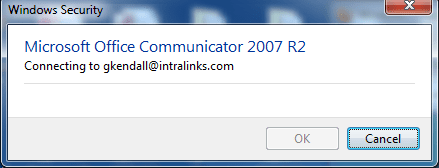
Bogus Windows Security pop-up

gkendall

New member
Local time
11:50 PM
Messages
1
I get this popup several (many) times a day even though I am logged in and receiving email.
[FONT=&quot]
[/FONT]

What is this and how do I get rid of it?
[FONT=&quot]
[/FONT]
 

Attachments

  • Windows Security.png
    Windows Security.png
    8.7 KB · Views: 4

My Computer

Computer Manufacturer/Model Number
Dell Precision T1500
OS
Windows 7 Professional
CPU
Intel Core i5
Motherboard
Intel
Memory
4.00 GB
Graphics Card(s)
ATI FirePro 2260
Sound Card
High Definition Audio Device
Monitor(s) Displays
Dell 24" & Dell 17"
Hard Drives
WDC WD3200AAKS-75L9A0 ATA Device
PSU
300 wat
Case
Dell
Cooling
Air
Hello gkendall and welcome to Seven Forums.

From what I could find out, this is a legitimate program from Microsoft. It was designed to be a replacement for Windows Messenger and is meant to be used in an office/corporate environment.

Microsoft Office Communicator 2007 R2 Product Overview - Communicator - Office.com

If what you have really is a legitimate program you should be able to uninstall it from control panel > programs and features unless this is installed on a company computer by an IT department.
 

My Computer

Computer type
Laptop
Computer Manufacturer/Model Number
Sony Vaio VPCEB47GM Laptop
OS
Win 7 Pro 64-bit
CPU
Intel i5 2.4 Ghz
Memory
8GB DDR3
Graphics Card(s)
Intel HD 3000
Sound Card
IDT High Definition
Monitor(s) Displays
15.6 WGXA Anti-Glare LED
Screen Resolution
1280x800
Hard Drives
640Gb 7200rpm
Antivirus
MSE
Browser
Opera (primary) with IE9 backup
Back
Top