
CalypsoArt
New member
- Local time
- 12:15 PM
- Messages
- 35
Had the problem before that was solved, but it has suddenly returned. I can't believe it is related, but my wireless keyboard transmitter died. I used an old USB keyboard, and when I started up no OS was found.
Hitting F8 brings up a DOS window I had never seen before. It asks on which hard drive to look for the OS. When I select C, it finds the OS the machine then boots fine. Shutdown and restart and it again can't find the OS.
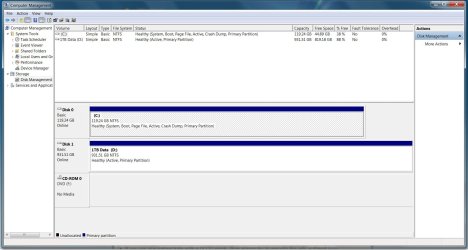
Disk manager shows both hard drives as active. "Mark partition Active" is grayed out in both.
I have run Startup repair many times. It always results in:
Root Cause found
-----------------------------
The partition does not have a valid system partition
Repair action: Partition table repair
Result: Completed successfully.
Then running it again it finds the same error.
the old thread on the problem here: http://www.sevenforums.com/installation-setup/137569-no-os-restart-comp-tries-boot-usb-drive.html
Hitting F8 brings up a DOS window I had never seen before. It asks on which hard drive to look for the OS. When I select C, it finds the OS the machine then boots fine. Shutdown and restart and it again can't find the OS.
Disk manager shows both hard drives as active. "Mark partition Active" is grayed out in both.
I have run Startup repair many times. It always results in:
Root Cause found
-----------------------------
The partition does not have a valid system partition
Repair action: Partition table repair
Result: Completed successfully.
Then running it again it finds the same error.
the old thread on the problem here: http://www.sevenforums.com/installation-setup/137569-no-os-restart-comp-tries-boot-usb-drive.html
Attachments
My Computer
- Computer Manufacturer/Model Number
- Sager/Midern
- OS
- Win 7 professional 64
- CPU
- i7 820
- Memory
- 4gb
- Graphics Card(s)
- nVidia GTX285m
- Monitor(s) Displays
- 17.3"
