Solved Boot Choice Menu Showing two windows, when having just one

bhavleen singh

New member
Local time
8:58 AM
Messages
5
Hello Friends..

I recently re-installed windows 7 in my D drive. earlier it was also installed there ,but due to some errors I had to do it. when i was installing , during setup it was showing drive C as primary, i formatted the whole drive d and re-installed the windows 7 32 bit.
i must also mention here that after the installation completed and I log on to windows 7 it changed the drive letter from d to c and and the other one which was showing c in setup menu had no drive letter. i had to go to the disk management to assign it a letter

Now i m getting a OS choice menu, giving me two options one is windows 7 and the other earlier version of windows. and when i select the earlier verison , nothing comes up, just a black screen. and windows 7 runs just fine..

i donot have a second os that is for sure. and I also checked in msconfig's "Boot" menu(as stated in other posts). There too i have only one windows showing up i.e. Windows 7.

Please help me to get rid of this problem....
i can provide any screenshots if you need it for solving.:)
 

My Computer My Computer

OS
Windows 7 professional 32bit
Hello bhavleen singh, welcome to Seven Forums!


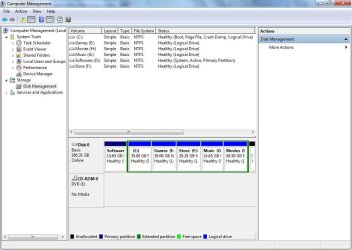
Before we make any specific recommendations will you please post a snip/screen-shot of the entire disk management drive map with a full description as to which drive/partition is which, so we can see what you have going on as there may be a fairly simple way to resolve the situation.

In the Windows start menu right click computer and click manage, in the left pane of the "Computer Management" window that opens click disk management and post a maximized snip of that.


My Computer My Computer

Computer Manufacturer/Model Number
* BFK Customs *
OS
W 7 64-bit Ultimate
CPU
Intel Q9550 Yorkfield
Motherboard
ASUS P5Q Pro
Memory
8GB Dominator 8500C5D
Graphics Card(s)
ATI : XFX 5870
Sound Card
Realtek HD Audio 7-1
Monitor(s) Displays
1x 47" LCD HDMI & 3x 26" LCD HDMI
Screen Resolution
1920x1080P & 1920x1200
Hard Drives
1x 80GB Intel X25-M G2 SSD : 1x 500GB & 1x 640GB WD Caviar Black(s)
PSU
Corsair 620HX
Case
Cooler Master RC-690
Cooling
Tuniq Tower 120, 2x 140mm and 3x 120mm case fans
Keyboard
Microsoft 500
Mouse
Razer Diamondback 3G
Internet Speed
14 Mb/s
Other Info
1x Koutech 3Gb/s SATA HDD Hot Swap Rack

My Computer My Computer

Computer Manufacturer/Model Number
* BFK Customs *
OS
W 7 64-bit Ultimate
CPU
Intel Q9550 Yorkfield
Motherboard
ASUS P5Q Pro
Memory
8GB Dominator 8500C5D
Graphics Card(s)
ATI : XFX 5870
Sound Card
Realtek HD Audio 7-1
Monitor(s) Displays
1x 47" LCD HDMI & 3x 26" LCD HDMI
Screen Resolution
1920x1080P & 1920x1200
Hard Drives
1x 80GB Intel X25-M G2 SSD : 1x 500GB & 1x 640GB WD Caviar Black(s)
PSU
Corsair 620HX
Case
Cooler Master RC-690
Cooling
Tuniq Tower 120, 2x 140mm and 3x 120mm case fans
Keyboard
Microsoft 500
Mouse
Razer Diamondback 3G
Internet Speed
14 Mb/s
Other Info
1x Koutech 3Gb/s SATA HDD Hot Swap Rack
bhavleen,

Make a System Repair Disc.

Boot from the the system repair disc.

Go to a command prompt.

Run DiskPart.
Use the List Disk command. According to your diskmanagement map you should only show disk 0 as a hard disk.

Select Disk 0

List volume
than will list the volumes by number and by drive letter.

Select volume n where n is the number of your drive D

Inactive
that will make the partition no longer active.

Select volume m where m is the number of your drive C
Active
that will make drive C your active drive.

exit to get out of diskpart
exit to get out of the command shell

Shutdown
your computer.

---------------------------------
[FONT=&quot]DISC - CREATE A SYSTEM REPAIR DISC[/FONT]
START | type System Repair | Enter key | Create Disc button


COMMAND PROMPT - GO TO A COMMAND PROMPT USING A SYSTEM REPAIR DISC

1) Insert System Repair Disc into optical reader.
2) Shutdown your computer.
3) Boot up your computer from the System Repair Disc
If your computer doesn’t boot from the optical drive, then
Immediately after pushing your Power ON button, start tapping the F2 key to get to the BIOS to change the boot order.

On some computers, you can:
Immediately after pushing your Power ON button, start tapping the F12 key and choose CD/DVD to change the boot order only for this time.
4) Wait while a mini-version of Windows is loaded and finally the System Recovery Options dialog appears.
5) SYSTEM RECOVERY OPTIONS dialog |
Select a keyboard input method |
NEXT button
6) SYSTEM RECOVERY OPTIONS dialog
will search your system for installed versions of Windows.
7) SYSTEM RECOVERY OPTIONS dialog |
select the Use recovery tools that can help fix problems starting Windows radio button |
NEXT button
8) SYSTEM RECOVERY OPTIONS |
Choose a recovery tool |
9) Click on command prompt from the list shown

Run any desired commands and type EXIT when finished.
Remove the System Repair Disc.
Shutdown your computer.
Power on your computer.
 

My Computer My Computer

Computer Manufacturer/Model Number
Toshiba Satellite S875D-S7239 laptop
OS
MS Windows 7 Ultimate SP1 64-bit
CPU
AMD A10-4600M
Motherboard
AMD Pumori (Socket FT1)
Memory
6.00 GB Dual-Channel DDR3 @ 798MHz (11-11-12-28)
Graphics Card(s)
AMD Radeon HD 7660G
Sound Card
High Definition Audio Device
Monitor(s) Displays
Generic PnP Monitor (1600x900@60Hz)
Screen Resolution
1600x900@60Hz
Hard Drives
SSD 119GB Corsair CSSD-V128GB2 ATA Device
Keyboard
Standard PS/2 Keyboard
Mouse
HP Wireless Optical Mobile Mouse Model FHA-3410
Internet Speed
What the local pub, local coffee shop offers.
Other Info
Optical Drive:MATSHITA BD-CMB UJ160B ATA Device


Also have an Asus ha1002xp netbook with Win 7 Ultimate installed.
Don't do that, D: as the only Primary partition has to remain the "System, Active" partition and if it's marked as Inactive Windows will no longer boot at all; an Extended partition/Logical drive cannot host the Windows boot files and cannot be made the "System" partition in any way.
 

My Computer My Computer

Computer Manufacturer/Model Number
* BFK Customs *
OS
W 7 64-bit Ultimate
CPU
Intel Q9550 Yorkfield
Motherboard
ASUS P5Q Pro
Memory
8GB Dominator 8500C5D
Graphics Card(s)
ATI : XFX 5870
Sound Card
Realtek HD Audio 7-1
Monitor(s) Displays
1x 47" LCD HDMI & 3x 26" LCD HDMI
Screen Resolution
1920x1080P & 1920x1200
Hard Drives
1x 80GB Intel X25-M G2 SSD : 1x 500GB & 1x 640GB WD Caviar Black(s)
PSU
Corsair 620HX
Case
Cooler Master RC-690
Cooling
Tuniq Tower 120, 2x 140mm and 3x 120mm case fans
Keyboard
Microsoft 500
Mouse
Razer Diamondback 3G
Internet Speed
14 Mb/s
Other Info
1x Koutech 3Gb/s SATA HDD Hot Swap Rack
You are correct.

I missed that C was listed as a logical drive.

I've never tried ti, but I'd think that diskpart wouldn't let yuu mark a logical as the active drive.
 

My Computer My Computer

Computer Manufacturer/Model Number
Toshiba Satellite S875D-S7239 laptop
OS
MS Windows 7 Ultimate SP1 64-bit
CPU
AMD A10-4600M
Motherboard
AMD Pumori (Socket FT1)
Memory
6.00 GB Dual-Channel DDR3 @ 798MHz (11-11-12-28)
Graphics Card(s)
AMD Radeon HD 7660G
Sound Card
High Definition Audio Device
Monitor(s) Displays
Generic PnP Monitor (1600x900@60Hz)
Screen Resolution
1600x900@60Hz
Hard Drives
SSD 119GB Corsair CSSD-V128GB2 ATA Device
Keyboard
Standard PS/2 Keyboard
Mouse
HP Wireless Optical Mobile Mouse Model FHA-3410
Internet Speed
What the local pub, local coffee shop offers.
Other Info
Optical Drive:MATSHITA BD-CMB UJ160B ATA Device


Also have an Asus ha1002xp netbook with Win 7 Ultimate installed.
if you are referring to the method that i gave, then
NO.

I didn't realize that your C is a logical drive rather than a primary partition.

My oversight.

I apologize for the error.
karl
 

My Computer My Computer

Computer Manufacturer/Model Number
Toshiba Satellite S875D-S7239 laptop
OS
MS Windows 7 Ultimate SP1 64-bit
CPU
AMD A10-4600M
Motherboard
AMD Pumori (Socket FT1)
Memory
6.00 GB Dual-Channel DDR3 @ 798MHz (11-11-12-28)
Graphics Card(s)
AMD Radeon HD 7660G
Sound Card
High Definition Audio Device
Monitor(s) Displays
Generic PnP Monitor (1600x900@60Hz)
Screen Resolution
1600x900@60Hz
Hard Drives
SSD 119GB Corsair CSSD-V128GB2 ATA Device
Keyboard
Standard PS/2 Keyboard
Mouse
HP Wireless Optical Mobile Mouse Model FHA-3410
Internet Speed
What the local pub, local coffee shop offers.
Other Info
Optical Drive:MATSHITA BD-CMB UJ160B ATA Device


Also have an Asus ha1002xp netbook with Win 7 Ultimate installed.
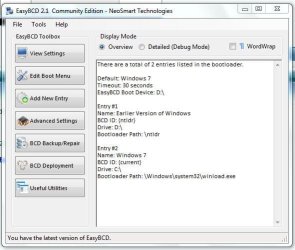
This is the screen shot of the EasyBCD program

Capture.JPG
 

My Computer My Computer

OS
Windows 7 professional 32bit
ok mates... thanks very much..... for your sincere effort, but i happen to solve problem. what i just did was that I went to edit boot menu option in the easyBCD, and deleted the second option of earlier version of windows. its perfectly fine running now.

Really really thanks for the help...
 

My Computer My Computer

OS
Windows 7 professional 32bit
Hello again.


I'm very glad you found a solution and thanks for the update.
 

My Computer My Computer

Computer Manufacturer/Model Number
* BFK Customs *
OS
W 7 64-bit Ultimate
CPU
Intel Q9550 Yorkfield
Motherboard
ASUS P5Q Pro
Memory
8GB Dominator 8500C5D
Graphics Card(s)
ATI : XFX 5870
Sound Card
Realtek HD Audio 7-1
Monitor(s) Displays
1x 47" LCD HDMI & 3x 26" LCD HDMI
Screen Resolution
1920x1080P & 1920x1200
Hard Drives
1x 80GB Intel X25-M G2 SSD : 1x 500GB & 1x 640GB WD Caviar Black(s)
PSU
Corsair 620HX
Case
Cooler Master RC-690
Cooling
Tuniq Tower 120, 2x 140mm and 3x 120mm case fans
Keyboard
Microsoft 500
Mouse
Razer Diamondback 3G
Internet Speed
14 Mb/s
Other Info
1x Koutech 3Gb/s SATA HDD Hot Swap Rack
Back
Top