Boot entry missing

conoflex

New member
Power User
VIP
Local time
12:52 PM
Messages
113
Location
Bridgend, S.Wales
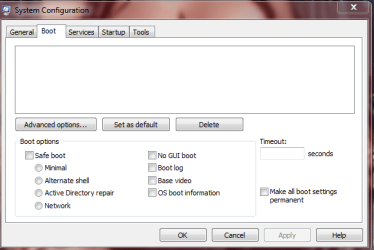
I just went to msconfig to check that all my cores were enabled and there is NO boot entry there so I can't access anything on the boot tab (See attachment)
What can I do about this please.

Andy
 

Attachments

  • msconfig.PNG
    msconfig.PNG
    15.6 KB · Views: 22

My Computer

Computer type
PC/Desktop
Computer Manufacturer/Model Number
Custom Build
OS
Windows 7 Pro 64 bit
CPU
Intel i7-3770K Processor
Motherboard
ASRock > Products > Fatal1ty Z77 Professional
Memory
32gb [RipjawsX] F3-12800CL10Q-32GBXL
Graphics Card(s)
ASUS HD7970-DC2T-3GD5
Sound Card
Asus Xonar D2/PM
Monitor(s) Displays
Iiyama prolite E2773HDS
Screen Resolution
1920 x 1080
Hard Drives
Crucial - 128GB M4 - CT128M4SSD2// 2TB Seagate Barracuda Green // 2TB Hitachi | Deskstar 5K3000 //
PSU
Corsair HX850 Modular PSU
Case
Bitfenix Shinobi XL
Cooling
Water cooled CPU loop
Keyboard
Tt esports
Mouse
Logitech G700 gaming mouse
Internet Speed
38mb
Antivirus
MSE
Browser
Chrome
Other Info
Lite-On iHAS624 DVD RW - Internal.
Buffalo Nfiniti WBMR-G300N router.
DuoSwap MB971SP-B 2.5"/3.5" SATA Hot Swap Drive Caddy.
Also I just found out that in elevated command prompt BCDEDIT is missing :
C:\>bcdedit
The boot configuration data store could not be opened.
The system cannot find the file specified.


So how can this be as computer is booting up no problem.
 

My Computer

Computer type
PC/Desktop
Computer Manufacturer/Model Number
Custom Build
OS
Windows 7 Pro 64 bit
CPU
Intel i7-3770K Processor
Motherboard
ASRock > Products > Fatal1ty Z77 Professional
Memory
32gb [RipjawsX] F3-12800CL10Q-32GBXL
Graphics Card(s)
ASUS HD7970-DC2T-3GD5
Sound Card
Asus Xonar D2/PM
Monitor(s) Displays
Iiyama prolite E2773HDS
Screen Resolution
1920 x 1080
Hard Drives
Crucial - 128GB M4 - CT128M4SSD2// 2TB Seagate Barracuda Green // 2TB Hitachi | Deskstar 5K3000 //
PSU
Corsair HX850 Modular PSU
Case
Bitfenix Shinobi XL
Cooling
Water cooled CPU loop
Keyboard
Tt esports
Mouse
Logitech G700 gaming mouse
Internet Speed
38mb
Antivirus
MSE
Browser
Chrome
Other Info
Lite-On iHAS624 DVD RW - Internal.
Buffalo Nfiniti WBMR-G300N router.
DuoSwap MB971SP-B 2.5"/3.5" SATA Hot Swap Drive Caddy.
Are you using a non windows bootloader.
 

My Computer

OS
ME/XP/Vista/Win7
Boot to the setup DVD and run Recovery menu. Navigate to the Command Prompt. Type the following commands one by one, hit Enter after each.

bcdedit /export C:\BCD_Backup
c:
cd boot
attrib bcd -s -h -r
ren c:\boot\bcd bcd.old

bootrec /RebuildBcd
 

My Computer

Computer Manufacturer/Model Number
Too many to describe...
OS
Windows 7 x64 pro/ Windows 7 x86 Pro/ XP SP3 x86

My Computer

Computer type
PC/Desktop
Computer Manufacturer/Model Number
Custom Build
OS
Windows 7 Pro 64 bit
CPU
Intel i7-3770K Processor
Motherboard
ASRock > Products > Fatal1ty Z77 Professional
Memory
32gb [RipjawsX] F3-12800CL10Q-32GBXL
Graphics Card(s)
ASUS HD7970-DC2T-3GD5
Sound Card
Asus Xonar D2/PM
Monitor(s) Displays
Iiyama prolite E2773HDS
Screen Resolution
1920 x 1080
Hard Drives
Crucial - 128GB M4 - CT128M4SSD2// 2TB Seagate Barracuda Green // 2TB Hitachi | Deskstar 5K3000 //
PSU
Corsair HX850 Modular PSU
Case
Bitfenix Shinobi XL
Cooling
Water cooled CPU loop
Keyboard
Tt esports
Mouse
Logitech G700 gaming mouse
Internet Speed
38mb
Antivirus
MSE
Browser
Chrome
Other Info
Lite-On iHAS624 DVD RW - Internal.
Buffalo Nfiniti WBMR-G300N router.
DuoSwap MB971SP-B 2.5"/3.5" SATA Hot Swap Drive Caddy.
Boot to the setup DVD and run Recovery menu. Navigate to the Command Prompt. Type the following commands one by one, hit Enter after each.

bcdedit /export C:\BCD_Backup
c:
cd boot
attrib bcd -s -h -r
ren c:\boot\bcd bcd.old

bootrec /RebuildBcd


Done that an it's still the same :(
 

My Computer

Computer type
PC/Desktop
Computer Manufacturer/Model Number
Custom Build
OS
Windows 7 Pro 64 bit
CPU
Intel i7-3770K Processor
Motherboard
ASRock > Products > Fatal1ty Z77 Professional
Memory
32gb [RipjawsX] F3-12800CL10Q-32GBXL
Graphics Card(s)
ASUS HD7970-DC2T-3GD5
Sound Card
Asus Xonar D2/PM
Monitor(s) Displays
Iiyama prolite E2773HDS
Screen Resolution
1920 x 1080
Hard Drives
Crucial - 128GB M4 - CT128M4SSD2// 2TB Seagate Barracuda Green // 2TB Hitachi | Deskstar 5K3000 //
PSU
Corsair HX850 Modular PSU
Case
Bitfenix Shinobi XL
Cooling
Water cooled CPU loop
Keyboard
Tt esports
Mouse
Logitech G700 gaming mouse
Internet Speed
38mb
Antivirus
MSE
Browser
Chrome
Other Info
Lite-On iHAS624 DVD RW - Internal.
Buffalo Nfiniti WBMR-G300N router.
DuoSwap MB971SP-B 2.5"/3.5" SATA Hot Swap Drive Caddy.
The only things I can think of are:

1) Run a startup repair.

2) Run an sfc scan.

3) If nothing works, try a repair install.

Of course, you have the option of doing nothing since your computer is booting up fine.
 

My Computer

Computer Manufacturer/Model Number
Too many to describe...
OS
Windows 7 x64 pro/ Windows 7 x86 Pro/ XP SP3 x86
The only things I can think of are:

1) Run a startup repair.

2) Run an sfc scan.

3) If nothing works, try a repair install.

Of course, you have the option of doing nothing since your computer is booting up fine.

1) Done startup repair - no good still same.

2) Done sfc scan - won't work I get this when trying -
C:\>sfc /scannow

Windows Resource Protection could not start the repair service.

3) Repair install - going to try that next will report back later.

Andy
 

My Computer

Computer type
PC/Desktop
Computer Manufacturer/Model Number
Custom Build
OS
Windows 7 Pro 64 bit
CPU
Intel i7-3770K Processor
Motherboard
ASRock > Products > Fatal1ty Z77 Professional
Memory
32gb [RipjawsX] F3-12800CL10Q-32GBXL
Graphics Card(s)
ASUS HD7970-DC2T-3GD5
Sound Card
Asus Xonar D2/PM
Monitor(s) Displays
Iiyama prolite E2773HDS
Screen Resolution
1920 x 1080
Hard Drives
Crucial - 128GB M4 - CT128M4SSD2// 2TB Seagate Barracuda Green // 2TB Hitachi | Deskstar 5K3000 //
PSU
Corsair HX850 Modular PSU
Case
Bitfenix Shinobi XL
Cooling
Water cooled CPU loop
Keyboard
Tt esports
Mouse
Logitech G700 gaming mouse
Internet Speed
38mb
Antivirus
MSE
Browser
Chrome
Other Info
Lite-On iHAS624 DVD RW - Internal.
Buffalo Nfiniti WBMR-G300N router.
DuoSwap MB971SP-B 2.5"/3.5" SATA Hot Swap Drive Caddy.
would not complete the repair install.
 

My Computer

Computer type
PC/Desktop
Computer Manufacturer/Model Number
Custom Build
OS
Windows 7 Pro 64 bit
CPU
Intel i7-3770K Processor
Motherboard
ASRock > Products > Fatal1ty Z77 Professional
Memory
32gb [RipjawsX] F3-12800CL10Q-32GBXL
Graphics Card(s)
ASUS HD7970-DC2T-3GD5
Sound Card
Asus Xonar D2/PM
Monitor(s) Displays
Iiyama prolite E2773HDS
Screen Resolution
1920 x 1080
Hard Drives
Crucial - 128GB M4 - CT128M4SSD2// 2TB Seagate Barracuda Green // 2TB Hitachi | Deskstar 5K3000 //
PSU
Corsair HX850 Modular PSU
Case
Bitfenix Shinobi XL
Cooling
Water cooled CPU loop
Keyboard
Tt esports
Mouse
Logitech G700 gaming mouse
Internet Speed
38mb
Antivirus
MSE
Browser
Chrome
Other Info
Lite-On iHAS624 DVD RW - Internal.
Buffalo Nfiniti WBMR-G300N router.
DuoSwap MB971SP-B 2.5"/3.5" SATA Hot Swap Drive Caddy.
MSConfig tab

Have the exact same problem, only in my case I also have a dual boot Win7/Ubuntu, I am almost sure GRUB is causing my problem, but would appreciate any suggestions, (GRUB related or not).
Thank you
 

My Computer

OS
7 64 bit
Have the exact same problem, only in my case I also have a dual boot Win7/Ubuntu, I am almost sure GRUB is causing my problem, but would appreciate any suggestions, (GRUB related or not).
Thank you
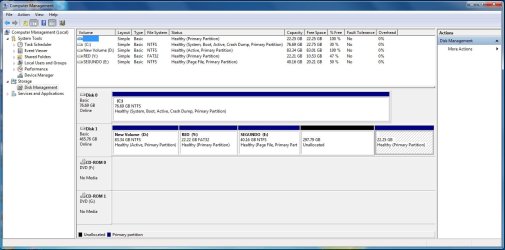
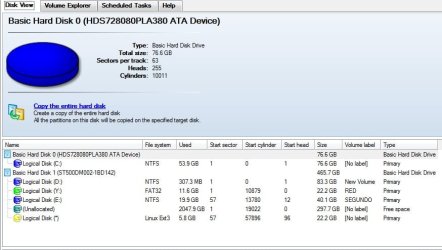
Post screenshot of disk management with all fields visible (from within win7).
GRUB has been installed in MBR or in "volume bootsector" (if you know)?
In linux:
Code:
sudo dd if=/dev/sda   bs=512  count=1| hexdump -c
Any readable code like "Grub" or "Missing operating system"?

UBUNTU installed before you installed WIN7 or vise versa?
 
Last edited:

My Computer

Computer type
Laptop
Computer Manufacturer/Model Number
ACER ASPIRE 5742G
OS
Microsoft Windows 7 Home Premium 64-bits 7601 Multiprocessor Free Service Pack 1
CPU
Intel(R) Core(TM) i3 CPU M 370 @ 2.40GHz
Motherboard
Acer Aspire 5742G
Memory
4,00 GB
Graphics Card(s)
ATI Mobility Radeon HD 5400 Series
Sound Card
(1) AMD High Definition Audio Device (2) Realtek High Defi
Screen Resolution
1366 x 768 x 32 bits (4294967296 colors) @ 60 Hz
Hard Drives
WDC WD5000BEVT-22ZAT0
I believe GRUB is in MBR, of disk1, but I am not sure.
Ubuntu (Disk1) was installed after Win7 (Disk0), but I recently changed my second disk (disk1) for a larger one and had to rebuild GRUB after copying the partitions in the older disk.
I don´t know if it matters, but also upgraded processor from a Pentium D to a Core i7 and Mother Board from D945PSN to DP67BA

Thanks for your quick reply
 

Attachments

  • DskMgt01.jpg
    DskMgt01.jpg
    106.3 KB · Views: 7
  • DskMgt02.jpg
    DskMgt02.jpg
    51.6 KB · Views: 7

My Computer

OS
7 64 bit
In elevated command prompt:
Code:
diskpart
sel  vol  d:
inactive
exit

D: is not active anymore in disk management now? Try to boot in win7 and ubuntu. Works?
 

My Computer

Computer type
Laptop
Computer Manufacturer/Model Number
ACER ASPIRE 5742G
OS
Microsoft Windows 7 Home Premium 64-bits 7601 Multiprocessor Free Service Pack 1
CPU
Intel(R) Core(TM) i3 CPU M 370 @ 2.40GHz
Motherboard
Acer Aspire 5742G
Memory
4,00 GB
Graphics Card(s)
ATI Mobility Radeon HD 5400 Series
Sound Card
(1) AMD High Definition Audio Device (2) Realtek High Defi
Screen Resolution
1366 x 768 x 32 bits (4294967296 colors) @ 60 Hz
Hard Drives
WDC WD5000BEVT-22ZAT0
Ok, in Ubuntu now.
Code:
mario@mario-desktop:~$ sudo dd if=/dev/sda   bs=512  count=1| hexdump -c
[sudo] password for mario: 
1+0 records in
1+0 records out
512 bytes (512 B) copied0000000   �   c 220   �   �  \0   |   �   P  \a   P 037   �   � 033   |
, 5.1943e-05 s, 9.9 MB/s
0000010   � 033 006   P   W   �   � 001   �   �   �   �   �  \a   � 004
0000020   8   n  \0   |  \t   u 023 203   � 020   �   �   � 030 213   
0000030 203   � 020   I   t 031   8   ,   t   �   �   �  \a   �  \a 213
0000040   �   �   <  \0   t   �   �  \a  \0   � 016   � 020   �   � 210
0000050   N 020   �   F  \0   s   *   �   F 020  \0 200 001  \0  \0  \0
0000060  \0  \0  \0  \0   �   � 220 220   �   � 200   t 005   �   �   p
0000070   t 002   � 200   �   y   |  \0  \0   1   � 216   � 216   �   �
0000080  \0       �   �   d   |   <   �   t 002 210   �   R   � 027 004
0000090 200   ' 003   t 006   � 210   }   � 027 001   � 005   |   �   A
00000a0   �   �   U   � 023   Z   R   r   = 201   �   U   �   u   7 203
00000b0   � 001   t   2   1   � 211   D 004   @ 210   D   � 211   D 002
00000c0   � 004 020  \0   f 213 036   \   |   f 211   \  \b   f 213 036
00000d0   `   |   f 211   \  \f   �   D 006  \0   p   �   B   � 023   r
00000e0 005   �  \0   p   �   v   �  \b   � 023   s  \r   �   � 200 017
00000f0 204   �  \0   � 223   }   � 202  \0   f 017   �   � 210   d   �
0000100   @   f 211   D 004 017   �   �   �   � 002 210   � 210   �   @
0000110 211   D  \b 017   �   �   �   � 002   f 211 004   f   �   `   |
0000120   f  \t   �   u   N   f   �   \   |   f   1   �   f   �   4 210
0000130   �   1   �   f   �   t 004   ;   D  \b   }   7   �   � 210   
0000140   0   �   �   � 002  \b   � 210   �   Z 210   �   �  \0   p 216
0000150   �   1   �   � 001 002   � 023   r 036 214   �   ` 036   �  \0
0000160 001 216   �   1   �   �  \0 200 216   �   �   �   � 037   a   �
0000170   &   Z   |   � 216   }   � 003   � 235   }   �   4  \0   �   �
0000180   }   �   .  \0   � 030   �   �   G   R   U   B      \0   G   e
0000190   o   m  \0   H   a   r   d       D   i   s   k  \0   R   e   a
00001a0   d  \0       E   r   r   o   r  \r  \n  \0   � 001  \0   � 016
00001b0   � 020   �   <  \0   u   �   �   �  \t   V 030  \0  \0 200 001
00001c0 001  \0  \a   �   �   �   ?  \0  \0  \0 200   �   j  \n  \0   �
00001d0   �   �  \f   �   �   �   �   �   j  \n 025   !   � 002  \0   �
00001e0   �   �  \a   �   �   �  \0   �   1  \r  \0   � 004 005  \0   �
00001f0   �   � 203   �   �   �  \0   H   p   7  \0 030   � 002   U   �
0000200
mario@mario-desktop:~$
 

My Computer

OS
7 64 bit
When you boot you see a boot menu. In that menu you select win7 or ubuntu. But is it a grub bootmenu or a win7 bootmenu?
Win7 bootmenu looks like this:
 

My Computer

Computer type
Laptop
Computer Manufacturer/Model Number
ACER ASPIRE 5742G
OS
Microsoft Windows 7 Home Premium 64-bits 7601 Multiprocessor Free Service Pack 1
CPU
Intel(R) Core(TM) i3 CPU M 370 @ 2.40GHz
Motherboard
Acer Aspire 5742G
Memory
4,00 GB
Graphics Card(s)
ATI Mobility Radeon HD 5400 Series
Sound Card
(1) AMD High Definition Audio Device (2) Realtek High Defi
Screen Resolution
1366 x 768 x 32 bits (4294967296 colors) @ 60 Hz
Hard Drives
WDC WD5000BEVT-22ZAT0
Ok, in Ubuntu now.
Code:
mario@mario-desktop:~$ sudo dd if=/dev/sda   bs=512  count=1| hexdump -c
[sudo] password for mario: 
1+0 records in
1+0 records out
512 bytes (512 B) copied0000000   �   c 220   �   �  \0   |   �   P  \a   P 037   �   � 033   |
, 5.1943e-05 s, 9.9 MB/s
0000010   � 033 006   P   W   �   � 001   �   �   �   �   �  \a   � 004
0000020   8   n  \0   |  \t   u 023 203   � 020   �   �   � 030 213   
0000030 203   � 020   I   t 031   8   ,   t   �   �   �  \a   �  \a 213
0000040   �   �   <  \0   t   �   �  \a  \0   � 016   � 020   �   � 210
0000050   N 020   �   F  \0   s   *   �   F 020  \0 200 001  \0  \0  \0
0000060  \0  \0  \0  \0   �   � 220 220   �   � 200   t 005   �   �   p
0000070   t 002   � 200   �   y   |  \0  \0   1   � 216   � 216   �   �
0000080  \0       �   �   d   |   <   �   t 002 210   �   R   � 027 004
0000090 200   ' 003   t 006   � 210   }   � 027 001   � 005   |   �   A
00000a0   �   �   U   � 023   Z   R   r   = 201   �   U   �   u   7 203
00000b0   � 001   t   2   1   � 211   D 004   @ 210   D   � 211   D 002
00000c0   � 004 020  \0   f 213 036   \   |   f 211   \  \b   f 213 036
00000d0   `   |   f 211   \  \f   �   D 006  \0   p   �   B   � 023   r
00000e0 005   �  \0   p   �   v   �  \b   � 023   s  \r   �   � 200 017
00000f0 204   �  \0   � 223   }   � 202  \0   f 017   �   � 210   d   �
0000100   @   f 211   D 004 017   �   �   �   � 002 210   � 210   �   @
0000110 211   D  \b 017   �   �   �   � 002   f 211 004   f   �   `   |
0000120   f  \t   �   u   N   f   �   \   |   f   1   �   f   �   4 210
0000130   �   1   �   f   �   t 004   ;   D  \b   }   7   �   � 210   
0000140   0   �   �   � 002  \b   � 210   �   Z 210   �   �  \0   p 216
0000150   �   1   �   � 001 002   � 023   r 036 214   �   ` 036   �  \0
0000160 001 216   �   1   �   �  \0 200 216   �   �   �   � 037   a   �
0000170   &   Z   |   � 216   }   � 003   � 235   }   �   4  \0   �   �
0000180   }   �   .  \0   � 030   �   �   G   R   U   B      \0   G   e
0000190   o   m  \0   H   a   r   d       D   i   s   k  \0   R   e   a
00001a0   d  \0       E   r   r   o   r  \r  \n  \0   � 001  \0   � 016
00001b0   � 020   �   <  \0   u   �   �   �  \t   V 030  \0  \0 200 001
00001c0 001  \0  \a   �   �   �   ?  \0  \0  \0 200   �   j  \n  \0   �
00001d0   �   �  \f   �   �   �   �   �   j  \n 025   !   � 002  \0   �
00001e0   �   �  \a   �   �   �  \0   �   1  \r  \0   � 004 005  \0   �
00001f0   �   � 203   �   �   �  \0   H   p   7  \0 030   � 002   U   �
0000200
mario@mario-desktop:~$
0000180 } � . \0 � 030 � � G R U B \0 G e

So grub is in MBR of /dev/sda

linux itself is on which disk?
Code:
sudo fdisk -l
 

My Computer

Computer type
Laptop
Computer Manufacturer/Model Number
ACER ASPIRE 5742G
OS
Microsoft Windows 7 Home Premium 64-bits 7601 Multiprocessor Free Service Pack 1
CPU
Intel(R) Core(TM) i3 CPU M 370 @ 2.40GHz
Motherboard
Acer Aspire 5742G
Memory
4,00 GB
Graphics Card(s)
ATI Mobility Radeon HD 5400 Series
Sound Card
(1) AMD High Definition Audio Device (2) Realtek High Defi
Screen Resolution
1366 x 768 x 32 bits (4294967296 colors) @ 60 Hz
Hard Drives
WDC WD5000BEVT-22ZAT0
It is an Ubuntu GRUB menu
ubuntu is in /dev/sdb4

*** sorry wrong place disregard sdb4

/dev/sda4 930105344 976773119 23333888 83 Linux
 

My Computer

OS
7 64 bit
Code:
Disk /dev/sda: 500.1 GB, 500107862016 bytes
255 heads, 63 sectors/track, 60801 cylinders, total 976773168 sectors
Units = sectors of 1 * 512 = 512 bytes
Sector size (logical/physical): 512 bytes / 4096 bytes
I/O size (minimum/optimal): 4096 bytes / 4096 bytes
Disk identifier: 0x185609d3

   Device Boot      Start         End      Blocks   Id  System
/dev/sda1   *          63   174771134    87385536    7  HPFS/NTFS/exFAT
Partition 1 does not start on physical sector boundary.
/dev/sda2       174771135   221375699    23302282+   c  W95 FAT32 (LBA)
Partition 2 does not start on physical sector boundary.
/dev/sda3       221376512   305588223    42105856    7  HPFS/NTFS/exFAT
/dev/sda4       930105344   976773119    23333888   83  Linux

Disk /dev/sdb: 82.3 GB, 82348277760 bytes
255 heads, 63 sectors/track, 10011 cylinders, total 160836480 sectors
Units = sectors of 1 * 512 = 512 bytes
Sector size (logical/physical): 512 bytes / 512 bytes
I/O size (minimum/optimal): 512 bytes / 512 bytes
Disk identifier: 0xed8eed8e

   Device Boot      Start         End      Blocks   Id  System
/dev/sdb1   *          63   160826714    80413326    7  HPFS/NTFS/exFAT

 

My Computer

OS
7 64 bit

My Computer

Computer type
Laptop
Computer Manufacturer/Model Number
ACER ASPIRE 5742G
OS
Microsoft Windows 7 Home Premium 64-bits 7601 Multiprocessor Free Service Pack 1
CPU
Intel(R) Core(TM) i3 CPU M 370 @ 2.40GHz
Motherboard
Acer Aspire 5742G
Memory
4,00 GB
Graphics Card(s)
ATI Mobility Radeon HD 5400 Series
Sound Card
(1) AMD High Definition Audio Device (2) Realtek High Defi
Screen Resolution
1366 x 768 x 32 bits (4294967296 colors) @ 60 Hz
Hard Drives
WDC WD5000BEVT-22ZAT0
Yes, I mixed up sda and sdb
Windows 7 is in dev/sdb1
Ubuntu is in dev/sda4
I thought they were in sda1 and sdb4 respectively

Sorry for the mix up
 

My Computer

OS
7 64 bit
Back
Top