Boot error

emerald08

New member
Local time
10:40 PM
Messages
55
Location
The Great SouthWest, Arizona
Is there anyone here who can help me figure out a boot script gone awry?

It's for an XP pro machine but for some reason it has Win 7 (recovery) on the menu. I also have Ubuntu on it and have that sorted out. The Xp will not boot and I get a phantom OS on my Windows Boot menu.

I would like to know what a normal Xp Boot config (not sure what you call it) looks like.

I also would like to know how I could go about changing mine so the Win 7 isn't coming up. I DO have W7 but that is on another lappy of mine.

What is strange is I don't remember even trying to install Win 7 on this laptop. I don't sleepwalk or drink so rule those out guys!

Any suggestions would be appreciated :)

Edit:

Sorry guys. I just didn't know where else to ask! If any redirection is necessary please let me know!
 

My Computer

Computer Manufacturer/Model Number
Dell Latitude e6510
OS
W7 Professional X64
CPU
Core i5-520
Memory
4gb
Graphics Card(s)
NVIDIA NVS3100M
Monitor(s) Displays
23" Samsung
Screen Resolution
1920X1080
Hard Drives
Intel X-25M 80gb
Hi,

I've just done a search for 'EasyBCD ubunto' and got to Ubuntu - NeoSmart Technologies Wiki.

See if that helps, it details how the Ubunto install CD acts like EasyBCD so you should/may be able to repair your boot manager.

Hope this helps :)


OS
 

My Computer

Computer Manufacturer/Model Number
Compaq Desktop
OS
Windows 7 Ultimate x64
CPU
AMD Sempron Dual Core
Memory
3GB
Graphics Card(s)
NVIDIA GeForce 6150SE nForce 430
Screen Resolution
1024x768
Hard Drives
150GB Sata
Is there a way for me to fix the MBR so:

a) there is no W7 on the boot; don't need it on there as I have W7 on another lappy I have

b)so that my lappy will boot the Xp Pro partition

I can get into the command-line for Xp via the Install disc. I just really really dread reinstalling since I have settings the way I want on that partition. I should also mention that if it would be easier to edit the boot scripts through GUI I could extract the file using Ubuntu and save it to SD card. I could then use my W7 lappy's Notepad (or however you do it with MS) and then put it back into the Xp partition.

Sound like an idea???

Edit:

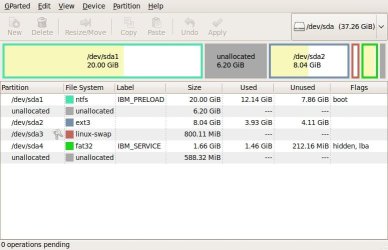
I should add that there is NO W7 partition on the drive at all. That W7 boot should not even be coming up. The only thing I have on the HDD is the Xp pro, Linux, Swap (for linux' page file type of thing) and Rescue and recovery for Xp. I'm going to post a picture of the partitions using Gparted.

Brb.
 
Last edited:

My Computer

Computer Manufacturer/Model Number
Dell Latitude e6510
OS
W7 Professional X64
CPU
Core i5-520
Memory
4gb
Graphics Card(s)
NVIDIA NVS3100M
Monitor(s) Displays
23" Samsung
Screen Resolution
1920X1080
Hard Drives
Intel X-25M 80gb
Here is a GUI shot of what my HDD looks like:
 

Attachments

  • Screenshot--dev-sda - GParted.jpg
    Screenshot--dev-sda - GParted.jpg
    43.5 KB · Views: 19

My Computer

Computer Manufacturer/Model Number
Dell Latitude e6510
OS
W7 Professional X64
CPU
Core i5-520
Memory
4gb
Graphics Card(s)
NVIDIA NVS3100M
Monitor(s) Displays
23" Samsung
Screen Resolution
1920X1080
Hard Drives
Intel X-25M 80gb
Hi,

I've just done a search for 'EasyBCD ubunto' and got to Ubuntu - NeoSmart Technologies Wiki.

See if that helps, it details how the Ubunto install CD acts like EasyBCD so you should/may be able to repair your boot manager.

Hope this helps :)


OS

Orbital! Thank you SO much :D

I had to really prod and poke for this to work. I'm also very lucky I have another lappy w/an MS OS here at home!

a) I downloaded EasyBCD to my R52 lappy and installed it.
b) Took the HDD out of my T30 and put it in an external drive.
c) Started up EasyBCD on the R52.
d) Connected the external HDD to my R52.
e) Had to go to choose F: at choosing different store for ext. HDD.
f) deleted the W7 (Recovered)
g) refreshed the store
h) renamed "an older Windows Operating System" to "Windows XP Professional"
I) restarted

I still have the Linux GRUB menu but when I choose XP it shows a Windows boot screen. It asks if I want to boot from "C:" or "Windows XP Professional."

At least it works now and no headache of reinstalling Xp and going through all the updates, reinstalling programs, etc.

Thanks once again Orbital!!!!

Rep +1 for you!
 

My Computer

Computer Manufacturer/Model Number
Dell Latitude e6510
OS
W7 Professional X64
CPU
Core i5-520
Memory
4gb
Graphics Card(s)
NVIDIA NVS3100M
Monitor(s) Displays
23" Samsung
Screen Resolution
1920X1080
Hard Drives
Intel X-25M 80gb
That's good news. Glad you got it sorted. And thanks for the +rep :D
 

My Computer

Computer Manufacturer/Model Number
Compaq Desktop
OS
Windows 7 Ultimate x64
CPU
AMD Sempron Dual Core
Memory
3GB
Graphics Card(s)
NVIDIA GeForce 6150SE nForce 430
Screen Resolution
1024x768
Hard Drives
150GB Sata
Back
Top