Solved Boot failure error 0xc000000f win7 | cannot auto-repair

talaitha

New member
Local time
3:55 PM
Messages
10
Location
nyc
Hi there, i went on break for about 2 weeks, and upon starting up my machine started getting a bsod for unmountable boot volume.
tired to restart in safe mode, but none of the options were working [when attempting safe mode, would load as far as file classpnp.sys], selecting anything would just loop back to the same bsod over & over.

i had a recovery tools/disk on USB [don't have any disc drives on this machine],
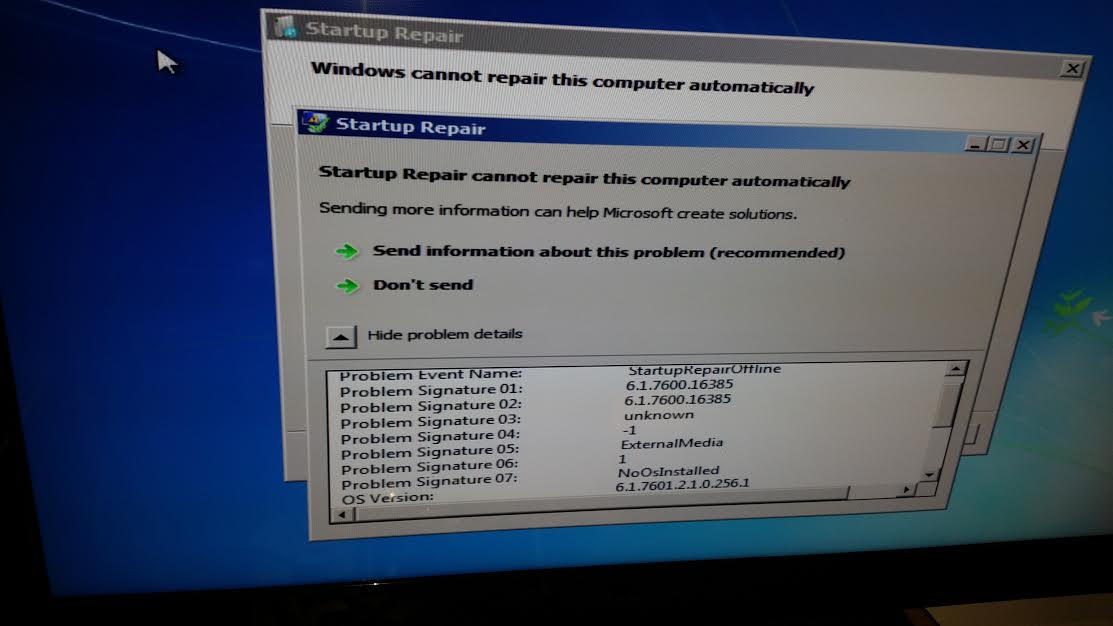
so plugged that in & tried running startup repair, but it fails. this is what i get:
Ztvk3a8.jpg


after that fail, rebooting my machine no longer yields the bsod mentioned above,
but rather this lovely boot failure error 0xc000000f:
2pQ3wJ0.jpg


so tried the recovery usb again, this time with command prompt as the recovery tool & ran some stuff there,
below are my results...

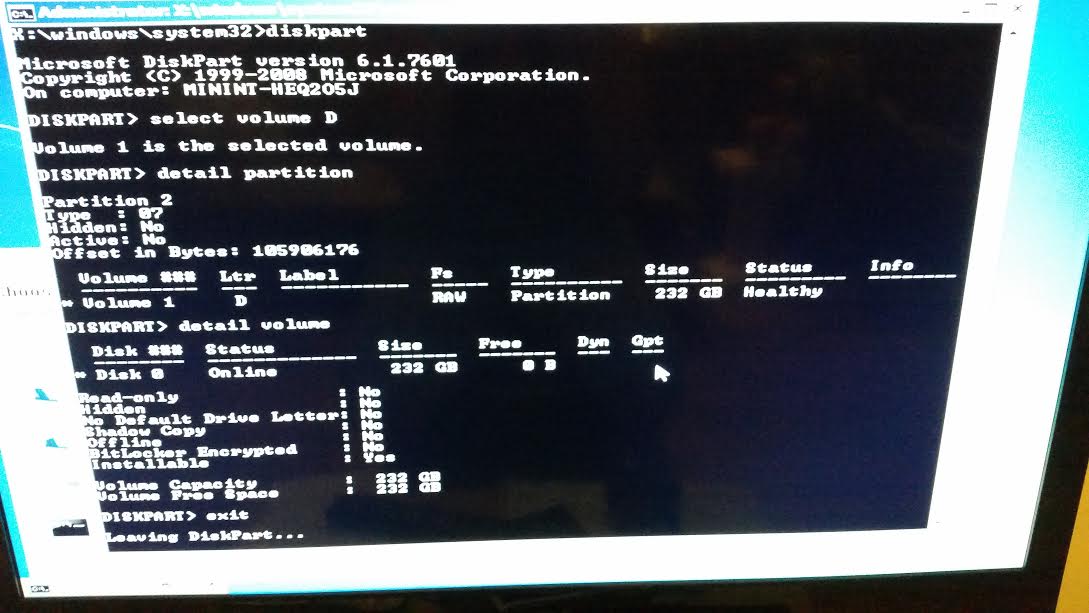
- diskpart output:
J6xE77x.jpg


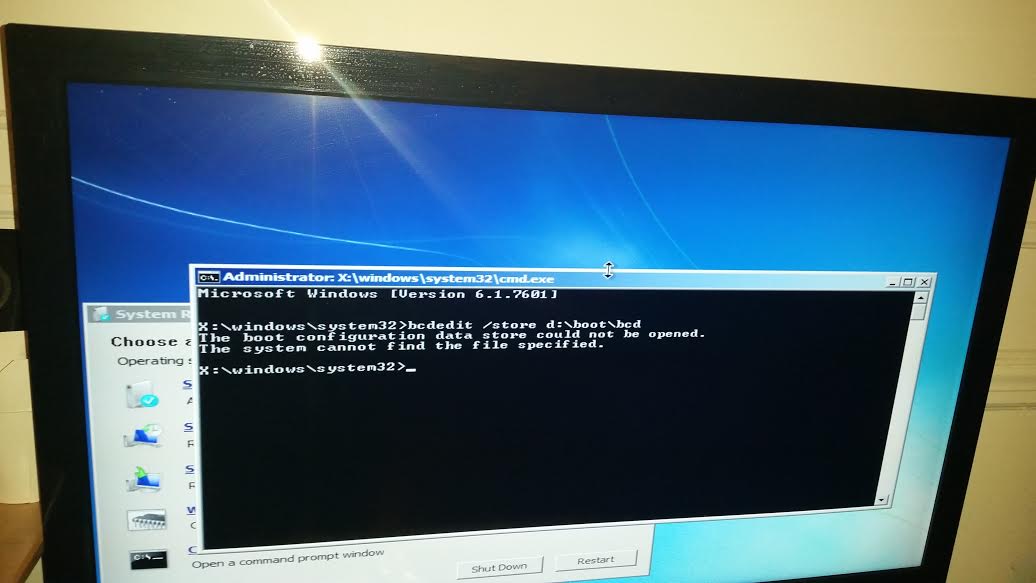
- bcdedit output:
pM6tdN9.jpg


not sure where to go from here. i've been trying to fix this for 3 days now [spent NYE at home trying to fix this even :party:].
am hoping won't have to re-install OS cause it's been a while & i don't have the disk anymore [would probably have to install via usb shenanigans], any suggestions greatly appreciated

p.s. sorry for the terrible images, taking them all with my phone.
 

My Computer

Computer type
PC/Desktop
Computer Manufacturer/Model Number
asus
OS
windows 7 ultimate x64
CPU
amd fx-4170 zambezi quad core ghz
Motherboard
asus m5a99x evo am3+
Memory
corsair vengeance 16gb 240-pin dd3
Graphics Card(s)
geforce gt 640 4gb
Hard Drives
Western Digital WD VelociRaptor WD2500HHTZ 250GB 10000 RPM 64MB Cache SATA 6.0Gb/s 3.5"
Browser
chrome
still haven't been able to fix, anyone have any ideas?
 

My Computer

Computer type
PC/Desktop
Computer Manufacturer/Model Number
asus
OS
windows 7 ultimate x64
CPU
amd fx-4170 zambezi quad core ghz
Motherboard
asus m5a99x evo am3+
Memory
corsair vengeance 16gb 240-pin dd3
Graphics Card(s)
geforce gt 640 4gb
Hard Drives
Western Digital WD VelociRaptor WD2500HHTZ 250GB 10000 RPM 64MB Cache SATA 6.0Gb/s 3.5"
Browser
chrome
i went on break for about 2 weeks, and upon starting up my machine started getting a bsod for unmountable boot volume.
That particular BSOD is almost always caused by damaged file system on "C:" partition. The corruption in turn is commonly cause by HDD surface defects ( otherwise called bad sectors ).

The first screenshot you posted also shows Problem signature 07 : No OS installed which means "Startup Repair" can't locate a valid Windows installation. This can also caused by damaged file system. If file system is corrupted and unreadable, the recovery environment will fail to detect whether Win7 is installed or not in the system.

( DISKPART also identifies the 232 GB partition as RAW - which means unidentifiable ).

I would recommend ;

1. Backup any important data to an external medium.

http://www.sevenforums.com/tutorials/287439-emergency-kit-save-your-files-dead-os.html

If file system is severely damaged, you may not be able to copy the data to an external medium. In that case, please proceed to step 2.

2. Diagnose and confirm the health status of hard drive.

Once important data are successfully rescued, follow http://www.sevenforums.com/tutorials/313457-seatools-dos-windows-how-use.html

Although you have a WD disk, "Seatool" supports diagnosing it. Make sure to plug the HDD to a SATA 3gb/s port and set SATA mode to IDE emulation in BIOS before running the "Long" test.

Once the test is finished, report back whether the test detected failures or not (or post a screenshot of the test result ).
 

My Computer

Computer type
PC/Desktop
OS
Windows 7 Ultimate x64
Same here. What the hell is wrong with rebooting the pc. I don't have the installation cd or whatever, just don't know what to do.
 

My Computer

Computer type
PC/Desktop
Computer Manufacturer/Model Number
AOC
OS
Windows 7 Ultimate x64
CPU
Neutron Fit
volume D in you screenshot (the OS disk with win7) has turned RAW. windows doesn't know what it is. Try in "command prompt":

Code:
chkdsk/f d:
what happens?

Code:
diskpart
select volume D
detail partition
detail volume
exit
Post results
 

My Computer

Computer type
Laptop
Computer Manufacturer/Model Number
ACER ASPIRE 5742G
OS
Microsoft Windows 7 Home Premium 64-bits 7601 Multiprocessor Free Service Pack 1
CPU
Intel(R) Core(TM) i3 CPU M 370 @ 2.40GHz
Motherboard
Acer Aspire 5742G
Memory
4,00 GB
Graphics Card(s)
ATI Mobility Radeon HD 5400 Series
Sound Card
(1) AMD High Definition Audio Device (2) Realtek High Defi
Screen Resolution
1366 x 768 x 32 bits (4294967296 colors) @ 60 Hz
Hard Drives
WDC WD5000BEVT-22ZAT0
Hi Anshad,

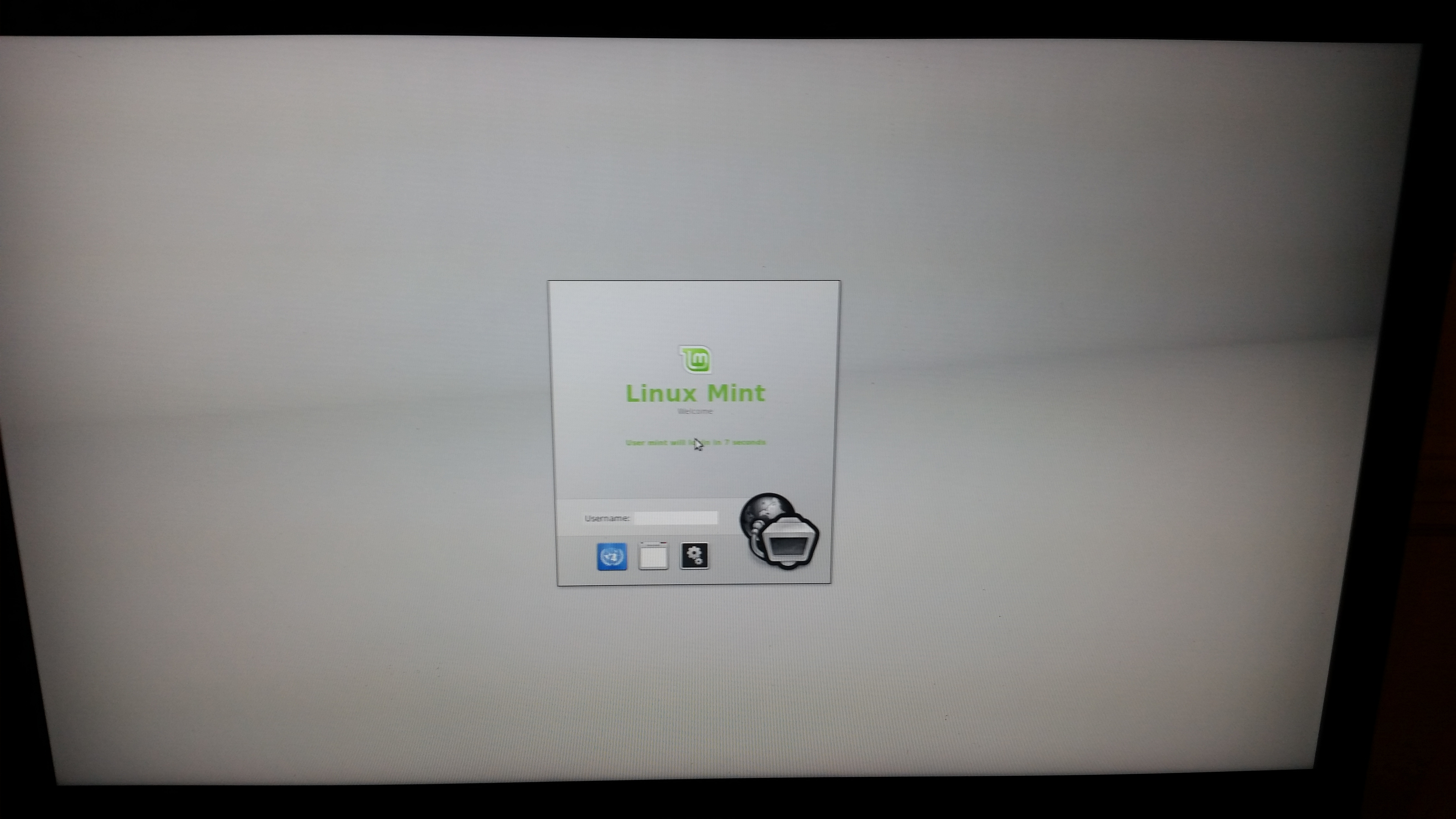
for step 1, wasn't able to back up anything :[
followed the instructions in the emergency kit, but linux mintmate usb stick just kept restarting over & over on boot screen:
nY7WBTs.jpg


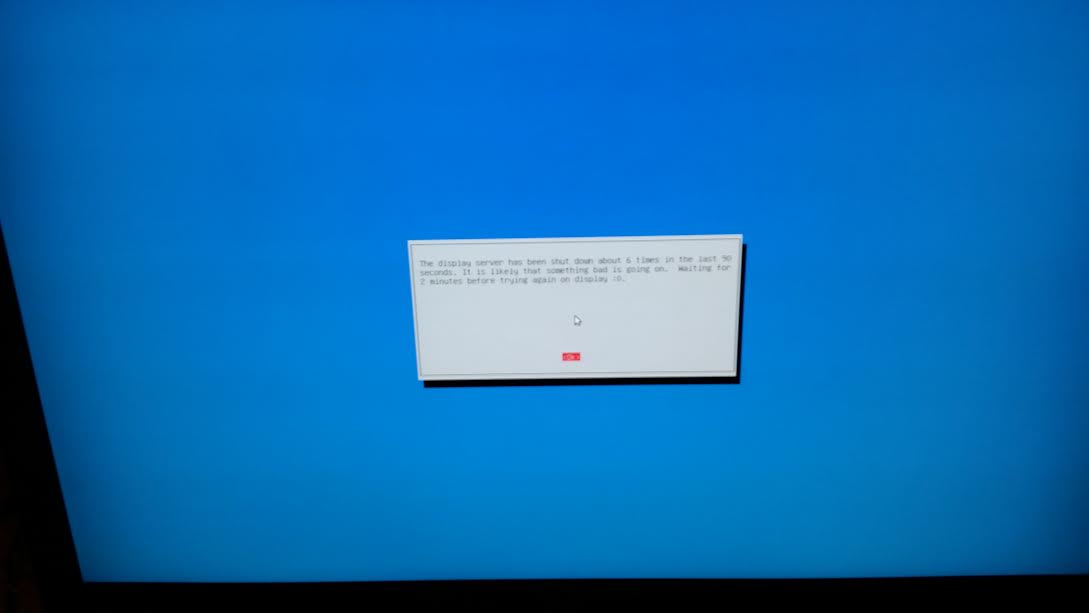
after several restarts got this additional message:
7eXVkrh.jpg


working on step 2 at the moment, will post again when done.
 

My Computer

Computer type
PC/Desktop
Computer Manufacturer/Model Number
asus
OS
windows 7 ultimate x64
CPU
amd fx-4170 zambezi quad core ghz
Motherboard
asus m5a99x evo am3+
Memory
corsair vengeance 16gb 240-pin dd3
Graphics Card(s)
geforce gt 640 4gb
Hard Drives
Western Digital WD VelociRaptor WD2500HHTZ 250GB 10000 RPM 64MB Cache SATA 6.0Gb/s 3.5"
Browser
chrome

My Computer

Computer type
PC/Desktop
Computer Manufacturer/Model Number
asus
OS
windows 7 ultimate x64
CPU
amd fx-4170 zambezi quad core ghz
Motherboard
asus m5a99x evo am3+
Memory
corsair vengeance 16gb 240-pin dd3
Graphics Card(s)
geforce gt 640 4gb
Hard Drives
Western Digital WD VelociRaptor WD2500HHTZ 250GB 10000 RPM 64MB Cache SATA 6.0Gb/s 3.5"
Browser
chrome
Do the same chkdsk/f d: zommand again please and post output again
 

My Computer

Computer type
Laptop
Computer Manufacturer/Model Number
ACER ASPIRE 5742G
OS
Microsoft Windows 7 Home Premium 64-bits 7601 Multiprocessor Free Service Pack 1
CPU
Intel(R) Core(TM) i3 CPU M 370 @ 2.40GHz
Motherboard
Acer Aspire 5742G
Memory
4,00 GB
Graphics Card(s)
ATI Mobility Radeon HD 5400 Series
Sound Card
(1) AMD High Definition Audio Device (2) Realtek High Defi
Screen Resolution
1366 x 768 x 32 bits (4294967296 colors) @ 60 Hz
Hard Drives
WDC WD5000BEVT-22ZAT0
CHKDSK has the bad habit of deleting partially corrupted data and this behavior may cause data loss if there are lost of bad sectors. That is the reason why i don't suggested running CHKDSK directly without knowing how much bad sectors are there ( Seatool usually report the number of defects it founds ). If there are no bad sectors/only a few, usually it is safe to run CHKDSK.

Since Mint refuses to run on your system, i would suggest "Puppy" which is only 160 MB in size : http://distro.ibiblio.org/puppylinux/puppy-slacko-5.7/slacko-5.7.0-PAE.iso
 

My Computer

Computer type
PC/Desktop
OS
Windows 7 Ultimate x64
CHKDSK has the bad habit of deleting partially corrupted data and this behavior may cause data loss if there are lost of bad sectors. That is the reason why i don't suggested running CHKDSK directly without knowing how much bad sectors are there ( Seatool usually report the number of defects it founds ). If there are no bad sectors/only a few, usually it is safe to run CHKDSK.

Since Mint refuses to run on your system, i would suggest "Puppy" which is only 160 MB in size : http://distro.ibiblio.org/puppylinux/puppy-slacko-5.7/slacko-5.7.0-PAE.iso
What do you mean by saying "partitially corrupted"??? If sectors are faulty,... the file the sector belongs to is corrupted. So useless. At least for system files.
 

My Computer

Computer type
Laptop
Computer Manufacturer/Model Number
ACER ASPIRE 5742G
OS
Microsoft Windows 7 Home Premium 64-bits 7601 Multiprocessor Free Service Pack 1
CPU
Intel(R) Core(TM) i3 CPU M 370 @ 2.40GHz
Motherboard
Acer Aspire 5742G
Memory
4,00 GB
Graphics Card(s)
ATI Mobility Radeon HD 5400 Series
Sound Card
(1) AMD High Definition Audio Device (2) Realtek High Defi
Screen Resolution
1366 x 768 x 32 bits (4294967296 colors) @ 60 Hz
Hard Drives
WDC WD5000BEVT-22ZAT0
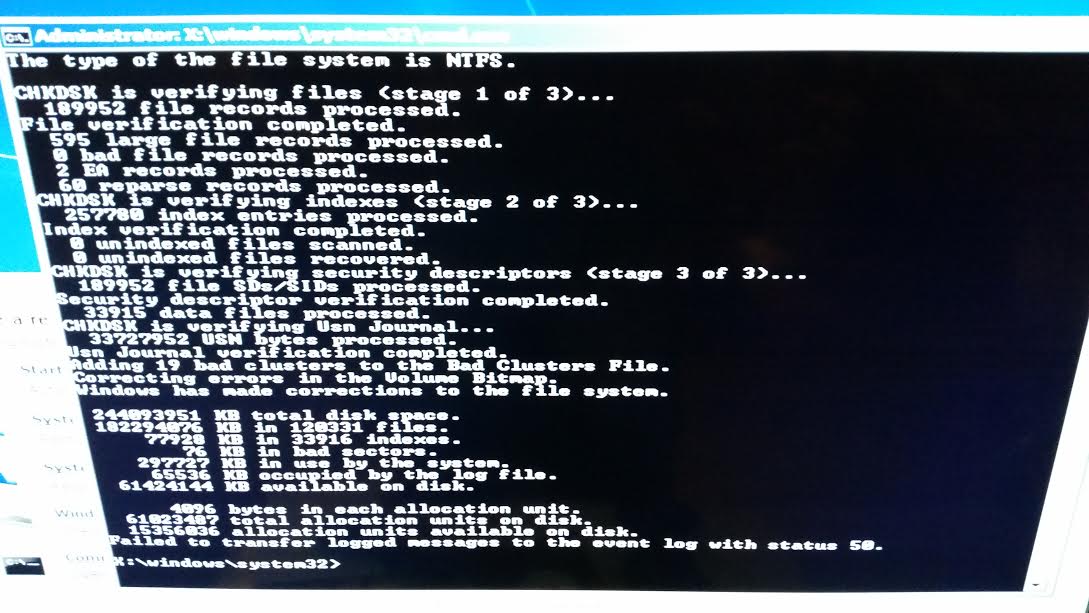
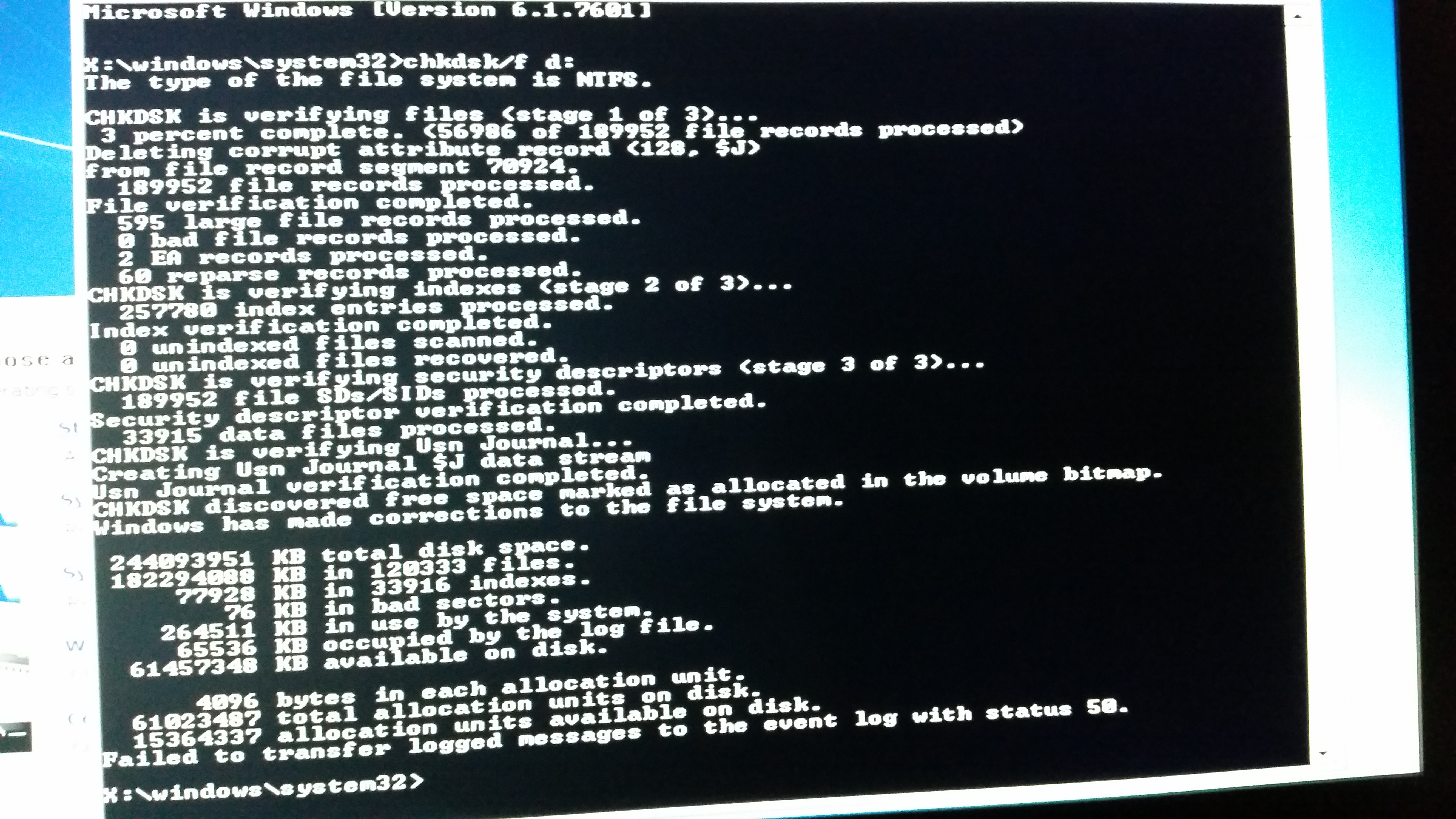
Do the same chkdsk/f d: zommand again please and post output again

done:
pYjGSCK.jpg


@Anshad: haven't gotten to step2 yet, as i have to go to someone else's house & borrow their machine to do so.
 

My Computer

Computer type
PC/Desktop
Computer Manufacturer/Model Number
asus
OS
windows 7 ultimate x64
CPU
amd fx-4170 zambezi quad core ghz
Motherboard
asus m5a99x evo am3+
Memory
corsair vengeance 16gb 240-pin dd3
Graphics Card(s)
geforce gt 640 4gb
Hard Drives
Western Digital WD VelociRaptor WD2500HHTZ 250GB 10000 RPM 64MB Cache SATA 6.0Gb/s 3.5"
Browser
chrome
What do you mean by saying "partitially corrupted"??? If sectors are faulty,... the file the sector belongs to is corrupted. So useless. At least for system files.
Not always. If a big file is using lots of sectors ( ie, 1000 or more) and only one of them is bad, the file may actually healthy. The part of data stored on the bad sector may or may not be vital.

Dealing with failing hard drives is one thing i do regularly as part of my job. I had the habit of running CHKDSK first to fix the corruption and then rescuing all readable data before changing the HDD. Since i do this fairly regularly, i noticed that CHKDSK is converting even healthy files to .CHK chunks and sometimes deleting entire folders which it thinks as corrupted (one time an entire User profile folder which has important data on it ! ). Then i begin to use Live Linux discs to try reading the corrupted volumes. Surprisingly the Linux NTFS drivers are stupid enough ( which is actually good ) to ignore some corruption and allow us to read the file system. I have much success this way than directly running CHKDSK.

If both Windows and Linux can't open the file system and there is important data to recover, i would first create a sector by sector disk image and then later use a DR tool to recover data from the image.
 

My Computer

Computer type
PC/Desktop
OS
Windows 7 Ultimate x64

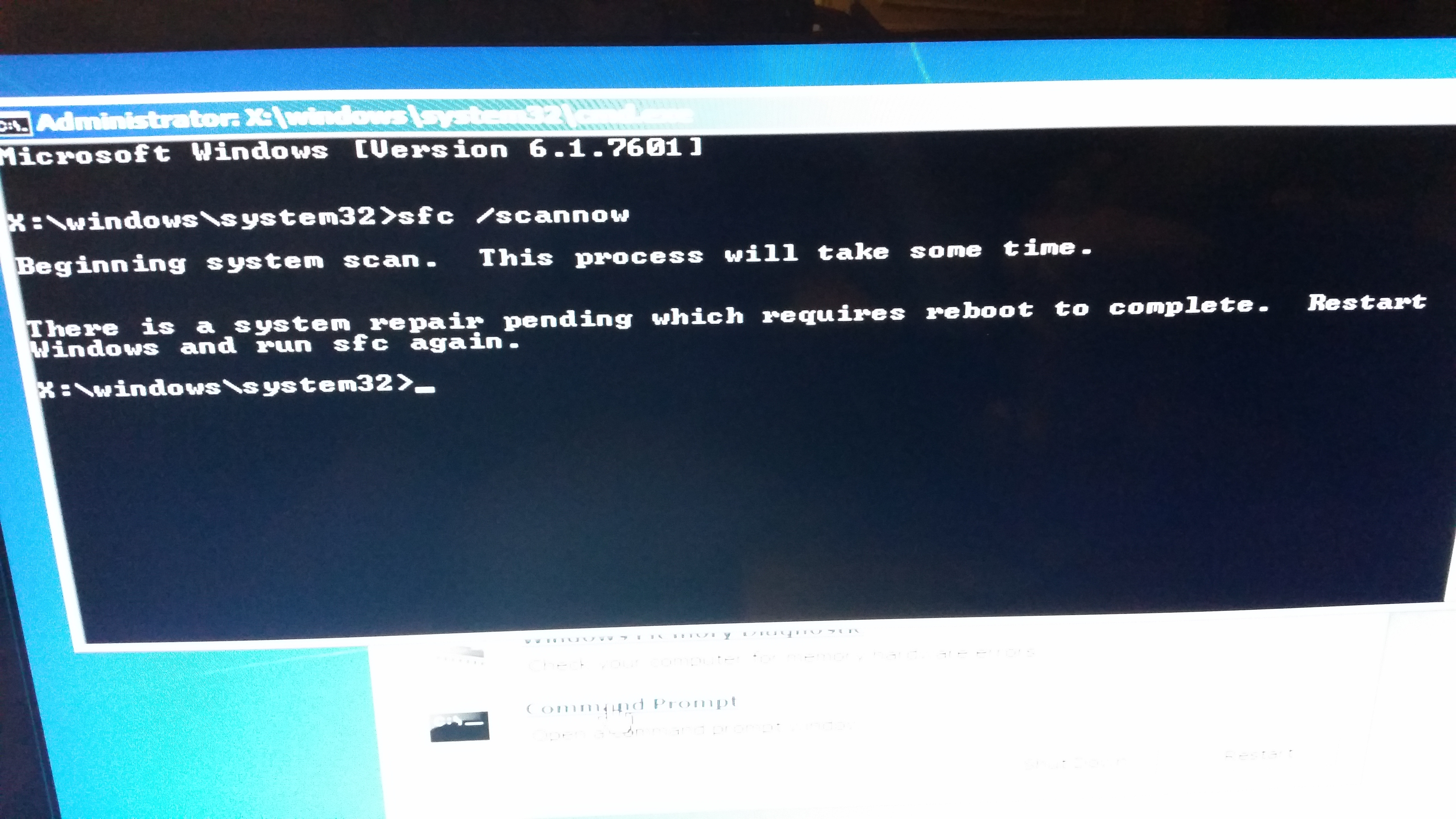
hi ShoTTas, tried sfc /scannow cmd several times [more than 3],
and all gave the same result:
ktGKphS.jpg

tried rebooting, & running the command again, same msg persists [pending repair needing reboot].
also tried sfc /verifyonly yet still same message [pending repair].


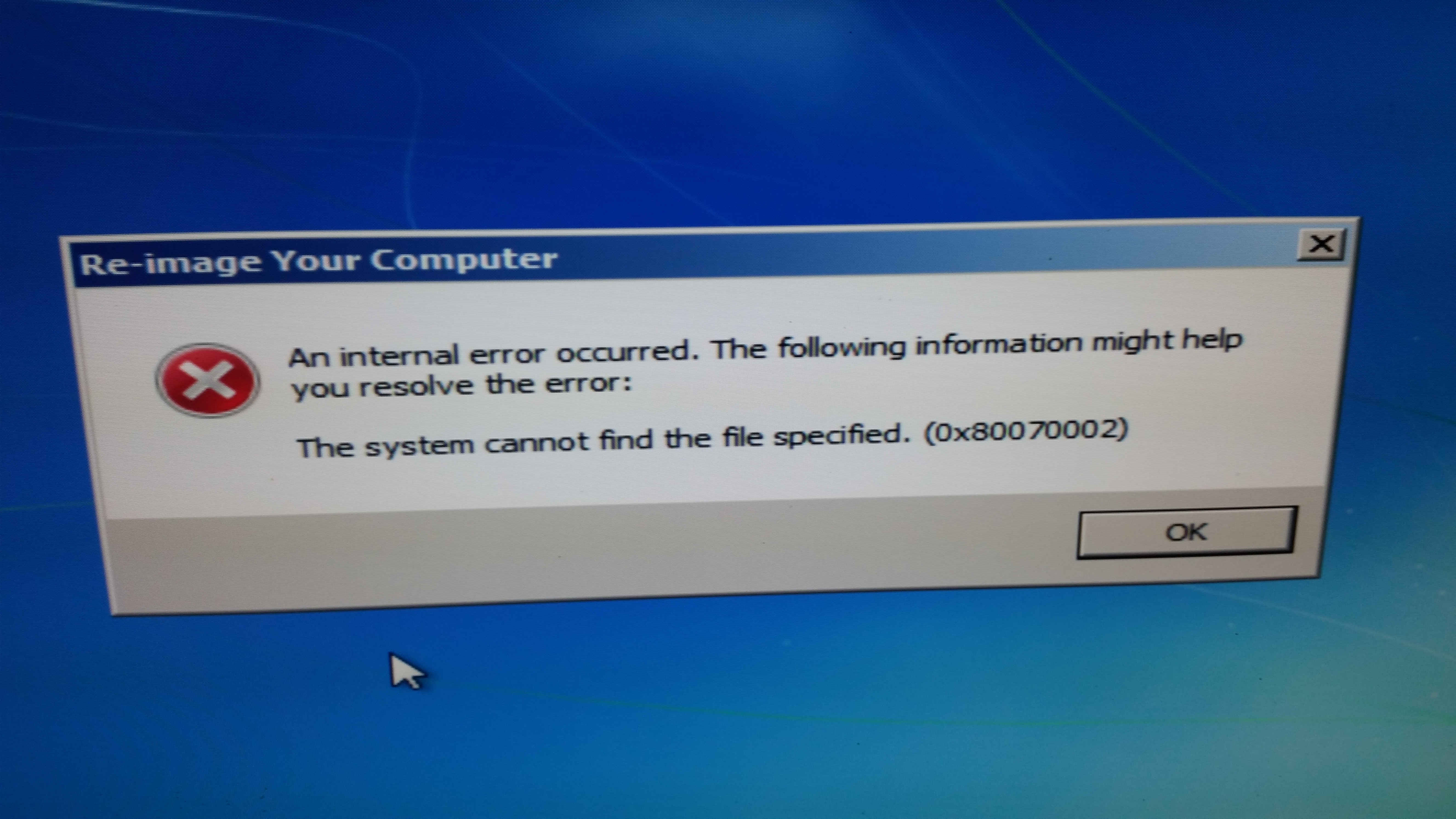
@Kaktussoft: after rebooting due to above suggestion,
system recovery tools is now presenting an extra screen advising me to re-img my machine:
VH3hZjy.jpg
 

My Computer

Computer type
PC/Desktop
Computer Manufacturer/Model Number
asus
OS
windows 7 ultimate x64
CPU
amd fx-4170 zambezi quad core ghz
Motherboard
asus m5a99x evo am3+
Memory
corsair vengeance 16gb 240-pin dd3
Graphics Card(s)
geforce gt 640 4gb
Hard Drives
Western Digital WD VelociRaptor WD2500HHTZ 250GB 10000 RPM 64MB Cache SATA 6.0Gb/s 3.5"
Browser
chrome
well puppy didn't work for backup either, very strange...

@Kaktussoft: any ideas from the 2nd chkdsk/f d: results?
 

My Computer

Computer type
PC/Desktop
Computer Manufacturer/Model Number
asus
OS
windows 7 ultimate x64
CPU
amd fx-4170 zambezi quad core ghz
Motherboard
asus m5a99x evo am3+
Memory
corsair vengeance 16gb 240-pin dd3
Graphics Card(s)
geforce gt 640 4gb
Hard Drives
Western Digital WD VelociRaptor WD2500HHTZ 250GB 10000 RPM 64MB Cache SATA 6.0Gb/s 3.5"
Browser
chrome
Is chkdsk/f giving errors all the time?

Try seatools or western digital lifeguard diagnostic to test the disk for hardware errors. Post results
 

My Computer

Computer type
Laptop
Computer Manufacturer/Model Number
ACER ASPIRE 5742G
OS
Microsoft Windows 7 Home Premium 64-bits 7601 Multiprocessor Free Service Pack 1
CPU
Intel(R) Core(TM) i3 CPU M 370 @ 2.40GHz
Motherboard
Acer Aspire 5742G
Memory
4,00 GB
Graphics Card(s)
ATI Mobility Radeon HD 5400 Series
Sound Card
(1) AMD High Definition Audio Device (2) Realtek High Defi
Screen Resolution
1366 x 768 x 32 bits (4294967296 colors) @ 60 Hz
Hard Drives
WDC WD5000BEVT-22ZAT0
If you have a system image then this is what you should be using.

Getting important data off your HDD should be a priority. Does Puppy linux show your HDD and can you click on it to mount it? If not then you may have a corrupt file system which will require an attempt at Raw file recovery. This software may help but it's tedious
PhotoRec - CGSecurity

Hopefully you have backups of critical data. If all else fails you need to check the integrity of your HDD ideally using the manufacturers disk check utility. Then do a clean install would be my recommendation if you don't have a system image.
 

My Computer

Computer type
PC/Desktop
Computer Manufacturer/Model Number
Own build
OS
Windows 7x64 Home Premium SP1
CPU
Intel i7 2600k
Motherboard
ASUS P8Z68 Deluxe
Memory
G.Skill Ripjaws (DDR3-1600) 2x4GB
Graphics Card(s)
Nvidia GeForce GTS 450; Intel HD Graphics 3000(GT2+)
Monitor(s) Displays
Dell Ultrasharp IPS panel U2311H, Samsung SyncMaster P2350
Screen Resolution
1920x1080
Hard Drives
Samsung 850 Pro SSD 256GB, Samsung SSD 840 120GB, Seagates 1TB Barracuda ST31000528AS x2
PSU
Seasonic M12II 520W
Case
Lian Li Lancool PC-K60
Cooling
Case: 1x120mm, 3x140mm CPU: Hyper 212+
Keyboard
Logitech MK520 (wireless)
Mouse
Logitech MK520
Internet Speed
6-7 Mbps
Antivirus
Norton Security Premium, Malwarebytes on 2 (MSE on 3rd PC)
Browser
FireFox
Other Info
Audio: Logitech Z523 2.1
@kaktussoft: chkdsk is just showing the same results i've posted

@mjt: at this point i've given up retrieving any data off the hdd, i've tried multiple things [including tools off hiren] & none are working. never seen this happen before. and no system img is available.

at this point i'm just going to re-install OS, data be damned, nothing too important on their anyway that i didn't have backed up on an external hd.

thx for the help & tips.
 

My Computer

Computer type
PC/Desktop
Computer Manufacturer/Model Number
asus
OS
windows 7 ultimate x64
CPU
amd fx-4170 zambezi quad core ghz
Motherboard
asus m5a99x evo am3+
Memory
corsair vengeance 16gb 240-pin dd3
Graphics Card(s)
geforce gt 640 4gb
Hard Drives
Western Digital WD VelociRaptor WD2500HHTZ 250GB 10000 RPM 64MB Cache SATA 6.0Gb/s 3.5"
Browser
chrome
so i ended up installing win 8, and it fantastically kept a backup of my old win7 install, i was then able to save a lot of the data i wanted onto OneDrive, then re-installed OS again with a fresh install [deleting all other prev partitions]

thanks to everyone's suggestions!
 

My Computer

Computer type
PC/Desktop
Computer Manufacturer/Model Number
asus
OS
windows 7 ultimate x64
CPU
amd fx-4170 zambezi quad core ghz
Motherboard
asus m5a99x evo am3+
Memory
corsair vengeance 16gb 240-pin dd3
Graphics Card(s)
geforce gt 640 4gb
Hard Drives
Western Digital WD VelociRaptor WD2500HHTZ 250GB 10000 RPM 64MB Cache SATA 6.0Gb/s 3.5"
Browser
chrome

My Computer

Computer type
PC/Desktop
Computer Manufacturer/Model Number
Own build
OS
Windows 7x64 Home Premium SP1
CPU
Intel i7 2600k
Motherboard
ASUS P8Z68 Deluxe
Memory
G.Skill Ripjaws (DDR3-1600) 2x4GB
Graphics Card(s)
Nvidia GeForce GTS 450; Intel HD Graphics 3000(GT2+)
Monitor(s) Displays
Dell Ultrasharp IPS panel U2311H, Samsung SyncMaster P2350
Screen Resolution
1920x1080
Hard Drives
Samsung 850 Pro SSD 256GB, Samsung SSD 840 120GB, Seagates 1TB Barracuda ST31000528AS x2
PSU
Seasonic M12II 520W
Case
Lian Li Lancool PC-K60
Cooling
Case: 1x120mm, 3x140mm CPU: Hyper 212+
Keyboard
Logitech MK520 (wireless)
Mouse
Logitech MK520
Internet Speed
6-7 Mbps
Antivirus
Norton Security Premium, Malwarebytes on 2 (MSE on 3rd PC)
Browser
FireFox
Other Info
Audio: Logitech Z523 2.1
Back
Top