
Solved Boot Issue After 1/13/15 MS Updates

jamis

New member
Power User
VIP
Local time
4:06 AM
Messages
246
Location
NW OH
Sorry if this is the wrong forum, but I'm not sure where it should go. I noticed this problem shortly after applying the 01/13/15 Updates. Sometimes the system boots OK all the way to the logon screen, but other times it doesn't. The problem begins when the "Windows Starting" message is displayed and then, instead of the four pane window coelecsing into focus, the display goes blank. When this happens, the system continues to load everything, but the logon screen will never display and the monitor stays black and powered on. If you turn the monitor off and back on, it will display the logon screen. Sometimes it takes three off/on cycles to get the wallpaper and desktop displayed. Once this is accomplished, things work fine for the rest of the session. I have checked the drivers for the monitor and the graphics card and both are current. I ran the troubleshooting routines for both with no issues. I have not started down the road of deleting individual updates to see if that corrects things. I wondered if there was/were setting(s) that might have gotten changed that I don't know about before attacking the updates. Nothing else has been changed on this PC since the 01/13/15 updates.
 

My Computer My Computer

Computer type
PC/Desktop
Computer Manufacturer/Model Number
ASUS
OS
Windows 7 Home Premium 64 bit SP1
CPU
i5-2320 @3.00 GHz
Memory
6GB
Graphics Card(s)
NVIDIA GeForce 7300 LE
Monitor(s) Displays
Acer S200HQL 19.5 LED
Screen Resolution
1280 x 800 (1900 x 900 max)
Hard Drives
Drive 1: 1 TB SATA internal: C drive
Drive 2: 250 GB SATA internal: User Data Backup
Drive 3: 500 GB SATA USB: Full System Backup 1, Father
Drive 4: 500 GB SATA USB: Full System Backup 2, Son
Drive 5: 40 GB IDE USB: Kindle, ASUS Tabl
Keyboard
ASUS KB34211
Mouse
Logitech m325 cordless
Internet Speed
27Mb down, 3 Mb up cable modem w/Netgear R6400 WiFi
Antivirus
NIS, Spybot S&D, CCleaner, Malwarebytes, MSERT, MRT
Browser
FF v44.0.2;IE11 v11.0.9600.18015,uv11.0.23;Chrome v44.0.2403
Other Info
FF has AdBlockPlus and Ghostery plugins,
I ran Startup Repair three separate times with two passes each time. There were no issues reported in the logs from each run. System still has a random issue on boot up. Here is the Disk Management Snip:
 

Attachments

  • Disk Manage Snip.PNG
    Disk Manage Snip.PNG
    34.3 KB · Views: 3

My Computer My Computer

Computer type
PC/Desktop
Computer Manufacturer/Model Number
ASUS
OS
Windows 7 Home Premium 64 bit SP1
CPU
i5-2320 @3.00 GHz
Memory
6GB
Graphics Card(s)
NVIDIA GeForce 7300 LE
Monitor(s) Displays
Acer S200HQL 19.5 LED
Screen Resolution
1280 x 800 (1900 x 900 max)
Hard Drives
Drive 1: 1 TB SATA internal: C drive
Drive 2: 250 GB SATA internal: User Data Backup
Drive 3: 500 GB SATA USB: Full System Backup 1, Father
Drive 4: 500 GB SATA USB: Full System Backup 2, Son
Drive 5: 40 GB IDE USB: Kindle, ASUS Tabl
Keyboard
ASUS KB34211
Mouse
Logitech m325 cordless
Internet Speed
27Mb down, 3 Mb up cable modem w/Netgear R6400 WiFi
Antivirus
NIS, Spybot S&D, CCleaner, Malwarebytes, MSERT, MRT
Browser
FF v44.0.2;IE11 v11.0.9600.18015,uv11.0.23;Chrome v44.0.2403
Other Info
FF has AdBlockPlus and Ghostery plugins,
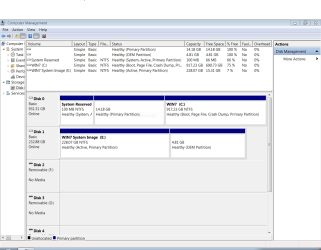
I was able to make Drive E not active.

I only get a Delete Volume prompt for the 14.18 GB partition on the C drive.

I only get a Help option on the 4.81 GB OEM partition on the E drive.

Making the E drive not active did nothing for the primary problem. I attempted to do a long format on the drive as well as a drive wipe with CCleaner. Long format shows 228.07 GB, but CCleaner shows 233.55 GB, so I'm going to let CCleaner wipe the drive. It's just a System Image back up and I have two more on removable 500 GB USB hard drives drives.

I have noticed a pattern to this boot up problem. If the system is power on booted immediately after a shut down or with a restart, it will come up to the logon screen fine. If the system is started after being shut down overnight or several hours, it may lose the display as detailed in the original post. After drive E is cleared, I'll see if it was contributing to the problem. Thanks in advance for the assistance.
 

My Computer My Computer

Computer type
PC/Desktop
Computer Manufacturer/Model Number
ASUS
OS
Windows 7 Home Premium 64 bit SP1
CPU
i5-2320 @3.00 GHz
Memory
6GB
Graphics Card(s)
NVIDIA GeForce 7300 LE
Monitor(s) Displays
Acer S200HQL 19.5 LED
Screen Resolution
1280 x 800 (1900 x 900 max)
Hard Drives
Drive 1: 1 TB SATA internal: C drive
Drive 2: 250 GB SATA internal: User Data Backup
Drive 3: 500 GB SATA USB: Full System Backup 1, Father
Drive 4: 500 GB SATA USB: Full System Backup 2, Son
Drive 5: 40 GB IDE USB: Kindle, ASUS Tabl
Keyboard
ASUS KB34211
Mouse
Logitech m325 cordless
Internet Speed
27Mb down, 3 Mb up cable modem w/Netgear R6400 WiFi
Antivirus
NIS, Spybot S&D, CCleaner, Malwarebytes, MSERT, MRT
Browser
FF v44.0.2;IE11 v11.0.9600.18015,uv11.0.23;Chrome v44.0.2403
Other Info
FF has AdBlockPlus and Ghostery plugins,
You can test this by unplugging the other hard drive. Also, the only wipe needed pertains to possible boot code which is quick Diskpart Clean Command.

The 14gb is likely the Recovery partition if you never wiped DISK0 to do a Clean Reinstall Windows 7, while the smaller OEM partition must be left over from another factory install.
 
The E drive was originally the C drive in previous XP system. I put it in this system to transfer files and programs from the old unit to the new. I then formatted it to use as a System Image backup drive. CCleaner wiped all 233.55 GB, but the OEM partition remains when viewed with diskmgmt, and it still can't be removed. So drive E is now empty. I'll see if the system still has the original issue tomorrow (and I think it will).
 

My Computer My Computer

Computer type
PC/Desktop
Computer Manufacturer/Model Number
ASUS
OS
Windows 7 Home Premium 64 bit SP1
CPU
i5-2320 @3.00 GHz
Memory
6GB
Graphics Card(s)
NVIDIA GeForce 7300 LE
Monitor(s) Displays
Acer S200HQL 19.5 LED
Screen Resolution
1280 x 800 (1900 x 900 max)
Hard Drives
Drive 1: 1 TB SATA internal: C drive
Drive 2: 250 GB SATA internal: User Data Backup
Drive 3: 500 GB SATA USB: Full System Backup 1, Father
Drive 4: 500 GB SATA USB: Full System Backup 2, Son
Drive 5: 40 GB IDE USB: Kindle, ASUS Tabl
Keyboard
ASUS KB34211
Mouse
Logitech m325 cordless
Internet Speed
27Mb down, 3 Mb up cable modem w/Netgear R6400 WiFi
Antivirus
NIS, Spybot S&D, CCleaner, Malwarebytes, MSERT, MRT
Browser
FF v44.0.2;IE11 v11.0.9600.18015,uv11.0.23;Chrome v44.0.2403
Other Info
FF has AdBlockPlus and Ghostery plugins,
CCleaner only wipes drive space within the partition so it's not really useful since the main benefit of a wipe in this and most other cases is to clear the partition table and any boot code off the disk.

Again, you'd use Diskpart Clean Command to wipe the hard drive of all partitions and boot code which could be interfering.
 
Drive E has been completely cleaned and reformatted. The problem still remains. "Cold" boots (where the system has been powered down for a few hours) will almost always fail with the display going blank after the "Starting Windows" message. "Warm" boots (where the system is restarted or shutdown and immediately booted) will work. I'm going to take it back to before the 1/13/15 updates and see what happens.

Note that the graphics card on this system is pretty "old". This is the third tower it's been in. It was in two XP Pro systems prior and it has been in this one since 2012. It is "working correctly" according to Windows and the driver is current. It worked fine prior to the 1/13/15 updates.
 

My Computer My Computer

Computer type
PC/Desktop
Computer Manufacturer/Model Number
ASUS
OS
Windows 7 Home Premium 64 bit SP1
CPU
i5-2320 @3.00 GHz
Memory
6GB
Graphics Card(s)
NVIDIA GeForce 7300 LE
Monitor(s) Displays
Acer S200HQL 19.5 LED
Screen Resolution
1280 x 800 (1900 x 900 max)
Hard Drives
Drive 1: 1 TB SATA internal: C drive
Drive 2: 250 GB SATA internal: User Data Backup
Drive 3: 500 GB SATA USB: Full System Backup 1, Father
Drive 4: 500 GB SATA USB: Full System Backup 2, Son
Drive 5: 40 GB IDE USB: Kindle, ASUS Tabl
Keyboard
ASUS KB34211
Mouse
Logitech m325 cordless
Internet Speed
27Mb down, 3 Mb up cable modem w/Netgear R6400 WiFi
Antivirus
NIS, Spybot S&D, CCleaner, Malwarebytes, MSERT, MRT
Browser
FF v44.0.2;IE11 v11.0.9600.18015,uv11.0.23;Chrome v44.0.2403
Other Info
FF has AdBlockPlus and Ghostery plugins,
After removing all of the 1/13/15 updates, the song remains the same. At least after one "cold" boot.
1. After the "Starting Windows" display, the monitor goes black.
2. Wait a few seconds, power off the monitor, power it back on, and get the log on screen.
3. Immediately click a user and the display goes black again.
4. Power the monitor off/on and get the desktop.
5. Select an icon and the screen goes black.
6. Power off/on and get the screen for the selected application.

I'll keep watch on this issue and see if the pattern changes. I checked all connections for the graphics card and monitor and they are good and tight. I did not pull the card and re-seat it though. Again, no issues with this system once it's up and running.
 

My Computer My Computer

Computer type
PC/Desktop
Computer Manufacturer/Model Number
ASUS
OS
Windows 7 Home Premium 64 bit SP1
CPU
i5-2320 @3.00 GHz
Memory
6GB
Graphics Card(s)
NVIDIA GeForce 7300 LE
Monitor(s) Displays
Acer S200HQL 19.5 LED
Screen Resolution
1280 x 800 (1900 x 900 max)
Hard Drives
Drive 1: 1 TB SATA internal: C drive
Drive 2: 250 GB SATA internal: User Data Backup
Drive 3: 500 GB SATA USB: Full System Backup 1, Father
Drive 4: 500 GB SATA USB: Full System Backup 2, Son
Drive 5: 40 GB IDE USB: Kindle, ASUS Tabl
Keyboard
ASUS KB34211
Mouse
Logitech m325 cordless
Internet Speed
27Mb down, 3 Mb up cable modem w/Netgear R6400 WiFi
Antivirus
NIS, Spybot S&D, CCleaner, Malwarebytes, MSERT, MRT
Browser
FF v44.0.2;IE11 v11.0.9600.18015,uv11.0.23;Chrome v44.0.2403
Other Info
FF has AdBlockPlus and Ghostery plugins,
What happens when you attempt to boot without Disk1 plugged in?

Disk 1 is now the C: drive and the only boot source on the system. What should I expect to see happen? Drive 0 is the former E: drive and it is empty after the clean and long format. It now has a single partition. I did do some test boots with the E: drive not connected to the system with the same results for the "cold" and 'warm" boots.

Boot sequence is:
1. DVD drive
2. C: drive
3. E: drive
 
Last edited:

My Computer My Computer

Computer type
PC/Desktop
Computer Manufacturer/Model Number
ASUS
OS
Windows 7 Home Premium 64 bit SP1
CPU
i5-2320 @3.00 GHz
Memory
6GB
Graphics Card(s)
NVIDIA GeForce 7300 LE
Monitor(s) Displays
Acer S200HQL 19.5 LED
Screen Resolution
1280 x 800 (1900 x 900 max)
Hard Drives
Drive 1: 1 TB SATA internal: C drive
Drive 2: 250 GB SATA internal: User Data Backup
Drive 3: 500 GB SATA USB: Full System Backup 1, Father
Drive 4: 500 GB SATA USB: Full System Backup 2, Son
Drive 5: 40 GB IDE USB: Kindle, ASUS Tabl
Keyboard
ASUS KB34211
Mouse
Logitech m325 cordless
Internet Speed
27Mb down, 3 Mb up cable modem w/Netgear R6400 WiFi
Antivirus
NIS, Spybot S&D, CCleaner, Malwarebytes, MSERT, MRT
Browser
FF v44.0.2;IE11 v11.0.9600.18015,uv11.0.23;Chrome v44.0.2403
Other Info
FF has AdBlockPlus and Ghostery plugins,
Why was a non-OS drive moved to Disk0 which is not advisable because repairs or reinstall can derail the boot files to any preceding Primary partition?

Please post back another screenshot of Disk Mgmt.

Did you wipe E drive with Diskpart Clean Command to clear the boot sector? This will still be necessary if the problem is related to E being connected.
 
I did clean the with the Diskpart Clean Command. The OS did the drive reassignment when the old E: drive was being cleaned and formatted. I guess I need to swap the drive numbers, yes?
 

Attachments

  • Diskmgmt Snip 021015.PNG
    Diskmgmt Snip 021015.PNG
    30.5 KB · Views: 0

My Computer My Computer

Computer type
PC/Desktop
Computer Manufacturer/Model Number
ASUS
OS
Windows 7 Home Premium 64 bit SP1
CPU
i5-2320 @3.00 GHz
Memory
6GB
Graphics Card(s)
NVIDIA GeForce 7300 LE
Monitor(s) Displays
Acer S200HQL 19.5 LED
Screen Resolution
1280 x 800 (1900 x 900 max)
Hard Drives
Drive 1: 1 TB SATA internal: C drive
Drive 2: 250 GB SATA internal: User Data Backup
Drive 3: 500 GB SATA USB: Full System Backup 1, Father
Drive 4: 500 GB SATA USB: Full System Backup 2, Son
Drive 5: 40 GB IDE USB: Kindle, ASUS Tabl
Keyboard
ASUS KB34211
Mouse
Logitech m325 cordless
Internet Speed
27Mb down, 3 Mb up cable modem w/Netgear R6400 WiFi
Antivirus
NIS, Spybot S&D, CCleaner, Malwarebytes, MSERT, MRT
Browser
FF v44.0.2;IE11 v11.0.9600.18015,uv11.0.23;Chrome v44.0.2403
Other Info
FF has AdBlockPlus and Ghostery plugins,
Yes, best to have OS drive as Disk0 otherwise the System boot files can be derailed to the first Primary partition during Startup Repairs or Reinstall.

Does the problem persist with E drive unplugged? I asked you this two days ago.
 
I haven't physically unplugged the E: drive yet. I haven't had time to pull the tower out and do so. I ave had the problem occur when the drive had no ID. Also, how do I switch the drive numbers? thanks.
 

My Computer My Computer

Computer type
PC/Desktop
Computer Manufacturer/Model Number
ASUS
OS
Windows 7 Home Premium 64 bit SP1
CPU
i5-2320 @3.00 GHz
Memory
6GB
Graphics Card(s)
NVIDIA GeForce 7300 LE
Monitor(s) Displays
Acer S200HQL 19.5 LED
Screen Resolution
1280 x 800 (1900 x 900 max)
Hard Drives
Drive 1: 1 TB SATA internal: C drive
Drive 2: 250 GB SATA internal: User Data Backup
Drive 3: 500 GB SATA USB: Full System Backup 1, Father
Drive 4: 500 GB SATA USB: Full System Backup 2, Son
Drive 5: 40 GB IDE USB: Kindle, ASUS Tabl
Keyboard
ASUS KB34211
Mouse
Logitech m325 cordless
Internet Speed
27Mb down, 3 Mb up cable modem w/Netgear R6400 WiFi
Antivirus
NIS, Spybot S&D, CCleaner, Malwarebytes, MSERT, MRT
Browser
FF v44.0.2;IE11 v11.0.9600.18015,uv11.0.23;Chrome v44.0.2403
Other Info
FF has AdBlockPlus and Ghostery plugins,
Swap the cables, making sure Win7 HD is set to boot first in BIOS setup.
 
Swap the cables, making sure Win7 HD is set to boot first in BIOS setup.

OK, but how did the drive numbers change if nothing was touched inside the tower? WIN7 is first in the BIOS, right after the DVD drive. I'll post back when I've had time to go inside the box. Time for bed now.
 

My Computer My Computer

Computer type
PC/Desktop
Computer Manufacturer/Model Number
ASUS
OS
Windows 7 Home Premium 64 bit SP1
CPU
i5-2320 @3.00 GHz
Memory
6GB
Graphics Card(s)
NVIDIA GeForce 7300 LE
Monitor(s) Displays
Acer S200HQL 19.5 LED
Screen Resolution
1280 x 800 (1900 x 900 max)
Hard Drives
Drive 1: 1 TB SATA internal: C drive
Drive 2: 250 GB SATA internal: User Data Backup
Drive 3: 500 GB SATA USB: Full System Backup 1, Father
Drive 4: 500 GB SATA USB: Full System Backup 2, Son
Drive 5: 40 GB IDE USB: Kindle, ASUS Tabl
Keyboard
ASUS KB34211
Mouse
Logitech m325 cordless
Internet Speed
27Mb down, 3 Mb up cable modem w/Netgear R6400 WiFi
Antivirus
NIS, Spybot S&D, CCleaner, Malwarebytes, MSERT, MRT
Browser
FF v44.0.2;IE11 v11.0.9600.18015,uv11.0.23;Chrome v44.0.2403
Other Info
FF has AdBlockPlus and Ghostery plugins,
You can leave it the way it is as long as you remember that running Startup Repair or a Reinstall can derail the boot files to any preceding Primary partition. But it would be worth pulling the cable to see if the problem persists without E drive.

You could also prevent this by converting E to Logical which can't receive System boot files: How to set partition as Primary or Logical with Partition Wizard
 
FWIW, bios shows the Win7 C: drive as being on port 0 and the Win7 System Image E: drive as being on port 1. This is where they always have been since the system was set up back in 2012.
 

My Computer My Computer

Computer type
PC/Desktop
Computer Manufacturer/Model Number
ASUS
OS
Windows 7 Home Premium 64 bit SP1
CPU
i5-2320 @3.00 GHz
Memory
6GB
Graphics Card(s)
NVIDIA GeForce 7300 LE
Monitor(s) Displays
Acer S200HQL 19.5 LED
Screen Resolution
1280 x 800 (1900 x 900 max)
Hard Drives
Drive 1: 1 TB SATA internal: C drive
Drive 2: 250 GB SATA internal: User Data Backup
Drive 3: 500 GB SATA USB: Full System Backup 1, Father
Drive 4: 500 GB SATA USB: Full System Backup 2, Son
Drive 5: 40 GB IDE USB: Kindle, ASUS Tabl
Keyboard
ASUS KB34211
Mouse
Logitech m325 cordless
Internet Speed
27Mb down, 3 Mb up cable modem w/Netgear R6400 WiFi
Antivirus
NIS, Spybot S&D, CCleaner, Malwarebytes, MSERT, MRT
Browser
FF v44.0.2;IE11 v11.0.9600.18015,uv11.0.23;Chrome v44.0.2403
Other Info
FF has AdBlockPlus and Ghostery plugins,
Back
Top