Boot issue

theschlepp

New member
Local time
2:42 PM
Messages
10
Hi All,
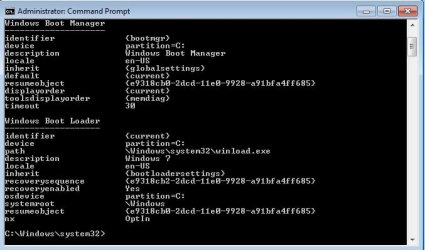
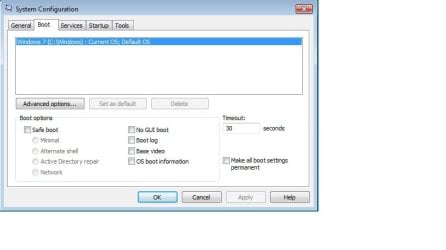
I recently purchased a laptop and performed a clean insall of Win7(x64) to get rid of all junkware etc. Everything is working great, however now upon booting I am asked to select which OS to boot: Win7 or Win7. I went into msconfig to check the boot configuration and noticed the following: Windows 7 (c:\Windows): Current OS; Default OS.

I also ran bcdedit, but I am not experienced enough to decipher it. Can anyone provide a permanent fix- meaning not going into msconfig/ boot to change the timeout function etc? I am considering setting up a dual boot system and don't want to have to select between 3 options. I attached a snapshot of my msconfig/boot and bcdedit screen. Any advice is much appreciated, thanks.
 

Attachments
  • msconfig.jpg
    msconfig.jpg
    28.2 KB · Views: 5
  • Boot Mgr.jpg
    Boot Mgr.jpg
    35.6 KB · Views: 8

My Computer

OS
Windows 7
Hello theschlepp.


Those aren't much help; before we make any specific recommendations will you please post a snip/screen-shot of the entire disk management drive map with a full description as to which drive/partition is which, so we can see what you have going on as there may be a fairly simple way to resolve the situation.

In the Windows start menu right click computer and click manage, in the left pane of the "Computer Management" window that opens click disk management and post a snip of that.


How to Upload and Post a Screenshot and File in Seven Forums
 

My Computer

Computer Manufacturer/Model Number
* BFK Customs *
OS
W 7 64-bit Ultimate
CPU
Intel Q9550 Yorkfield
Motherboard
ASUS P5Q Pro
Memory
8GB Dominator 8500C5D
Graphics Card(s)
ATI : XFX 5870
Sound Card
Realtek HD Audio 7-1
Monitor(s) Displays
1x 47" LCD HDMI & 3x 26" LCD HDMI
Screen Resolution
1920x1080P & 1920x1200
Hard Drives
1x 80GB Intel X25-M G2 SSD : 1x 500GB & 1x 640GB WD Caviar Black(s)
PSU
Corsair 620HX
Case
Cooler Master RC-690
Cooling
Tuniq Tower 120, 2x 140mm and 3x 120mm case fans
Keyboard
Microsoft 500
Mouse
Razer Diamondback 3G
Internet Speed
14 Mb/s
Other Info
1x Koutech 3Gb/s SATA HDD Hot Swap Rack
Barefoot,
Thanks for the quick response. Prior to clean installing, I deleted the OEM partition containing the restore info, then repartitioned the drive into 3 partitions. Win7 is installed on the first partition (40gb). I don't have anything else installed or saved in the other partitions since everything is brand new.
 

My Computer

OS
Windows 7
You may have repartitioned but because you didnt' wipe the HD of all code you have old boot sector information that should have been wiped and is now interfering.

You can install EasyBCD 2.0 to see if the ghost listing can be removed on Edit OS menu, but it would be better to wipe the HD as should have been done in the first place if you want to start clean.

Steps to get a purrfect clean reinstall of factory OEM: http://www.sevenforums.com/installation-setup/125874-re-install-windows-7-a.html#post1086729
 
Thanks Gregrocker,
No i didn't wipe drive since it was new. Wiping the entire drive (all partitions) will take some time, wiping the new sys partition should suffice, no?
 

My Computer

OS
Windows 7
If you are going to reinstall, use the clean all command.
 

My Computer

OS
ME/XP/Vista/Win7
Thanks Theog, looks like this may take some time. I will see if anyone else or bare foot provides an easier fix prior to another clean install.
 

My Computer

OS
Windows 7
Did you try installing EasyBCD 2.0 to see if the ghost listing is present to remove? Check first in msconfig>Boot tab to see if the ghost listing is there to Delete.

I'm not clear why you would want to clean reinstall to overcome factory bloatware but not have the time to wipe your HD of all code to give you the cleanest possible install and eliminate the boot sector corruption?

http://neosmart.net/blog/2010/welcome-to-easybcd-2/
 
Hello mate.


Running a "clean all" will overwrite all the data on the entire HDD, I would suggest that after you have copied out or made back-ups of the data you need to save to external media you do the wipe (secure erase) to the HDD booting the Windows 7 installation DVD and the link THEOG posted above.

DISKPART : At PC Startup
 

My Computer

Computer Manufacturer/Model Number
* BFK Customs *
OS
W 7 64-bit Ultimate
CPU
Intel Q9550 Yorkfield
Motherboard
ASUS P5Q Pro
Memory
8GB Dominator 8500C5D
Graphics Card(s)
ATI : XFX 5870
Sound Card
Realtek HD Audio 7-1
Monitor(s) Displays
1x 47" LCD HDMI & 3x 26" LCD HDMI
Screen Resolution
1920x1080P & 1920x1200
Hard Drives
1x 80GB Intel X25-M G2 SSD : 1x 500GB & 1x 640GB WD Caviar Black(s)
PSU
Corsair 620HX
Case
Cooler Master RC-690
Cooling
Tuniq Tower 120, 2x 140mm and 3x 120mm case fans
Keyboard
Microsoft 500
Mouse
Razer Diamondback 3G
Internet Speed
14 Mb/s
Other Info
1x Koutech 3Gb/s SATA HDD Hot Swap Rack
Bare Foot/ Gregrocker/Theog,
Went to tutorial, using diskpart now to clear all. Thanks for the quick responses.
 

My Computer

OS
Windows 7
Be sure to keep us informed.
 

My Computer

Computer Manufacturer/Model Number
* BFK Customs *
OS
W 7 64-bit Ultimate
CPU
Intel Q9550 Yorkfield
Motherboard
ASUS P5Q Pro
Memory
8GB Dominator 8500C5D
Graphics Card(s)
ATI : XFX 5870
Sound Card
Realtek HD Audio 7-1
Monitor(s) Displays
1x 47" LCD HDMI & 3x 26" LCD HDMI
Screen Resolution
1920x1080P & 1920x1200
Hard Drives
1x 80GB Intel X25-M G2 SSD : 1x 500GB & 1x 640GB WD Caviar Black(s)
PSU
Corsair 620HX
Case
Cooler Master RC-690
Cooling
Tuniq Tower 120, 2x 140mm and 3x 120mm case fans
Keyboard
Microsoft 500
Mouse
Razer Diamondback 3G
Internet Speed
14 Mb/s
Other Info
1x Koutech 3Gb/s SATA HDD Hot Swap Rack
Now I have a new problem. The product activation key does not work; after typing and confirming correct I received an error that it is invalid. I unselected auto-activate and continued with install. When complete, I went to computer properties and added the product key and received an error that the version is not valid for clean install (I purchased the student version). What to do?
 

My Computer

OS
Windows 7
Good to see you got it running and thanks for the update.
 

My Computer

Computer Manufacturer/Model Number
* BFK Customs *
OS
W 7 64-bit Ultimate
CPU
Intel Q9550 Yorkfield
Motherboard
ASUS P5Q Pro
Memory
8GB Dominator 8500C5D
Graphics Card(s)
ATI : XFX 5870
Sound Card
Realtek HD Audio 7-1
Monitor(s) Displays
1x 47" LCD HDMI & 3x 26" LCD HDMI
Screen Resolution
1920x1080P & 1920x1200
Hard Drives
1x 80GB Intel X25-M G2 SSD : 1x 500GB & 1x 640GB WD Caviar Black(s)
PSU
Corsair 620HX
Case
Cooler Master RC-690
Cooling
Tuniq Tower 120, 2x 140mm and 3x 120mm case fans
Keyboard
Microsoft 500
Mouse
Razer Diamondback 3G
Internet Speed
14 Mb/s
Other Info
1x Koutech 3Gb/s SATA HDD Hot Swap Rack
Back
Top