Boot issues, Restart during Windows logo

Mariusmssj

New member
Local time
11:40 AM
Messages
15
Hey guys,

I am trying fix friends PC that has an odd issue. When you turn it on it gets to Windows logo animation and at the beginning of the animation it just restarts.

I loaded a Windows 7 image and tried the start-up repair but that gave no results so I thought I'll heck out the bootcat.cache file in C:\Windows\system32\CodeIntegrity but when I tried that I got this:
A3di2Bw.jpg


I'm not sure what to do now. Any suggestions?

Thank you
 

My Computer

OS
Windows 7 64 Ultimate

My Computer

Computer type
Laptop
Computer Manufacturer/Model Number
ACER ASPIRE 5742G
OS
Microsoft Windows 7 Home Premium 64-bits 7601 Multiprocessor Free Service Pack 1
CPU
Intel(R) Core(TM) i3 CPU M 370 @ 2.40GHz
Motherboard
Acer Aspire 5742G
Memory
4,00 GB
Graphics Card(s)
ATI Mobility Radeon HD 5400 Series
Sound Card
(1) AMD High Definition Audio Device (2) Realtek High Defi
Screen Resolution
1366 x 768 x 32 bits (4294967296 colors) @ 60 Hz
Hard Drives
WDC WD5000BEVT-22ZAT0
Hey guys,

I am trying fix friends PC that has an odd issue. When you turn it on it gets to Windows logo animation and at the beginning of the animation it just restarts.

I loaded a Windows 7 image and tried the start-up repair but that gave no results so I thought I'll heck out the bootcat.cache file in C:\Windows\system32\CodeIntegrity but when I tried that I got this:
A3di2Bw.jpg


I'm not sure what to do now. Any suggestions?

Thank you

You did

DIR C:

But in winre drive letters are different! You probably have to do DIR D:
 

My Computer

Computer type
Laptop
Computer Manufacturer/Model Number
ACER ASPIRE 5742G
OS
Microsoft Windows 7 Home Premium 64-bits 7601 Multiprocessor Free Service Pack 1
CPU
Intel(R) Core(TM) i3 CPU M 370 @ 2.40GHz
Motherboard
Acer Aspire 5742G
Memory
4,00 GB
Graphics Card(s)
ATI Mobility Radeon HD 5400 Series
Sound Card
(1) AMD High Definition Audio Device (2) Realtek High Defi
Screen Resolution
1366 x 768 x 32 bits (4294967296 colors) @ 60 Hz
Hard Drives
WDC WD5000BEVT-22ZAT0
My friend was saying that he got few BSODs during the week and then it just refused to boot. And no once animation starts the PC just restarts no BSOD.

Ok Disabled the automatic restart and this the BSOD message:
o2FhRH8.jpg
 

My Computer

OS
Windows 7 64 Ultimate
So there is a bsod... but he didn't see it because it was shown for 0.1 second.
STOP 0x0000007B code (INACCESSIBLE_BOOT_DEVICE)

So boot process can't find the disk. What did you do just prior to problems?
update disk driver?
changed from ide to ahci mode?
changes things in bios?
 

My Computer

Computer type
Laptop
Computer Manufacturer/Model Number
ACER ASPIRE 5742G
OS
Microsoft Windows 7 Home Premium 64-bits 7601 Multiprocessor Free Service Pack 1
CPU
Intel(R) Core(TM) i3 CPU M 370 @ 2.40GHz
Motherboard
Acer Aspire 5742G
Memory
4,00 GB
Graphics Card(s)
ATI Mobility Radeon HD 5400 Series
Sound Card
(1) AMD High Definition Audio Device (2) Realtek High Defi
Screen Resolution
1366 x 768 x 32 bits (4294967296 colors) @ 60 Hz
Hard Drives
WDC WD5000BEVT-22ZAT0
Boot into windows recover environment->command prompt
Code:
bootrec/fixmbr
bootrec/fixboot
chkdsk/f  D:

Replace D with actual drive letter of windows partition. So do DIR D:, DIR E: first.
All errors repaired? Run chkdsk command again. No errors?
 

My Computer

Computer type
Laptop
Computer Manufacturer/Model Number
ACER ASPIRE 5742G
OS
Microsoft Windows 7 Home Premium 64-bits 7601 Multiprocessor Free Service Pack 1
CPU
Intel(R) Core(TM) i3 CPU M 370 @ 2.40GHz
Motherboard
Acer Aspire 5742G
Memory
4,00 GB
Graphics Card(s)
ATI Mobility Radeon HD 5400 Series
Sound Card
(1) AMD High Definition Audio Device (2) Realtek High Defi
Screen Resolution
1366 x 768 x 32 bits (4294967296 colors) @ 60 Hz
Hard Drives
WDC WD5000BEVT-22ZAT0
So there is a bsod... but he didn't see it because it was shown for 0.1 second.
STOP 0x0000007B code (INACCESSIBLE_BOOT_DEVICE)

So boot process can't find the disk. What did you do just prior to problems?
update disk driver?
changed from ide to ahci mode?
changes things in bios?

Well I am not sure, It was able to boot under safe mode. Then I tried the normal start-up repair and after that it began crashing on the boot.
I set the BIOS now to optimized defaults but still crashes.
 

My Computer

OS
Windows 7 64 Ultimate
So there is a bsod... but he didn't see it because it was shown for 0.1 second.
STOP 0x0000007B code (INACCESSIBLE_BOOT_DEVICE)

So boot process can't find the disk. What did you do just prior to problems?
update disk driver?
changed from ide to ahci mode?
changes things in bios?

Well I am not sure, It was able to boot under safe mode. Then I tried the normal start-up repair and after that it began crashing on the boot.
I set the BIOS now to optimized defaults but still crashes.
Stupid! Now you don't know the previous settings.


startup repair doesn't find find any errors, click "view diagnostics results" .status 0x0 means no error.

So boot to safe mode did work... now it doesn't anymore? Where does it crash?
 

My Computer

Computer type
Laptop
Computer Manufacturer/Model Number
ACER ASPIRE 5742G
OS
Microsoft Windows 7 Home Premium 64-bits 7601 Multiprocessor Free Service Pack 1
CPU
Intel(R) Core(TM) i3 CPU M 370 @ 2.40GHz
Motherboard
Acer Aspire 5742G
Memory
4,00 GB
Graphics Card(s)
ATI Mobility Radeon HD 5400 Series
Sound Card
(1) AMD High Definition Audio Device (2) Realtek High Defi
Screen Resolution
1366 x 768 x 32 bits (4294967296 colors) @ 60 Hz
Hard Drives
WDC WD5000BEVT-22ZAT0
Well I am not sure, It was able to boot under safe mode. Then I tried the normal start-up repair and after that it began crashing on the boot.
So it didn't crash at all before doing staartup repair? Why did you do startup repair?
 

My Computer

Computer type
Laptop
Computer Manufacturer/Model Number
ACER ASPIRE 5742G
OS
Microsoft Windows 7 Home Premium 64-bits 7601 Multiprocessor Free Service Pack 1
CPU
Intel(R) Core(TM) i3 CPU M 370 @ 2.40GHz
Motherboard
Acer Aspire 5742G
Memory
4,00 GB
Graphics Card(s)
ATI Mobility Radeon HD 5400 Series
Sound Card
(1) AMD High Definition Audio Device (2) Realtek High Defi
Screen Resolution
1366 x 768 x 32 bits (4294967296 colors) @ 60 Hz
Hard Drives
WDC WD5000BEVT-22ZAT0
Well I am not sure, It was able to boot under safe mode. Then I tried the normal start-up repair and after that it began crashing on the boot.
So it didn't crash at all before doing staartup repair? Why did you do startup repair?

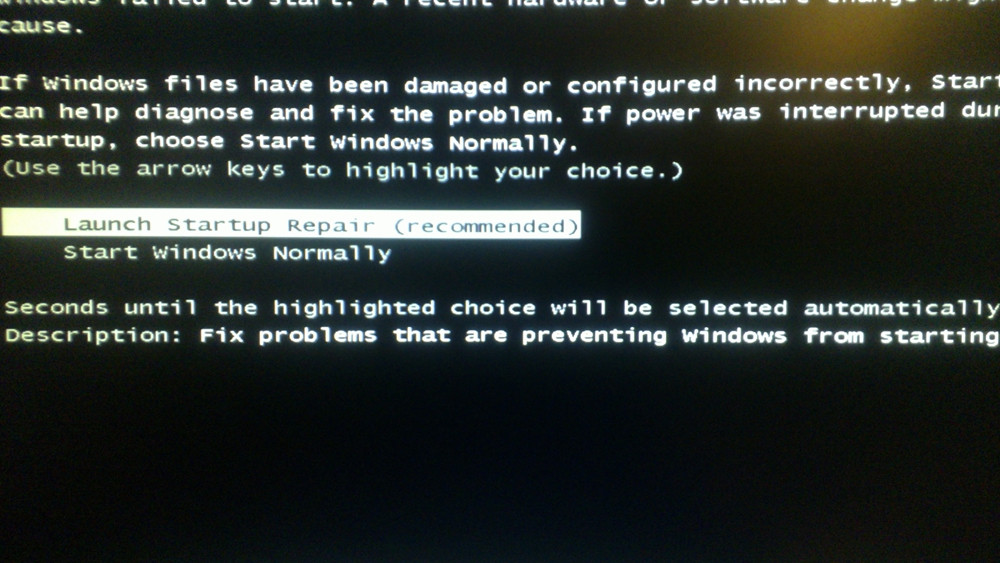
Because It would not boot properly and hang after the password. It would say welcome forever. And show this:
pP0nGfL.jpg
 

My Computer

OS
Windows 7 64 Ultimate
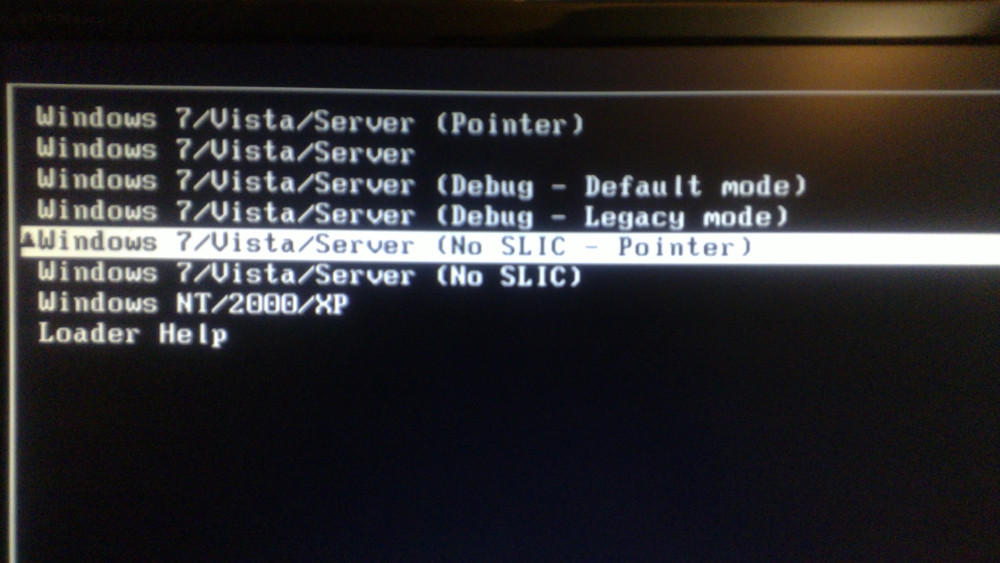
Odd Pressing F8 now gives this:
RnPVlaV.jpg

This screenshot you have a windows loader installed!! Meaning your windows is not genuine!! Buy a license
 

My Computer

Computer type
Laptop
Computer Manufacturer/Model Number
ACER ASPIRE 5742G
OS
Microsoft Windows 7 Home Premium 64-bits 7601 Multiprocessor Free Service Pack 1
CPU
Intel(R) Core(TM) i3 CPU M 370 @ 2.40GHz
Motherboard
Acer Aspire 5742G
Memory
4,00 GB
Graphics Card(s)
ATI Mobility Radeon HD 5400 Series
Sound Card
(1) AMD High Definition Audio Device (2) Realtek High Defi
Screen Resolution
1366 x 768 x 32 bits (4294967296 colors) @ 60 Hz
Hard Drives
WDC WD5000BEVT-22ZAT0
Like I said in the first post the machine is not mine I am just trying to help my friend. So you suggestion is to buy a license and format and new install?
 

My Computer

OS
Windows 7 64 Ultimate
Like I said in the first post the machine is not mine I am just trying to help my friend. So you suggestion is to buy a license and format and new install?

Not willing to help for illegal windows.
 

My Computer

Computer type
Laptop
Computer Manufacturer/Model Number
ACER ASPIRE 5742G
OS
Microsoft Windows 7 Home Premium 64-bits 7601 Multiprocessor Free Service Pack 1
CPU
Intel(R) Core(TM) i3 CPU M 370 @ 2.40GHz
Motherboard
Acer Aspire 5742G
Memory
4,00 GB
Graphics Card(s)
ATI Mobility Radeon HD 5400 Series
Sound Card
(1) AMD High Definition Audio Device (2) Realtek High Defi
Screen Resolution
1366 x 768 x 32 bits (4294967296 colors) @ 60 Hz
Hard Drives
WDC WD5000BEVT-22ZAT0
Back
Top