
Solved Boot laptop from CD

sam49

New member
Member
VIP
Local time
5:02 PM
Messages
140
Hi i dont know if this post is in the correct place but i need advice please

I have been given a Acer aspire 5734Z laptop running windows 7 the problem i have is the person that gave me the laptop has forgot the password

I have tried to boot from a bootable USB and cd but what ever settings i have in the bios it still boot to ther hard drive

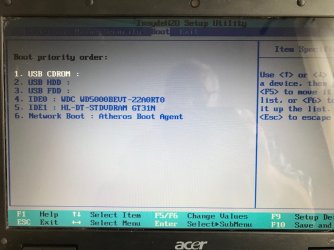
I have attached a screenshot of the bios but can someone tell me what to do next
 

Attachments
  • zzIMG_3992.jpg
    zzIMG_3992.jpg
    366.9 KB · Views: 2

My Computer

Computer Manufacturer/Model Number
Custom Made
OS
Windows 7 Professional 64 Bit
CPU
Intel Core I7 920 @ 2.6 GHz
Motherboard
Asus P6T SE
Memory
12 Meg Triple Channel DDR3
Graphics Card(s)
Nvidia Gforce GTX 260
Sound Card
On Board
Monitor(s) Displays
DGM
Hard Drives
500 gig Sata
PSU
Not sure
Case
Thermalite
Cooling
Standard cooling
Keyboard
Usb
Mouse
Usb
Internet Speed
7meg
You need to make sure the CD works and boots on another pc is this a modern system that may have secure boot set as that may stop it
 

My Computer

Computer type
PC/Desktop
OS
win 8 32 bit
Hi i dont know if this post is in the correct place but i need advice please

I have been given a Acer aspire 5734Z laptop running windows 7 the problem i have is the person that gave me the laptop has forgot the password

I have tried to boot from a bootable USB and cd but what ever settings i have in the bios it still boot to ther hard drive

I have attached a screenshot of the bios but can someone tell me what to do next

Move the item at IDE1 to the very top: HL-DT-STDVDRAM, that should be the first item. THEN the USB Items, THEN the HDD of the system. Once you have your Physical (not USB) Optical Device selected as first boot item, your system will automatically boot to that medium. If it is a Windows 7 Installer, you will see "Press any key to boot from disk" - However, you don't really need to wipe the device:

Use Hiren's Boot CD (googol it) to unlock the password, there is a Windows NT/2k/XP/Vista/7/8 Offline Password utility that even works on Windows 10 to some extent (except on accounts that are dependent upon your Microsoft account for Login).

Also always check with your Device manufacturer's website for boot order instructions, this was pretty easy to find, but it may or may not work with your exact device:

Changing Boot order
 

My Computer

Computer type
PC/Desktop
Computer Manufacturer/Model Number
Lenovo Thinkcenter M92p
OS
Windows 10/Windows 7 (My Idea- Virtual PC)
CPU
Intel(R) Core(TM) i5-3470 CPU @ 3.20GHz
Motherboard
Lenovo MahoBay
Memory
16 GB
Graphics Card(s)
nVidia GeForce GTX 750 Ti (2GB)
Sound Card
nVidia HD Audio
Monitor(s) Displays
RCA 4KTV 50"
Screen Resolution
3840p x 2160p
Hard Drives
Onboard:
Seagate ST500DM009-2F110A 500GB
WDC WD4000FYYZ-01UL1B1 (WD-WCC131910831) [3726 GB]

USB 3.0
My Book 1140 (WCAZAD122454) [1862 GB]
Apple MDT MD10EAVS-00D7B0 (0000AB123473) [931 GB]

External:
WD Blue Innostar/Matsunichi (465 GB)
WD
PSU
Stock Thinkcenter M92p
Case
Stock Thinkcenter M92p
Cooling
Active
Keyboard
BYTEC BY-GA-KT-100-AC
Mouse
BYTEC
Internet Speed
1 GHz Down, 40 Mbps Up
Antivirus
Windows Defender
Browser
EDGE
Other Info
Old Other Info:
I finally have an Intel machine that has more than 8GB of Ram.
My ASUS M2N-SE AMD Windows 7 machine is back to Windows 7. Replaced the AMD 4400+ CPU and maxed out the RAM (4GB).
My Core Duo machine is only 2GB of Ram and it is locked to Windows XP in order to run Pro Tools 6.4, which I have been using since 2004.
I have one other Dell OptiPlex 980 tower, Identical to this one,
Move the item at IDE1 to the very top: HL-DT-STDVDRAM, that should be the first item. THEN the USB Items, THEN the HDD of the system. Once you have your Physical (not USB) Optical Device selected as first boot item, your system will automatically boot to that medium. If it is a Windows 7 Installer, you will see "Press any key to boot from disk" - However, you don't really need to wipe the device:

Use Hiren's Boot CD (googol it) to unlock the password, there is a Windows NT/2k/XP/Vista/7/8 Offline Password utility that even works on Windows 10 to some extent (except on accounts that are dependent upon your Microsoft account for Login).

Also always check with your Device manufacturer's website for boot order instructions, this was pretty easy to find, but it may or may not work with your exact device:

Changing Boot order

Thank you followed the advice and it worked just fine

Thanks again
 

My Computer

Computer Manufacturer/Model Number
Custom Made
OS
Windows 7 Professional 64 Bit
CPU
Intel Core I7 920 @ 2.6 GHz
Motherboard
Asus P6T SE
Memory
12 Meg Triple Channel DDR3
Graphics Card(s)
Nvidia Gforce GTX 260
Sound Card
On Board
Monitor(s) Displays
DGM
Hard Drives
500 gig Sata
PSU
Not sure
Case
Thermalite
Cooling
Standard cooling
Keyboard
Usb
Mouse
Usb
Internet Speed
7meg
Thank you followed the advice and it worked just fine

Thanks again

No Problem, I've had to deal with this hundreds of times, so I knew exactly what it was. Sometimes a particular system will not be as friendly to users who want to change boot order items, especially on newer systems, but in your case it was one of the easy ones.
 

My Computer

Computer type
PC/Desktop
Computer Manufacturer/Model Number
Lenovo Thinkcenter M92p
OS
Windows 10/Windows 7 (My Idea- Virtual PC)
CPU
Intel(R) Core(TM) i5-3470 CPU @ 3.20GHz
Motherboard
Lenovo MahoBay
Memory
16 GB
Graphics Card(s)
nVidia GeForce GTX 750 Ti (2GB)
Sound Card
nVidia HD Audio
Monitor(s) Displays
RCA 4KTV 50"
Screen Resolution
3840p x 2160p
Hard Drives
Onboard:
Seagate ST500DM009-2F110A 500GB
WDC WD4000FYYZ-01UL1B1 (WD-WCC131910831) [3726 GB]

USB 3.0
My Book 1140 (WCAZAD122454) [1862 GB]
Apple MDT MD10EAVS-00D7B0 (0000AB123473) [931 GB]

External:
WD Blue Innostar/Matsunichi (465 GB)
WD
PSU
Stock Thinkcenter M92p
Case
Stock Thinkcenter M92p
Cooling
Active
Keyboard
BYTEC BY-GA-KT-100-AC
Mouse
BYTEC
Internet Speed
1 GHz Down, 40 Mbps Up
Antivirus
Windows Defender
Browser
EDGE
Other Info
Old Other Info:
I finally have an Intel machine that has more than 8GB of Ram.
My ASUS M2N-SE AMD Windows 7 machine is back to Windows 7. Replaced the AMD 4400+ CPU and maxed out the RAM (4GB).
My Core Duo machine is only 2GB of Ram and it is locked to Windows XP in order to run Pro Tools 6.4, which I have been using since 2004.
I have one other Dell OptiPlex 980 tower, Identical to this one,
Back
Top