

Could use a little help here…
Here’s the deal, I have Windows 7 on one partition "C" drive, but my boot loader is located on another partition - "M" drive.
Now whenever I attempt to do a full backup/image I’m required to backup the M drive as well. What’s the best way to move the boot loader and have everything on the “C” drive so that I’m only imaging the “C” drive?
I read something about doing this by making the OS drive active? Then moving the boot loader, but I’m not sure about this and don’t want to hose the system by having to do a reinstall of the OS.
Also, is there a reason that the loader should/needs to be on a different partition?
Thanks.
Here’s the deal, I have Windows 7 on one partition "C" drive, but my boot loader is located on another partition - "M" drive.
Now whenever I attempt to do a full backup/image I’m required to backup the M drive as well. What’s the best way to move the boot loader and have everything on the “C” drive so that I’m only imaging the “C” drive?
I read something about doing this by making the OS drive active? Then moving the boot loader, but I’m not sure about this and don’t want to hose the system by having to do a reinstall of the OS.
Also, is there a reason that the loader should/needs to be on a different partition?
Thanks.
My Computer
- Computer type
- PC/Desktop
- Computer Manufacturer/Model Number
- Custom built by me.
- OS
- Windows 10 Pro
- CPU
- Intel Core i7-4770K (3.5Ghz)
- Motherboard
- Gigabyte G1 Sniper 5 (F10 Bios)
- Memory
- 32 gig Corsair Dominator Platinum (4x8Gig)
- Graphics Card(s)
- Sapphire Tri-X R9 Fury
- Sound Card
- Soundblaster ZXR
- Monitor(s) Displays
- NEC PA242W 24" LCD Monitor
- Screen Resolution
- 1920 x 1200
- Hard Drives
- Primary - Samsung 850 Pro (512gig), Samsung 840 Pro (256gig), 2TB WD Caviar Black.
- PSU
- EVGA Supernova 1000 G2
- Case
- Cooler Master HAF X
- Cooling
- Corsair H100i with Corsair Air Series SP120 Quiet Fans
- Keyboard
- Logitech Wireless Wave
- Mouse
- Logitech Performance MX
- Internet Speed
- High Speed Cable
- Antivirus
- Norton Security
- Browser
- IE11
- Other Info
- Memory Timings - 1866MHz @ 9-9-9-27-1T @ 1.5 volts

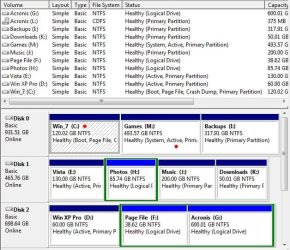
 . But yeah, that's exactly what happened. What I'd like to do is have everything on "C" drive - without having to reinstall the OS.


