JavaScript is disabled. For a better experience, please enable JavaScript in your browser before proceeding.
You are using an out of date browser. It may not display this or other websites correctly.
You should upgrade or use an
alternative browser .
Solved Boot Manager missing
okay, so on an computer I had vista installed, and wanted to install 7. So I created an 100 GiB partition on my hdd, and shrunk the vista installation.
Later I booted in 7 and copied all the files I needed to 7. Afterwards I deleted the vista partition, but now I cant boot into 7, It says boot mngr missing. SO I tried the windows 7 repair feature on the DVD, after about 8 tries it still won't fix it. The repair manager says missing system partition was fixed, but I still get the missing Boot Mngr?
Help please.
Computer type PC/Desktop Computer Manufacturer/Model Number HP Pavilion g7-1350dx OS Windows 7 Ultimate SP1 x64 CPU AMD A6-3420M APU Memory 4.0 Gb DDR3 838 MHz Graphics Card(s) AMD Radeon HD 6520G Sound Card IDT HD Audio Screen Resolution 1600x 900 Hard Drives 500GB Hitachi HTS547550A9E384
New member
Guru
Gold Member
VIP
Is your Win7 partition set to "active"
Computer Manufacturer/Model Number HP, Dell, Gateway, Toshiba - 4 laptops and 2 desktops OS Vista, Windows7, Mint Mate, Zorin, Windows 8 CPU from 1.6GHz Duo to i7 Monitor(s) Displays 2x HP w2207 Hard Drives 5x HDD, 7x SSD, 12x Externals Keyboard with trackball - no mices Mouse Trackball mice Internet Speed DSL 6000
New member
Guru
VIP
Thread Starter
I dont know because I cant boot into windows 7
. Unless there is a way I can find out with the CMD prompt on my Windows 7 DVD?
Computer type PC/Desktop Computer Manufacturer/Model Number HP Pavilion g7-1350dx OS Windows 7 Ultimate SP1 x64 CPU AMD A6-3420M APU Memory 4.0 Gb DDR3 838 MHz Graphics Card(s) AMD Radeon HD 6520G Sound Card IDT HD Audio Screen Resolution 1600x 900 Hard Drives 500GB Hitachi HTS547550A9E384
New member
Guru
Gold Member
VIP
Create the bootable CD of
this program (see on the left side of the webpage). Then boot from that CD and you will see all your disks/partitions and can change attributes if necessary.
Computer Manufacturer/Model Number HP, Dell, Gateway, Toshiba - 4 laptops and 2 desktops OS Vista, Windows7, Mint Mate, Zorin, Windows 8 CPU from 1.6GHz Duo to i7 Monitor(s) Displays 2x HP w2207 Hard Drives 5x HDD, 7x SSD, 12x Externals Keyboard with trackball - no mices Mouse Trackball mice Internet Speed DSL 6000
New member
Guru
VIP
Thread Starter
Actualy I realized that during the Repair operation I had my USB drive plunged in and I unplugged it and it repaired successfully
.
Computer type PC/Desktop Computer Manufacturer/Model Number HP Pavilion g7-1350dx OS Windows 7 Ultimate SP1 x64 CPU AMD A6-3420M APU Memory 4.0 Gb DDR3 838 MHz Graphics Card(s) AMD Radeon HD 6520G Sound Card IDT HD Audio Screen Resolution 1600x 900 Hard Drives 500GB Hitachi HTS547550A9E384
New member
Guru
Gold Member
VIP
Good deal. The bootable PW CD you should get anyhow. One of the best tools in my toolbox.
Computer Manufacturer/Model Number HP, Dell, Gateway, Toshiba - 4 laptops and 2 desktops OS Vista, Windows7, Mint Mate, Zorin, Windows 8 CPU from 1.6GHz Duo to i7 Monitor(s) Displays 2x HP w2207 Hard Drives 5x HDD, 7x SSD, 12x Externals Keyboard with trackball - no mices Mouse Trackball mice Internet Speed DSL 6000
R.I.P. August 13th 2014
SF Team
Hello mate, good to see you got it sorted.
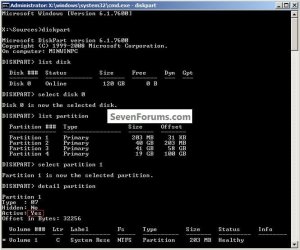
If ever there's a need in future, you can get the details of a partition by booting to diskpart, have a look at the snip below for an outline of the process.
Computer Manufacturer/Model Number * BFK Customs * OS W 7 64-bit Ultimate CPU Intel Q9550 Yorkfield Motherboard ASUS P5Q Pro Memory 8GB Dominator 8500C5D Graphics Card(s) ATI : XFX 5870 Sound Card Realtek HD Audio 7-1 Monitor(s) Displays 1x 47" LCD HDMI & 3x 26" LCD HDMI Screen Resolution 1920x1080P & 1920x1200 Hard Drives 1x 80GB Intel X25-M G2 SSD : 1x 500GB & 1x 640GB WD Caviar Black(s) PSU Corsair 620HX Case Cooler Master RC-690 Cooling Tuniq Tower 120, 2x 140mm and 3x 120mm case fans Keyboard Microsoft 500 Mouse Razer Diamondback 3G Internet Speed 14 Mb/s Other Info 1x Koutech 3Gb/s SATA HDD Hot Swap Rack



 . Unless there is a way I can find out with the CMD prompt on my Windows 7 DVD?
 .
.