Boot menu at start up, 2 min of beeps before Win7 successfully starts

Pikake

New member
Local time
3:42 PM
Messages
34
(Hello, people coming here with the same problem.
update/edit: the boot menu upon start up has been resolved with this
Just run an elevated command prompt in windows and put:
bcdedit /set optionsedit No
then hit enter and reboot the pc and see if it just starts up into windows normally.

Elevated Command Prompt

Malcolm.
Start up beep issue has not been resolved. Upon start up, it is still beeping and displaying "starting windows" for minutes before windows successfully starts--but not in safe mode.)

___________________________________________________________________________________
Original post
Thank you in advance for any help. I run Windows 7 Premium on a refurbished Acer that my mother gave me right after she let windows install updates,and only since then the computer has had this problem. It booted fine prior. Now when I power it on it goes straight to the boot menu, I select the operating system, then sit through 2 minutes of loud beeps while Win7 loads files then starts up. I have no recovery CD's or images (for this Acer but can burn from an Asus Win 7 64 bit) but barely know what I am doing and have tried:

*created system repair disk: successful--joy!

*System restore: successful once for 2/9/17 point but has failed for other points via safe mode, system recovery, and normal admin log in.

*windows memory diagnostic tool via system recovery: unsuccessful. Gets to end of scan, retarts, goes back to boot manager, does not display results (?) after loading windows successfully.

* Disk check via system recovery command prompt: unsuccessful? "chkdsk/r" did not work because the volume was right protected. "chkdsk c: /f /r/ /x" I tried three times and got a different message: failed to transfer logged messages, or in use by another process.

*Startup repair via boot disk and via boot manager, advanced boot options: unsuccessful with nothing attached to the computer! Grr. :( Both ways produced "start up repair could not detect a problem. If you have recently attached a device to this computer, ..., remove it and retart your computer."

Start up repair diagnostic and repair details
-------------------
last successful boot time: 3/19/2017
number of attempts: 2

session details
-----------------
system disk = /device/harddisk0
windows directory = d:/windows
autochk run = 0
number of root causes=1

test performed
--------------
name: check for updates
result: completed successfully. Error code = 0x0
time taken : 15ms

test performed
---------------
name system disk test
result: completed successfully. Error code = 0x0
time taken: 0ms

test performed
--------------
name: disk failure diagnosis
result: completed successfully. Error code = 0x0
time taken: 219 ms

test performed
--------------
disk metadata test
result: completed successfully. Error code = 0x0
time taken: 62 ms

test performed
--------------

name: target OS test
result: completed successfully. Error code = 0x0
time taken: 203ms

test performed
--------------

name: volume content check
result: completed successfully. Error code = 0x0
time taken: 234ms

test performed
---------------
name: boot manager diagnosis
result: completed successfully. Error code = 0x0
time taken: 0 ms

test performed
--------------

name: system boot log diagnosis
result: completed successfully. Error code = 0x0
time taken: 0ms


test performed
--------------

name: event log diagnosis
result: completed successfully. Error code = 0x0
time taken: 46ms

test performed
--------------
name: internal state check
result: completed successfully. Error code = 0x0
time taken: 246ms


test performed
--------------
name: boot status test
result: completed successfully. Error code = 0x0
time taken: 47ms

root cause found:
-----------------------------------
boot status indicates that the OS booted successfully

--------------------------
 
Last edited:

My Computer My Computer

At a glance

Microsoft Windows 7 Home Premium 64-bit 7601 ...Intel(R) Core(TM) i3-2310M CPU @ 2.10GHz8.00 GBIntel(R) HD Graphics 3000
Computer type
Laptop
Computer Manufacturer/Model Number
Acer Aspire 5750 refurbished
OS
Microsoft Windows 7 Home Premium 64-bit 7601 Multiprocessor Free Service Pack 1
CPU
Intel(R) Core(TM) i3-2310M CPU @ 2.10GHz
Motherboard
Acer JE50_HR
Memory
8.00 GB
Graphics Card(s)
Intel(R) HD Graphics 3000
Sound Card
(1) High Definition Audio Device (2) High Definition Audio
Screen Resolution
1366x768
Hard Drives
ST500LT012-1DG142 ATA Device
Fixed hard disk media
2 partitions
serial number: 2020202020202020202020203353505033564538
465.76 GB
Antivirus
Microsoft Security Essentials
Browser
Firefox
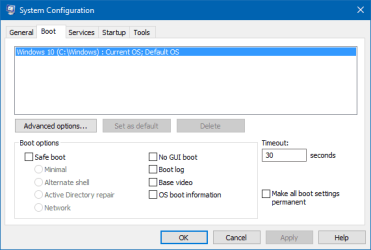
Chkdsk when in the recovery environment is not C: for your hard drive normally. It is normally another letter when you are in the recovery disc Command Prompt and if you see C:\ and you type dir then hit enter what do you see? As for the list you get at start up when in windows hit win+r and put msconfig then enter and on the boot tab is there more than one OS listed and are any of the boxes checked in that window? If you could also follow the guide below to fill in your full system specs that would also help determine the beeping.

System Info - See Your System Specs

Malcolm
 

Attachments

  • msconfig_2017-03-23_11-00-24.png
    msconfig_2017-03-23_11-00-24.png
    6.7 KB · Views: 51

My Computer My Computer

At a glance

10 Pro x64Ryzen 9 3900X64GB(4x16GB) DDR4EVGA 1080ti FTW3
Computer type
PC/Desktop
Computer Manufacturer/Model Number
Custom
OS
10 Pro x64
CPU
Ryzen 9 3900X
Motherboard
Asrock x370 Tachi
Memory
64GB(4x16GB) DDR4
Graphics Card(s)
EVGA 1080ti FTW3
Sound Card
ASUS Xonar Essence STX (V4 Bursons), ODAC rev B, NFB-11, O2
Monitor(s) Displays
3xASUS PB278Q/R, Optoma HD142X
Screen Resolution
3x1440p, 1080p
Hard Drives
512GB 850 EVO(OS, Programs)
4TB (Movies)
3TB (Downloads)
3TB (Programs)
1TB HDD (Games)
2x6TB R1 (videos)
PSU
AX760
Case
Fractal Define R5
Cooling
NH-D15S
Keyboard
Massdrop Ctrl with Box Navy's
Mouse
G903, Alioth XXL Mat
Internet Speed
280/40
Antivirus
MBAM, ESET
Browser
Canary 64 Bit
Other Info
I also own a Thinkpad P50 Xeon 4K, X220T, X1C5
Thank you for your help. I typed out this post days ago, waited until I had a day off again to post, and have not turned the computer back on until now. And...now I am seeing something different when I power the computer on: edit boot options. I don't know what to do from here to get me where you'd like me to be. It's saying:

Edit windows boot options for: windows 7
partition: 2
Hard disk: de4b0149
[ /NOEXECUTE=OPTIN

ENTER=Submit ESC=Cancel

Where should I navigate in this new land, captain?:huh:
 

My Computer My Computer

At a glance

Microsoft Windows 7 Home Premium 64-bit 7601 ...Intel(R) Core(TM) i3-2310M CPU @ 2.10GHz8.00 GBIntel(R) HD Graphics 3000
Computer type
Laptop
Computer Manufacturer/Model Number
Acer Aspire 5750 refurbished
OS
Microsoft Windows 7 Home Premium 64-bit 7601 Multiprocessor Free Service Pack 1
CPU
Intel(R) Core(TM) i3-2310M CPU @ 2.10GHz
Motherboard
Acer JE50_HR
Memory
8.00 GB
Graphics Card(s)
Intel(R) HD Graphics 3000
Sound Card
(1) High Definition Audio Device (2) High Definition Audio
Screen Resolution
1366x768
Hard Drives
ST500LT012-1DG142 ATA Device
Fixed hard disk media
2 partitions
serial number: 2020202020202020202020203353505033564538
465.76 GB
Antivirus
Microsoft Security Essentials
Browser
Firefox
Okay yeah your edit options are flagged possibly by your recovery work. Hit enter and does it boot into windows after that, if so try to get to look at the msconfig afterwards.

Malcolm
 

My Computer My Computer

At a glance

10 Pro x64Ryzen 9 3900X64GB(4x16GB) DDR4EVGA 1080ti FTW3
Computer type
PC/Desktop
Computer Manufacturer/Model Number
Custom
OS
10 Pro x64
CPU
Ryzen 9 3900X
Motherboard
Asrock x370 Tachi
Memory
64GB(4x16GB) DDR4
Graphics Card(s)
EVGA 1080ti FTW3
Sound Card
ASUS Xonar Essence STX (V4 Bursons), ODAC rev B, NFB-11, O2
Monitor(s) Displays
3xASUS PB278Q/R, Optoma HD142X
Screen Resolution
3x1440p, 1080p
Hard Drives
512GB 850 EVO(OS, Programs)
4TB (Movies)
3TB (Downloads)
3TB (Programs)
1TB HDD (Games)
2x6TB R1 (videos)
PSU
AX760
Case
Fractal Define R5
Cooling
NH-D15S
Keyboard
Massdrop Ctrl with Box Navy's
Mouse
G903, Alioth XXL Mat
Internet Speed
280/40
Antivirus
MBAM, ESET
Browser
Canary 64 Bit
Other Info
I also own a Thinkpad P50 Xeon 4K, X220T, X1C5
It booted and started without any further problem and no beeping after I selected Enter. Hmmm.

Should I now be putting the boot disk back in, restarting the computer, and when it loads windows press "win+r" then type msconfig? Or is there another way to get there with windows 7 running?
 

My Computer My Computer

At a glance

Microsoft Windows 7 Home Premium 64-bit 7601 ...Intel(R) Core(TM) i3-2310M CPU @ 2.10GHz8.00 GBIntel(R) HD Graphics 3000
Computer type
Laptop
Computer Manufacturer/Model Number
Acer Aspire 5750 refurbished
OS
Microsoft Windows 7 Home Premium 64-bit 7601 Multiprocessor Free Service Pack 1
CPU
Intel(R) Core(TM) i3-2310M CPU @ 2.10GHz
Motherboard
Acer JE50_HR
Memory
8.00 GB
Graphics Card(s)
Intel(R) HD Graphics 3000
Sound Card
(1) High Definition Audio Device (2) High Definition Audio
Screen Resolution
1366x768
Hard Drives
ST500LT012-1DG142 ATA Device
Fixed hard disk media
2 partitions
serial number: 2020202020202020202020203353505033564538
465.76 GB
Antivirus
Microsoft Security Essentials
Browser
Firefox
No, dont mess with any boot disk if you mean a recovery cd. Just run an elevated command prompt in windows and put:
bcdedit /set optionsedit No
then hit enter and reboot the pc and see if it just starts up into windows normally.

Elevated Command Prompt

Malcolm.
 

My Computer My Computer

At a glance

10 Pro x64Ryzen 9 3900X64GB(4x16GB) DDR4EVGA 1080ti FTW3
Computer type
PC/Desktop
Computer Manufacturer/Model Number
Custom
OS
10 Pro x64
CPU
Ryzen 9 3900X
Motherboard
Asrock x370 Tachi
Memory
64GB(4x16GB) DDR4
Graphics Card(s)
EVGA 1080ti FTW3
Sound Card
ASUS Xonar Essence STX (V4 Bursons), ODAC rev B, NFB-11, O2
Monitor(s) Displays
3xASUS PB278Q/R, Optoma HD142X
Screen Resolution
3x1440p, 1080p
Hard Drives
512GB 850 EVO(OS, Programs)
4TB (Movies)
3TB (Downloads)
3TB (Programs)
1TB HDD (Games)
2x6TB R1 (videos)
PSU
AX760
Case
Fractal Define R5
Cooling
NH-D15S
Keyboard
Massdrop Ctrl with Box Navy's
Mouse
G903, Alioth XXL Mat
Internet Speed
280/40
Antivirus
MBAM, ESET
Browser
Canary 64 Bit
Other Info
I also own a Thinkpad P50 Xeon 4K, X220T, X1C5
I now have my system info edited into my profile

bcdedit /set optionsedit No completed successfully

Upon restart it did not show the boot menu I was seeing so that problem seems to be resolved. :) Edit: nevermind. it is still doing it.

But it still beeped for a few minutes before successfully starting windows. I still only have the power cord connected to the computer and nothing in the disk drive.
 
Last edited:

My Computer My Computer

At a glance

Microsoft Windows 7 Home Premium 64-bit 7601 ...Intel(R) Core(TM) i3-2310M CPU @ 2.10GHz8.00 GBIntel(R) HD Graphics 3000
Computer type
Laptop
Computer Manufacturer/Model Number
Acer Aspire 5750 refurbished
OS
Microsoft Windows 7 Home Premium 64-bit 7601 Multiprocessor Free Service Pack 1
CPU
Intel(R) Core(TM) i3-2310M CPU @ 2.10GHz
Motherboard
Acer JE50_HR
Memory
8.00 GB
Graphics Card(s)
Intel(R) HD Graphics 3000
Sound Card
(1) High Definition Audio Device (2) High Definition Audio
Screen Resolution
1366x768
Hard Drives
ST500LT012-1DG142 ATA Device
Fixed hard disk media
2 partitions
serial number: 2020202020202020202020203353505033564538
465.76 GB
Antivirus
Microsoft Security Essentials
Browser
Firefox
That beeping is normally windows thinks you have a stuck key. Do you have any broken keys on the keyboard of the laptop?

Malcolm
 

My Computer My Computer

At a glance

10 Pro x64Ryzen 9 3900X64GB(4x16GB) DDR4EVGA 1080ti FTW3
Computer type
PC/Desktop
Computer Manufacturer/Model Number
Custom
OS
10 Pro x64
CPU
Ryzen 9 3900X
Motherboard
Asrock x370 Tachi
Memory
64GB(4x16GB) DDR4
Graphics Card(s)
EVGA 1080ti FTW3
Sound Card
ASUS Xonar Essence STX (V4 Bursons), ODAC rev B, NFB-11, O2
Monitor(s) Displays
3xASUS PB278Q/R, Optoma HD142X
Screen Resolution
3x1440p, 1080p
Hard Drives
512GB 850 EVO(OS, Programs)
4TB (Movies)
3TB (Downloads)
3TB (Programs)
1TB HDD (Games)
2x6TB R1 (videos)
PSU
AX760
Case
Fractal Define R5
Cooling
NH-D15S
Keyboard
Massdrop Ctrl with Box Navy's
Mouse
G903, Alioth XXL Mat
Internet Speed
280/40
Antivirus
MBAM, ESET
Browser
Canary 64 Bit
Other Info
I also own a Thinkpad P50 Xeon 4K, X220T, X1C5
No keys are stuck that I am aware of. They all seem pretty level and the keyboard is clean. is there a way to check other than visually? I could plug an external keyboard in....
 

My Computer My Computer

At a glance

Microsoft Windows 7 Home Premium 64-bit 7601 ...Intel(R) Core(TM) i3-2310M CPU @ 2.10GHz8.00 GBIntel(R) HD Graphics 3000
Computer type
Laptop
Computer Manufacturer/Model Number
Acer Aspire 5750 refurbished
OS
Microsoft Windows 7 Home Premium 64-bit 7601 Multiprocessor Free Service Pack 1
CPU
Intel(R) Core(TM) i3-2310M CPU @ 2.10GHz
Motherboard
Acer JE50_HR
Memory
8.00 GB
Graphics Card(s)
Intel(R) HD Graphics 3000
Sound Card
(1) High Definition Audio Device (2) High Definition Audio
Screen Resolution
1366x768
Hard Drives
ST500LT012-1DG142 ATA Device
Fixed hard disk media
2 partitions
serial number: 2020202020202020202020203353505033564538
465.76 GB
Antivirus
Microsoft Security Essentials
Browser
Firefox
It is making the beeping when it says starting windows right?
EDIT: It could be a modifier key that is stuck or broken like the shift, alt keys ect.

Malcolm
 

My Computer My Computer

At a glance

10 Pro x64Ryzen 9 3900X64GB(4x16GB) DDR4EVGA 1080ti FTW3
Computer type
PC/Desktop
Computer Manufacturer/Model Number
Custom
OS
10 Pro x64
CPU
Ryzen 9 3900X
Motherboard
Asrock x370 Tachi
Memory
64GB(4x16GB) DDR4
Graphics Card(s)
EVGA 1080ti FTW3
Sound Card
ASUS Xonar Essence STX (V4 Bursons), ODAC rev B, NFB-11, O2
Monitor(s) Displays
3xASUS PB278Q/R, Optoma HD142X
Screen Resolution
3x1440p, 1080p
Hard Drives
512GB 850 EVO(OS, Programs)
4TB (Movies)
3TB (Downloads)
3TB (Programs)
1TB HDD (Games)
2x6TB R1 (videos)
PSU
AX760
Case
Fractal Define R5
Cooling
NH-D15S
Keyboard
Massdrop Ctrl with Box Navy's
Mouse
G903, Alioth XXL Mat
Internet Speed
280/40
Antivirus
MBAM, ESET
Browser
Canary 64 Bit
Other Info
I also own a Thinkpad P50 Xeon 4K, X220T, X1C5
Yes, it only beeps when Windows starts; the screen says "starting windows" the entire time it is beeping. I lifted each key with a pair of tweezers, restarted two times, and there was no beeping. BUT, upon the third restart the boot menu came back up, it booted windows without me specifying it to (!), beeped for two minutes, then successfully started windows. It seems we are back where we began, captain, with the two original problems.

Could it be possessed? :)
 

My Computer My Computer

At a glance

Microsoft Windows 7 Home Premium 64-bit 7601 ...Intel(R) Core(TM) i3-2310M CPU @ 2.10GHz8.00 GBIntel(R) HD Graphics 3000
Computer type
Laptop
Computer Manufacturer/Model Number
Acer Aspire 5750 refurbished
OS
Microsoft Windows 7 Home Premium 64-bit 7601 Multiprocessor Free Service Pack 1
CPU
Intel(R) Core(TM) i3-2310M CPU @ 2.10GHz
Motherboard
Acer JE50_HR
Memory
8.00 GB
Graphics Card(s)
Intel(R) HD Graphics 3000
Sound Card
(1) High Definition Audio Device (2) High Definition Audio
Screen Resolution
1366x768
Hard Drives
ST500LT012-1DG142 ATA Device
Fixed hard disk media
2 partitions
serial number: 2020202020202020202020203353505033564538
465.76 GB
Antivirus
Microsoft Security Essentials
Browser
Firefox
Is this the window that is coming up then disappearing immediately?
59589d1486572579t-safe-mode-advanced_boot_options.jpg


Safe Mode

Malcolm
 

My Computer My Computer

At a glance

10 Pro x64Ryzen 9 3900X64GB(4x16GB) DDR4EVGA 1080ti FTW3
Computer type
PC/Desktop
Computer Manufacturer/Model Number
Custom
OS
10 Pro x64
CPU
Ryzen 9 3900X
Motherboard
Asrock x370 Tachi
Memory
64GB(4x16GB) DDR4
Graphics Card(s)
EVGA 1080ti FTW3
Sound Card
ASUS Xonar Essence STX (V4 Bursons), ODAC rev B, NFB-11, O2
Monitor(s) Displays
3xASUS PB278Q/R, Optoma HD142X
Screen Resolution
3x1440p, 1080p
Hard Drives
512GB 850 EVO(OS, Programs)
4TB (Movies)
3TB (Downloads)
3TB (Programs)
1TB HDD (Games)
2x6TB R1 (videos)
PSU
AX760
Case
Fractal Define R5
Cooling
NH-D15S
Keyboard
Massdrop Ctrl with Box Navy's
Mouse
G903, Alioth XXL Mat
Internet Speed
280/40
Antivirus
MBAM, ESET
Browser
Canary 64 Bit
Other Info
I also own a Thinkpad P50 Xeon 4K, X220T, X1C5
After your last reply, I tried restarting three times so that I could replicate that problem and get a picture of the boot manager screen that came up last time but it did not come up. Now it won't show the boot manager again; upon restart it says "starting windows" and beeps for varying amounts of time before windows successfully starts.

That is never the screen that I have gotten when the boot manager does come up. It looks like this http://3.bp.blogspot.com/_68sk2PaFt3Q/SwfnhTmpTCI/AAAAAAAAE2M/_qEDsBlHSbg/s1600/Modify%20the%20Boot%20Manager%20configuration%20In%20Windows%207%20And%20Windows%20Vista%20To%20Setup%20Multi%20Boot.png but with only Windows 7 as an option to boot from. I have to press f8 from the Boot manager screen that comes up to get to the Advanced Boot Options screen that you are showing me.
 

My Computer My Computer

At a glance

Microsoft Windows 7 Home Premium 64-bit 7601 ...Intel(R) Core(TM) i3-2310M CPU @ 2.10GHz8.00 GBIntel(R) HD Graphics 3000
Computer type
Laptop
Computer Manufacturer/Model Number
Acer Aspire 5750 refurbished
OS
Microsoft Windows 7 Home Premium 64-bit 7601 Multiprocessor Free Service Pack 1
CPU
Intel(R) Core(TM) i3-2310M CPU @ 2.10GHz
Motherboard
Acer JE50_HR
Memory
8.00 GB
Graphics Card(s)
Intel(R) HD Graphics 3000
Sound Card
(1) High Definition Audio Device (2) High Definition Audio
Screen Resolution
1366x768
Hard Drives
ST500LT012-1DG142 ATA Device
Fixed hard disk media
2 partitions
serial number: 2020202020202020202020203353505033564538
465.76 GB
Antivirus
Microsoft Security Essentials
Browser
Firefox
That does still sound like a keyboard issue, but in windows what do you get in that boot screen for the msconfig?

Malcolm
 

My Computer My Computer

At a glance

10 Pro x64Ryzen 9 3900X64GB(4x16GB) DDR4EVGA 1080ti FTW3
Computer type
PC/Desktop
Computer Manufacturer/Model Number
Custom
OS
10 Pro x64
CPU
Ryzen 9 3900X
Motherboard
Asrock x370 Tachi
Memory
64GB(4x16GB) DDR4
Graphics Card(s)
EVGA 1080ti FTW3
Sound Card
ASUS Xonar Essence STX (V4 Bursons), ODAC rev B, NFB-11, O2
Monitor(s) Displays
3xASUS PB278Q/R, Optoma HD142X
Screen Resolution
3x1440p, 1080p
Hard Drives
512GB 850 EVO(OS, Programs)
4TB (Movies)
3TB (Downloads)
3TB (Programs)
1TB HDD (Games)
2x6TB R1 (videos)
PSU
AX760
Case
Fractal Define R5
Cooling
NH-D15S
Keyboard
Massdrop Ctrl with Box Navy's
Mouse
G903, Alioth XXL Mat
Internet Speed
280/40
Antivirus
MBAM, ESET
Browser
Canary 64 Bit
Other Info
I also own a Thinkpad P50 Xeon 4K, X220T, X1C5
Okay, I will try replicating a problem I only now recall having with the shift key pasting clipboard content once we get through this boot thingy.

Windows is still up and running. How do I now look at msconfig, whatever that may be?:)
 

My Computer My Computer

At a glance

Microsoft Windows 7 Home Premium 64-bit 7601 ...Intel(R) Core(TM) i3-2310M CPU @ 2.10GHz8.00 GBIntel(R) HD Graphics 3000
Computer type
Laptop
Computer Manufacturer/Model Number
Acer Aspire 5750 refurbished
OS
Microsoft Windows 7 Home Premium 64-bit 7601 Multiprocessor Free Service Pack 1
CPU
Intel(R) Core(TM) i3-2310M CPU @ 2.10GHz
Motherboard
Acer JE50_HR
Memory
8.00 GB
Graphics Card(s)
Intel(R) HD Graphics 3000
Sound Card
(1) High Definition Audio Device (2) High Definition Audio
Screen Resolution
1366x768
Hard Drives
ST500LT012-1DG142 ATA Device
Fixed hard disk media
2 partitions
serial number: 2020202020202020202020203353505033564538
465.76 GB
Antivirus
Microsoft Security Essentials
Browser
Firefox
Hit windows key+R then in that window type msconfig and hit enter. Then in that new window the boot tab up top.
You can also just hit the windows key and type msconfig then it will show up to click too.

Malcolm
 

My Computer My Computer

At a glance

10 Pro x64Ryzen 9 3900X64GB(4x16GB) DDR4EVGA 1080ti FTW3
Computer type
PC/Desktop
Computer Manufacturer/Model Number
Custom
OS
10 Pro x64
CPU
Ryzen 9 3900X
Motherboard
Asrock x370 Tachi
Memory
64GB(4x16GB) DDR4
Graphics Card(s)
EVGA 1080ti FTW3
Sound Card
ASUS Xonar Essence STX (V4 Bursons), ODAC rev B, NFB-11, O2
Monitor(s) Displays
3xASUS PB278Q/R, Optoma HD142X
Screen Resolution
3x1440p, 1080p
Hard Drives
512GB 850 EVO(OS, Programs)
4TB (Movies)
3TB (Downloads)
3TB (Programs)
1TB HDD (Games)
2x6TB R1 (videos)
PSU
AX760
Case
Fractal Define R5
Cooling
NH-D15S
Keyboard
Massdrop Ctrl with Box Navy's
Mouse
G903, Alioth XXL Mat
Internet Speed
280/40
Antivirus
MBAM, ESET
Browser
Canary 64 Bit
Other Info
I also own a Thinkpad P50 Xeon 4K, X220T, X1C5
Thank you for your patience. In the boot tab of system configuration I only see "Windows 7 (C:windows) Current OS; Default OS" listed.
 

My Computer My Computer

At a glance

Microsoft Windows 7 Home Premium 64-bit 7601 ...Intel(R) Core(TM) i3-2310M CPU @ 2.10GHz8.00 GBIntel(R) HD Graphics 3000
Computer type
Laptop
Computer Manufacturer/Model Number
Acer Aspire 5750 refurbished
OS
Microsoft Windows 7 Home Premium 64-bit 7601 Multiprocessor Free Service Pack 1
CPU
Intel(R) Core(TM) i3-2310M CPU @ 2.10GHz
Motherboard
Acer JE50_HR
Memory
8.00 GB
Graphics Card(s)
Intel(R) HD Graphics 3000
Sound Card
(1) High Definition Audio Device (2) High Definition Audio
Screen Resolution
1366x768
Hard Drives
ST500LT012-1DG142 ATA Device
Fixed hard disk media
2 partitions
serial number: 2020202020202020202020203353505033564538
465.76 GB
Antivirus
Microsoft Security Essentials
Browser
Firefox
Thank you for your patience. In the boot tab of system configuration I only see "Windows 7 (C:windows) Current OS; Default OS" listed.

No boxes are checked correct in that window on the bottom?

If you go into notepad and try to hold the shifts down (one at a time) and type does it always put out capital letters?

Malcolm
 

My Computer My Computer

At a glance

10 Pro x64Ryzen 9 3900X64GB(4x16GB) DDR4EVGA 1080ti FTW3
Computer type
PC/Desktop
Computer Manufacturer/Model Number
Custom
OS
10 Pro x64
CPU
Ryzen 9 3900X
Motherboard
Asrock x370 Tachi
Memory
64GB(4x16GB) DDR4
Graphics Card(s)
EVGA 1080ti FTW3
Sound Card
ASUS Xonar Essence STX (V4 Bursons), ODAC rev B, NFB-11, O2
Monitor(s) Displays
3xASUS PB278Q/R, Optoma HD142X
Screen Resolution
3x1440p, 1080p
Hard Drives
512GB 850 EVO(OS, Programs)
4TB (Movies)
3TB (Downloads)
3TB (Programs)
1TB HDD (Games)
2x6TB R1 (videos)
PSU
AX760
Case
Fractal Define R5
Cooling
NH-D15S
Keyboard
Massdrop Ctrl with Box Navy's
Mouse
G903, Alioth XXL Mat
Internet Speed
280/40
Antivirus
MBAM, ESET
Browser
Canary 64 Bit
Other Info
I also own a Thinkpad P50 Xeon 4K, X220T, X1C5
Nothing is checked in the boxes below.

Nothing happens when I only hold down either shift key in note pad. When I hold either shift key down and a letter key it only types that capitalized letter.
 

My Computer My Computer

At a glance

Microsoft Windows 7 Home Premium 64-bit 7601 ...Intel(R) Core(TM) i3-2310M CPU @ 2.10GHz8.00 GBIntel(R) HD Graphics 3000
Computer type
Laptop
Computer Manufacturer/Model Number
Acer Aspire 5750 refurbished
OS
Microsoft Windows 7 Home Premium 64-bit 7601 Multiprocessor Free Service Pack 1
CPU
Intel(R) Core(TM) i3-2310M CPU @ 2.10GHz
Motherboard
Acer JE50_HR
Memory
8.00 GB
Graphics Card(s)
Intel(R) HD Graphics 3000
Sound Card
(1) High Definition Audio Device (2) High Definition Audio
Screen Resolution
1366x768
Hard Drives
ST500LT012-1DG142 ATA Device
Fixed hard disk media
2 partitions
serial number: 2020202020202020202020203353505033564538
465.76 GB
Antivirus
Microsoft Security Essentials
Browser
Firefox
That is interesting well you can try in the boot tab setting your timeout to 0 and see if it helps but I don't think your going to be able to fix that booting issue unfortunately. But it does not seem to affect windows once booted so that is good and I guess you will just want to use the sleep option more then shutdown nowadays. Short of unplugging the keyboard in the laptop and using an external one to test you can't really diagnose that issue very well. That menu since you only have one OS listed and the all the boxes are unchecked should not be showing up though and I know of no command at boot to make it appear either, only the F8 at boot to make the safe mode one appear that I linked earlier. Any thing I can find online about that specific issue is always windows thinking the keyboard is bad. Just in case it is something else that is hard to diagnose though I would backup what ever data you can not lose off that machine somewhere else to be safe.
EDIT: I'll ask some more people to take a quick look at your thread and see if they notice something I did not.

Malcolm
 

My Computer My Computer

At a glance

10 Pro x64Ryzen 9 3900X64GB(4x16GB) DDR4EVGA 1080ti FTW3
Computer type
PC/Desktop
Computer Manufacturer/Model Number
Custom
OS
10 Pro x64
CPU
Ryzen 9 3900X
Motherboard
Asrock x370 Tachi
Memory
64GB(4x16GB) DDR4
Graphics Card(s)
EVGA 1080ti FTW3
Sound Card
ASUS Xonar Essence STX (V4 Bursons), ODAC rev B, NFB-11, O2
Monitor(s) Displays
3xASUS PB278Q/R, Optoma HD142X
Screen Resolution
3x1440p, 1080p
Hard Drives
512GB 850 EVO(OS, Programs)
4TB (Movies)
3TB (Downloads)
3TB (Programs)
1TB HDD (Games)
2x6TB R1 (videos)
PSU
AX760
Case
Fractal Define R5
Cooling
NH-D15S
Keyboard
Massdrop Ctrl with Box Navy's
Mouse
G903, Alioth XXL Mat
Internet Speed
280/40
Antivirus
MBAM, ESET
Browser
Canary 64 Bit
Other Info
I also own a Thinkpad P50 Xeon 4K, X220T, X1C5
Back
Top