Boot Menu Problem

multibot

New member
Member
VIP
Local time
2:25 AM
Messages
142
Location
earth
hiii alll n wish u all a belated happy new year.. :D

i had been using win 7 ultimate x86 and ubuntu 10.10 dual booted for about last 4-5 months. i used the wubi installer to install ubuntu inside win7 in a win 7 partition. just few hrs before i have reformatted my laptop. but there stays a problem inside the boot menu.
It is showing both win 7 n ubuntu as the boot menu still now..!!!
plzz help me guys to get rid of it.
ty all.
 

My Computer

Computer Manufacturer/Model Number
self build/assembled
OS
windows 7 rtm ultimate build 7600 x86
CPU
intel pentium 4 HT 3GHz
Motherboard
intel 945 GZ Micro 775 SE
Memory
1 gb transcend 667 Mhz
Graphics Card(s)
Nvidea 8400 GS 512 MB
Sound Card
realtek inbuild
Monitor(s) Displays
23" samsung syncmaster P2370MS full HD 1080p
Screen Resolution
1920x1080
Hard Drives
hitachi 160gb sata+Samsung 500gb sata
PSU
Zebronics 450W
Case
trendsonic
Cooling
two extra fans taken from damaged PSUs
Keyboard
Microsoft
Mouse
Microsoft
Internet Speed
512Kbps
Installing Linuxes may give you booting problems. I have been using Linux. I think, it may have something to do with the Ubuntu bootloader. Do you use the Grub bootloader? Because installing this usually creates a partition that contains the Grub bootloader in what I think. Its a separate partition from the main partition which you have formatted but you left this small partition of less than 1GB is size and still continues to initiate the bootloader, showing bot Windows 7 and Ubuntu when you start the computer. You have to format this small partition as well. But reformatting this partition, might make your currently installed operating systems to be undetectable on bootup, I'm not sure about that but its only fully safe to format this partition if your laptop is completely empty, with no existing operating systems installed. But I don't think the Wubi install would install the Grub bootloader as well.

Do you have Windows 7 installed on that laptop right now? I suggest you right click My Computer on the Desktop, choose Manage and on that console, go to Disk Management and confirm if my suspicion about this partition is correct. It should be a small partition of around 900+MB in what I remember.

You did not tell how exactly you formatted your laptop. Did you format everything including Ubuntu? Is that laptop empty right now?
 

My Computer

Computer Manufacturer/Model Number
Custom Built
OS
Windows 7 Ultimate 32 Bit, Windows Developer Preview, Linux Mint 9 Gnome 32 Bit
CPU
Intel Pentium Dual CPU E2180@2GHz
Motherboard
Elitegroup 671T-M3
Graphics Card(s)
NVIDIA GeForce 7200 GS
Monitor(s) Displays
AOC TFT1560 15" LCD Monitor
Screen Resolution
1024x768
Keyboard
Logitech USB Keyboard
That is why we say to install grub in another HDD .

Download EasyBCD 2 or older from the links in the right bottom of the page Download EasyBCD 2.1.2 - NeoSmart Technologies . (versions below 2.1 are free).
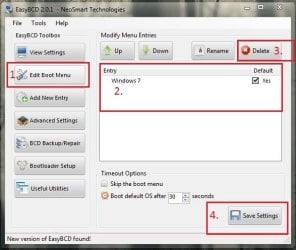
Install it. Then run it. First click on "Edit Boot Menu", you will get a list of boot entries there. If there is any GRUB or Linux entry (anuthing other than Windows 7), select it, and then click the delete button. Finally save changes, and then restart your computer and see if it is still there.
Capture.JPG

If it is still there, better you follow what theog suggested .
 

My Computer

Computer type
PC/Desktop
Computer Manufacturer/Model Number
Self Assembled
OS
Microsoft Windows 10 Pro Insider Preview 64-bit
CPU
Intel(R) Core(TM) i3-4130 CPU @ 3.40GHz
Motherboard
Gigabyte Technology Co., Ltd. B85M-D3H
Memory
Corsair Vengence 4GB x2 (8.00GB Dual-Channel DDR3 @ 798MHz)
Graphics Card(s)
2047MB GeForce GTS 450 (ZOTAC International)
Sound Card
Onboard (Realtek High Definition Audio)
Monitor(s) Displays
LG Flatron E2040T
Screen Resolution
1600x900
Hard Drives
Western Digital 1 TB
Seagate 500 GB
PSU
Corsair VS550
Case
Cooler Master K380
Cooling
Cooler Master Seidon 120V Plus
Keyboard
Logitech MK260r
Mouse
Logitech MK260r
Internet Speed
PMPL Broadband
Antivirus
Windows Defender + MBAM
Browser
Firefox
Other Info
Dell Studio 15" Laptop
Installing Linuxes may give you booting problems. I have been using Linux. I think, it may have something to do with the Ubuntu bootloader. Do you use the Grub bootloader? Because installing this usually creates a partition that contains the Grub bootloader in what I think. Its a separate partition from the main partition which you have formatted but you left this small partition of less than 1GB is size and still continues to initiate the bootloader, showing bot Windows 7 and Ubuntu when you start the computer. You have to format this small partition as well. But reformatting this partition, might make your currently installed operating systems to be undetectable on bootup, I'm not sure about that but its only fully safe to format this partition if your laptop is completely empty, with no existing operating systems installed. But I don't think the Wubi install would install the Grub bootloader as well.

Do you have Windows 7 installed on that laptop right now? I suggest you right click My Computer on the Desktop, choose Manage and on that console, go to Disk Management and confirm if my suspicion about this partition is correct. It should be a small partition of around 900+MB in what I remember.

You did not tell how exactly you formatted your laptop. Did you format everything including Ubuntu? Is that laptop empty right now?

i didn't removed any apps nor even Ubuntu from the previous win 7. I just inserted my win 7 DVD n formatted the partition containing win 7... Its of about 50 GB in size.
I dont know exactly about what kind of partition u r talking about...but i have a partition of 100 mb named system reserved.
 

My Computer

Computer Manufacturer/Model Number
self build/assembled
OS
windows 7 rtm ultimate build 7600 x86
CPU
intel pentium 4 HT 3GHz
Motherboard
intel 945 GZ Micro 775 SE
Memory
1 gb transcend 667 Mhz
Graphics Card(s)
Nvidea 8400 GS 512 MB
Sound Card
realtek inbuild
Monitor(s) Displays
23" samsung syncmaster P2370MS full HD 1080p
Screen Resolution
1920x1080
Hard Drives
hitachi 160gb sata+Samsung 500gb sata
PSU
Zebronics 450W
Case
trendsonic
Cooling
two extra fans taken from damaged PSUs
Keyboard
Microsoft
Mouse
Microsoft
Internet Speed
512Kbps

My Computer

OS
ME/XP/Vista/Win7
  • Like
Reactions: Arc

All Linux code must be deleted using the CLEAN ALL command.As you have had linux on the HD you need do a Clean all & full format.


Type in command line
DISKPART
LIST DISK
SELECT DISK # (win HD)
CLEAN ALL
CREATE PARTITION PRIMARY
SELECT PARTITION 1
ACTIVE
FORMAT fs=NTFS
ASSIGN
EXIT
EXIT

Actually after i installed windows 7. i didn't formatted the Ubuntu partition. Since the entire linux stored in a .disk file, i simply deleted the folder named "ubuntu' where i installed it in my another windows partition.
 

My Computer

Computer Manufacturer/Model Number
self build/assembled
OS
windows 7 rtm ultimate build 7600 x86
CPU
intel pentium 4 HT 3GHz
Motherboard
intel 945 GZ Micro 775 SE
Memory
1 gb transcend 667 Mhz
Graphics Card(s)
Nvidea 8400 GS 512 MB
Sound Card
realtek inbuild
Monitor(s) Displays
23" samsung syncmaster P2370MS full HD 1080p
Screen Resolution
1920x1080
Hard Drives
hitachi 160gb sata+Samsung 500gb sata
PSU
Zebronics 450W
Case
trendsonic
Cooling
two extra fans taken from damaged PSUs
Keyboard
Microsoft
Mouse
Microsoft
Internet Speed
512Kbps
multibot, as you have installed linux using WUBI, the linux should be installed in windows partition, like an installed program. Still, there are something suggested to you earlier like trying EasyBCD . It edits boot menu as I told you.

Formatting C drive will not remove the GRUB entry from boot, coz it will be stored in the System Reserved partition. I guess you haven't formatted that partition .

You can have an easy access to System Reserved and make any alteration thereto using EasyBCD .

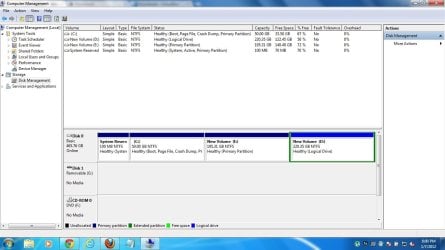
Plus, if you upload a screenshot of your maximized disk management window, we may check that if GRUM installed anywhere else, as Vertex thinks .
 

My Computer

Computer type
PC/Desktop
Computer Manufacturer/Model Number
Self Assembled
OS
Microsoft Windows 10 Pro Insider Preview 64-bit
CPU
Intel(R) Core(TM) i3-4130 CPU @ 3.40GHz
Motherboard
Gigabyte Technology Co., Ltd. B85M-D3H
Memory
Corsair Vengence 4GB x2 (8.00GB Dual-Channel DDR3 @ 798MHz)
Graphics Card(s)
2047MB GeForce GTS 450 (ZOTAC International)
Sound Card
Onboard (Realtek High Definition Audio)
Monitor(s) Displays
LG Flatron E2040T
Screen Resolution
1600x900
Hard Drives
Western Digital 1 TB
Seagate 500 GB
PSU
Corsair VS550
Case
Cooler Master K380
Cooling
Cooler Master Seidon 120V Plus
Keyboard
Logitech MK260r
Mouse
Logitech MK260r
Internet Speed
PMPL Broadband
Antivirus
Windows Defender + MBAM
Browser
Firefox
Other Info
Dell Studio 15" Laptop
multibot, as you have installed linux using wubi, the linux should be installed in windows partition, like an installed program. Still, there are something suggested to you earlier like trying easybcd . It edits boot menu as i told you.

Formatting c drive will not remove the grub entry from boot, coz it will be stored in the system reserved partition. I guess you haven't formatted that partition .

You can have an easy access to system reserved and make any alteration thereto using easybcd .

Plus, if you upload a screenshot of your maximized disk management window, we may check that if grum installed anywhere else, as vertex thinks .

Untitled.jpg
 

My Computer

Computer Manufacturer/Model Number
self build/assembled
OS
windows 7 rtm ultimate build 7600 x86
CPU
intel pentium 4 HT 3GHz
Motherboard
intel 945 GZ Micro 775 SE
Memory
1 gb transcend 667 Mhz
Graphics Card(s)
Nvidea 8400 GS 512 MB
Sound Card
realtek inbuild
Monitor(s) Displays
23" samsung syncmaster P2370MS full HD 1080p
Screen Resolution
1920x1080
Hard Drives
hitachi 160gb sata+Samsung 500gb sata
PSU
Zebronics 450W
Case
trendsonic
Cooling
two extra fans taken from damaged PSUs
Keyboard
Microsoft
Mouse
Microsoft
Internet Speed
512Kbps
As expected (the feature of WUBI) , there is no other partition for GRUB. So it was installed in the C drive, and removed with the formatting. but the boot entry remained there , as the System Reserved partition is not formatted. If you accept the Ubuntu option to boot, it will not load anything !

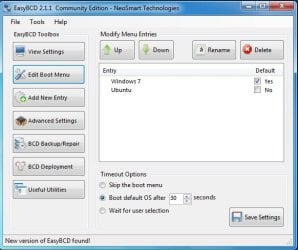
Have you installed EasyBCD ? If so, post a screenshot of EasyBCD window, with the "Edit Boot Menu" button selected in the toolbox, as I have shown in the screenshot earlier.
 

My Computer

Computer type
PC/Desktop
Computer Manufacturer/Model Number
Self Assembled
OS
Microsoft Windows 10 Pro Insider Preview 64-bit
CPU
Intel(R) Core(TM) i3-4130 CPU @ 3.40GHz
Motherboard
Gigabyte Technology Co., Ltd. B85M-D3H
Memory
Corsair Vengence 4GB x2 (8.00GB Dual-Channel DDR3 @ 798MHz)
Graphics Card(s)
2047MB GeForce GTS 450 (ZOTAC International)
Sound Card
Onboard (Realtek High Definition Audio)
Monitor(s) Displays
LG Flatron E2040T
Screen Resolution
1600x900
Hard Drives
Western Digital 1 TB
Seagate 500 GB
PSU
Corsair VS550
Case
Cooler Master K380
Cooling
Cooler Master Seidon 120V Plus
Keyboard
Logitech MK260r
Mouse
Logitech MK260r
Internet Speed
PMPL Broadband
Antivirus
Windows Defender + MBAM
Browser
Firefox
Other Info
Dell Studio 15" Laptop
Have you checked 'msconfig' - boot options tab to see if an entry exist in there for the ubuntu install, if so you should be able to remove it.
 

My Computer

Computer Manufacturer/Model Number
Custom - PC Specialist
OS
Windows 7/Linux
CPU
Athlon 64 x2 6000+
Motherboard
ASUS M3N78 PRO
Memory
4Gb Dual Channel
Graphics Card(s)
Geforce 8400
Sound Card
On Board
Monitor(s) Displays
BenQ G2222HDL
Screen Resolution
1920x1080
Hard Drives
1Gb Spinpoint F3/740Gb Western Digital
640Gb Western Digital
PSU
National Grid
Case
Yes
Cooling
Stock Cooler
Keyboard
Saitek Eclipse II
Mouse
Microsoft Laser Mouse
Internet Speed
50Mb
Yep, I also think the bootloader is on the 100MB system reserved partition. It wasn't formatted, so technically, it would still display an entry of Ubuntu.

There is an option however when I installed Linux Mint 9 to whether or not install a bootloader. I haven't tried not installing it.
 

My Computer

Computer Manufacturer/Model Number
Custom Built
OS
Windows 7 Ultimate 32 Bit, Windows Developer Preview, Linux Mint 9 Gnome 32 Bit
CPU
Intel Pentium Dual CPU E2180@2GHz
Motherboard
Elitegroup 671T-M3
Graphics Card(s)
NVIDIA GeForce 7200 GS
Monitor(s) Displays
AOC TFT1560 15" LCD Monitor
Screen Resolution
1024x768
Keyboard
Logitech USB Keyboard
As expected (the feature of WUBI) , there is no other partition for GRUB. So it was installed in the C drive, and removed with the formatting. but the boot entry remained there , as the System Reserved partition is not formatted. If you accept the Ubuntu option to boot, it will not load anything !

Have you installed EasyBCD ? If so, post a screenshot of EasyBCD window, with the "Edit Boot Menu" button selected in the toolbox, as I have shown in the screenshot earlier.

here is d screenshot bro....
Untitled.jpg
 

My Computer

Computer Manufacturer/Model Number
self build/assembled
OS
windows 7 rtm ultimate build 7600 x86
CPU
intel pentium 4 HT 3GHz
Motherboard
intel 945 GZ Micro 775 SE
Memory
1 gb transcend 667 Mhz
Graphics Card(s)
Nvidea 8400 GS 512 MB
Sound Card
realtek inbuild
Monitor(s) Displays
23" samsung syncmaster P2370MS full HD 1080p
Screen Resolution
1920x1080
Hard Drives
hitachi 160gb sata+Samsung 500gb sata
PSU
Zebronics 450W
Case
trendsonic
Cooling
two extra fans taken from damaged PSUs
Keyboard
Microsoft
Mouse
Microsoft
Internet Speed
512Kbps
bro i also forgot to told u all that i after correcting this boot menu i will be installing fedora beside this win 7, dual boot booting both.
 

My Computer

Computer Manufacturer/Model Number
self build/assembled
OS
windows 7 rtm ultimate build 7600 x86
CPU
intel pentium 4 HT 3GHz
Motherboard
intel 945 GZ Micro 775 SE
Memory
1 gb transcend 667 Mhz
Graphics Card(s)
Nvidea 8400 GS 512 MB
Sound Card
realtek inbuild
Monitor(s) Displays
23" samsung syncmaster P2370MS full HD 1080p
Screen Resolution
1920x1080
Hard Drives
hitachi 160gb sata+Samsung 500gb sata
PSU
Zebronics 450W
Case
trendsonic
Cooling
two extra fans taken from damaged PSUs
Keyboard
Microsoft
Mouse
Microsoft
Internet Speed
512Kbps
Fedora will probably install its own bootloader too.
 

My Computer

Computer Manufacturer/Model Number
Custom Built
OS
Windows 7 Ultimate 32 Bit, Windows Developer Preview, Linux Mint 9 Gnome 32 Bit
CPU
Intel Pentium Dual CPU E2180@2GHz
Motherboard
Elitegroup 671T-M3
Graphics Card(s)
NVIDIA GeForce 7200 GS
Monitor(s) Displays
AOC TFT1560 15" LCD Monitor
Screen Resolution
1024x768
Keyboard
Logitech USB Keyboard
hey wats dis new trouble to me..!!!!!..?????
i cant make a new volume in win 7 after i installed fedora 16 in a separate 50 gb partition.
see the screenshot below..
Untitled.jpg
 

My Computer

Computer Manufacturer/Model Number
self build/assembled
OS
windows 7 rtm ultimate build 7600 x86
CPU
intel pentium 4 HT 3GHz
Motherboard
intel 945 GZ Micro 775 SE
Memory
1 gb transcend 667 Mhz
Graphics Card(s)
Nvidea 8400 GS 512 MB
Sound Card
realtek inbuild
Monitor(s) Displays
23" samsung syncmaster P2370MS full HD 1080p
Screen Resolution
1920x1080
Hard Drives
hitachi 160gb sata+Samsung 500gb sata
PSU
Zebronics 450W
Case
trendsonic
Cooling
two extra fans taken from damaged PSUs
Keyboard
Microsoft
Mouse
Microsoft
Internet Speed
512Kbps
Multibot, using windows 7 disk, you cannot make an extra partition over four. If you want to make an extra partition, you may try Partition Wizard Free Bootable CD .

But, it is always risky to use any linux distro in the same HDD with windows7. If possible, buy another HDD and install Linux on it, with the Windows disk disconnected; so that the bootloaders may be completely separated. This is the best practice. You may choose which HDD to boot from using the boot menu key, and no dual booting is needed.
http://www.partitionwizard.com/download.html
 

My Computer

Computer type
PC/Desktop
Computer Manufacturer/Model Number
Self Assembled
OS
Microsoft Windows 10 Pro Insider Preview 64-bit
CPU
Intel(R) Core(TM) i3-4130 CPU @ 3.40GHz
Motherboard
Gigabyte Technology Co., Ltd. B85M-D3H
Memory
Corsair Vengence 4GB x2 (8.00GB Dual-Channel DDR3 @ 798MHz)
Graphics Card(s)
2047MB GeForce GTS 450 (ZOTAC International)
Sound Card
Onboard (Realtek High Definition Audio)
Monitor(s) Displays
LG Flatron E2040T
Screen Resolution
1600x900
Hard Drives
Western Digital 1 TB
Seagate 500 GB
PSU
Corsair VS550
Case
Cooler Master K380
Cooling
Cooler Master Seidon 120V Plus
Keyboard
Logitech MK260r
Mouse
Logitech MK260r
Internet Speed
PMPL Broadband
Antivirus
Windows Defender + MBAM
Browser
Firefox
Other Info
Dell Studio 15" Laptop
Back
Top