
Solved Boot MGR missing, only boots with a bootable usb in system

tj1990

New member
Local time
6:18 PM
Messages
7
Location
Australia
Hi,

Recently had to format from windows 10 back to 7, until the black screen of death happened so formatted 7 again.

Everything functions normally except that it will not boot unless a bootable usb is selected as first priority.

If you press no buttons when told to after a few seconds it goes straight into windows.

What do i need to do to fix the boot mgr? i tried startup repair and it told me there was no problems with windows, have only tried it once tho does it have to be attempted a few times?

At the end of the day its not a really bad problem i suppose, but would be nice to free up a USB port. :)

Thanks.


Edit: Windows was installed from a USB if that makes any difference, startup repair also run from same USB.
 

My Computer My Computer

Computer type
PC/Desktop
OS
Windows 7 Ultimate X64
CPU
Intel i7 950
Motherboard
Gigabyte GA-X58A-UD3R Intel Mainboard
Memory
Corsair DDR3 PC-12800/1600 (6x XMS3 2GB)
Graphics Card(s)
MSI GTX 970
Hard Drives
Samsung 850 EVO 250gb Drive
2 x WD 1TB Caviar Black
PSU
Antec TruePower New Series 750W ATX Power Supply (Blue LED)
Case
Antec Nine Hundred - Black Ultimate ATX Gaming Case
Cooling
Corsair H80i Liquid CPU Cooler
Keyboard
Corsair Vengeance K70 Gaming Keyboard Cherry Red
You can use EasyBCD to move all the boot files to the main drive.
 

My Computer My Computer

Computer type
PC/Desktop
Computer Manufacturer/Model Number
dell precision t3400 tower
OS
Linux Lite 3.2 x64; Windows 7, 8.1
CPU
Core2Duo 2.4
Memory
6GB ddr2
Graphics Card(s)
nVidia
Hard Drives
120gb SSD, 1TB HD, 2TB HD; sata II
Internet Speed
12/2
Browser
Vivaldi, Slimjet (Chromium) x64
Post a snapshot of a fullscreen Disk Management Window:

To open Disk Management, press Windows key+r, type diskmgmt.msc and press Enter or click GO.

Make it full screen.
Expand the fields as necessary so everything can be seen.

Windows 7:
How to Upload and Post a Screenshot and File in Seven Forums
 

My Computer My Computer

Computer type
PC/Desktop
Computer Manufacturer/Model Number
Lenovo IdeaCenter 450
OS
Windows 10 Pro X64
CPU
Intel Quad Core i7-4770 @ 3.4Ghz
Memory
16.0GB PC3-12800 DDR3 SDRAM 1600 MHz
Graphics Card(s)
Intel Integrated HD Graphics
Sound Card
Realtek HD Audio
Monitor(s) Displays
HP 22" LCD
Screen Resolution
1680 x 1050
Hard Drives
250GB Samsung EVO SATA-3 SSD
2TB Seagate ST2000DM001 SATA-2
1.5TB Seagate ST3150041AS SATA
Keyboard
Dell USB
Mouse
Lenovo USB
Internet Speed
Cable via Road Runner 3MB Upload, 30MB Download
Antivirus
Windows Defender, MBAM Pro, MBAE
Browser
Seamonkey
Other Info
UEFI/GPT
PLDS DVD-RW DH16AERSH
Here it is. the E drive is an external hard drive, thats not always plugged in.


You can use EasyBCD to move all the boot files to the main drive.


i just had a look at that, is it really that simple ? :O
 

Attachments

  • dskmg.PNG
    dskmg.PNG
    33.8 KB · Views: 8

My Computer My Computer

Computer type
PC/Desktop
OS
Windows 7 Ultimate X64
CPU
Intel i7 950
Motherboard
Gigabyte GA-X58A-UD3R Intel Mainboard
Memory
Corsair DDR3 PC-12800/1600 (6x XMS3 2GB)
Graphics Card(s)
MSI GTX 970
Hard Drives
Samsung 850 EVO 250gb Drive
2 x WD 1TB Caviar Black
PSU
Antec TruePower New Series 750W ATX Power Supply (Blue LED)
Case
Antec Nine Hundred - Black Ultimate ATX Gaming Case
Cooling
Corsair H80i Liquid CPU Cooler
Keyboard
Corsair Vengeance K70 Gaming Keyboard Cherry Red
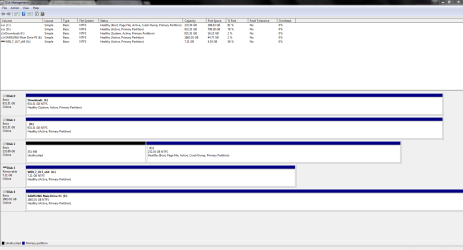
I'm not sure at this point that the BCD location is your problem. Can you go into the BIOS and see what the boot drive order is? Try to spec the drive with your C partition as number one boot device. You might even switch the wires in the box so that it's Drive 0, though normally that doesn't matter. Was the E drive plugged in when you did the 7 install?
 

My Computer My Computer

Computer type
PC/Desktop
Computer Manufacturer/Model Number
dell precision t3400 tower
OS
Linux Lite 3.2 x64; Windows 7, 8.1
CPU
Core2Duo 2.4
Memory
6GB ddr2
Graphics Card(s)
nVidia
Hard Drives
120gb SSD, 1TB HD, 2TB HD; sata II
Internet Speed
12/2
Browser
Vivaldi, Slimjet (Chromium) x64
The boot order has the USB drive at first otherwise it will never go past boot mgr missing. the 250gb SSD is the drive with windows on it.

If i take out the USB and leave the SSD as first it gets the mgr missing error.

E drive was not plugged in.

i see that F says system, could that be the issue?
 

My Computer My Computer

Computer type
PC/Desktop
OS
Windows 7 Ultimate X64
CPU
Intel i7 950
Motherboard
Gigabyte GA-X58A-UD3R Intel Mainboard
Memory
Corsair DDR3 PC-12800/1600 (6x XMS3 2GB)
Graphics Card(s)
MSI GTX 970
Hard Drives
Samsung 850 EVO 250gb Drive
2 x WD 1TB Caviar Black
PSU
Antec TruePower New Series 750W ATX Power Supply (Blue LED)
Case
Antec Nine Hundred - Black Ultimate ATX Gaming Case
Cooling
Corsair H80i Liquid CPU Cooler
Keyboard
Corsair Vengeance K70 Gaming Keyboard Cherry Red
That does seem strange. I would disconnect the drive and see how the machine boots or what startup repair says then. If there is a problem I would run the bootrec commands from the WinRe command line, with all other drives disconnected.
 

My Computer My Computer

Computer type
PC/Desktop
Computer Manufacturer/Model Number
dell precision t3400 tower
OS
Linux Lite 3.2 x64; Windows 7, 8.1
CPU
Core2Duo 2.4
Memory
6GB ddr2
Graphics Card(s)
nVidia
Hard Drives
120gb SSD, 1TB HD, 2TB HD; sata II
Internet Speed
12/2
Browser
Vivaldi, Slimjet (Chromium) x64
That does seem strange. I would disconnect the drive and see how the machine boots or what startup repair says then. If there is a problem I would run the bootrec commands from the WinRe command line, with all other drives disconnected.

which drive would you like me to unplug ?
 

My Computer My Computer

Computer type
PC/Desktop
OS
Windows 7 Ultimate X64
CPU
Intel i7 950
Motherboard
Gigabyte GA-X58A-UD3R Intel Mainboard
Memory
Corsair DDR3 PC-12800/1600 (6x XMS3 2GB)
Graphics Card(s)
MSI GTX 970
Hard Drives
Samsung 850 EVO 250gb Drive
2 x WD 1TB Caviar Black
PSU
Antec TruePower New Series 750W ATX Power Supply (Blue LED)
Case
Antec Nine Hundred - Black Ultimate ATX Gaming Case
Cooling
Corsair H80i Liquid CPU Cooler
Keyboard
Corsair Vengeance K70 Gaming Keyboard Cherry Red
To straighten this out I would disconnect all drives but the one with the C partition, to make sure that the BCD is on that drive along with the Win7 installation.
 

My Computer My Computer

Computer type
PC/Desktop
Computer Manufacturer/Model Number
dell precision t3400 tower
OS
Linux Lite 3.2 x64; Windows 7, 8.1
CPU
Core2Duo 2.4
Memory
6GB ddr2
Graphics Card(s)
nVidia
Hard Drives
120gb SSD, 1TB HD, 2TB HD; sata II
Internet Speed
12/2
Browser
Vivaldi, Slimjet (Chromium) x64
so i didnt get around to unplugging the drives but i used easy bcd and its fixed. It now no longer needs a bootable usb plugged in to boot!
 

My Computer My Computer

Computer type
PC/Desktop
OS
Windows 7 Ultimate X64
CPU
Intel i7 950
Motherboard
Gigabyte GA-X58A-UD3R Intel Mainboard
Memory
Corsair DDR3 PC-12800/1600 (6x XMS3 2GB)
Graphics Card(s)
MSI GTX 970
Hard Drives
Samsung 850 EVO 250gb Drive
2 x WD 1TB Caviar Black
PSU
Antec TruePower New Series 750W ATX Power Supply (Blue LED)
Case
Antec Nine Hundred - Black Ultimate ATX Gaming Case
Cooling
Corsair H80i Liquid CPU Cooler
Keyboard
Corsair Vengeance K70 Gaming Keyboard Cherry Red
although i did encounter the black screen of death again, but i was able to system restore this time.

I formatted to fix the black screen of death issue -_-

If it happens again hopefully new GPU Drivers will sort it out.
 

My Computer My Computer

Computer type
PC/Desktop
OS
Windows 7 Ultimate X64
CPU
Intel i7 950
Motherboard
Gigabyte GA-X58A-UD3R Intel Mainboard
Memory
Corsair DDR3 PC-12800/1600 (6x XMS3 2GB)
Graphics Card(s)
MSI GTX 970
Hard Drives
Samsung 850 EVO 250gb Drive
2 x WD 1TB Caviar Black
PSU
Antec TruePower New Series 750W ATX Power Supply (Blue LED)
Case
Antec Nine Hundred - Black Ultimate ATX Gaming Case
Cooling
Corsair H80i Liquid CPU Cooler
Keyboard
Corsair Vengeance K70 Gaming Keyboard Cherry Red
Back
Top