

Chaim613
New member
- Local time
- 6:44 PM
- Messages
- 50
Hi,
I'm a novice, but puzzled, I love getting to the bottom of things. Here's one I'm working on, but I'm at an impasse (I'm going to run out of time, school starts next week):
After a re-install of Win7 Pro on Lenovos Desktop with WD5000AAKS drive, I get "Missing Operating System" when the machine is rebooted with no disk in the drive.
Machine boots if I put GRMCPRXFRER_EN_DVD (the Win7 Install Disk) in the drive before powering up or Restart.
I've re-installed more than a half dozen times with same outcome.
I've tried re-installing from 2 sources, the above mentioned Win7 Install Disk, and a Restore Disk from Lenovos, both gave same outcome. Each source was tried several times, same outcome each time.
I've tried switching the HDD mode between RAID and ACHP(?), same outcome each mode.
I've tried re-installing the Western Digital HDD driver, same outcome.
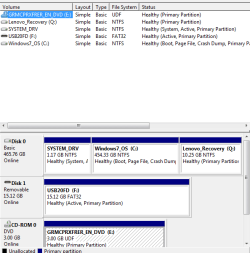
My disk partition is:
I'm a
novice, but puzzled, I love getting to the bottom of things. Here's one I'm working on, but I'm at an impasse (I'm going to run out of time, school starts next week):After a re-install of Win7 Pro on Lenovos Desktop with WD5000AAKS drive, I get "Missing Operating System" when the machine is rebooted with no disk in the drive.
Machine boots if I put GRMCPRXFRER_EN_DVD (the Win7 Install Disk) in the drive before powering up or Restart.
I've re-installed more than a half dozen times with same outcome.
I've tried re-installing from 2 sources, the above mentioned Win7 Install Disk, and a Restore Disk from Lenovos, both gave same outcome. Each source was tried several times, same outcome each time.
I've tried switching the HDD mode between RAID and ACHP(?), same outcome each mode.
I've tried re-installing the Western Digital HDD driver, same outcome.
My disk partition is:
Attachments
My Computer
- OS
- Windows 7 Pro 64 bit

