Boot option not in bcdedit

Wannabe007

New member
Local time
1:05 AM
Messages
13
While optimizing a system after installing Win7 i've come across a problem. I needed to alter the boot menu and after some quick research i've managed to remove the 'previous windows' option with bcdedit.

Now in bcdedit there are 2 entries: 'boot manager' and 'windows7'. After booting however, there stil is an entry 'Microsoft Windows XP Setup'. Sadly this is also the default option. At this point I'm clueless where to go from here? Any suggestions?

Thanks.
 

My Computer

OS
Windows7 Ultimate 64
CPU
Intel Core I7-950
Motherboard
Gigabyte
Memory
12 GB
Graphics Card(s)
ATI Radeon HD6970

Attachments

  • brys snap ?16 ?December ?2010 10h39m44s.png
    brys snap ?16 ?December ?2010 10h39m44s.png
    76.7 KB · Views: 22

My Computer

Computer Manufacturer/Model Number
packard bell IXTREME M5722
OS
Operating System : Windows 7 Home Premium Edition 6.01.7600 SP1 (x64)
CPU
Processor : Intel Core 2 Quad Q8300 @ 2500 MHz
Motherboard
Mainboard : Packard Bell (Acer EG43M )
Memory
Physical Memory :8GB Corsair4x 2GB 800MHz C5 DDR2
Graphics Card(s)
Video Card : XFX 6700 AMD
Monitor(s) Displays
Maestro 234DL - BenQ V2220 - BenQ VW2420H
Screen Resolution
Current Display :1920x1080p pixels at 60 Hz in HD LED
Hard Drives
Hard Disks : WDC (1000 GB)
Drive C: (Hard Disk) : 428 GB available on 491 GB
Drive D: (Hard Disk) : 426 GB available on 492 GB
SAMSUNG spinpoint HD103SJ 1000.2 GB
(X 2) KINGSTON SSD NOW V 30GB
PSU
XFX ProSeries 550W PSU
Case
PACKARD BELL IXTREME
Cooling
System Blower Current: 150mA Air Flow16CFM ;Akasa 90mm rear
Keyboard
Gigabyte Aivia K8100
Mouse
TRUST-Wireless Laser Mouse - Carbon edition MI-7770C
Internet Speed
TP-LINK > TL-WN951N / AV500 Gigabit Powerline Adapters
Browser
chrome dev
Other Info
EXTRA COOLING>(FAN CONTROLLER) PC Bay Cooler 3 x 40mm fans; Akasa AK-HD-BL Blue hard drive cooler 2 x 40 mm fan 4500 rpm 29.7 dBA
Bios> American Megatrends Inc.
Version : P01-A1
Date : 08/31/2009
Nope, I'm not having trouble to boot Win7, but after booting the default selection is the old winxp setup and after 30 secs this is what gets loaded. So I'd like to get rid of it.

edit: I am using win7 but the bootoption is bugging me
 

My Computer

OS
Windows7 Ultimate 64
CPU
Intel Core I7-950
Motherboard
Gigabyte
Memory
12 GB
Graphics Card(s)
ATI Radeon HD6970

My Computer

Computer Manufacturer/Model Number
* BFK Customs *
OS
W 7 64-bit Ultimate
CPU
Intel Q9550 Yorkfield
Motherboard
ASUS P5Q Pro
Memory
8GB Dominator 8500C5D
Graphics Card(s)
ATI : XFX 5870
Sound Card
Realtek HD Audio 7-1
Monitor(s) Displays
1x 47" LCD HDMI & 3x 26" LCD HDMI
Screen Resolution
1920x1080P & 1920x1200
Hard Drives
1x 80GB Intel X25-M G2 SSD : 1x 500GB & 1x 640GB WD Caviar Black(s)
PSU
Corsair 620HX
Case
Cooler Master RC-690
Cooling
Tuniq Tower 120, 2x 140mm and 3x 120mm case fans
Keyboard
Microsoft 500
Mouse
Razer Diamondback 3G
Internet Speed
14 Mb/s
Other Info
1x Koutech 3Gb/s SATA HDD Hot Swap Rack
Windows 7 Boot Manager Remove instructions

If you have two similar Windows 7 entries on your computer system, then before you follow this step by step guide you need to be sure which is the wrong entry and which is the right entry. The order of the Windows 7 entries displayed at the boot time is same when displayed in Windows. So, you just have to remember, whether the top entry is correct or the bottom one.

Step 1: Press Windows Key to open up Start Menu and then select Run. Alternatively, you can press the Windows + R key to open up the Run window. In the Run window, type “msconfig” without double quotes and press the Enter key.

System Configuration window will appear.

Step 2: In System Configuration window, select the Boot tab. There you will find the Windows 7 entries. Before following the Windows 7 boot manager remove instructions, you must have figured out the correct and the wrong Windows 7 entry. In the boot tab, select the wrong entry and press the Delete button to remove the wrong Windows 7 entry.


If you remove the working Windows 7 entry, then you will not be able to boot into Windows. So, make sure you remove the wrong entry only.
 

My Computer

Computer Manufacturer/Model Number
packard bell IXTREME M5722
OS
Operating System : Windows 7 Home Premium Edition 6.01.7600 SP1 (x64)
CPU
Processor : Intel Core 2 Quad Q8300 @ 2500 MHz
Motherboard
Mainboard : Packard Bell (Acer EG43M )
Memory
Physical Memory :8GB Corsair4x 2GB 800MHz C5 DDR2
Graphics Card(s)
Video Card : XFX 6700 AMD
Monitor(s) Displays
Maestro 234DL - BenQ V2220 - BenQ VW2420H
Screen Resolution
Current Display :1920x1080p pixels at 60 Hz in HD LED
Hard Drives
Hard Disks : WDC (1000 GB)
Drive C: (Hard Disk) : 428 GB available on 491 GB
Drive D: (Hard Disk) : 426 GB available on 492 GB
SAMSUNG spinpoint HD103SJ 1000.2 GB
(X 2) KINGSTON SSD NOW V 30GB
PSU
XFX ProSeries 550W PSU
Case
PACKARD BELL IXTREME
Cooling
System Blower Current: 150mA Air Flow16CFM ;Akasa 90mm rear
Keyboard
Gigabyte Aivia K8100
Mouse
TRUST-Wireless Laser Mouse - Carbon edition MI-7770C
Internet Speed
TP-LINK > TL-WN951N / AV500 Gigabit Powerline Adapters
Browser
chrome dev
Other Info
EXTRA COOLING>(FAN CONTROLLER) PC Bay Cooler 3 x 40mm fans; Akasa AK-HD-BL Blue hard drive cooler 2 x 40 mm fan 4500 rpm 29.7 dBA
Bios> American Megatrends Inc.
Version : P01-A1
Date : 08/31/2009
I'm sorry if I've been not clear, but in the boot menu there is a bootoption whis is not shown when using bcdedit. This option is for booting an old xp setup (don't know where it came from) which was no problem before. After installing (not upgrading (to) Win7) this option keeps bugging me because i's the default option. So if I'm not quick enough it starts an XP setup. Where do I look to remove this?
 

My Computer

OS
Windows7 Ultimate 64
CPU
Intel Core I7-950
Motherboard
Gigabyte
Memory
12 GB
Graphics Card(s)
ATI Radeon HD6970
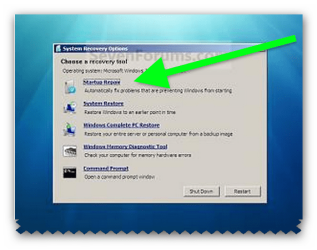
run the start up repair and see if windows will solve it. have you tried Windows 7 Boot Manager Remove instructions
 

My Computer

Computer Manufacturer/Model Number
packard bell IXTREME M5722
OS
Operating System : Windows 7 Home Premium Edition 6.01.7600 SP1 (x64)
CPU
Processor : Intel Core 2 Quad Q8300 @ 2500 MHz
Motherboard
Mainboard : Packard Bell (Acer EG43M )
Memory
Physical Memory :8GB Corsair4x 2GB 800MHz C5 DDR2
Graphics Card(s)
Video Card : XFX 6700 AMD
Monitor(s) Displays
Maestro 234DL - BenQ V2220 - BenQ VW2420H
Screen Resolution
Current Display :1920x1080p pixels at 60 Hz in HD LED
Hard Drives
Hard Disks : WDC (1000 GB)
Drive C: (Hard Disk) : 428 GB available on 491 GB
Drive D: (Hard Disk) : 426 GB available on 492 GB
SAMSUNG spinpoint HD103SJ 1000.2 GB
(X 2) KINGSTON SSD NOW V 30GB
PSU
XFX ProSeries 550W PSU
Case
PACKARD BELL IXTREME
Cooling
System Blower Current: 150mA Air Flow16CFM ;Akasa 90mm rear
Keyboard
Gigabyte Aivia K8100
Mouse
TRUST-Wireless Laser Mouse - Carbon edition MI-7770C
Internet Speed
TP-LINK > TL-WN951N / AV500 Gigabit Powerline Adapters
Browser
chrome dev
Other Info
EXTRA COOLING>(FAN CONTROLLER) PC Bay Cooler 3 x 40mm fans; Akasa AK-HD-BL Blue hard drive cooler 2 x 40 mm fan 4500 rpm 29.7 dBA
Bios> American Megatrends Inc.
Version : P01-A1
Date : 08/31/2009
Your situation is not clear for me, I'll make a guess, you can tell me if it's correct.

You have XP installed on your computer.

Then you installed Win7.

Your boot option defaulted to XP, you wanted it to default to Win7 so you deleted the XP boot option with bcdedit.

Now the boot options are 'boot manager' and 'windows7'.

Is this correct?


If the above is correct, your boot files are in the origional XP partition, when you have XP on your computer and install Win7 the boot files will stay in the XP partition.
This is called Dual Boot.

When you deleted the XP boot option the OS still needs the boot files, which are still in the XP partition so it will call it 'Boot Manager'

The only way to have a single boot and keep both OSs is to have them on seperate HDDs and unplug the XP HDD and install Win7 on the other HDD.
You can choose one as default and select the other with a function key (will depend on your computer) at boot up.

If you want to keep both OSs and have it default to Win7 at sartup, this can easily be done.
First you will need to add XP back to your Boot Manager.
Then use this tutorial:
How to Change the Default Operating System to Start in Windows 7


If this is not what you're trying to do then post a snip of your Disk Mangement so we can see what partitions you have .

Start button>right click 'Computer'> Select 'Manage' >click 'Disk Management'

Then go to the start button, in the 'Search programs and files' box type 'Snipping Tool' then hit enter.
Select the area over Disk Mangement and save to a convient place.
This tutorial will explain how to upload the file you just saved:
A Preferred Method of Uploading/Posting Screen Shots
 
Last edited:

My Computer

Computer type
PC/Desktop
Computer Manufacturer/Model Number
76~2.0
OS
Windows 7 Ult x64 - SP1/ Windows 8 Pro x64
CPU
Intel Core i5-3570K 4.6GHz
Motherboard
Gigabyte GA-Z77X UD3H, f18
Memory
8GB (2X4GB) DDR3 1600 Corsair Vengeance CL8 1.5v
Graphics Card(s)
Sapphire HD 7770 Vapor-X OC 1GB DDR5
Sound Card
Onboard VIA VT2021
Monitor(s) Displays
22" LCD Dell
Screen Resolution
1680x1050
Hard Drives
Samsung 840Pro 128GB SSD,
Seagate Barracuda 500GB SATA2 7200rpm 32MB cache, Seagate Barracuda 1TB SATA2 7200rpm 32MB cache,
PSU
Corsair HX650W
Case
Cooler Master Storm Scout
Cooling
Corsair H80 2x12cm Noctua NF P12 , 2x14cm case fans
Keyboard
Logitech Wave
Mouse
CM Sentinel
Internet Speed
Dismal
Antivirus
Avast
Browser
Opera Next
Other Info
Haswell laptop: HP Envy 17t-j, i7-4700MQ, GeForce 740M 2GB DDR3, 17.3" Full HD 1920x1080, 16GB RAM, Samsung 840 Pro 128GB, 1TB Hitachi 7200 HDD,
Desktop: eSATA ports,
External eSATA Seagate 500GB SATA2 7200rpm,
External WD USB 500GB
As an EasyBCD alternative you can use Free Windows BCD Editor - Windows 7 and Vista - it displays the whole contents of the BCD store in an explorer like style. All BCD entries are editable/deletable and nothing is hidden from the user.
 

My Computer

Computer Manufacturer/Model Number
Acer Notebook
OS
Win 8 RP, Win 7, XP
CPU
Intel
Back
Top