Boot order issue.......

WakkoWarner

New member
Local time
8:15 AM
Messages
2
When I originally installed 7 on my dad's PC, I disconnected the other 2 hard drives (I did not want the boot selection screen popping up all the time). Everything has been working fine (he uses XP, so I use the BIOS to select the hard drive boot order when I want to boot into 7). Yesterday I disconnected the Windows 7 hard drive, so that I could clone his XP installation over to the secondary hard drive in the machine (the primary & secondary drives are 80 GB SATA units, while the Windows 7 drive is a 30 GB IDE unit). When I was finished, I shut down the machine & hooked the Windows 7 hard drive back up. For some odd reason, the machine boots into 7 no matter which drive is selected first in the BIOS boot order. I cannot figure this one out. With the Windows 7 drive disconnected, the machine boots into XP just fine. Does anyone have any idea what could be causing this to happen?? I cloned the XP drive once before & did not have this problem(I do it every couple of months so that he has a complete image should the main hard drive fail). Any input will be greatly appreciated. Thanks in advance.
 

My Computer

OS
OS X
CPU
Athlon XP 2800+
Motherboard
Epox 8KRAIPRO
Memory
2 GB
Graphics Card(s)
Radeon 1650
Hi and welcome to windows 7 forums.
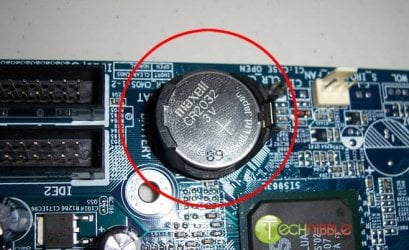
Looks like the BIOS is unable to hold the settings.
Open your computer and remove the CMOS battery and put it back in. This should fix it.
remove-battery.jpg
 

My Computer

Computer Manufacturer/Model Number
Samsung NP530U4B-S02IN
OS
Windows® 8 Pro (64-bit)
CPU
Intel® Core™ i5 Processor 2467M (1.60GHz, 3MB L3 Cache)
Motherboard
Samsung Electronics
Memory
6GB DDR3 System Memory at 1,333MHz (on BD 4GB + 2GB x 1)
Graphics Card(s)
AMD Radeon™ HD7550M 1GB DDR3 (Ext. Graphic)
Sound Card
Realtek High Definition Audio
Monitor(s) Displays
35.56cm (14.0) SuperBright 300nit HD LED Display
Screen Resolution
1366x768
Hard Drives
1TB S-ATA II Hard Drive (5400RPM) with ExpressCache 16GB SSD
Internet Speed
sucks
Antivirus
Microsoft Security Essentials
Browser
Google Chrome (Sync enabled)
I decided to disconnect the secondary SATA drive (the one I cloned the OS to) & run it through a boot cycle with the primary SATA drive & the IDE drive hooked up (the one with 7 on it). It booted to XP just fine. So after I did a small update that Windows needed, I shut down, hooked up the secondary SATA drive again & it is booting like it should now.
 

My Computer

OS
OS X
CPU
Athlon XP 2800+
Motherboard
Epox 8KRAIPRO
Memory
2 GB
Graphics Card(s)
Radeon 1650
Oh that's great. Glad to hear that you got it sorted. :)
 

My Computer

Computer Manufacturer/Model Number
Samsung NP530U4B-S02IN
OS
Windows® 8 Pro (64-bit)
CPU
Intel® Core™ i5 Processor 2467M (1.60GHz, 3MB L3 Cache)
Motherboard
Samsung Electronics
Memory
6GB DDR3 System Memory at 1,333MHz (on BD 4GB + 2GB x 1)
Graphics Card(s)
AMD Radeon™ HD7550M 1GB DDR3 (Ext. Graphic)
Sound Card
Realtek High Definition Audio
Monitor(s) Displays
35.56cm (14.0) SuperBright 300nit HD LED Display
Screen Resolution
1366x768
Hard Drives
1TB S-ATA II Hard Drive (5400RPM) with ExpressCache 16GB SSD
Internet Speed
sucks
Antivirus
Microsoft Security Essentials
Browser
Google Chrome (Sync enabled)
Back
Top