Boot OS selection

canuck257

New member
Local time
1:44 PM
Messages
19
Location
BC. Canada
I have re-installed Windows 7 on my computer to resolve a number of issues. As a result I now get a screen asking which version of Windows I wish to use that requires me to hit enter. How do I get rid of this screen please?
 

My Computer

OS
Windows 7 32 bit
I have re-installed Windows 7 on my computer to resolve a number of issues. As a result I now get a screen asking which version of Windows I wish to use that requires me to hit enter. How do I get rid of this screen please?

Have you got two versions of Windows on your PC? What choices does it give you?
 

My Computer

Computer type
PC/Desktop
Computer Manufacturer/Model Number
Custom Build
OS
Windows 7 Home Premium 32-Bit - Build 7600 SP1
CPU
Intel Core i3-2120 3.30Ghz
Motherboard
Asus P8Z68-V LX Intel Z68 Socket H2 ATX
Memory
Kingston 4 GB DDR3 1333 mhz
Graphics Card(s)
AMD Radeon HD6670
Sound Card
Sound Blaster Audigy SE 24-Bit
Monitor(s) Displays
Asus VE228
Screen Resolution
1440 X 900
Hard Drives
OCZ Vertex 3 120 GB Sata 3 SSD ==
Kingston SH103/S3 120 G Hyper X 120 GB SSD ==
Western Digital 500 GB Caviar Green 7200 RPM ==
PSU
Corsair CX600M == 600 Watt
Case
NZXT Apollo - Silver with Clear Side Panel
Cooling
Three 120 mm Fans
Keyboard
Microsoft Natural 4000
Mouse
Microsoft Custom Optical 3000
Internet Speed
AT&T Fiber Optic Wireless Network
Antivirus
Microsoft Security Essentials
Browser
Chrome
Other Info
120 mm Blue LED Fan -- Three Blue LED Lazer Light Sticks
I have re-installed Windows 7 on my computer to resolve a number of issues. As a result I now get a screen asking which version of Windows I wish to use that requires me to hit enter. How do I get rid of this screen please?

Have you got two versions of Windows on your PC? What choices does it give you?


Only one version. The altenate choice is "Use an older version of Windows". I think this comes from me having tried to resolve the problems by installing Windows retaining the old settings (which did not fix anything) before doing a "clean" install.
 

My Computer

OS
Windows 7 32 bit
You should only get the Dual Boot menu you describe if you reinstalled to another partition from your old Win7.

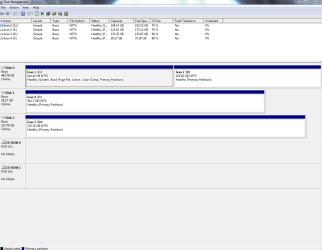
Can you post back a screenshot of your full Disk Mgmt drive map, using Snipping Tool in Start Menu. We can then see what is going on with your installation(s) and partitioning, and help you correct it if necessary.
 
You should only get the Dual Boot menu you describe if you reinstalled to another partition from your old Win7.

Can you post back a screenshot of your full Disk Mgmt drive map, using Snipping Tool in Start Menu. We can then see what is going on with your installation(s) and partitioning, and help you correct it if necessary.

I'm going to need some help with this!! I'm very new to Windows 7 so I would appreciate a step by step "how to" if possible?
 

My Computer

OS
Windows 7 32 bit
Click Start orb in bottom left>Rightclick Computer>Manage>Disk Management. Maximize to full screen.

Type Snipping Tool in Start search box (above Orb button), open Tool, select Rectangular Snip, draw box around full Disk mgmt drive map and listings. Save as file to Desktop.

Click Paper clip in new Quick Reply box, attach file.
 
Hopefully?? this is it!!
 

Attachments

  • Disk Capture.PNG
    Disk Capture.PNG
    24.8 KB · Views: 54

My Computer

OS
Windows 7 32 bit
Can you account for what is on each of those partitions shown? It doesn't look like you have an OS on any except C.

In that case, first type msconfig into Start Search box, on Boot tab see if more than one listing is there and delete the one which is not active.

If that doesn't work, then install EasyBCD 2.0 and remove the extra listing on Edit Boot Menu tab.
 
Back
Top