Boot problems following use of EasyBCD

ppbrec1

New member
Local time
4:21 AM
Messages
23
Location
Brecon, Mid Wales, UK
I have XP pro on one internal disk and W7 pro on another. Both were working fine except the OS choice screen at startup was not allowing me to boot straight in to the OS of choice (there was another choice screen when using the XP option). It was trying to rectify this that I started using Easy BCD and managed to completely mess up my boot up process. At one point I was not able to go any further than black screens with white print!
XP is working again courtesy of a clean instal (there were only programs on that drive and no data to worry about)
The W7 drive is another matter though. I had spent quite a bit of time setting things up as I wanted and whilst all data is backed up, restoring the drive to where it was will be a real pain.
The W7 drive was supplied by the maker (Novatech, a UK firm) with the OS pre-installed and a recovery partition included (plus a W7 OEM cd).
It appears that the Recovery Partition also included the MBR.
As a result of my endeavours the drive does boot into W7 but no longer recognises the OS as a genuine copy and hangs at the "preparing your desktop" screen before advising that the copy of W7 is not genuine and powering down.
Any bright ideas would be much appreciated if it can save me rebuilding things to the way they were.
The OS's incidentally are W7 pro 64bit and XP pro 32bit.(and both are genuine!)
 

My Computer My Computer

Computer Manufacturer/Model Number
Novatech (Custom build)
OS
Windows 7 Pro (64 bit), fully updated
CPU
Intel i5-2500
Motherboard
Asus P8P67-M
Memory
8Gb DDR3 10666/1333Mhz
Graphics Card(s)
nVidia GeForce GT220
Sound Card
Soundblaster X-Fi Extreme (Music)
Monitor(s) Displays
HP ZR24w
Hard Drives
1 x Crucial M500 480Gb SSD
2 x WD Caviar Black 640Gb 7200rpm 4.2ms SATA
2 x WD 200Gb SATA
PSU
Novatech 750W Silent ATX2 Modular
Case
Coolermaster Elite 330
Cooling
Front & rear case 120mm Akasa silent fans
Keyboard
Microsoft wireless Comfort 5000
Mouse
do
Internet Speed
Broadband (slow end)
Have you run Startup Repair repeatedly and what did it report?

It's too bad you didn't check with us when you had the EasyBCD problems before reinstalling XP as we could have easily helped you correct it.

Non-geniune lockouts after repairs, reimaging or repartitioning are often caused by drive letter slippage. Download and burn to CD (using Windows Image Burner) this program: Paragon rescue disk; change drive letter; recover data. Boot into Normal mode, select Boot corrector, browse to the correct partition by size and name, make sure it has its correct letter. If not, change the letter to the correct one, if necessary freeing up the letter which has been hijacked by another partition.


Is the OEM disk you have a Win7 reinstallation DVD or just drivers? If necessary we can help you get the superior Clean Reinstall Windows 7 Factory OEM without the OEM bloatware and useless factory utilties which have much better versions built into WIn7. This will also correctly configure the Dual Boot with XP partition. Start by copying your data out to external or flash stick using Paragon CD.
 
Hi Gregrocker,

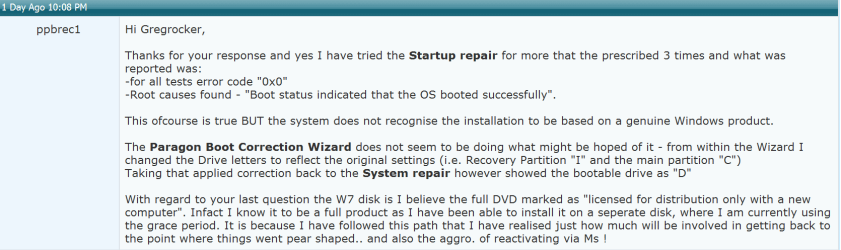
Thanks for your response and yes I have tried the Startup repair for more that the prescribed 3 times and what was reported was:
-for all tests error code "0x0"
-Root causes found - "Boot status indicated that the OS booted successfully".

This ofcourse is true BUT the system does not recognise the installation to be based on a genuine Windows product.

The Paragon Boot Correction Wizard does not seem to be doing what might be hoped of it - from within the Wizard I changed the Drive letters to reflect the original settings (i.e. Recovery Partition "I" and the main partition "C")
Taking that applied correction back to the System repair however showed the bootable drive as "D"

With regard to your last question the W7 disk is I believe the full DVD marked as "licensed for distribution only with a new computer". Infact I know it to be a full product as I have been able to install it on a seperate disk, where I am currently using the grace period. It is because I have followed this path that I have realised just how much will be involved in getting back to the point where things went pear shaped.. and also the aggro. of reactivating via Ms !
 

My Computer My Computer

Computer Manufacturer/Model Number
Novatech (Custom build)
OS
Windows 7 Pro (64 bit), fully updated
CPU
Intel i5-2500
Motherboard
Asus P8P67-M
Memory
8Gb DDR3 10666/1333Mhz
Graphics Card(s)
nVidia GeForce GT220
Sound Card
Soundblaster X-Fi Extreme (Music)
Monitor(s) Displays
HP ZR24w
Hard Drives
1 x Crucial M500 480Gb SSD
2 x WD Caviar Black 640Gb 7200rpm 4.2ms SATA
2 x WD 200Gb SATA
PSU
Novatech 750W Silent ATX2 Modular
Case
Coolermaster Elite 330
Cooling
Front & rear case 120mm Akasa silent fans
Keyboard
Microsoft wireless Comfort 5000
Mouse
do
Internet Speed
Broadband (slow end)
Windows recovery environment ( System Repair) will assign it's own drive letters - they are temporary and have nothing to do with the drive letters stored in your operating system on the hard drive.

If you are certain that when you used Paragon you assigned the correct drive letter to your windows 7 partition, try booting it and see what happens - you may still get a windows not genuine message for a moment - but should be able to get past it.
 

My Computers My Computers

System One System Two

  • Computer type
    PC/Desktop
    OS
    7 X64
    CPU
    i5 8400
    Motherboard
    gigabyte b365m ds3h
    Memory
    2x8gb 3200mhz
    Hard Drives
    various
    PSU
    pure power 11 400w cm
    Case
    Coolermaster
    Cooling
    cryorig m9i
  • Computer type
    PC/Desktop
    OS
    7x64
    CPU
    g5400
    Motherboard
    ga b365m ds3h
    Memory
    8gb ddr4 2400
    PSU
    xfx pro 450w
W7 Forum - SIW2 reply1.PNG

Thanks SIW2. I have again tried to boot into my original W7 drive but to no avail. The startup hangs on the "preparing your desktop" screen before the screen eventually turns black and having in the bottom right corner the advice that "This copy of Windows is not genuine".

As to my certainty of having entered the correct drive information in the Boot Correction Wizard, I guess in truth I can not be certain. I am sure that the Drive letters I have assigned are those which were originally allocated to the Drive / Partitions (as seen in Disk Management) before things went wrong. If letters might have been varied in the MBR via my forray into Easy BCD, I am not sure how I would gain that info.
 

My Computer My Computer

Computer Manufacturer/Model Number
Novatech (Custom build)
OS
Windows 7 Pro (64 bit), fully updated
CPU
Intel i5-2500
Motherboard
Asus P8P67-M
Memory
8Gb DDR3 10666/1333Mhz
Graphics Card(s)
nVidia GeForce GT220
Sound Card
Soundblaster X-Fi Extreme (Music)
Monitor(s) Displays
HP ZR24w
Hard Drives
1 x Crucial M500 480Gb SSD
2 x WD Caviar Black 640Gb 7200rpm 4.2ms SATA
2 x WD 200Gb SATA
PSU
Novatech 750W Silent ATX2 Modular
Case
Coolermaster Elite 330
Cooling
Front & rear case 120mm Akasa silent fans
Keyboard
Microsoft wireless Comfort 5000
Mouse
do
Internet Speed
Broadband (slow end)
Oem activation involves a slic table in bios with a matching validation marker.

As far as I know - the mbr is not relevant.

Because you are getting as far as you are - you are way past the mbr stage - there is nothing wrong with the mbr.

What exactly did you do with Easybcd?
 

My Computers My Computers

System One System Two

  • Computer type
    PC/Desktop
    OS
    7 X64
    CPU
    i5 8400
    Motherboard
    gigabyte b365m ds3h
    Memory
    2x8gb 3200mhz
    Hard Drives
    various
    PSU
    pure power 11 400w cm
    Case
    Coolermaster
    Cooling
    cryorig m9i
  • Computer type
    PC/Desktop
    OS
    7x64
    CPU
    g5400
    Motherboard
    ga b365m ds3h
    Memory
    8gb ddr4 2400
    PSU
    xfx pro 450w

My Computer My Computer

Computer Manufacturer/Model Number
Novatech (Custom build)
OS
Windows 7 Pro (64 bit), fully updated
CPU
Intel i5-2500
Motherboard
Asus P8P67-M
Memory
8Gb DDR3 10666/1333Mhz
Graphics Card(s)
nVidia GeForce GT220
Sound Card
Soundblaster X-Fi Extreme (Music)
Monitor(s) Displays
HP ZR24w
Hard Drives
1 x Crucial M500 480Gb SSD
2 x WD Caviar Black 640Gb 7200rpm 4.2ms SATA
2 x WD 200Gb SATA
PSU
Novatech 750W Silent ATX2 Modular
Case
Coolermaster Elite 330
Cooling
Front & rear case 120mm Akasa silent fans
Keyboard
Microsoft wireless Comfort 5000
Mouse
do
Internet Speed
Broadband (slow end)
Oem activation involves a slic table in bios with a matching validation marker.

As far as I know - the mbr is not relevant.

Because you are getting as far as you are - you are way past the mbr stage - there is nothing wrong with the mbr.

What exactly did you do with Easybcd?

SIW2,

I wish I knew! This seems to enforce that a little knowledge is a dangerous thing.

I'll try to put together the material that Gregrocker has suggested to see if that clarifies the current state of play.

From attempts to get things as I wanted them (before the foul up) it did seem that the relationship between the two partitions on the pre-loaded drive were key to the genuineness of the installation being recognised, booting from the Recovery partition ("I" initially) to the system partition "C".

It appears that the drive letters on my pc have indeed ""slipped" and I am guessing that the combination of drive letters being looked for at start up is no longer what is being found.

I'll get snipping.
 

My Computer My Computer

Computer Manufacturer/Model Number
Novatech (Custom build)
OS
Windows 7 Pro (64 bit), fully updated
CPU
Intel i5-2500
Motherboard
Asus P8P67-M
Memory
8Gb DDR3 10666/1333Mhz
Graphics Card(s)
nVidia GeForce GT220
Sound Card
Soundblaster X-Fi Extreme (Music)
Monitor(s) Displays
HP ZR24w
Hard Drives
1 x Crucial M500 480Gb SSD
2 x WD Caviar Black 640Gb 7200rpm 4.2ms SATA
2 x WD 200Gb SATA
PSU
Novatech 750W Silent ATX2 Modular
Case
Coolermaster Elite 330
Cooling
Front & rear case 120mm Akasa silent fans
Keyboard
Microsoft wireless Comfort 5000
Mouse
do
Internet Speed
Broadband (slow end)
Oem activation involves a slic table in bios with a matching validation marker.

As far as I know - the mbr is not relevant.

Because you are getting as far as you are - you are way past the mbr stage - there is nothing wrong with the mbr.

What exactly did you do with Easybcd?

SIW2,

I wish I knew! This seems to enforce that a little knowledge is a dangerous thing.

I'll try to put together the material that Gregrocker has suggested to see if that clarifies the current state of play.

From attempts to get things as I wanted them (before the foul up) it did seem that the relationship between the two partitions on the pre-loaded drive were key to the genuineness of the installation being recognised, booting from the Recovery partition ("I" initially) to the system partition "C".

It appears that the drive letters on my pc have indeed ""slipped" and I am guessing that the combination of drive letters being looked for at start up is no longer what is being found.

I'll get snipping.

OK. Sorry for the delay - my wife feels that life should go on as normal despite my PC's ailments.

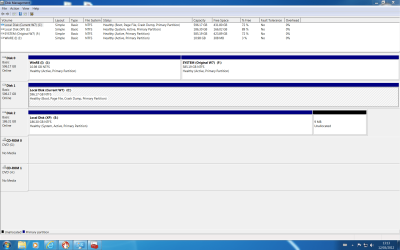
Below are the screen shots gregrocker was suggesting for comparative purposes:-

a) Expanded view of Disk Management - 3 x HDD drives attached.

Disk Mgt Capture 12.3.12.PNG

b) Paragon Disk Drives screen.

Paragon Disk Map 12.3.12 Capture.PNG

{I am not sure whether at this stage it would be helpful or not to give a brief outline of what has gone before - if not then please ignore this bracketed section.

My PC came with W7 pre-installed on the Drive currently containing Partitions "I" and "F". The smallest HDD currently "E" came from my last machine where I was running XP and on which the mobo "died".
At the outset I was not au fait with Microsoft's licensing policy when introducing the old drive into the present PC - a leason well enough learned.
When a new copy of XP was obtained it seemed that minimum cause for disruption would come from disconnecting my other drives whilst a clean install was performed.
Once completed and all drives reconnected I had two OS's on the seperate drives and then tried to employ the boot wizard from Paragon's Hard Disk Management Suite 11.

I could not have used that product properly because the boot process I was left with required going through an extra screen. At the time that seemed to offend sensibilities - in hind site it really was not that much of a problem !!

So to overcome that I contacted Paragon's "Support" section who felt that a reinstall of XP first followed by W7 was the simplest way to achieve a Dual Boot.They did however mention the EasyBCD program and that is how I came across it - and armed with this new-found toy managed to cause even more mayhem than I had achieved with Paragon's program alone.}

From background reading, and because W7 came pre-installed with the PC, I have tended to disconnect drives "to preserve their integrity?" whilst working on others. So it is that in my earlier comments I have referred to Drive letters that no longer match the screen shots I have produced for you now. What I can tell you however is that whilst the original W7 drive is the only one connected, and accessing the data via Startup repair on the W7 disc, the partitions which started life as "I" and "C" are respectively shown as "C" and "D" from a Diskpart query at the Comand Prompt. Whether this holds any clues I regret I can not interpret.
 

My Computer My Computer

Computer Manufacturer/Model Number
Novatech (Custom build)
OS
Windows 7 Pro (64 bit), fully updated
CPU
Intel i5-2500
Motherboard
Asus P8P67-M
Memory
8Gb DDR3 10666/1333Mhz
Graphics Card(s)
nVidia GeForce GT220
Sound Card
Soundblaster X-Fi Extreme (Music)
Monitor(s) Displays
HP ZR24w
Hard Drives
1 x Crucial M500 480Gb SSD
2 x WD Caviar Black 640Gb 7200rpm 4.2ms SATA
2 x WD 200Gb SATA
PSU
Novatech 750W Silent ATX2 Modular
Case
Coolermaster Elite 330
Cooling
Front & rear case 120mm Akasa silent fans
Keyboard
Microsoft wireless Comfort 5000
Mouse
do
Internet Speed
Broadband (slow end)
When you have the luxury of separate HD's it's cleanest to boot them via the BIOS boot order or one-time BIOS Boot Menu key to avoid problems like this. You did right unplugging the other HD's during install, but when you plugged them back in you should have set preferred to boot first in BIOS, then booted the other using Boot Menu key given on first screen (normally F8 on Asus')

I saw nothing mentioned in all the rambling about a second Win7 installation which is what's booted in the screenshots. It is booting off of the XP partition as depicted by it holding the only System flag. Are you getting a Multi-boot menu to choose it successfully? Is the other Win7 shown on this menu?

Did the I:Winre partition come that way from the factory? Is it also the Recovery partition as it appears judging by size? It was likely the System partition which is hard to determine since both Disk0 partitions are now incorrectly marked Active, but if it was System it has lost its boot files which apparently moved to the only remaining System partition on XP.

Perhaps we should start by moving System back to I , but let's wait for your answers and SIW2 to weigh in.
 
Last edited:
You're right ofcourse with regard to using the boot order in the BIOS rather than mess about with the Paragon Boot Wizard but this was a first time effort for me and impatience got the better of thorough research.


Quote for Greg Capture.PNG

As to the present W7 yes I did indeed do a clean install on the free HDD which came with the PC and having already got a drive with XP on it I left that attached this time and have the conventional Dual Boot screen as a result. The choices presented lead to the correct OS's but no, the original W7 is not shown in the menu.

As to the WinRE partition "I" - yes the factory set this up as a recovery partition.
 

My Computer My Computer

Computer Manufacturer/Model Number
Novatech (Custom build)
OS
Windows 7 Pro (64 bit), fully updated
CPU
Intel i5-2500
Motherboard
Asus P8P67-M
Memory
8Gb DDR3 10666/1333Mhz
Graphics Card(s)
nVidia GeForce GT220
Sound Card
Soundblaster X-Fi Extreme (Music)
Monitor(s) Displays
HP ZR24w
Hard Drives
1 x Crucial M500 480Gb SSD
2 x WD Caviar Black 640Gb 7200rpm 4.2ms SATA
2 x WD 200Gb SATA
PSU
Novatech 750W Silent ATX2 Modular
Case
Coolermaster Elite 330
Cooling
Front & rear case 120mm Akasa silent fans
Keyboard
Microsoft wireless Comfort 5000
Mouse
do
Internet Speed
Broadband (slow end)
How are you attempting to boot the original Win7 then?

You can unplug the other HD's, mark F Inactive: Partition - Mark as Inactive - Windows 7 Forums

Then from DVD or Repair CD run Startup Repair - Run 3 Separate Times.

If this fails switch the Active flag to F and try again with the three repairs.

This will move the System boot files to the Recovery (as it likely came from Factory, so Recovery would run from boot) or Win7 so that it will be correctly configured.
 
At present I am not attempting to boot into that drive.

If I unplug the other two drives (which are functioning properly) then the system boots into the I / F drive - it does boot into W7 but hangs at the "Preparing your desktop" screen and eventually the screen goes to black and in the bottom right hand corner it advises that it is not a genuine copy of Windows. So, whilst I can boot into the drive / OS, I can not use it.

I have tried the Startup repair on a number of occasions but will make sure that I have tried all the various combinations you have suggested.

If that produces no success I think I shall try to get hold of someone at the suppliers tomorrow to establish exactly what this "I" partition is all about. Unfortunately its a bit pot luck as to who is on the Support Desk and does normally take a considerable amount of time.

I'll let you know the outcome
 

My Computer My Computer

Computer Manufacturer/Model Number
Novatech (Custom build)
OS
Windows 7 Pro (64 bit), fully updated
CPU
Intel i5-2500
Motherboard
Asus P8P67-M
Memory
8Gb DDR3 10666/1333Mhz
Graphics Card(s)
nVidia GeForce GT220
Sound Card
Soundblaster X-Fi Extreme (Music)
Monitor(s) Displays
HP ZR24w
Hard Drives
1 x Crucial M500 480Gb SSD
2 x WD Caviar Black 640Gb 7200rpm 4.2ms SATA
2 x WD 200Gb SATA
PSU
Novatech 750W Silent ATX2 Modular
Case
Coolermaster Elite 330
Cooling
Front & rear case 120mm Akasa silent fans
Keyboard
Microsoft wireless Comfort 5000
Mouse
do
Internet Speed
Broadband (slow end)
According to all we've seen here with OEM machine partitioning the size would have to make it a Recovery partition holding the factory image used to reimage the HD from within WIndows or from boot using it's hotkey. In most cases these partitions when in first place are System Active meaning the System boot files are located there so that it can boot using just the hotkey.

However it's lost its System flag (holds the System boot files) which is incorrect and it has two Active partitions on a single HD which I have never seen before in thousands of these cases. So I would sort that first as given earlier to at least have it configured correctly and see where it goes.

Hopefully SIW2 will drop in soon to add his wisdom.
 
Last edited:
Regrettably I was unable to give sufficient time today to make contact with the PC's suppliers, but hope to do that tomorrow.

I have marked the "F" partition as inactive but that does not seem to have made a difference, so I'm hoping that Novatech can provide the info on what the "I" partition is supposed to contain and if they can suggest a fix. We'll see!
 

My Computer My Computer

Computer Manufacturer/Model Number
Novatech (Custom build)
OS
Windows 7 Pro (64 bit), fully updated
CPU
Intel i5-2500
Motherboard
Asus P8P67-M
Memory
8Gb DDR3 10666/1333Mhz
Graphics Card(s)
nVidia GeForce GT220
Sound Card
Soundblaster X-Fi Extreme (Music)
Monitor(s) Displays
HP ZR24w
Hard Drives
1 x Crucial M500 480Gb SSD
2 x WD Caviar Black 640Gb 7200rpm 4.2ms SATA
2 x WD 200Gb SATA
PSU
Novatech 750W Silent ATX2 Modular
Case
Coolermaster Elite 330
Cooling
Front & rear case 120mm Akasa silent fans
Keyboard
Microsoft wireless Comfort 5000
Mouse
do
Internet Speed
Broadband (slow end)
Just a quick update. Trawling through my backup material I found a disk image I had taken with Paragon Hard Disk Suite 11 last year. Whilst I do not want to overwrite the data on the main partition I am quite happy to restore the WinRE recovery partition (I) to a good state. Naturally this has not rectified the situation on its own as the link remains unaltered on the "C" partition.
So I have e-mailed the PC suppliers to see if they can advise me of what I may need / be able to restore to complete the exercise. No response as yet, so we shall wait and see if that is a possibility.
No reply as yet - and the files I need may be inaccessable
 

My Computer My Computer

Computer Manufacturer/Model Number
Novatech (Custom build)
OS
Windows 7 Pro (64 bit), fully updated
CPU
Intel i5-2500
Motherboard
Asus P8P67-M
Memory
8Gb DDR3 10666/1333Mhz
Graphics Card(s)
nVidia GeForce GT220
Sound Card
Soundblaster X-Fi Extreme (Music)
Monitor(s) Displays
HP ZR24w
Hard Drives
1 x Crucial M500 480Gb SSD
2 x WD Caviar Black 640Gb 7200rpm 4.2ms SATA
2 x WD 200Gb SATA
PSU
Novatech 750W Silent ATX2 Modular
Case
Coolermaster Elite 330
Cooling
Front & rear case 120mm Akasa silent fans
Keyboard
Microsoft wireless Comfort 5000
Mouse
do
Internet Speed
Broadband (slow end)
You can always copy out your data to external or flash using the Win7 DVD or System Repair Disk with this method: Copy & Paste - in Windows Recovery Console.

Or use free Paragon rescue disk to recover data.

Have you tried marking C Inactive and WinRE Active, then running Startup Repair up to 3 separate times with reboots with both other HD's unplugged? If it fails change the Active flag to C and try again. Once Win7 starts you can plug back in the other HD's and add it using EasyBCD, or boot it using BIOS Boot Menu key while setting the other Win7 HD first to boot since it is also booting XP via Dual Boot Menu.

You can have a picture of marking Active/Inactive if you use the very valuable tool free Partition Wizard bootable CD. After marking one partition Active, click on Disk # to highlight it, from Disk tab select Rebuild MBR, Apply. This may preclude the need to run Startup Repairs from the DVD/Repair CD.
http://www.sevenforums.com/tutorials/93347-copy-paste-windows-recovery-console.html
 
To conclude this topic I'll just post a quick note to acknowledge that I feel I have given sufficient time to this problem and now wish to move on with my life!!
.
Gregrocker, thanks for your various suggestions but regrettably I have not been able to get my original main drive back to a bootable / "genuine" state as I had initially hoped.

The PC suppliers have not returned to me with any suggestions and so I have had to make a decision.One actually made quite easy as, with the passage of time, I rebuilt more and more of the partition I had been reluctant to lose, for although the drive would not boot, all its contents were available via the OS I re-installed on my spare drive. My data was already backed up in any case.

So XP was re-installed (and now activated by telephone) and the subsequent re-instal of W7 has given me the correct set up for dual booting. Happily the W7 re-instal must have looked exactly like the original as that was reactivated online.

The end!
 
Last edited:

My Computer My Computer

Computer Manufacturer/Model Number
Novatech (Custom build)
OS
Windows 7 Pro (64 bit), fully updated
CPU
Intel i5-2500
Motherboard
Asus P8P67-M
Memory
8Gb DDR3 10666/1333Mhz
Graphics Card(s)
nVidia GeForce GT220
Sound Card
Soundblaster X-Fi Extreme (Music)
Monitor(s) Displays
HP ZR24w
Hard Drives
1 x Crucial M500 480Gb SSD
2 x WD Caviar Black 640Gb 7200rpm 4.2ms SATA
2 x WD 200Gb SATA
PSU
Novatech 750W Silent ATX2 Modular
Case
Coolermaster Elite 330
Cooling
Front & rear case 120mm Akasa silent fans
Keyboard
Microsoft wireless Comfort 5000
Mouse
do
Internet Speed
Broadband (slow end)
Glad you got it back up and running. Cleaner is always better so you came out on top!

If you want to post up a screenshot of your maximized Disk Management drive map we can look it over for you for any possible gremlins. Otherwise you can mark the thread Solved at top.
 
Back
Top