Boot repair problem

scleone1987

New member
Local time
7:19 AM
Messages
14
Location
Lecce
Hi,
I have an ASUS N56VZ-S4082V with Win7 Home Premium 64 bit SP1 installed (EFI BIOS). I recently installed and then removed Ubuntu 12.04 on another partition, and used EasyBCD to remove the Ubuntu boot entry that was still present in BIOS. Unfortunately, I used the command to rewrite the MBR, so now Win7 won't start:

File: \EFI\Microsoft\Boot\BCD
Code: 0xc0000098
Info: The Windows Boot Configuration Data File does not contain a valid OS entry.

Next I installed Ubuntu 13.04 on an unallocated disk space I already had. Ubuntu recognizes the Win7 partition and boot entry but when I select Win7 on boot selection screen, it returns an "Invalid EFI path" error.

Thanks to a handy tool, I generated the Bootinfo file: Ubuntu Pastebin


P.S. I don't have a Windows recovery image, and when I try to use a Win7 HP SP1 DVD and enter to system recovery options to repair the boot, it returns me the error that the version of the system recovery options is not compatible with this version of Windows.

Can you help me?

Thanks in advance.
 

My Computer

Computer Manufacturer/Model Number
ASUS N56VZ-S4082V
OS
Windows 7 Home Premium x64 SP1
CPU
Intel(R) Core(TM) i7-3610QM CPU @ 2.30GHz (8 cores)
Memory
8 GB DDR3 1600 MHz SDRAM
Graphics Card(s)
NVIDIA® GeForce® GT 650M with 2GB DDR3 VRAM
Sound Card
Intel Corporation 7 Series/C210 Series Chipset Family HDA
Monitor(s) Displays
15.6" Full HD (1920x1080)/Wide View Angle LED
Screen Resolution
1920x1080
Hard Drives
750 GB Hybrid (8GB SSD) Seagate Momentus XT-2 (ATA ST750LX003-1AC15)
PSU
6.3 A , 120 W
P.S. I don't have a Windows recovery image, and when I try to use a Windows 7 HP SP1 DVD and enter to system recovery options to repair the boot, it returns me the error that the version of the system recovery options is not compatible with this version of Windows.

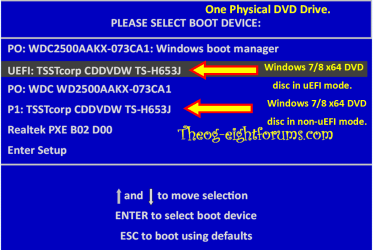
Is the DVD x64? If yes, boot the DVD in uEFI mode.

Windows 8 Downgrade-006 SB for posting.PNG
 

My Computer

OS
ME/XP/Vista/Win7
P.S. I don't have a Windows recovery image, and when I try to use a Windows 7 HP SP1 DVD and enter to system recovery options to repair the boot, it returns me the error that the version of the system recovery options is not compatible with this version of Windows.
Is the DVD x64? If yes, boot the DVD in uEFI mode.

View attachment 254040
I remember there wasn't an UEFI boot option but only the non-UEFI mode in BIOS boot priority list. When I created an USB with Ubuntu, however, both options were present. Is there a way to create a bootable Win7 USB in UEFI mode?
 

My Computer

Computer Manufacturer/Model Number
ASUS N56VZ-S4082V
OS
Windows 7 Home Premium x64 SP1
CPU
Intel(R) Core(TM) i7-3610QM CPU @ 2.30GHz (8 cores)
Memory
8 GB DDR3 1600 MHz SDRAM
Graphics Card(s)
NVIDIA® GeForce® GT 650M with 2GB DDR3 VRAM
Sound Card
Intel Corporation 7 Series/C210 Series Chipset Family HDA
Monitor(s) Displays
15.6" Full HD (1920x1080)/Wide View Angle LED
Screen Resolution
1920x1080
Hard Drives
750 GB Hybrid (8GB SSD) Seagate Momentus XT-2 (ATA ST750LX003-1AC15)
PSU
6.3 A , 120 W
P.S. I don't have a Windows recovery image, and when I try to use a Windows 7 HP SP1 DVD and enter to system recovery options to repair the boot, it returns me the error that the version of the system recovery options is not compatible with this version of Windows.
Is the DVD x64? If yes, boot the DVD in uEFI mode.

View attachment 254040
I remember there wasn't an UEFI boot option but only the non-UEFI mode in BIOS boot priority list. When I created an USB with Ubuntu, however, both options were present. Is there a way to create a bootable Win7 USB in UEFI mode?

You can make Repair CD on a PC with Windows 7 x64 in uEFI.

http://www.sevenforums.com/tutorials/2083-system-repair-disc-create.html

You can not use a USB Pendrive to do a startup Repair, as startup repair will find the MBR on the Pendrive & not the HD.
Therefore will not detect a problem.

Windows Vista or Windows 7 no longer starts, and the Startup Repair tool does not fix the problem
 

My Computer

OS
ME/XP/Vista/Win7
Is the DVD x64? If yes, boot the DVD in uEFI mode.

View attachment 254040
I remember there wasn't an UEFI boot option but only the non-UEFI mode in BIOS boot priority list. When I created an USB with Ubuntu, however, both options were present. Is there a way to create a bootable Win7 USB in UEFI mode?

You can make Repair CD on a PC with Windows 7 x64 in uEFI.

http://www.sevenforums.com/tutorials/2083-system-repair-disc-create.html

You can not use a USB Pendrive to do a startup Repair, as startup repair will find the MBR on the Pendrive & not the HD.
Therefore will not detect a problem.

Windows Vista or Windows 7 no longer starts, and the Startup Repair tool does not fix the problem
Thanks for your help and fast reply, I'll let you know if it will work.
 

My Computer

Computer Manufacturer/Model Number
ASUS N56VZ-S4082V
OS
Windows 7 Home Premium x64 SP1
CPU
Intel(R) Core(TM) i7-3610QM CPU @ 2.30GHz (8 cores)
Memory
8 GB DDR3 1600 MHz SDRAM
Graphics Card(s)
NVIDIA® GeForce® GT 650M with 2GB DDR3 VRAM
Sound Card
Intel Corporation 7 Series/C210 Series Chipset Family HDA
Monitor(s) Displays
15.6" Full HD (1920x1080)/Wide View Angle LED
Screen Resolution
1920x1080
Hard Drives
750 GB Hybrid (8GB SSD) Seagate Momentus XT-2 (ATA ST750LX003-1AC15)
PSU
6.3 A , 120 W
Done, but the UEFI mode is still absent.
 

My Computer

Computer Manufacturer/Model Number
ASUS N56VZ-S4082V
OS
Windows 7 Home Premium x64 SP1
CPU
Intel(R) Core(TM) i7-3610QM CPU @ 2.30GHz (8 cores)
Memory
8 GB DDR3 1600 MHz SDRAM
Graphics Card(s)
NVIDIA® GeForce® GT 650M with 2GB DDR3 VRAM
Sound Card
Intel Corporation 7 Series/C210 Series Chipset Family HDA
Monitor(s) Displays
15.6" Full HD (1920x1080)/Wide View Angle LED
Screen Resolution
1920x1080
Hard Drives
750 GB Hybrid (8GB SSD) Seagate Momentus XT-2 (ATA ST750LX003-1AC15)
PSU
6.3 A , 120 W
Back
Top