Boot Screen freezing !!

hussnainh8

New member
Local time
4:49 PM
Messages
3
Hi there,

I had windows 8 installed and my system froze on the desktop one day so I rebooted the system and it froze on the boot screen. I tried getting into recovery mode and safe mode which didn't work so refreshed the system back to windows 7. Windows 7 worked for a few days and then the system froze again, restarted the system and got the boot screen freezing as well. Eventually I got to safe mode with command prompt and the it froze on the CLASSPNP.SYS file. I took my second hard drive out and rebooted and windows 7 started booting like normal? what could the problem be? I know this is related to the CLASSPNP.SYS file but cant seem to figure out what caused this too happen.

Thanks, Reply ASAP


System Specs:

PSU: 400 Watt PSU
Graphics card: Nvidia Geforce 8500GT
Motherboard: Gigabyte 945GZM-S2
2x 160GB Harddrives
2GB DDR 2 RAM
Intel Pentium D 945 Dual Core 3.40GHZ
 

My Computer

OS
Windows 7 ultimate 32bit
Hello hussain and welcome mate the problem may be the amount of RAM you have mate only being 2GB DDR2.

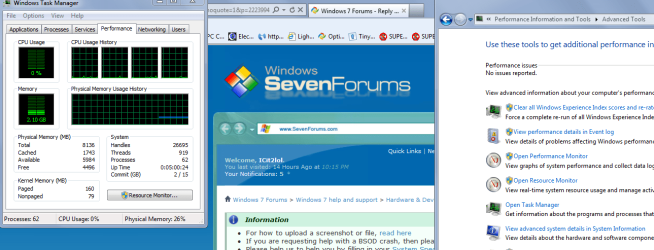
I would hazard a guess that if you run Windows Task manager you will see a lot of the RAM eaten up by the OS and the security etc see pic.

Control Panel > Performance Information and Tools > Task Manager and it will show you what is being used - CPU and RAM.

Ithink you need at least another 2GB in any case but not knowing what * requires probably more than 7.
 

Attachments

  • TM.PNG
    TM.PNG
    65.2 KB · Views: 4

My Computer

Computer type
PC/Desktop
Computer Manufacturer/Model Number
Own build (new) Desk1 / Asus ROG Win 7 / Desk2 1st build
OS
Desk1 7 Home Prem / Desk2 10 Pro / Main lap Asus ROG 10 Pro 2 laptop Toshiba 7 Pro Asus P2520 7 & 10
CPU
Desk1 i5 3750K / Laptop i7 GTX 860M / Desk2 i5 2500
Motherboard
Desk1 Asus P877-V / Desk2 Gigabyte H67 UD3H / Laptop ?
Memory
Desk1 8GB (1866) / Desk2 16GB (1333) / Laptop 8Gb DDR3
Graphics Card(s)
Desk 1& 2NVidia GTX 650 & Laptops on board Intel
Sound Card
Desk 1 & 2 -XONAR DG Realtek High Def audio Laptop
Monitor(s) Displays
Desk 1 Benq HD 2450 / Desk2 Philips 24" / Laptop 17.5"
Screen Resolution
1920x1080 D1 & D2 & Laptop 1
Hard Drives
Desk1 Samsung 120GB 830 SSD
Asus ROG 256GB 850 Pro SSD
Desk2 Samsung 840 256 SSD
Toshiba 120GB EVO
PSU
Desk 1 Corsair HX 1050/ Laptop ? / Desk 2 Corsair HX 650
Case
Desk 1 Cooler HAF XM ? Toshiba laptop / Desk2 Coolermaster
Cooling
Fans on all Desk1 -2 Desk2 - all Coolermasters 5 Laptop ?
Keyboard
Desk 1 MS Sidewinder X6 Desk 2 MS Sidewinder X 4
Mouse
Desk 1&2 - Gigabyte MS 900 gamer - laptop - Logitec wireless
Internet Speed
ADSL2+
Other Info
One other Desktop (tester) and spare Toshba laptop both with SSD's
Running Kaspersky 2016 ISS on all machines config'd identically
Logitec audio stereo systems on each machine (x3)
Canon MG5250MFC
Router/modem TP-Link running WPA2SK
Thank you for the quick reply :), I have opened task manager and it says my ram being used is 932mb with google chrome opened that still leaves 1gb for other applications. All i run is google chrome and my desktop I dont do any gaming on this PC. I havent had ram problems with this computer aswell, when i bought the computer of a friend it was working for atleast a year on windows 7 since then I put a extra 160gb harddrive into the system and started getting these problems. I know that windows 7 32 bit requires atleast 2gb minimum which is what I have but i also know it isnt the ram causing this problem. I know its to do with my harddrive which i need a solution to fix both my harddrives to work together.
 

My Computer

OS
Windows 7 ultimate 32bit
Hum that seems a lot for a browser Hussain and don't forget if you have Adobe and security plus all the Windows stuff it is going to make short work of 2GB mate I think you need another 2GB of RAM to be honest and lets take it from there. The remaining 1GB would be filled quite quickly once you start running apps.

But first to see what usage of your file system is try this Folder Size - Freeware file size analysis. Check the directory sizes, folder sizes and file sizes on your computer with this freeware tree size analysis tool. it will give you a pie chart showing the system break up and another is WinDirStat

WinDirStat - Windows Directory Statistics as I said each will show how the C: drive and individual folders are filled up. Just select the drive or individual folders ie Program Files and scan.
 

My Computer

Computer type
PC/Desktop
Computer Manufacturer/Model Number
Own build (new) Desk1 / Asus ROG Win 7 / Desk2 1st build
OS
Desk1 7 Home Prem / Desk2 10 Pro / Main lap Asus ROG 10 Pro 2 laptop Toshiba 7 Pro Asus P2520 7 & 10
CPU
Desk1 i5 3750K / Laptop i7 GTX 860M / Desk2 i5 2500
Motherboard
Desk1 Asus P877-V / Desk2 Gigabyte H67 UD3H / Laptop ?
Memory
Desk1 8GB (1866) / Desk2 16GB (1333) / Laptop 8Gb DDR3
Graphics Card(s)
Desk 1& 2NVidia GTX 650 & Laptops on board Intel
Sound Card
Desk 1 & 2 -XONAR DG Realtek High Def audio Laptop
Monitor(s) Displays
Desk 1 Benq HD 2450 / Desk2 Philips 24" / Laptop 17.5"
Screen Resolution
1920x1080 D1 & D2 & Laptop 1
Hard Drives
Desk1 Samsung 120GB 830 SSD
Asus ROG 256GB 850 Pro SSD
Desk2 Samsung 840 256 SSD
Toshiba 120GB EVO
PSU
Desk 1 Corsair HX 1050/ Laptop ? / Desk 2 Corsair HX 650
Case
Desk 1 Cooler HAF XM ? Toshiba laptop / Desk2 Coolermaster
Cooling
Fans on all Desk1 -2 Desk2 - all Coolermasters 5 Laptop ?
Keyboard
Desk 1 MS Sidewinder X6 Desk 2 MS Sidewinder X 4
Mouse
Desk 1&2 - Gigabyte MS 900 gamer - laptop - Logitec wireless
Internet Speed
ADSL2+
Other Info
One other Desktop (tester) and spare Toshba laptop both with SSD's
Running Kaspersky 2016 ISS on all machines config'd identically
Logitec audio stereo systems on each machine (x3)
Canon MG5250MFC
Router/modem TP-Link running WPA2SK
Even though I have 2gb the system without google chrome running is at around 600mb that is including my antivirus and other system background programs. When I open Google Chrome to browse websites I can open atleast 5 tabs without my system reaching over 1gb, the maximum I have seen the system run at is 980mb. I am actually thinking about ram upgrade which also includes me having to check with my motherboard how much ram it can support. Now I have downloaded the program called Foldersize. It has scanned the system and given a pie chart, the pie chart shows, Windows (58.03%), pagefile.sys (12.33%), program files (10.3%). hiberfil.sys (9.25%), users (7.03), program data (2.1%) and other (0.97%). I havent really understood why you have given me a link to this program as this hasnt really helped me. I can confirm that ram isnt the issue with the system as i removed my secondary harddrive and havent had a problem since then. Thanks for the help so far :)

Happy Christmas :)
 

My Computer

OS
Windows 7 ultimate 32bit
Have you tried running a sfc /scannow? Could be that the file is corrupted. Maybe a repair install?
 

My Computer

Computer type
Laptop
Computer Manufacturer/Model Number
MSI GE72VR Apache Pro-416
OS
Windows 10x64 Build 1709
CPU
Intel i7 7700HQ Kaby Lake
Motherboard
Micro-Star Intl. MS-179B (U3C1)
Memory
16 GB DDR4 @2400
Graphics Card(s)
Nvidia Geforce GTX 1060
Screen Resolution
1920x1080 120Hz
Hard Drives
256 GB Nvme M.2 SSD

1TB HDD@7200
Cooling
Cooler Blast 4
Keyboard
Steel Series
Antivirus
Bit Defender Free
Browser
Edge
Back
Top