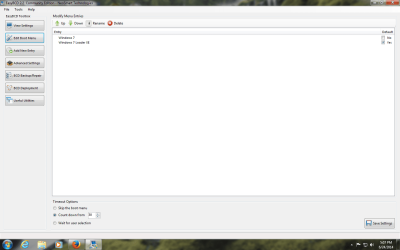
boot screen has 2 options

George A

New member
Local time
3:57 PM
Messages
3
I recently installed win 7. After activating I now get a boot up screen that has three options.
1. windows 7
2. windows 7 setup
3. memory
On a link here it says to go to system properties and check the boot screen and shows two operating systems. Mine only shows the win 7 os. Thanks for your help
 

My Computer

Computer type
PC/Desktop
Computer Manufacturer/Model Number
custom
OS
windows 7 ultimate x 64
CPU
AMD
Motherboard
Asus
Memory
14 gig
Hard Drives
80 gig
Antivirus
frontier secure
Browser
firefox
Please post a screenshot of http://www.sevenforums.com/tutorials/274797-disk-management-post-screen-capture-image.html for us to look over. Tell us to the best of your knowlege what's on each partition or label them in the empty label field on each partition's Properties box.

What happens if you click Setup choice? The Windows Memory Diagnostic will always appear on that Boot screen so you can ignore it unless you want to test your RAM. But does the setup listing actually try to start the install again? Is your installation media still attached?

Check in msconfig>Boot to see if another listing is there to delete.

If not then install EasyBCD (click Download - no Name or Email required) to uncheck Boot Menu and delete the unwanted listing on Edit OS Menu tab.
 
Thanks for your help. hope this will give you ideas.


I hope the screenshots come thru. One is Disk Management. the other is easybcd.screen shot.png


easy.png

boot menu.png
 

My Computer

Computer type
PC/Desktop
Computer Manufacturer/Model Number
custom
OS
windows 7 ultimate x 64
CPU
AMD
Motherboard
Asus
Memory
14 gig
Hard Drives
80 gig
Antivirus
frontier secure
Browser
firefox
THANKS FOR YOUR HELP. iT APPEARS TO BE WORKING ok
George A.
 

My Computer

Computer type
PC/Desktop
Computer Manufacturer/Model Number
custom
OS
windows 7 ultimate x 64
CPU
AMD
Motherboard
Asus
Memory
14 gig
Hard Drives
80 gig
Antivirus
frontier secure
Browser
firefox
Back
Top