
Boot SSD

MasterofTofu

New member
Local time
6:33 PM
Messages
12
Hi Everyone,

I got a new computer about a week ago with a boot SSD and two 750 gig hard drives in RAID-0. However, when I went through and installed all of my video games (at least 300GB) along with other big programs like Photoshop on my D:/ drive (the two 750 gigs), I began running out of space on my boot SSD! This is also where my Windows 7 Partition is, which I think is the problem. To fix this might require a format, which I am okay with.

How am I able to make it so that my computer can boot from the SSD but make it so I don't run out of space when I install programs? Can I make it so my computer boots from the SSD, but the Windows 7 Partition is on my RAID drive? I can't keep disabling features that I wish to keep on the computer (page file, hibernation) in order to make room on my SSD.
 

My Computer

Computer Manufacturer/Model Number
Cyber Power PC
OS
Windows 7 64-bit
CPU
Intel Core i7-930 @2.80Ghz
Motherboard
Gigabyte GA-X58A-UD3R
Memory
A-Data Gaming Series DDR3, 2GBx3
Graphics Card(s)
EVGA Nvidia GeForce GTX 470
Sound Card
Creative Extreme Gamer PCI
Monitor(s) Displays
Asus VH242 23.6" HD LCD
Screen Resolution
1920x1080
PSU
Cyber Power Stock PSU (~950 Watts)
Case
Cooler Master Storm Sniper Mid-Tower Gaming Case
Cooling
Asetek Liquid Cooling on CPU; fans everywhere else
Keyboard
Logitech G15
Mouse
Logitech G5
Internet Speed
~18Mbits/sec or about 2.25MB/sec
Other Info
Also have a CD Drive (TSSTcorp CD/DVD RW Drive)
I would move those games that are not that disk performance critical to the Raid. Removing the hibernation file is OK if you do not use hibernation. Moving or removing the page file is a big mistake. That will either negatively impact your performance and/or lead to more serious problems.
The system should stay in it's entirety (less possibly some program files) on the SSD. That's what gets you the performance.
 

My Computer

Computer Manufacturer/Model Number
HP, Dell, Gateway, Toshiba - 4 laptops and 2 desktops
OS
Vista, Windows7, Mint Mate, Zorin, Windows 8
CPU
from 1.6GHz Duo to i7
Monitor(s) Displays
2x HP w2207
Hard Drives
5x HDD, 7x SSD, 12x Externals
Keyboard
with trackball - no mices
Mouse
Trackball mice
Internet Speed
DSL 6000
All of the games are on the RAID. I do use hibernation (sleep hybrid) and I already moved the page file to my RAID drive without any issues. What I want to know is if it is possible for me to install Windows on the RAID drive, while keeping the boot partition on the SSD (the system reserved partition) without sacrificing the speed of the boot? I can't use this SSD if I keep running out of room...whenever I install a program that is something like 7 to 15 gigabytes on my RAID drive, my SSD loses something like 150-400MB of room per install too.
 

My Computer

Computer Manufacturer/Model Number
Cyber Power PC
OS
Windows 7 64-bit
CPU
Intel Core i7-930 @2.80Ghz
Motherboard
Gigabyte GA-X58A-UD3R
Memory
A-Data Gaming Series DDR3, 2GBx3
Graphics Card(s)
EVGA Nvidia GeForce GTX 470
Sound Card
Creative Extreme Gamer PCI
Monitor(s) Displays
Asus VH242 23.6" HD LCD
Screen Resolution
1920x1080
PSU
Cyber Power Stock PSU (~950 Watts)
Case
Cooler Master Storm Sniper Mid-Tower Gaming Case
Cooling
Asetek Liquid Cooling on CPU; fans everywhere else
Keyboard
Logitech G15
Mouse
Logitech G5
Internet Speed
~18Mbits/sec or about 2.25MB/sec
Other Info
Also have a CD Drive (TSSTcorp CD/DVD RW Drive)
All of the games are on the RAID. I do use hibernation (sleep hybrid) and I already moved the page file to my RAID drive without any issues. What I want to know is if it is possible for me to install Windows on the RAID drive, while keeping the boot partition on the SSD (the system reserved partition) without sacrificing the speed of the SSD?
Short answer is NO. It is not only the MBR that makes the speed but the whole system on the SSD.
Maybe you should give us a bit more data:
1. How big is your SSD
2. how big is your Windows7 right now
3. How much RAM do you have (to get a better view on your page file tweak)

My win7 is around 17GB since 6 months on an Intel SSD and I have many programs installed - 11.668 files (no games though). That's why I do not understand your space problem.
 

My Computer

Computer Manufacturer/Model Number
HP, Dell, Gateway, Toshiba - 4 laptops and 2 desktops
OS
Vista, Windows7, Mint Mate, Zorin, Windows 8
CPU
from 1.6GHz Duo to i7
Monitor(s) Displays
2x HP w2207
Hard Drives
5x HDD, 7x SSD, 12x Externals
Keyboard
with trackball - no mices
Mouse
Trackball mice
Internet Speed
DSL 6000
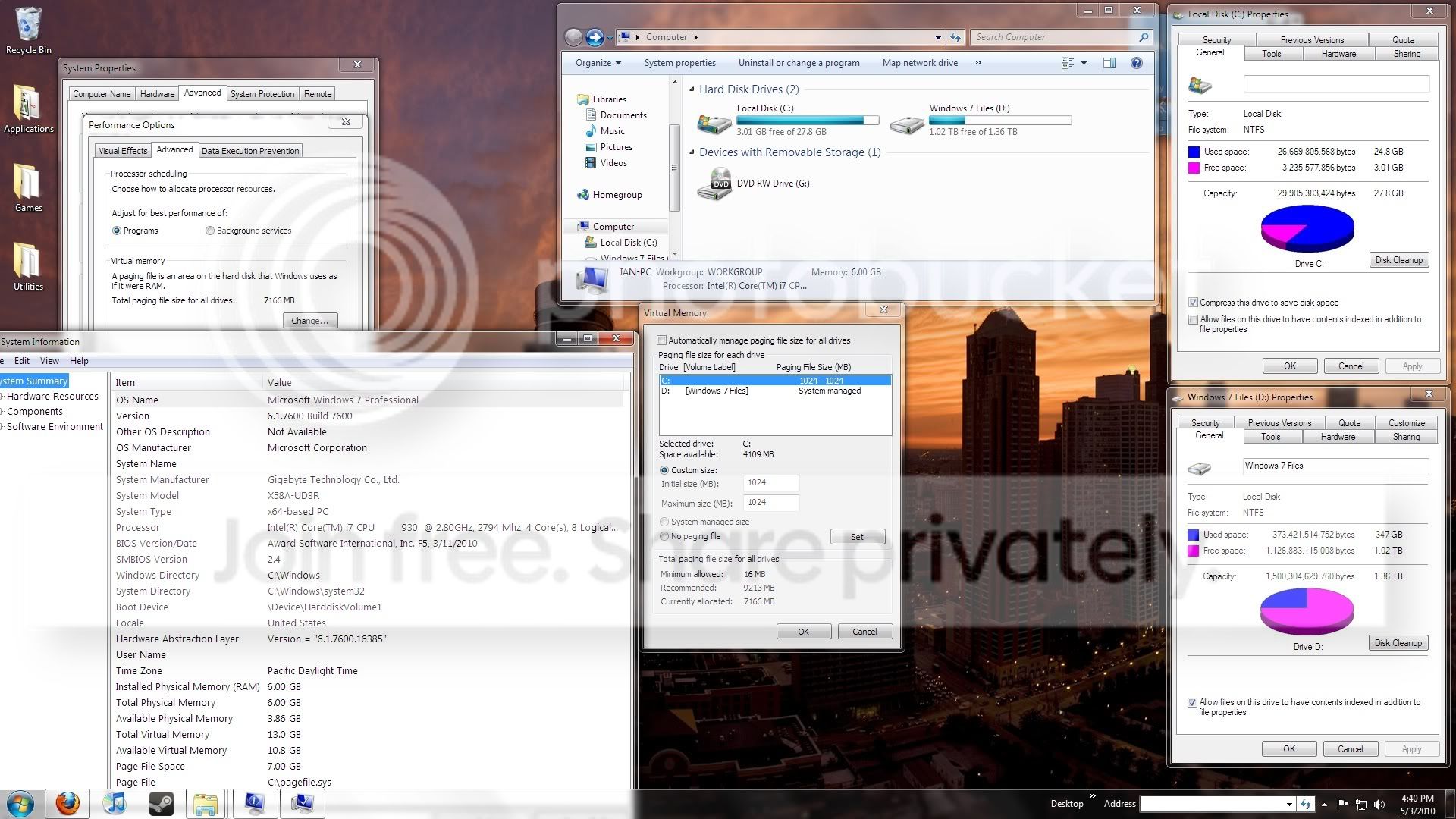
My SSD is 30GB (well, 27.8GB...)
My Windows 7 is 25GB and growing
I have 6GB of RAM

My RAID hard drive has 350GB used...here is a pic of what I am looking at. Don't mind the compress drive thing, I was just messing around with it for a second.

System.jpg
 

My Computer

Computer Manufacturer/Model Number
Cyber Power PC
OS
Windows 7 64-bit
CPU
Intel Core i7-930 @2.80Ghz
Motherboard
Gigabyte GA-X58A-UD3R
Memory
A-Data Gaming Series DDR3, 2GBx3
Graphics Card(s)
EVGA Nvidia GeForce GTX 470
Sound Card
Creative Extreme Gamer PCI
Monitor(s) Displays
Asus VH242 23.6" HD LCD
Screen Resolution
1920x1080
PSU
Cyber Power Stock PSU (~950 Watts)
Case
Cooler Master Storm Sniper Mid-Tower Gaming Case
Cooling
Asetek Liquid Cooling on CPU; fans everywhere else
Keyboard
Logitech G15
Mouse
Logitech G5
Internet Speed
~18Mbits/sec or about 2.25MB/sec
Other Info
Also have a CD Drive (TSSTcorp CD/DVD RW Drive)
OK, understand.

1. With 6gbs of RAM you will most likely never really need the pagefile. So moving it does not matter one way or another.
2. Your windows is too big (my 17GBs include a 3GB pagefile). I suspect you did not disable the shadowstorage. Go into elevated command Prompt and type vssadmin list shadowstorage and tell me what the numbers on C for Allocated and Maximum are. If they are anything other than 300MB, we will fix it.
 

My Computer

Computer Manufacturer/Model Number
HP, Dell, Gateway, Toshiba - 4 laptops and 2 desktops
OS
Vista, Windows7, Mint Mate, Zorin, Windows 8
CPU
from 1.6GHz Duo to i7
Monitor(s) Displays
2x HP w2207
Hard Drives
5x HDD, 7x SSD, 12x Externals
Keyboard
with trackball - no mices
Mouse
Trackball mice
Internet Speed
DSL 6000
Used shadow cop storage space: 210.891 MB (0%)
Allocated shadow copy storage space: 320 MB (1%)
Maximum shadow copy storage space: 320 MB (1%)

And I am sure that is MB, not GB.
 

My Computer

Computer Manufacturer/Model Number
Cyber Power PC
OS
Windows 7 64-bit
CPU
Intel Core i7-930 @2.80Ghz
Motherboard
Gigabyte GA-X58A-UD3R
Memory
A-Data Gaming Series DDR3, 2GBx3
Graphics Card(s)
EVGA Nvidia GeForce GTX 470
Sound Card
Creative Extreme Gamer PCI
Monitor(s) Displays
Asus VH242 23.6" HD LCD
Screen Resolution
1920x1080
PSU
Cyber Power Stock PSU (~950 Watts)
Case
Cooler Master Storm Sniper Mid-Tower Gaming Case
Cooling
Asetek Liquid Cooling on CPU; fans everywhere else
Keyboard
Logitech G15
Mouse
Logitech G5
Internet Speed
~18Mbits/sec or about 2.25MB/sec
Other Info
Also have a CD Drive (TSSTcorp CD/DVD RW Drive)
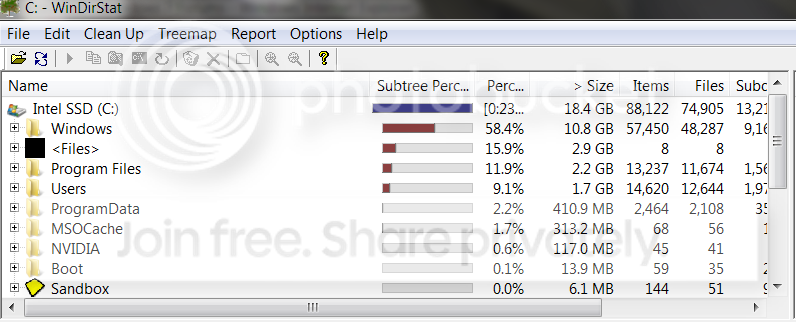
OK, so that's not it. Run WinDirStat on C and post the top left quadrant with all the numbers (no need to post the colored quadrants). That will give us an idea on what's on your C.
And yes I made a typo before. It should read 300MB - not GB.
 

My Computer

Computer Manufacturer/Model Number
HP, Dell, Gateway, Toshiba - 4 laptops and 2 desktops
OS
Vista, Windows7, Mint Mate, Zorin, Windows 8
CPU
from 1.6GHz Duo to i7
Monitor(s) Displays
2x HP w2207
Hard Drives
5x HDD, 7x SSD, 12x Externals
Keyboard
with trackball - no mices
Mouse
Trackball mice
Internet Speed
DSL 6000
Here you go:

Results.png
 

My Computer

Computer Manufacturer/Model Number
Cyber Power PC
OS
Windows 7 64-bit
CPU
Intel Core i7-930 @2.80Ghz
Motherboard
Gigabyte GA-X58A-UD3R
Memory
A-Data Gaming Series DDR3, 2GBx3
Graphics Card(s)
EVGA Nvidia GeForce GTX 470
Sound Card
Creative Extreme Gamer PCI
Monitor(s) Displays
Asus VH242 23.6" HD LCD
Screen Resolution
1920x1080
PSU
Cyber Power Stock PSU (~950 Watts)
Case
Cooler Master Storm Sniper Mid-Tower Gaming Case
Cooling
Asetek Liquid Cooling on CPU; fans everywhere else
Keyboard
Logitech G15
Mouse
Logitech G5
Internet Speed
~18Mbits/sec or about 2.25MB/sec
Other Info
Also have a CD Drive (TSSTcorp CD/DVD RW Drive)
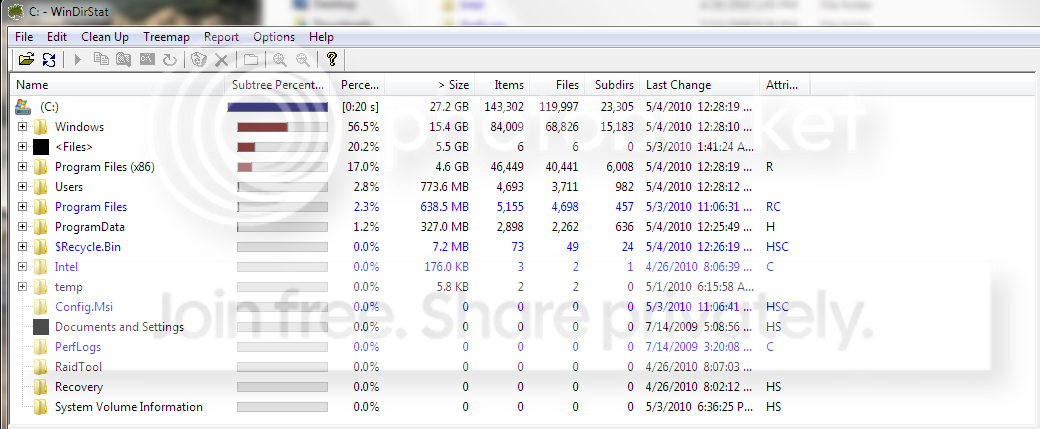
This is not exactly what I had expected. Before you say OK in WinDirStat, highlight C. Then you should get something like this.

2010-05-03_2019.png
 

My Computer

Computer Manufacturer/Model Number
HP, Dell, Gateway, Toshiba - 4 laptops and 2 desktops
OS
Vista, Windows7, Mint Mate, Zorin, Windows 8
CPU
from 1.6GHz Duo to i7
Monitor(s) Displays
2x HP w2207
Hard Drives
5x HDD, 7x SSD, 12x Externals
Keyboard
with trackball - no mices
Mouse
Trackball mice
Internet Speed
DSL 6000
Results-1.png
 

My Computer

Computer Manufacturer/Model Number
Cyber Power PC
OS
Windows 7 64-bit
CPU
Intel Core i7-930 @2.80Ghz
Motherboard
Gigabyte GA-X58A-UD3R
Memory
A-Data Gaming Series DDR3, 2GBx3
Graphics Card(s)
EVGA Nvidia GeForce GTX 470
Sound Card
Creative Extreme Gamer PCI
Monitor(s) Displays
Asus VH242 23.6" HD LCD
Screen Resolution
1920x1080
PSU
Cyber Power Stock PSU (~950 Watts)
Case
Cooler Master Storm Sniper Mid-Tower Gaming Case
Cooling
Asetek Liquid Cooling on CPU; fans everywhere else
Keyboard
Logitech G15
Mouse
Logitech G5
Internet Speed
~18Mbits/sec or about 2.25MB/sec
Other Info
Also have a CD Drive (TSSTcorp CD/DVD RW Drive)
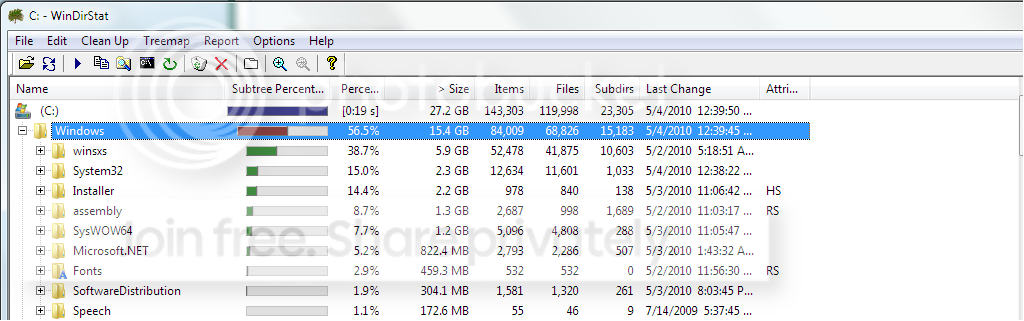
Your Windows and your <Files> folders are awfully bloated. Open those in this picture and snip everything that is more than 1%.

PS: in Windows it is probably the winsxs folder that is unusually big - because of all the .dlls for your games.
 

My Computer

Computer Manufacturer/Model Number
HP, Dell, Gateway, Toshiba - 4 laptops and 2 desktops
OS
Vista, Windows7, Mint Mate, Zorin, Windows 8
CPU
from 1.6GHz Duo to i7
Monitor(s) Displays
2x HP w2207
Hard Drives
5x HDD, 7x SSD, 12x Externals
Keyboard
with trackball - no mices
Mouse
Trackball mice
Internet Speed
DSL 6000
I also included "Program Files (x86)":

win32.png
win32.png
programfiles.png
 

My Computer

Computer Manufacturer/Model Number
Cyber Power PC
OS
Windows 7 64-bit
CPU
Intel Core i7-930 @2.80Ghz
Motherboard
Gigabyte GA-X58A-UD3R
Memory
A-Data Gaming Series DDR3, 2GBx3
Graphics Card(s)
EVGA Nvidia GeForce GTX 470
Sound Card
Creative Extreme Gamer PCI
Monitor(s) Displays
Asus VH242 23.6" HD LCD
Screen Resolution
1920x1080
PSU
Cyber Power Stock PSU (~950 Watts)
Case
Cooler Master Storm Sniper Mid-Tower Gaming Case
Cooling
Asetek Liquid Cooling on CPU; fans everywhere else
Keyboard
Logitech G15
Mouse
Logitech G5
Internet Speed
~18Mbits/sec or about 2.25MB/sec
Other Info
Also have a CD Drive (TSSTcorp CD/DVD RW Drive)
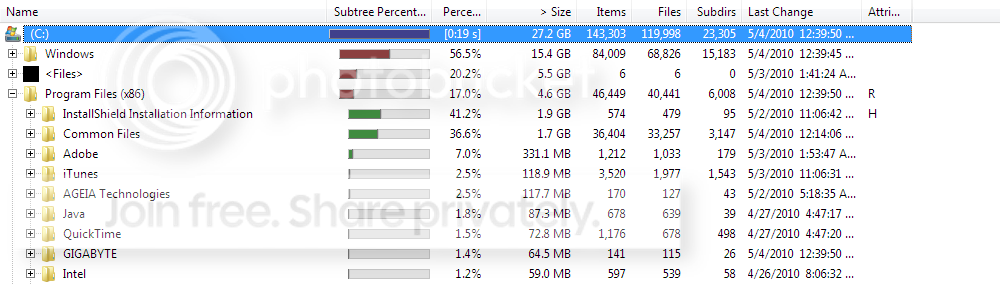
In Windows, as suspected, it is the winsxs that is bigger than one would normally see. This is because a lot of your games probably drop .dlls (common subroutines) into there. The rest look normal for an x64 system - remind you mine here is a x86 system which is a little smaller by design. Unfortunately my x64 laptop is packed away and I cannot check it right now.
The <Files> folder you did not open, only the Program Files and that looks as expected. Maybe you want to open the <Files> folder too. Then we'll see whether something can be done to reduce it somewhat.
 

My Computer

Computer Manufacturer/Model Number
HP, Dell, Gateway, Toshiba - 4 laptops and 2 desktops
OS
Vista, Windows7, Mint Mate, Zorin, Windows 8
CPU
from 1.6GHz Duo to i7
Monitor(s) Displays
2x HP w2207
Hard Drives
5x HDD, 7x SSD, 12x Externals
Keyboard
with trackball - no mices
Mouse
Trackball mice
Internet Speed
DSL 6000
Oh ooops I posted the Windows twice! Sorry about that.

files.png
 

My Computer

Computer Manufacturer/Model Number
Cyber Power PC
OS
Windows 7 64-bit
CPU
Intel Core i7-930 @2.80Ghz
Motherboard
Gigabyte GA-X58A-UD3R
Memory
A-Data Gaming Series DDR3, 2GBx3
Graphics Card(s)
EVGA Nvidia GeForce GTX 470
Sound Card
Creative Extreme Gamer PCI
Monitor(s) Displays
Asus VH242 23.6" HD LCD
Screen Resolution
1920x1080
PSU
Cyber Power Stock PSU (~950 Watts)
Case
Cooler Master Storm Sniper Mid-Tower Gaming Case
Cooling
Asetek Liquid Cooling on CPU; fans everywhere else
Keyboard
Logitech G15
Mouse
Logitech G5
Internet Speed
~18Mbits/sec or about 2.25MB/sec
Other Info
Also have a CD Drive (TSSTcorp CD/DVD RW Drive)
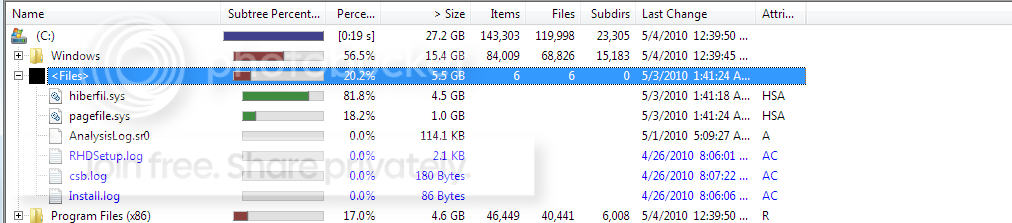
From all the data I gather the following:

1. You can delete the hibernation file which would save you 4.5GB. Run the following command on elevated cmd: powercfg -h off

2. You could move the rest of your Program files and save another 4.6GBs. But that is not a simple operation and not without risks. See here for detail: http://www.sevenforums.com/tutorials/39689-program-files-directory-change-default-installs.html

3. Before you take step #2, I suggest you make yourself an image - in case things go bad. See my tutorial here (and don't forget to burn the recovery disk as step #1) http://www.sevenforums.com/tutorials/73828-imaging-free-macrium.html?ltr=I

There is also a short introduction if you do not want to sit thru 30 minutes of video: Image your system with free Macrium - Vista Forums


My Computer

Computer Manufacturer/Model Number
HP, Dell, Gateway, Toshiba - 4 laptops and 2 desktops
OS
Vista, Windows7, Mint Mate, Zorin, Windows 8
CPU
from 1.6GHz Duo to i7
Monitor(s) Displays
2x HP w2207
Hard Drives
5x HDD, 7x SSD, 12x Externals
Keyboard
with trackball - no mices
Mouse
Trackball mice
Internet Speed
DSL 6000
Ok, thank you for your help. Do you think that I could move the x86 folder? I have some files in there that take up a huge amount of space, like the Installshield and Common Files.
 

My Computer

Computer Manufacturer/Model Number
Cyber Power PC
OS
Windows 7 64-bit
CPU
Intel Core i7-930 @2.80Ghz
Motherboard
Gigabyte GA-X58A-UD3R
Memory
A-Data Gaming Series DDR3, 2GBx3
Graphics Card(s)
EVGA Nvidia GeForce GTX 470
Sound Card
Creative Extreme Gamer PCI
Monitor(s) Displays
Asus VH242 23.6" HD LCD
Screen Resolution
1920x1080
PSU
Cyber Power Stock PSU (~950 Watts)
Case
Cooler Master Storm Sniper Mid-Tower Gaming Case
Cooling
Asetek Liquid Cooling on CPU; fans everywhere else
Keyboard
Logitech G15
Mouse
Logitech G5
Internet Speed
~18Mbits/sec or about 2.25MB/sec
Other Info
Also have a CD Drive (TSSTcorp CD/DVD RW Drive)
I am not sure. Those folders are owned by the trusted installer. In order to get control, you have to run those 2 commands in elevated cmd:
 
takeown /f "C:\Programs Files (x86)" /r /d n

and then
 
icacls "C:\Programs Files (x86)" /grant administrators:F /t
 
and then you can try to move them. But again, make sure you first make an image in case this blows up in your face.

Note: I have never done that myself, that's why I insist on a prior image so that you can bail yourself out in case of trouble.
 

My Computer

Computer Manufacturer/Model Number
HP, Dell, Gateway, Toshiba - 4 laptops and 2 desktops
OS
Vista, Windows7, Mint Mate, Zorin, Windows 8
CPU
from 1.6GHz Duo to i7
Monitor(s) Displays
2x HP w2207
Hard Drives
5x HDD, 7x SSD, 12x Externals
Keyboard
with trackball - no mices
Mouse
Trackball mice
Internet Speed
DSL 6000
I am preparing for a clean install now...I am going to take several steps to prevent something like this from happening again.
 

My Computer

Computer Manufacturer/Model Number
Cyber Power PC
OS
Windows 7 64-bit
CPU
Intel Core i7-930 @2.80Ghz
Motherboard
Gigabyte GA-X58A-UD3R
Memory
A-Data Gaming Series DDR3, 2GBx3
Graphics Card(s)
EVGA Nvidia GeForce GTX 470
Sound Card
Creative Extreme Gamer PCI
Monitor(s) Displays
Asus VH242 23.6" HD LCD
Screen Resolution
1920x1080
PSU
Cyber Power Stock PSU (~950 Watts)
Case
Cooler Master Storm Sniper Mid-Tower Gaming Case
Cooling
Asetek Liquid Cooling on CPU; fans everywhere else
Keyboard
Logitech G15
Mouse
Logitech G5
Internet Speed
~18Mbits/sec or about 2.25MB/sec
Other Info
Also have a CD Drive (TSSTcorp CD/DVD RW Drive)
I guess that is one way of doing it. Lots of luck. Would be nice if you could post the results for the benefit of the community.
 

My Computer

Computer Manufacturer/Model Number
HP, Dell, Gateway, Toshiba - 4 laptops and 2 desktops
OS
Vista, Windows7, Mint Mate, Zorin, Windows 8
CPU
from 1.6GHz Duo to i7
Monitor(s) Displays
2x HP w2207
Hard Drives
5x HDD, 7x SSD, 12x Externals
Keyboard
with trackball - no mices
Mouse
Trackball mice
Internet Speed
DSL 6000
Back
Top