Boot time extremely slow when external hd connected

tremaine

New member
Local time
11:08 AM
Messages
56
Hi,I have windows 7 installed, and the boot up time was under 1 min, i noticed when i connected my external hard drive it will go through the normal bootup checks and then i get a black screen with a white curser that blinks in the top left corner of the screen.It says on this blank screen section for at least 2 minutes then it with resume booting to the windows logo screen.I have the latest bios on my computer and the drivers for the hard drive is up to date. my mother board is an asus m3a7-em with the lastest bios, and the external hard drive is a
seagate barracuda 7200.10 500630
(ST350063 0AS USB) 500 GIG

Ive googled this issue online and no one has found a solution other than unpluging it before i turn my computer on which is annoying. any help or suggestions would be much appreciated.thank you
 

My Computer

Computer Manufacturer/Model Number
Custom Build
OS
windows 7 64bit
CPU
AMD phenom 9950 X4 BE overclocked from 2.6Ghz to 3.1Ghz
Motherboard
Asus m3a78-em
Memory
OCZ XTC SLI DDR2 800MHz 2 Gig x 2
Graphics Card(s)
ATI Radeon HD 4890 overclocked 20%
Sound Card
n/a
Monitor(s) Displays
22" DCLCD
Screen Resolution
1680 x 1050
Hard Drives
500 gig Western Digital,1000 Gig Seagate, 500 Gig external Seagate
PSU
Ultra 650 W
Case
Antec 1200
Cooling
Cooler Master V8
Keyboard
Logitech Cordless EX110
Mouse
Logitech Optical Mouse
Internet Speed
10Mbs
Here is your support page :
ASUSTeK Computer Inc.
You might check downloads to see you have the latest drivers, or download your manual, and check for bios settings.
Check you have the latest bios installed.
Join the asus forum and do a search - type in your motherboards name.
Forums : ASUSTeK Computer Inc.-Forum-
 

My Computer

OS
XP, Vista, W7 64bit Home Premium
CPU
Intel Core Duo 6850 3.0 ghz @ 3.7 ghz
Motherboard
Asus P5E
Memory
4GB Corsair DDR 2 PC-6400
Graphics Card(s)
Ati 4870 1ghz
Sound Card
Supreme FX 11
Monitor(s) Displays
View Sonic VX1962wm
Screen Resolution
1680 X1050
Hard Drives
3 Seagate Sata Drives 160gb 250gb 500gb
PSU
Thermaltake 600 watt
Case
NZXT Alpha
Cooling
3X120cm Fans
Keyboard
Microsoft Digital Media Pro Keyboard
Mouse
Microsoft Wheel Mouse Optical
Internet Speed
1.5Mb to 8Mb/384k
i have dont that already.
 

My Computer

Computer Manufacturer/Model Number
Custom Build
OS
windows 7 64bit
CPU
AMD phenom 9950 X4 BE overclocked from 2.6Ghz to 3.1Ghz
Motherboard
Asus m3a78-em
Memory
OCZ XTC SLI DDR2 800MHz 2 Gig x 2
Graphics Card(s)
ATI Radeon HD 4890 overclocked 20%
Sound Card
n/a
Monitor(s) Displays
22" DCLCD
Screen Resolution
1680 x 1050
Hard Drives
500 gig Western Digital,1000 Gig Seagate, 500 Gig external Seagate
PSU
Ultra 650 W
Case
Antec 1200
Cooling
Cooler Master V8
Keyboard
Logitech Cordless EX110
Mouse
Logitech Optical Mouse
Internet Speed
10Mbs
usb enabled under boot options in bios? I had to disconnect mine b/c it couldn't find mbr on external and just sat there.
 

My Computer

OS
7 Pro
i have it dissabled in the bios boot options, the only thing i have enabled is the hard drive that my os is on.
 

My Computer

Computer Manufacturer/Model Number
Custom Build
OS
windows 7 64bit
CPU
AMD phenom 9950 X4 BE overclocked from 2.6Ghz to 3.1Ghz
Motherboard
Asus m3a78-em
Memory
OCZ XTC SLI DDR2 800MHz 2 Gig x 2
Graphics Card(s)
ATI Radeon HD 4890 overclocked 20%
Sound Card
n/a
Monitor(s) Displays
22" DCLCD
Screen Resolution
1680 x 1050
Hard Drives
500 gig Western Digital,1000 Gig Seagate, 500 Gig external Seagate
PSU
Ultra 650 W
Case
Antec 1200
Cooling
Cooler Master V8
Keyboard
Logitech Cordless EX110
Mouse
Logitech Optical Mouse
Internet Speed
10Mbs
Hi there
depending on what was on the external USB drive and whether it's a Primary partition at boot time the system is just going through it's start up routine. sometimes with plugged in external HDD's it has to look for and load extra drives at start up time.

It's best usually when booting to disconnect any portable USB devices first and plug them in afterwards - especially if there is also a NON windows file system on them too such as a Linux partition.

After boot the "plug 'n play" routines are already part of the Kernel and will have been loaded. At BOOT these aren't yet fully loaded and if they need to be called during the part of the boot process it will slow down boot for a while in some cases.

Nothing to worry about however --the system isn't broken.

Cheers
jimbo
 

My Computer

Computer type
PC/Desktop
Computer Manufacturer/Model Number
Custom built, several laptops HP/ASUS
OS
Linux CENTOS 7 / various Windows OS'es and servers
CPU
Intel i7 Intel i5
Memory
8GB, 16GB
Graphics Card(s)
On Motherboard
Sound Card
Realtek HD audio
Monitor(s) Displays
Apple Cinema display, Samsung LCD
Screen Resolution
1920 X 1080
Hard Drives
4 X 1TB SATA
Mouse
Toshiba wireless laser
Internet Speed
> 20MB up
the thing is ive made sure that the bios setting dont look for any other device to boot from other the the harddrive with my operating system on it, also i just tried connecting the same external drive to my my laptop which is running 7 ultimate 32 bit, and it loading up under a minute with no delays. so that makes me think it has something to do with a bios setting/or setting in the operation system on my desktop.
 

My Computer

Computer Manufacturer/Model Number
Custom Build
OS
windows 7 64bit
CPU
AMD phenom 9950 X4 BE overclocked from 2.6Ghz to 3.1Ghz
Motherboard
Asus m3a78-em
Memory
OCZ XTC SLI DDR2 800MHz 2 Gig x 2
Graphics Card(s)
ATI Radeon HD 4890 overclocked 20%
Sound Card
n/a
Monitor(s) Displays
22" DCLCD
Screen Resolution
1680 x 1050
Hard Drives
500 gig Western Digital,1000 Gig Seagate, 500 Gig external Seagate
PSU
Ultra 650 W
Case
Antec 1200
Cooling
Cooler Master V8
Keyboard
Logitech Cordless EX110
Mouse
Logitech Optical Mouse
Internet Speed
10Mbs
just tried that no change.
 

My Computer

Computer Manufacturer/Model Number
Custom Build
OS
windows 7 64bit
CPU
AMD phenom 9950 X4 BE overclocked from 2.6Ghz to 3.1Ghz
Motherboard
Asus m3a78-em
Memory
OCZ XTC SLI DDR2 800MHz 2 Gig x 2
Graphics Card(s)
ATI Radeon HD 4890 overclocked 20%
Sound Card
n/a
Monitor(s) Displays
22" DCLCD
Screen Resolution
1680 x 1050
Hard Drives
500 gig Western Digital,1000 Gig Seagate, 500 Gig external Seagate
PSU
Ultra 650 W
Case
Antec 1200
Cooling
Cooler Master V8
Keyboard
Logitech Cordless EX110
Mouse
Logitech Optical Mouse
Internet Speed
10Mbs
Have you tried switching the port that the USB cable is plugged into? do you have any other external devices that you could test it's functionality with? ex: ipod, camera, printer etc...


Also, that drive sounds like it's trying to be a master drive. I'm wondering if there are a jumper or pin set that needs to be switched to 'slave'.
 

My Computer

OS
7 Pro
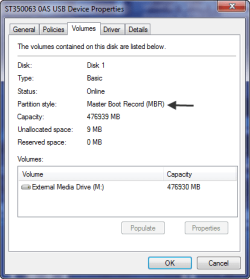
I have tried every usb port,with the same results.I dont have any other devices that i connect through the usb other than my mouse and keyboard.and as far as what you said about the drive tryin to be the master drive i think your on the right path, heres a picture does this help any ???
 

Attachments

  • seagate hd pic.png
    seagate hd pic.png
    14.2 KB · Views: 101

My Computer

Computer Manufacturer/Model Number
Custom Build
OS
windows 7 64bit
CPU
AMD phenom 9950 X4 BE overclocked from 2.6Ghz to 3.1Ghz
Motherboard
Asus m3a78-em
Memory
OCZ XTC SLI DDR2 800MHz 2 Gig x 2
Graphics Card(s)
ATI Radeon HD 4890 overclocked 20%
Sound Card
n/a
Monitor(s) Displays
22" DCLCD
Screen Resolution
1680 x 1050
Hard Drives
500 gig Western Digital,1000 Gig Seagate, 500 Gig external Seagate
PSU
Ultra 650 W
Case
Antec 1200
Cooling
Cooler Master V8
Keyboard
Logitech Cordless EX110
Mouse
Logitech Optical Mouse
Internet Speed
10Mbs
Back
Top