Solved Boot Time Increase

timw128

New member
Member
VIP
Local time
6:40 PM
Messages
294
Location
Michigan, USA
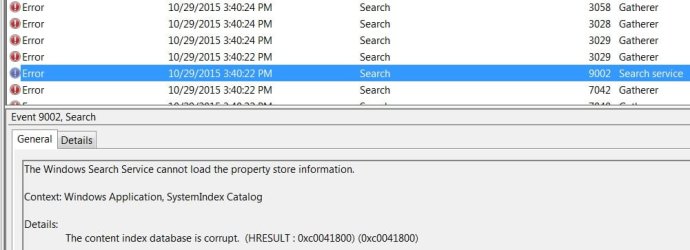
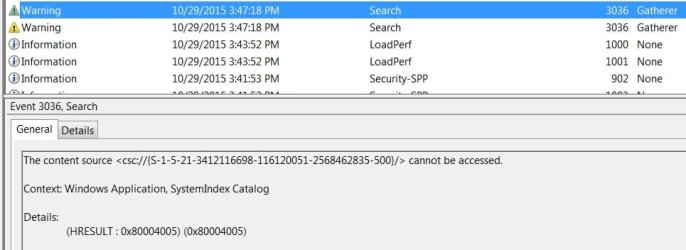
Hello- All of a sudden, my Windows 7 Pro SP1 x64 is taking longer to load/boot. In the Notification Area, I have 6 icons set.The network is taking 30-45 secs to load and sometimes I get a yellow triangle with exclamation point for 15 secs. Once that loads, the avast! and Anti Exploit icon come online about 20 secs later. I ran Process Monitor 'Enable Boot Logging', and looked at the time sequence of items loading and there are some gaps of a significant amount. There are more than what's illustrated in the attached photos. Also, note the errors and warnings in Event Viewer that appear associated.
I hope someone can help me out here. To the best of my knowledge, there is no malware present.
Thank you in advance.
tim
 

Attachments

  • nai.jpg
    nai.jpg
    3.6 KB · Views: 31
  • Gap1.jpg
    Gap1.jpg
    10.6 KB · Views: 0
  • Gap2.jpg
    Gap2.jpg
    8.9 KB · Views: 0
  • Gap3.jpg
    Gap3.jpg
    10.2 KB · Views: 0
  • EVE1.jpg
    EVE1.jpg
    38.7 KB · Views: 1
  • EVW1.jpg
    EVW1.jpg
    31 KB · Views: 1
  • EVW2.jpg
    EVW2.jpg
    37.9 KB · Views: 0

My Computer

Computer type
PC/Desktop
Computer Manufacturer/Model Number
HP ENVY 700-515xt CTO, with more cam, headers, and 4.11 gears.
OS
Windows 7 Pro SP1 x64
CPU
Intel Haswell i7-4770 3.4GHz
Motherboard
OEM Kaili2 (MSI MS-7826 v2.0)
Memory
G. SKILLS 32GB Ripjaws X Series DDR3 1600 SDRAM
Graphics Card(s)
Integrated HD4600- upgrade coming!
Sound Card
Integrated...for now.
Monitor(s) Displays
Dell ST-2310 Digital
Screen Resolution
I like 1920x1080
Hard Drives
C\:-Samsung 850PRO SSD-256gb, D:\-SG Barracuda 7200 HDD 1 TB (Storage)
PSU
350w OEM (About to become a display in the aquarium!)
Case
ENVY OEM
Cooling
FANS
Keyboard
Logitech and HP- USB.
Mouse
Logitech LS1 (Alltime favorite of mine!) and HP- both USB
Internet Speed
65Mbps Down (min)/4.5Mbps UP- Charter Comm HS cable
Antivirus
avast! Internet Security 2015/MBAM
Browser
Opera, at present. Love that Chromium horsepower!
The errors seem to have to do with Windows Indexing. If you run services.msc you can turn off and then disable Windows Search Service. I would reboot, then go back in and enable the Windows Search Service if you want indexing. The data store likely got corrupted. I only have NTFS partitions so I use Everything Search and disable Windows Indexing. That keeps it from hogging the HD. :)

But anyway, see if that helps with the boot time. The other thing that often gums up the works are active av "shield" type software. I use backup imaging ans snapshot restore rather than surfing wearing a prophylactic. But that's up to you. :)
 

My Computer

Computer Manufacturer/Model Number
HP Media Center
OS
Windows 7 32 bit
CPU
AMD 5200+ dual core
Memory
2 GB
Graphics Card(s)
NVidia GeForce 6150SE 128 MB
Monitor(s) Displays
CRT
Screen Resolution
1280x1024
Hard Drives
500 GB Sata internal :

SIIG USB 3.0 docking stations w/WD Caviar Black 6 Gb/s drives
Keyboard
PS/2
Mouse
PS/2 Wheel Mouse
Other Info
SIIG USB 3.0 PCIexpress card.
The errors seem to have to do with Windows Indexing. If you run services.msc you can turn off and then disable Windows Search Service. I would reboot, then go back in and enable the Windows Search Service if you want indexing. The data store likely got corrupted. I only have NTFS partitions so I use Everything Search and disable Windows Indexing. That keeps it from hogging the HD. :)

But anyway, see if that helps with the boot time. The other thing that often gums up the works are active av "shield" type software. I use backup imaging ans snapshot restore rather than surfing wearing a prophylactic. But that's up to you. :)

Yes, agreed... especially with the Event ID 3029 Error (corruption). I just deleted and rebuilt indexing in Indexing Options, cleared EV, rebooted, and Event 3036 Warning is back. Question is, why all of a sudden did this machine start doing that?
My partitions are NTFS, as well... I have no idea what Everything Search is about, although I've heard of it in chasing these anomalies down.
As far as your last paragraph goes, I haven't a clue as to what you're talking about. Perhaps you refer to the avast! Internet Security 2015 I use, it being the condom. Well, if so, it would be the first time in 6 yrs. it's given me trouble. I suppose I could uninstall it using the 'avast uninstaller utility' and reinstall. In today's world, I'll stick with 'safe sex', thank you. ;)

Thanks for your response.

tim
 

My Computer

Computer type
PC/Desktop
Computer Manufacturer/Model Number
HP ENVY 700-515xt CTO, with more cam, headers, and 4.11 gears.
OS
Windows 7 Pro SP1 x64
CPU
Intel Haswell i7-4770 3.4GHz
Motherboard
OEM Kaili2 (MSI MS-7826 v2.0)
Memory
G. SKILLS 32GB Ripjaws X Series DDR3 1600 SDRAM
Graphics Card(s)
Integrated HD4600- upgrade coming!
Sound Card
Integrated...for now.
Monitor(s) Displays
Dell ST-2310 Digital
Screen Resolution
I like 1920x1080
Hard Drives
C\:-Samsung 850PRO SSD-256gb, D:\-SG Barracuda 7200 HDD 1 TB (Storage)
PSU
350w OEM (About to become a display in the aquarium!)
Case
ENVY OEM
Cooling
FANS
Keyboard
Logitech and HP- USB.
Mouse
Logitech LS1 (Alltime favorite of mine!) and HP- both USB
Internet Speed
65Mbps Down (min)/4.5Mbps UP- Charter Comm HS cable
Antivirus
avast! Internet Security 2015/MBAM
Browser
Opera, at present. Love that Chromium horsepower!
Timw128, like what you and MilesAhead has said, it appears to be related to indexing. I have disabled indexing of my drives for this exact reason and have experienced no ill effects.
 

My Computer

Computer type
PC/Desktop
Computer Manufacturer/Model Number
custom build
OS
Microsoft Windows 7 Ultimate 64-bit 7601 Multiprocessor Free Service Pack 1
CPU
AMD FX(tm)-6100 Six-Core Processor
Motherboard
ASUSTeK Computer INC. M5A78L-M LX PLUS
Memory
4.00 GB
Graphics Card(s)
AMD Radeon HD 6450
Sound Card
(1) AMD High Definition Audio Device (2) Realtek High Defi
Monitor(s) Displays
Toshiba 47ZV650U 47" LCD 240Hz
Screen Resolution
1920 x 1080 x 32 bits (4294967296 colors) @ 60 Hz
Hard Drives
(1) HDT722516DLA380 ATA Device (2) Hitachi HDS721025CLA382 ATA Device (3) ST4000VN000-1H4168 ATA Device (4) Generic STORAGE DEVICE USB Device (5) Generic STORAGE DEVICE USB Device (6) Generic STORAGE DEVICE USB Device (7) Generic STORAGE
PSU
Corsair CX430M
Case
WMI (Waste Management Incorporated)
Cooling
Yes, it's very cool.
Keyboard
Bluetooth KB & Mousepad
Internet Speed
Fios 15/5 and it sucks when Verizon is throttling it down
Antivirus
Avast, MSE and Malwarebytes
Browser
Firefox v.41.0.2 and IE 11
Other Info
2 years old and so far this rig still kicks butt
MilesAhead, a full body wet suit is better when surfing! Just sayin'.
 

My Computer

Computer type
PC/Desktop
Computer Manufacturer/Model Number
custom build
OS
Microsoft Windows 7 Ultimate 64-bit 7601 Multiprocessor Free Service Pack 1
CPU
AMD FX(tm)-6100 Six-Core Processor
Motherboard
ASUSTeK Computer INC. M5A78L-M LX PLUS
Memory
4.00 GB
Graphics Card(s)
AMD Radeon HD 6450
Sound Card
(1) AMD High Definition Audio Device (2) Realtek High Defi
Monitor(s) Displays
Toshiba 47ZV650U 47" LCD 240Hz
Screen Resolution
1920 x 1080 x 32 bits (4294967296 colors) @ 60 Hz
Hard Drives
(1) HDT722516DLA380 ATA Device (2) Hitachi HDS721025CLA382 ATA Device (3) ST4000VN000-1H4168 ATA Device (4) Generic STORAGE DEVICE USB Device (5) Generic STORAGE DEVICE USB Device (6) Generic STORAGE DEVICE USB Device (7) Generic STORAGE
PSU
Corsair CX430M
Case
WMI (Waste Management Incorporated)
Cooling
Yes, it's very cool.
Keyboard
Bluetooth KB & Mousepad
Internet Speed
Fios 15/5 and it sucks when Verizon is throttling it down
Antivirus
Avast, MSE and Malwarebytes
Browser
Firefox v.41.0.2 and IE 11
Other Info
2 years old and so far this rig still kicks butt
I'm paranoid so I use Windows 7 Indexing and Everything Search. Then throw in regedit I will find it if it's on my computer.
 

My Computer

Computer type
PC/Desktop
Computer Manufacturer/Model Number
Home made Desktop
OS
Windows 10 Pro. 64/ version 1709 Windows 7 Pro/64
CPU
Intel i7-6800K @ 4.3
Motherboard
ASUS X-99 Deluxe II
Memory
Corsair Platinum 16 gig @2400
Graphics Card(s)
EVGA GTX 1070 OC
Monitor(s) Displays
Asus 27" LED LCD/VE278Q
Screen Resolution
1920-1080 or 1280-720 HDMI
Hard Drives
INTEL SSD 730-240 Gb Sata 3.0/
PSU
EVGA Platium 1200W
Case
Phanteks Luxe Tempered Glass 8 fans/ one radiator
Cooling
XSPC/ Water Cooled CPU
Keyboard
Das 4 Professional
Mouse
Logitech M705/MX Anywhere 2-S
Internet Speed
100 mbits
Antivirus
Microsoft Security Essentials/ Malwarebytes Premium 3.0/ SAS
Browser
I.E. 11 default/Firefox/ ISP Time Warner Cable/Spectrum
Other Info
LG BluRay Burner/
Sound system-KLipsch-THX/
Icy Dock ssd Hot Swap bays.
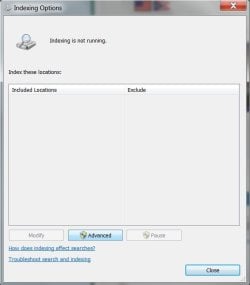
Yeah, I just went ahead and disabled Windows Search in 'services.msc', and added Search Everything in case I need it.
Funny thing is, I can still do Searches anywhere- contrary to what M$ says in this link-

What happens if I turn off Windows Search? - Windows Help

I'll keep an eye on Event Viewer and see what happens. This stuff seems to have started when I made a late night, little sleep booboo with CCleaner, if you get my drift. It messed things up so bad that I had to do a Restore via Fix My Computer (F8) at boot. I have to make sure this install is working good and running clean as I am about to migrate it to an SSD.

Nice signature, 'Layback Bear', by the way!

tim
 

Attachments

  • Untitled.jpg
    Untitled.jpg
    22.1 KB · Views: 15

My Computer

Computer type
PC/Desktop
Computer Manufacturer/Model Number
HP ENVY 700-515xt CTO, with more cam, headers, and 4.11 gears.
OS
Windows 7 Pro SP1 x64
CPU
Intel Haswell i7-4770 3.4GHz
Motherboard
OEM Kaili2 (MSI MS-7826 v2.0)
Memory
G. SKILLS 32GB Ripjaws X Series DDR3 1600 SDRAM
Graphics Card(s)
Integrated HD4600- upgrade coming!
Sound Card
Integrated...for now.
Monitor(s) Displays
Dell ST-2310 Digital
Screen Resolution
I like 1920x1080
Hard Drives
C\:-Samsung 850PRO SSD-256gb, D:\-SG Barracuda 7200 HDD 1 TB (Storage)
PSU
350w OEM (About to become a display in the aquarium!)
Case
ENVY OEM
Cooling
FANS
Keyboard
Logitech and HP- USB.
Mouse
Logitech LS1 (Alltime favorite of mine!) and HP- both USB
Internet Speed
65Mbps Down (min)/4.5Mbps UP- Charter Comm HS cable
Antivirus
avast! Internet Security 2015/MBAM
Browser
Opera, at present. Love that Chromium horsepower!
Well, my goodness!...we just checked Event Viewer and there's absolutely no Errors or Warnings in 'Windows Logs>Application' or 'System'. Of further note, I am wondering if one of lasts weeks Updates glitched me. I research them good before installing, and rarely install any optional ones. So far, we have discovered about 15 Windows Updates that have a negative impact on our system.

I'm going to leave this open for a couple of days, because one of the event warnings that I didn't list in the original post had to do with Avast and something not closing in the Registry- can't remember the specifics. On that matter, it's probable that we'll have to uninstall/reinstall Avast to straighten that out. Since that just started happening a month or so ago, it's possible the Avast installation may have become corrupt.

OK... see you guys later...have a good one.

tim
 

My Computer

Computer type
PC/Desktop
Computer Manufacturer/Model Number
HP ENVY 700-515xt CTO, with more cam, headers, and 4.11 gears.
OS
Windows 7 Pro SP1 x64
CPU
Intel Haswell i7-4770 3.4GHz
Motherboard
OEM Kaili2 (MSI MS-7826 v2.0)
Memory
G. SKILLS 32GB Ripjaws X Series DDR3 1600 SDRAM
Graphics Card(s)
Integrated HD4600- upgrade coming!
Sound Card
Integrated...for now.
Monitor(s) Displays
Dell ST-2310 Digital
Screen Resolution
I like 1920x1080
Hard Drives
C\:-Samsung 850PRO SSD-256gb, D:\-SG Barracuda 7200 HDD 1 TB (Storage)
PSU
350w OEM (About to become a display in the aquarium!)
Case
ENVY OEM
Cooling
FANS
Keyboard
Logitech and HP- USB.
Mouse
Logitech LS1 (Alltime favorite of mine!) and HP- both USB
Internet Speed
65Mbps Down (min)/4.5Mbps UP- Charter Comm HS cable
Antivirus
avast! Internet Security 2015/MBAM
Browser
Opera, at present. Love that Chromium horsepower!
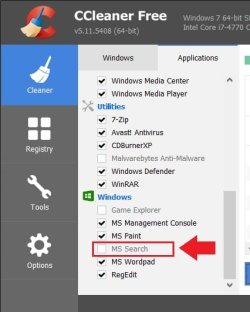
Forgot to mention this, and some will already know about it- If you are using CCleaner make sure in Applications pane > Windows that the 'MS Search' box is unchecked. There is a bug in the Piriform program that they neglect to fix that's wreaking havoc on Windows... just sayin'... there's a thread over on CCleaner forums regarding the matter.
 

Attachments

  • Untitled.jpg
    Untitled.jpg
    26.8 KB · Views: 12

My Computer

Computer type
PC/Desktop
Computer Manufacturer/Model Number
HP ENVY 700-515xt CTO, with more cam, headers, and 4.11 gears.
OS
Windows 7 Pro SP1 x64
CPU
Intel Haswell i7-4770 3.4GHz
Motherboard
OEM Kaili2 (MSI MS-7826 v2.0)
Memory
G. SKILLS 32GB Ripjaws X Series DDR3 1600 SDRAM
Graphics Card(s)
Integrated HD4600- upgrade coming!
Sound Card
Integrated...for now.
Monitor(s) Displays
Dell ST-2310 Digital
Screen Resolution
I like 1920x1080
Hard Drives
C\:-Samsung 850PRO SSD-256gb, D:\-SG Barracuda 7200 HDD 1 TB (Storage)
PSU
350w OEM (About to become a display in the aquarium!)
Case
ENVY OEM
Cooling
FANS
Keyboard
Logitech and HP- USB.
Mouse
Logitech LS1 (Alltime favorite of mine!) and HP- both USB
Internet Speed
65Mbps Down (min)/4.5Mbps UP- Charter Comm HS cable
Antivirus
avast! Internet Security 2015/MBAM
Browser
Opera, at present. Love that Chromium horsepower!
Back
Top