Boot to black screen with cursor/Repair Windows

speedgamer01

concert? use earplugs
Guru
Local time
10:25 AM
Messages
917
Hello.

Yesterday, when i booted into my windows 7 64bit installation it took me to a black screen with a cursor and nothing else.
What happened was i was trying to tweak the 'authui.dll' (i wanted to remove the logon picture...never do that again) and i changed a height and a width value. At reboot it took me to the black screen.
I booted into another windows install and changed back the files and restored every permission and ownership manually.
Then my original windows install (instead of booting normally this time) didn't manage to start. I have 'no gui boot' enabled. Instead of giving me 8 or so little blue lines on the top, it gives me the lines and a Bunch of other colorful dots horizontally. The colored dots change slowly and nothing happens.
In safe mode i see the same dots but Over the DLL loading screen.

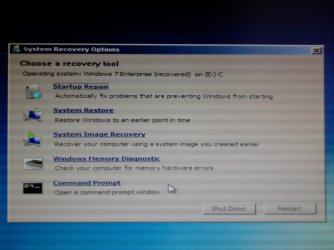
I created a bootable usb drive that has the official windows installer on it and it is the same version as i use.
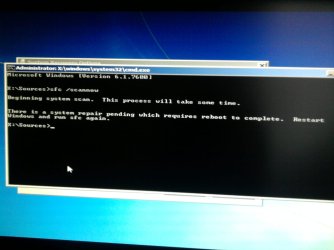
The installer console detects my original istallation, but i can't run sfc /scannow at all. (gives me the same error every time, screenshot below)

I also tried 'Upgrade'-ing but i could only do that if i were running the original installation.

Any help would be greatly appreciated. If i can't fix this installation in like 2 days i'm screwed :huh:
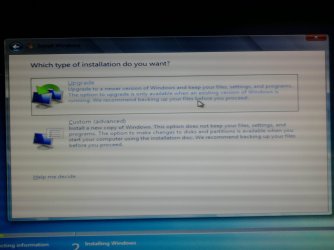
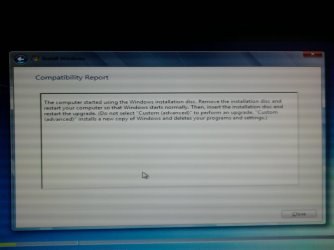
Photo0514.jpg Photo0513.jpg Photo0509.jpg Photo0508.jpg
 

My Computer My Computer

At a glance

Windows 7 Ultimate 64 bit SP1Intel(R) Core(TM) i5-2500K12GB Kingston Hyperx 1600MHzAsus GTS 450
Computer type
PC/Desktop
Computer Manufacturer/Model Number
Custom Built PC
OS
Windows 7 Ultimate 64 bit SP1
CPU
Intel(R) Core(TM) i5-2500K
Motherboard
Gigabyte Technology Co., Ltd. Z68X-UD3-B3
Memory
12GB Kingston Hyperx 1600MHz
Graphics Card(s)
Asus GTS 450
PSU
500W Coolink
Other Info
Genius G-Pen F610 (PenPad)

My Computer My Computer

At a glance

Microsoft Windows 10 Pro Insider Preview 64-bitIntel(R) Core(TM) i3-4130 CPU @ 3.40GHzCorsair Vengence 4GB x2 (8.00GB Dual-Channel ...2047MB GeForce GTS 450 (ZOTAC International)
Computer type
PC/Desktop
Computer Manufacturer/Model Number
Self Assembled
OS
Microsoft Windows 10 Pro Insider Preview 64-bit
CPU
Intel(R) Core(TM) i3-4130 CPU @ 3.40GHz
Motherboard
Gigabyte Technology Co., Ltd. B85M-D3H
Memory
Corsair Vengence 4GB x2 (8.00GB Dual-Channel DDR3 @ 798MHz)
Graphics Card(s)
2047MB GeForce GTS 450 (ZOTAC International)
Sound Card
Onboard (Realtek High Definition Audio)
Monitor(s) Displays
LG Flatron E2040T
Screen Resolution
1600x900
Hard Drives
Western Digital 1 TB
Seagate 500 GB
PSU
Corsair VS550
Case
Cooler Master K380
Cooling
Cooler Master Seidon 120V Plus
Keyboard
Logitech MK260r
Mouse
Logitech MK260r
Internet Speed
PMPL Broadband
Antivirus
Windows Defender + MBAM
Browser
Firefox
Other Info
Dell Studio 15" Laptop
Thank you Arc, I forgot to add that Startup Repair finds no errors :cry:
I will try sfc /scannow Method 2 right now. Wish me luck :zip:
 

My Computer My Computer

At a glance

Windows 7 Ultimate 64 bit SP1Intel(R) Core(TM) i5-2500K12GB Kingston Hyperx 1600MHzAsus GTS 450
Computer type
PC/Desktop
Computer Manufacturer/Model Number
Custom Built PC
OS
Windows 7 Ultimate 64 bit SP1
CPU
Intel(R) Core(TM) i5-2500K
Motherboard
Gigabyte Technology Co., Ltd. Z68X-UD3-B3
Memory
12GB Kingston Hyperx 1600MHz
Graphics Card(s)
Asus GTS 450
PSU
500W Coolink
Other Info
Genius G-Pen F610 (PenPad)
Thank you Arc, I forgot to add that Startup Repair finds no errors :cry:
I will try sfc /scannow Method 2 right now. Wish me luck :zip:
Best wishes mate :)
 

My Computer My Computer

At a glance

Microsoft Windows 10 Pro Insider Preview 64-bitIntel(R) Core(TM) i3-4130 CPU @ 3.40GHzCorsair Vengence 4GB x2 (8.00GB Dual-Channel ...2047MB GeForce GTS 450 (ZOTAC International)
Computer type
PC/Desktop
Computer Manufacturer/Model Number
Self Assembled
OS
Microsoft Windows 10 Pro Insider Preview 64-bit
CPU
Intel(R) Core(TM) i3-4130 CPU @ 3.40GHz
Motherboard
Gigabyte Technology Co., Ltd. B85M-D3H
Memory
Corsair Vengence 4GB x2 (8.00GB Dual-Channel DDR3 @ 798MHz)
Graphics Card(s)
2047MB GeForce GTS 450 (ZOTAC International)
Sound Card
Onboard (Realtek High Definition Audio)
Monitor(s) Displays
LG Flatron E2040T
Screen Resolution
1600x900
Hard Drives
Western Digital 1 TB
Seagate 500 GB
PSU
Corsair VS550
Case
Cooler Master K380
Cooling
Cooler Master Seidon 120V Plus
Keyboard
Logitech MK260r
Mouse
Logitech MK260r
Internet Speed
PMPL Broadband
Antivirus
Windows Defender + MBAM
Browser
Firefox
Other Info
Dell Studio 15" Laptop
Now i managed to run the sfc /scannow command with Brink's method, and it replaced my system files with the orginial ones... Although it said that it has done the job with errors (log:CBS.log) View attachment 202240

When i boot into the original installation it displays the windows logo (which it shouldn't i believe) and at the end it gives me a BSOD but no information under the usual text, no dump file and an instant reboot (i only managed to view the BSOD through my phone where i played back a video :D)

Sfc log attached.

To sum it up... Now i have all or most of the orginial system files (please, review my log file), but windows is unable to boot. :( I hope some guys see this, who could understand my log file.
 

My Computer My Computer

At a glance

Windows 7 Ultimate 64 bit SP1Intel(R) Core(TM) i5-2500K12GB Kingston Hyperx 1600MHzAsus GTS 450
Computer type
PC/Desktop
Computer Manufacturer/Model Number
Custom Built PC
OS
Windows 7 Ultimate 64 bit SP1
CPU
Intel(R) Core(TM) i5-2500K
Motherboard
Gigabyte Technology Co., Ltd. Z68X-UD3-B3
Memory
12GB Kingston Hyperx 1600MHz
Graphics Card(s)
Asus GTS 450
PSU
500W Coolink
Other Info
Genius G-Pen F610 (PenPad)

My Computer My Computer

At a glance

Microsoft Windows 10 Pro Insider Preview 64-bitIntel(R) Core(TM) i3-4130 CPU @ 3.40GHzCorsair Vengence 4GB x2 (8.00GB Dual-Channel ...2047MB GeForce GTS 450 (ZOTAC International)
Computer type
PC/Desktop
Computer Manufacturer/Model Number
Self Assembled
OS
Microsoft Windows 10 Pro Insider Preview 64-bit
CPU
Intel(R) Core(TM) i3-4130 CPU @ 3.40GHz
Motherboard
Gigabyte Technology Co., Ltd. B85M-D3H
Memory
Corsair Vengence 4GB x2 (8.00GB Dual-Channel DDR3 @ 798MHz)
Graphics Card(s)
2047MB GeForce GTS 450 (ZOTAC International)
Sound Card
Onboard (Realtek High Definition Audio)
Monitor(s) Displays
LG Flatron E2040T
Screen Resolution
1600x900
Hard Drives
Western Digital 1 TB
Seagate 500 GB
PSU
Corsair VS550
Case
Cooler Master K380
Cooling
Cooler Master Seidon 120V Plus
Keyboard
Logitech MK260r
Mouse
Logitech MK260r
Internet Speed
PMPL Broadband
Antivirus
Windows Defender + MBAM
Browser
Firefox
Other Info
Dell Studio 15" Laptop

My Computer My Computer

At a glance

Windows 7 Ultimate SP1 64-BitIntel Core i7 870 @ 2.93GHz8Gb Dual-Channel DDR3 @ 664MHznVidia GeForce GTX 460 1024MB dedicated RAM
Computer Manufacturer/Model Number
HP Pavilion Elite 495UK
OS
Windows 7 Ultimate SP1 64-Bit
CPU
Intel Core i7 870 @ 2.93GHz
Motherboard
MSI 2A9C (CPU1)
Memory
8Gb Dual-Channel DDR3 @ 664MHz
Graphics Card(s)
nVidia GeForce GTX 460 1024MB dedicated RAM
Sound Card
Realtek HD Audio
Monitor(s) Displays
HP2310i
Screen Resolution
1920 x 1080
Hard Drives
1x1954GB Hitachi HDS22020ALA 330 (RAID), 1x1954GB Hitachi External for backup and storage
PSU
460W
Case
HP Elite
Cooling
Air cooled
Keyboard
Logitech K750 solar-powered keyboard
Mouse
Logitech Wireless M180 mouse
Internet Speed
2Mb
Other Info
Pure Avanti Flow Internet Radio with iPod Dock, 64Gb iPod, HP USB Speakers, Sony MDR-V500 Headphones, Sony Vaio F-Series Laptop
Thank you both seavixen, Arc. The only problem is that i would need to boot into my original installation (which i can not) to perform an Upgrade install or so called repair install.
I also tried 'Upgrade'-ing but i could only do that if i were running the original installation.

I ran the Startup Repair 2 times already, and it was doing the same: trying to fix disk errors for about an hour. It said the usual things, if it was successful windows will boot normally...

This problem is very misterious.
Also, i was using Intel SRT (ssd caching) (in the mode that stated that no data loss would occur if the ssd is detached)
My working installation is on the sdd which was previously used as a cache drive. :cry: I'm afraid that i did something real stupid.
 

My Computer My Computer

At a glance

Windows 7 Ultimate 64 bit SP1Intel(R) Core(TM) i5-2500K12GB Kingston Hyperx 1600MHzAsus GTS 450
Computer type
PC/Desktop
Computer Manufacturer/Model Number
Custom Built PC
OS
Windows 7 Ultimate 64 bit SP1
CPU
Intel(R) Core(TM) i5-2500K
Motherboard
Gigabyte Technology Co., Ltd. Z68X-UD3-B3
Memory
12GB Kingston Hyperx 1600MHz
Graphics Card(s)
Asus GTS 450
PSU
500W Coolink
Other Info
Genius G-Pen F610 (PenPad)

My Computer My Computer

At a glance

Windows 7 Ultimate SP1 64-BitIntel Core i7 870 @ 2.93GHz8Gb Dual-Channel DDR3 @ 664MHznVidia GeForce GTX 460 1024MB dedicated RAM
Computer Manufacturer/Model Number
HP Pavilion Elite 495UK
OS
Windows 7 Ultimate SP1 64-Bit
CPU
Intel Core i7 870 @ 2.93GHz
Motherboard
MSI 2A9C (CPU1)
Memory
8Gb Dual-Channel DDR3 @ 664MHz
Graphics Card(s)
nVidia GeForce GTX 460 1024MB dedicated RAM
Sound Card
Realtek HD Audio
Monitor(s) Displays
HP2310i
Screen Resolution
1920 x 1080
Hard Drives
1x1954GB Hitachi HDS22020ALA 330 (RAID), 1x1954GB Hitachi External for backup and storage
PSU
460W
Case
HP Elite
Cooling
Air cooled
Keyboard
Logitech K750 solar-powered keyboard
Mouse
Logitech Wireless M180 mouse
Internet Speed
2Mb
Other Info
Pure Avanti Flow Internet Radio with iPod Dock, 64Gb iPod, HP USB Speakers, Sony MDR-V500 Headphones, Sony Vaio F-Series Laptop
Thank you for your efforts, I will do a clean install then :rolleyes: I guess microsoft is not ready for such evil users like me trolling around in the system folders:picnic:

This time I will install to the ssd. I think I will wipe it with my bootable installer to avoid the windows.old folder.

If anybody has any new ideas on this topic please feel free to post them here, my hard drive with the original installation will stay untouched for about a week.

Thanks again, have a nice day!
 

My Computer My Computer

At a glance

Windows 7 Ultimate 64 bit SP1Intel(R) Core(TM) i5-2500K12GB Kingston Hyperx 1600MHzAsus GTS 450
Computer type
PC/Desktop
Computer Manufacturer/Model Number
Custom Built PC
OS
Windows 7 Ultimate 64 bit SP1
CPU
Intel(R) Core(TM) i5-2500K
Motherboard
Gigabyte Technology Co., Ltd. Z68X-UD3-B3
Memory
12GB Kingston Hyperx 1600MHz
Graphics Card(s)
Asus GTS 450
PSU
500W Coolink
Other Info
Genius G-Pen F610 (PenPad)

My Computer My Computer

At a glance

Windows 7 Ultimate SP1 64-BitIntel Core i7 870 @ 2.93GHz8Gb Dual-Channel DDR3 @ 664MHznVidia GeForce GTX 460 1024MB dedicated RAM
Computer Manufacturer/Model Number
HP Pavilion Elite 495UK
OS
Windows 7 Ultimate SP1 64-Bit
CPU
Intel Core i7 870 @ 2.93GHz
Motherboard
MSI 2A9C (CPU1)
Memory
8Gb Dual-Channel DDR3 @ 664MHz
Graphics Card(s)
nVidia GeForce GTX 460 1024MB dedicated RAM
Sound Card
Realtek HD Audio
Monitor(s) Displays
HP2310i
Screen Resolution
1920 x 1080
Hard Drives
1x1954GB Hitachi HDS22020ALA 330 (RAID), 1x1954GB Hitachi External for backup and storage
PSU
460W
Case
HP Elite
Cooling
Air cooled
Keyboard
Logitech K750 solar-powered keyboard
Mouse
Logitech Wireless M180 mouse
Internet Speed
2Mb
Other Info
Pure Avanti Flow Internet Radio with iPod Dock, 64Gb iPod, HP USB Speakers, Sony MDR-V500 Headphones, Sony Vaio F-Series Laptop

My Computer My Computer

At a glance

Windows 7 Ultimate 64 bit SP1Intel(R) Core(TM) i5-2500K12GB Kingston Hyperx 1600MHzAsus GTS 450
Computer type
PC/Desktop
Computer Manufacturer/Model Number
Custom Built PC
OS
Windows 7 Ultimate 64 bit SP1
CPU
Intel(R) Core(TM) i5-2500K
Motherboard
Gigabyte Technology Co., Ltd. Z68X-UD3-B3
Memory
12GB Kingston Hyperx 1600MHz
Graphics Card(s)
Asus GTS 450
PSU
500W Coolink
Other Info
Genius G-Pen F610 (PenPad)
You can't count on windows.old as a backup anyway, but you don't usually get it from a booted install.

You can browse into your install to copy out your data including hidden AppData folders to external or USB flash with the DVD or System Repair Disk using this method: Copy & Paste - in Windows Recovery Console, or using Paragon rescue disk to recover data.

But I would not reimport AppData settings as they are a corruption path into a fresh new install. Better to start over with new settings, access AppData if you need game, mail or other data which might also be in Program Data folder.

But if you have the DVD or Repair CD I'd run the repairs again, including System Restore, to see if they work better.
 
Windows' internal startup repair can't detect the problem. The installer's startup repair finds problems, but doesn't seem to help.
Now it doesn't even show the windows logo, just the blank BSOD screen for a split second.
 

My Computer My Computer

At a glance

Windows 7 Ultimate 64 bit SP1Intel(R) Core(TM) i5-2500K12GB Kingston Hyperx 1600MHzAsus GTS 450
Computer type
PC/Desktop
Computer Manufacturer/Model Number
Custom Built PC
OS
Windows 7 Ultimate 64 bit SP1
CPU
Intel(R) Core(TM) i5-2500K
Motherboard
Gigabyte Technology Co., Ltd. Z68X-UD3-B3
Memory
12GB Kingston Hyperx 1600MHz
Graphics Card(s)
Asus GTS 450
PSU
500W Coolink
Other Info
Genius G-Pen F610 (PenPad)
Are you still using flash stick for repairs? Try DVD or Repair CD. It can make a difference.

Does it Blue Screen when installer is loading or Windows is loading?

Next I would test RAM - Test with Memtest86+, HD using maker's HD Diagnostic extended CD scan and run Disk Check from DVD/CD Command Line or slaved in another computer with a full disk partition created to check.

Once hardware passes tests, I'd copy out my data using Paragon disk if necessary or by slaving HD to another computer. Then I'd wipe the HD with Diskpart Clean Command which should force installer to autostart, follow these steps to get a perfect Clean Reinstall Windows 7 Factory OEM disregarding the steps for OEM if they don't apply.
 
Thank you for the reply. I get the Blue Screen when loading Windows. No problems with the installer so far.

So far I have used the flash stick and the internal windows startup repair (I guess running on the 100mb partition) I will create a Repair CD now.

Currently I am running a clean install on my SSD, so another drive. I will only move back to the HDD if I can get that installation working again, if I can't, I will format that partition.

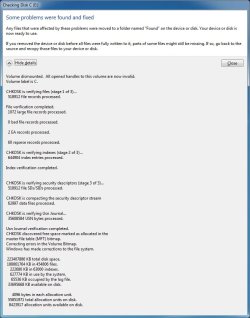
CheckDisk results attached, I will test other hardware stuff tomorrow.
 

Attachments

  • chkdsk_log_01.jpg
    chkdsk_log_01.jpg
    69.7 KB · Views: 14

My Computer My Computer

At a glance

Windows 7 Ultimate 64 bit SP1Intel(R) Core(TM) i5-2500K12GB Kingston Hyperx 1600MHzAsus GTS 450
Computer type
PC/Desktop
Computer Manufacturer/Model Number
Custom Built PC
OS
Windows 7 Ultimate 64 bit SP1
CPU
Intel(R) Core(TM) i5-2500K
Motherboard
Gigabyte Technology Co., Ltd. Z68X-UD3-B3
Memory
12GB Kingston Hyperx 1600MHz
Graphics Card(s)
Asus GTS 450
PSU
500W Coolink
Other Info
Genius G-Pen F610 (PenPad)
Repair CD didn't make a difference this time, excluding "Attemping repairs" took 3 times longer.

So, what do you think, what are my chances to perform a successful windows.old to new installation progress?
 

My Computer My Computer

At a glance

Windows 7 Ultimate 64 bit SP1Intel(R) Core(TM) i5-2500K12GB Kingston Hyperx 1600MHzAsus GTS 450
Computer type
PC/Desktop
Computer Manufacturer/Model Number
Custom Built PC
OS
Windows 7 Ultimate 64 bit SP1
CPU
Intel(R) Core(TM) i5-2500K
Motherboard
Gigabyte Technology Co., Ltd. Z68X-UD3-B3
Memory
12GB Kingston Hyperx 1600MHz
Graphics Card(s)
Asus GTS 450
PSU
500W Coolink
Other Info
Genius G-Pen F610 (PenPad)
Back
Top