boot XPmode vhd?

paul3200

Banned
Local time
3:44 AM
Messages
83
is it possible to boot XPmode at the boot screen using the vhd boot thing in win7??
 

My Computer

Computer Manufacturer/Model Number
Fujitsu Esprimo E5905 Desktop
OS
Windows 7 Ultimate X64
CPU
Intel P4 3.0Ghz
Motherboard
Fujitsu D2164
Memory
3GB
Graphics Card(s)
On-board (intel GMA950)
Sound Card
Realtek ALC260
Screen Resolution
1024x700
Hard Drives
500gb seagate

My Computer

Computer type
Laptop
Computer Manufacturer/Model Number
HP ENVY 17-1150eg
OS
Windows 10 Pro x64 EN-GB
CPU
1.6 GHz Intel Core i7-720QM Processor
Memory
6 GB
Graphics Card(s)
ATI Mobility Radeon HD 5850 Graphics
Sound Card
Beats sound system with integrated subwoofer
Monitor(s) Displays
17" laptop display, 22" LED and 32" Full HD TV through HDMI
Screen Resolution
1600*900 (1), 1920*1080 (2&3)
Hard Drives
Internal: 2 x 500 GB SATA Hard Disk Drive 7200 rpm
External: 2TB for backups, 3TB USB3 network drive for media
Cooling
As Envy runs a bit warm, I have it on a Cooler Master pad
Keyboard
Logitech diNovo Media Desktop Laser (bluetooth)
Mouse
Logitech Performance Mouse MX
Internet Speed
50/10 Mbps VDSL
Antivirus
Windows Defender 4.3.9431.0
Browser
Maxthon 3.5.2., IE11
we just released VBoot today,

VBoot Overview

It can boot any Windows starting from Windows 2000, any service packs, any editions from VHD, VMDK, VDI and Raw formats.

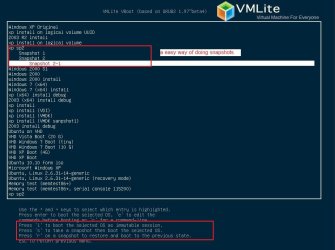
Differencing and Snapshots are supported. Extremely easy to take a snapshot and restore.

It supports installing Windows from iso files. You simply take an iso file, then install it to a virtual disk file, then boot it using VBoot Loader.
 

Attachments

  • vboot-snapshots.jpg
    vboot-snapshots.jpg
    65.7 KB · Views: 30
Last edited:

My Computer

OS
windows 7
Back
Top