Boot

iron

New member
Local time
1:38 PM
Messages
16
Had Windows 7 7100 86x and worked ok. Formated drive and when I try to install Windows 7 RC 64 it says: The boot selection failed because required device is inaccesible. Have Windows Vista installed one drive. Trying to install 7 on second drive by itself.
 

My Computer

OS
Windows Vista
When you say Drive - do you mean a separate partition or HD?

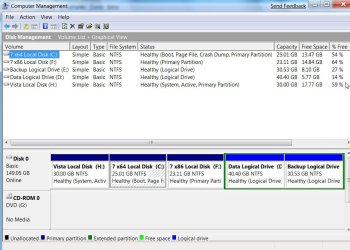
Please post a screenshot of Disk Management - like this:

DISKMANAGEMENT2009-02-04_031947.jpg
 

My Computers

System One System Two

  • Computer type
    PC/Desktop
    OS
    7 X64
    CPU
    i5 8400
    Motherboard
    gigabyte b365m ds3h
    Memory
    2x8gb 3200mhz
    Hard Drives
    various
    PSU
    pure power 11 400w cm
    Case
    Coolermaster
    Cooling
    cryorig m9i
  • Computer type
    PC/Desktop
    OS
    7x64
    CPU
    g5400
    Motherboard
    ga b365m ds3h
    Memory
    8gb ddr4 2400
    PSU
    xfx pro 450w
2 hard drives

I have vista 32 bit on one drive and am trying to install windows 7 rc 64 on a second drive. Don't know how to copy a picture of my drives the way you did. I can bring them up on the screen but can't find a option to copy.
 

My Computer

OS
Windows Vista
Iron, use the "print screen" button on the top right of your keyboard (may appear as Prtsc or prtscrn)

Then open up windows paint, or any image editing software and press Ctrl + V , to paste the image, save it and upload it as an attachment.

Hope it helps!

Enzo.
 

My Computer

Computer Manufacturer/Model Number
Custom Build
OS
W7 RTM Ultimate x64
CPU
Intel Q8400 @ 2.66GHZ
Motherboard
Gigabyte GA-EG45M-UD2H
Memory
4GB DDR2-800
Graphics Card(s)
Gainward GTS 450 GLH 1GB Edition
Sound Card
Integrated 8 Channel
Monitor(s) Displays
AOC 23.6 Inch Widescreen LCD
Screen Resolution
1920x1080
Hard Drives
Seagate 500GB Internal
Western Digital 1TB Internal

Hitachi 1TB External
PSU
Apevia Java Power 500W
Case
Cooler Master HAF 922 Black
Cooling
Stock Intel CPU Fan
Keyboard
HP SK-2960 Multimedia Keyboard
Mouse
Logitech M350 Wireless Gaming Mouse
Internet Speed
1.5MB
Disk Management

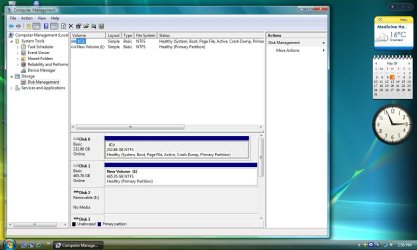
Thanks. Here is a picture of my Disk Management
 

Attachments

  • Untitled.jpg
    Untitled.jpg
    101.9 KB · Views: 58

My Computer

OS
Windows Vista
OK, i could be wrong, but the way i see it, run the W7 Disc, and when it asks you where you would like to install W7, choose your second HDD, and it should start installing.

Can someone correct me if im wrong.

Enzo.
 

My Computer

Computer Manufacturer/Model Number
Custom Build
OS
W7 RTM Ultimate x64
CPU
Intel Q8400 @ 2.66GHZ
Motherboard
Gigabyte GA-EG45M-UD2H
Memory
4GB DDR2-800
Graphics Card(s)
Gainward GTS 450 GLH 1GB Edition
Sound Card
Integrated 8 Channel
Monitor(s) Displays
AOC 23.6 Inch Widescreen LCD
Screen Resolution
1920x1080
Hard Drives
Seagate 500GB Internal
Western Digital 1TB Internal

Hitachi 1TB External
PSU
Apevia Java Power 500W
Case
Cooler Master HAF 922 Black
Cooling
Stock Intel CPU Fan
Keyboard
HP SK-2960 Multimedia Keyboard
Mouse
Logitech M350 Wireless Gaming Mouse
Internet Speed
1.5MB
Yes, install it to the larger of the two drives 465GB.
 

My Computer

Computer type
PC/Desktop
Computer Manufacturer/Model Number
Self Build
OS
MS Windows 7 Professional 64-bit SP1
CPU
AMD FX(tm)-6100 Six-Core Processor Socket AM3+ (942)
Motherboard
ASUSTeK COMPUTER INC. SABERTOOTH 990FX (AM3r2)
Memory
8.00 GB Dual-Channel DDR3 @ 802MHz (11-11-11-36) 1.5Volts
Graphics Card(s)
NVIDIA GeForce GTX 560 Ti
Sound Card
Onboard Realtek HD
Monitor(s) Displays
shimian (1920x1080@60Hz)
Screen Resolution
1920*1080
Hard Drives
OCZ-AGIL ITY3 SATA Disk Device 120GB
PSU
Corsair TX 750
Case
Corsair
Cooling
WaterCooled
Keyboard
Microsoft Wired
Mouse
Logitech USB Optical TiltWheel Mouse
Internet Speed
Realtek PCIe GBE Family Controller 20MB*1MB
Antivirus
Avast
Browser
Firefox
Other Info
150GB Internal Hard Drive for Backing Up Important Files -
Hauppauge Nova-DT Dual DVB-T Tuner Device (+IR) -
USB PC Camera with Mic (SN9C105)
OK, i could be wrong, but the way i see it, run the W7 Disc, and when it asks you where you would like to install W7, choose your second HDD, and it should start installing.

Can someone correct me if im wrong.

Enzo.

Yes but the boot files will be written to the vista drive which i assume is the device that is being reported as inaccesible.
 

My Computer

OS
Win 7
Hi,

A couple of ways round this may be:

1. Install the free Daemon Tools Lite on Vista. Mount the 7 iso - run setup and point it at the second HD when it asks where you want to install.

Lite version is third one down on this page:

Downloads :: DAEMON-Tools.cc

OR

2. Detach the Vista HD. Install 7 on the remaining attached HD by booting the 7 dvd in the normal way.

http://www.sevenforums.com/tutorials/1649-clean-install-windows-7-a.html

You can setup dual boot by adding the bcd entries afterwards.

Hope it helps.
 

My Computers

System One System Two

  • Computer type
    PC/Desktop
    OS
    7 X64
    CPU
    i5 8400
    Motherboard
    gigabyte b365m ds3h
    Memory
    2x8gb 3200mhz
    Hard Drives
    various
    PSU
    pure power 11 400w cm
    Case
    Coolermaster
    Cooling
    cryorig m9i
  • Computer type
    PC/Desktop
    OS
    7x64
    CPU
    g5400
    Motherboard
    ga b365m ds3h
    Memory
    8gb ddr4 2400
    PSU
    xfx pro 450w
Disconnect Drive 0 and start the install and you should be ok.

Once installed, you can reattach Drive 0.

Then, at boot, press F8 to bring up the Bios boot manager and select
the drive you want to boot from.
 

My Computer

Computer Manufacturer/Model Number
Intel E8500
OS
Win7 build 7100, Win Bus 64bit, Mac OS X
Motherboard
Asus P5Q3 Deluxe WiFi
Memory
4gb DDR3 Gskill
Graphics Card(s)
EVGA Nvidia Geforce 9800GT
Sound Card
Onboard Soundmax
Monitor(s) Displays
8 yr old Princeton 17" LCD
Screen Resolution
1024 768
Hard Drives
3 Sata 2 Seagate 500gb
Case
Coolermaster
Keyboard
Microsoft USB
Mouse
Logitech USB
Yeah, Snifferpro's got the idea, disconnect vista drive, connect w7 drive to main connectors, run w7 disc, install on drive, place w7 drive as slave, and vista drive as master, boot up, enter BIOS and select OS to boot.

I think thats right, havent done it for ages tho. Correct me if im wrong.

Enzo.
 

My Computer

Computer Manufacturer/Model Number
Custom Build
OS
W7 RTM Ultimate x64
CPU
Intel Q8400 @ 2.66GHZ
Motherboard
Gigabyte GA-EG45M-UD2H
Memory
4GB DDR2-800
Graphics Card(s)
Gainward GTS 450 GLH 1GB Edition
Sound Card
Integrated 8 Channel
Monitor(s) Displays
AOC 23.6 Inch Widescreen LCD
Screen Resolution
1920x1080
Hard Drives
Seagate 500GB Internal
Western Digital 1TB Internal

Hitachi 1TB External
PSU
Apevia Java Power 500W
Case
Cooler Master HAF 922 Black
Cooling
Stock Intel CPU Fan
Keyboard
HP SK-2960 Multimedia Keyboard
Mouse
Logitech M350 Wireless Gaming Mouse
Internet Speed
1.5MB
He only needs to disconnect the Vista drive and then install 7 - exactly as point 2. of my earlier post - which snifferpro kindly repeated.
 

My Computers

System One System Two

  • Computer type
    PC/Desktop
    OS
    7 X64
    CPU
    i5 8400
    Motherboard
    gigabyte b365m ds3h
    Memory
    2x8gb 3200mhz
    Hard Drives
    various
    PSU
    pure power 11 400w cm
    Case
    Coolermaster
    Cooling
    cryorig m9i
  • Computer type
    PC/Desktop
    OS
    7x64
    CPU
    g5400
    Motherboard
    ga b365m ds3h
    Memory
    8gb ddr4 2400
    PSU
    xfx pro 450w
Oh, my bad :S

Enzo.
 

My Computer

Computer Manufacturer/Model Number
Custom Build
OS
W7 RTM Ultimate x64
CPU
Intel Q8400 @ 2.66GHZ
Motherboard
Gigabyte GA-EG45M-UD2H
Memory
4GB DDR2-800
Graphics Card(s)
Gainward GTS 450 GLH 1GB Edition
Sound Card
Integrated 8 Channel
Monitor(s) Displays
AOC 23.6 Inch Widescreen LCD
Screen Resolution
1920x1080
Hard Drives
Seagate 500GB Internal
Western Digital 1TB Internal

Hitachi 1TB External
PSU
Apevia Java Power 500W
Case
Cooler Master HAF 922 Black
Cooling
Stock Intel CPU Fan
Keyboard
HP SK-2960 Multimedia Keyboard
Mouse
Logitech M350 Wireless Gaming Mouse
Internet Speed
1.5MB
There is a thread here where a user had a problem with a removable device causing the "The boot selection failed because required device is inaccessible " error. I noticed in your device management that you have some removable devices so disconnect them and try installing.
 

My Computer

OS
Win 7
Disconnected one hard drive tried to boot on the other and get this message: Reboot and select proper boot device or insert boot media in selected boot device and press a key.
 

My Computer

OS
Windows Vista
Might be he needs to login to Vista as Admin, not std user.
that is the only reason I can see he would not have permission to write to C:\ and install Win7 as dual boot.
it also takes a fairly experience operator to add the dual boot sequence.

I also agree with all other suggestions. but I think he will have major problems with the rest of it
disconnect vista drive, connect w7 drive to main connectors, run w7 disc, install on drive, place w7 drive as slave, and vista drive as master, boot up, enter BIOS and select OS to boot.
 
Now when I boot into the second drive I get: BOOTMGR is missing
 

My Computer

OS
Windows Vista
You have to set your bios to boot from your DVD drive first in able
to install Win 7 to the empty hard drive.

You can also try tapping f8 at boot to get the bios boot screen and
select your dvd drive to start the install
 

My Computer

Computer Manufacturer/Model Number
Intel E8500
OS
Win7 build 7100, Win Bus 64bit, Mac OS X
Motherboard
Asus P5Q3 Deluxe WiFi
Memory
4gb DDR3 Gskill
Graphics Card(s)
EVGA Nvidia Geforce 9800GT
Sound Card
Onboard Soundmax
Monitor(s) Displays
8 yr old Princeton 17" LCD
Screen Resolution
1024 768
Hard Drives
3 Sata 2 Seagate 500gb
Case
Coolermaster
Keyboard
Microsoft USB
Mouse
Logitech USB
windows 7

I did set my bios to boot from dvd.
 

My Computer

OS
Windows Vista
can you tap f8 at boot (keep tapping) and see if you get a bios boot screen
where you can select the dvd drive to boot from
 

My Computer

Computer Manufacturer/Model Number
Intel E8500
OS
Win7 build 7100, Win Bus 64bit, Mac OS X
Motherboard
Asus P5Q3 Deluxe WiFi
Memory
4gb DDR3 Gskill
Graphics Card(s)
EVGA Nvidia Geforce 9800GT
Sound Card
Onboard Soundmax
Monitor(s) Displays
8 yr old Princeton 17" LCD
Screen Resolution
1024 768
Hard Drives
3 Sata 2 Seagate 500gb
Case
Coolermaster
Keyboard
Microsoft USB
Mouse
Logitech USB
Back
Top