
You are using an out of date browser. It may not display this or other websites correctly.
You should upgrade or use an alternative browser.
You should upgrade or use an alternative browser.
Boot
- Thread starter iron
- Start date
- Local time
- 4:03 PM
- Messages
- 73
How did you create the DVD? You have to use a program like Imgburn (free)
to burn the DVD.
to burn the DVD.
My Computer
- Computer Manufacturer/Model Number
- Intel E8500
- OS
- Win7 build 7100, Win Bus 64bit, Mac OS X
- Motherboard
- Asus P5Q3 Deluxe WiFi
- Memory
- 4gb DDR3 Gskill
- Graphics Card(s)
- EVGA Nvidia Geforce 9800GT
- Sound Card
- Onboard Soundmax
- Monitor(s) Displays
- 8 yr old Princeton 17" LCD
- Screen Resolution
- 1024 768
- Hard Drives
- 3 Sata 2 Seagate 500gb
- Case
- Coolermaster
- Keyboard
- Microsoft USB
- Mouse
- Logitech USB
windows 7 rc 64
I used media player and I also used nero. The thing is I have downloaded windows 7 x86 a few times and that always worked. I would like to try 64 bit but can't get it to boot onto my drive.
I used media player and I also used nero. The thing is I have downloaded windows 7 x86 a few times and that always worked. I would like to try 64 bit but can't get it to boot onto my drive.
My Computer
- OS
- Windows Vista
- Local time
- 4:03 PM
- Messages
- 73
Download ImgBurn (a free app) and try burning with that to a DVD+/-R.
If your download is good and you burn the ISO with ImgBurn, it should boot.
If your download is good and you burn the ISO with ImgBurn, it should boot.
My Computer
- Computer Manufacturer/Model Number
- Intel E8500
- OS
- Win7 build 7100, Win Bus 64bit, Mac OS X
- Motherboard
- Asus P5Q3 Deluxe WiFi
- Memory
- 4gb DDR3 Gskill
- Graphics Card(s)
- EVGA Nvidia Geforce 9800GT
- Sound Card
- Onboard Soundmax
- Monitor(s) Displays
- 8 yr old Princeton 17" LCD
- Screen Resolution
- 1024 768
- Hard Drives
- 3 Sata 2 Seagate 500gb
- Case
- Coolermaster
- Keyboard
- Microsoft USB
- Mouse
- Logitech USB
what method of install did you use.?Now when I boot into the second drive I get: BOOTMGR is missing
maybe its just a very long day today, but I'm getting confused reading the below parts of the thread. I'm really not sure what we are working with.
1.
2.Disconnected one hard drive tried to boot on the other and get this message: Reboot and select proper boot device or insert boot media in selected boot device and press a key.
3. Does your system support x64. Not all CPUs support x64.Now when I boot into the second drive I get: BOOTMGR is missing
I used media player and I also used nero. The thing is I have downloaded windows 7 x86 a few times and that always worked. I would like to try 64 bit but can't get it to boot onto my drive.
might be best to solve 1 problem at a time... have we done that?

iron You do have a x64 capable pc correct, I see no specs listed?I used media player and I also used nero. The thing is I have downloaded windows 7 x86 a few times and that always worked. I would like to try 64 bit but can't get it to boot onto my drive.
My Computer
- Computer Manufacturer/Model Number
- Gateway GT5692
- OS
- Windows 7 Ulti. x64
- CPU
- AMD Phenom 8450 triple-core 2.10 ghz
- Memory
- 4GB
- Graphics Card(s)
- ATI Radion HD 3200
- Monitor(s) Displays
- Gateway FPD1775W
- Screen Resolution
- 1280x720
- Hard Drives
- 465.6613 Gibibytes
- Local time
- 4:03 PM
- Messages
- 73
Iron, are you saying that you cannot boot from the burned Win 7 DVD?
My Computer
- Computer Manufacturer/Model Number
- Intel E8500
- OS
- Win7 build 7100, Win Bus 64bit, Mac OS X
- Motherboard
- Asus P5Q3 Deluxe WiFi
- Memory
- 4gb DDR3 Gskill
- Graphics Card(s)
- EVGA Nvidia Geforce 9800GT
- Sound Card
- Onboard Soundmax
- Monitor(s) Displays
- 8 yr old Princeton 17" LCD
- Screen Resolution
- 1024 768
- Hard Drives
- 3 Sata 2 Seagate 500gb
- Case
- Coolermaster
- Keyboard
- Microsoft USB
- Mouse
- Logitech USB
iron.... nice specs my friend, that sure is not you problem. Have you redownloaded the x64 from ms site and then burned at a low speed on a campatible disc?
My Computer
- Computer Manufacturer/Model Number
- Gateway GT5692
- OS
- Windows 7 Ulti. x64
- CPU
- AMD Phenom 8450 triple-core 2.10 ghz
- Memory
- 4GB
- Graphics Card(s)
- ATI Radion HD 3200
- Monitor(s) Displays
- Gateway FPD1775W
- Screen Resolution
- 1280x720
- Hard Drives
- 465.6613 Gibibytes
windows 7
I downloaded windows 7 rc 64 three times from microsoft site and burned it with 3 different programs at slow speed still won't load. I downloaded windows 7 x86 and loaded that threw vista and that worked but that would not boot directly to my second drive either.
I downloaded windows 7 rc 64 three times from microsoft site and burned it with 3 different programs at slow speed still won't load. I downloaded windows 7 x86 and loaded that threw vista and that worked but that would not boot directly to my second drive either.
My Computer
- OS
- Windows Vista
- Local time
- 4:03 PM
- Messages
- 73
when you boot, try tapping f8 until you get the bios boot manager screen.
Select your win 7 drive and press enter to boot from it.
If it does not boot, the install is not creating an MBR on the drive you installed to.
Can you boot your DVD in any other machine?
Select your win 7 drive and press enter to boot from it.
If it does not boot, the install is not creating an MBR on the drive you installed to.
Can you boot your DVD in any other machine?
My Computer
- Computer Manufacturer/Model Number
- Intel E8500
- OS
- Win7 build 7100, Win Bus 64bit, Mac OS X
- Motherboard
- Asus P5Q3 Deluxe WiFi
- Memory
- 4gb DDR3 Gskill
- Graphics Card(s)
- EVGA Nvidia Geforce 9800GT
- Sound Card
- Onboard Soundmax
- Monitor(s) Displays
- 8 yr old Princeton 17" LCD
- Screen Resolution
- 1024 768
- Hard Drives
- 3 Sata 2 Seagate 500gb
- Case
- Coolermaster
- Keyboard
- Microsoft USB
- Mouse
- Logitech USB
Have you looked around in your bios for something like allow other versions of os's to load on this machine. or something like that. I did that on an old win 98 machine so I could load win 2000 but that was long ago. Why it would load x86 and not x64 is sure a head scratcher. Good luck to you.I downloaded windows 7 rc 64 three times from microsoft site and burned it with 3 different programs at slow speed still won't load. I downloaded windows 7 x86 and loaded that threw vista and that worked but that would not boot directly to my second drive either.
Rumor has it leak coming soon maybe work for you?
My Computer
- Computer Manufacturer/Model Number
- Gateway GT5692
- OS
- Windows 7 Ulti. x64
- CPU
- AMD Phenom 8450 triple-core 2.10 ghz
- Memory
- 4GB
- Graphics Card(s)
- ATI Radion HD 3200
- Monitor(s) Displays
- Gateway FPD1775W
- Screen Resolution
- 1280x720
- Hard Drives
- 465.6613 Gibibytes
- Local time
- 4:03 PM
- Messages
- 73
Iron, I think you should disconnect your vista drive (Remove all cables) and leave only the empty drive to install win 7 on.
boot your system and immediately start tapping f8 to get to bios boot manager and select your DVD Drive (I you put the DVD in) and see if it will boot.
If the DVD does not boot then you should take that DVD to another machine and see if it will boot there.
If the DVD does not boot on any machine, then the DVD is no good.
If the DVD boots on your machine, you should be able to complete the install and get a bootable Hard drive. If it installs, remove the DVD, do not connect other drive, and see if it will boot from your newly created hard drive.
If it boots, you are good to go. If it doesn't then there is another issue.
Please post back
boot your system and immediately start tapping f8 to get to bios boot manager and select your DVD Drive (I you put the DVD in) and see if it will boot.
If the DVD does not boot then you should take that DVD to another machine and see if it will boot there.
If the DVD does not boot on any machine, then the DVD is no good.
If the DVD boots on your machine, you should be able to complete the install and get a bootable Hard drive. If it installs, remove the DVD, do not connect other drive, and see if it will boot from your newly created hard drive.
If it boots, you are good to go. If it doesn't then there is another issue.
Please post back
My Computer
- Computer Manufacturer/Model Number
- Intel E8500
- OS
- Win7 build 7100, Win Bus 64bit, Mac OS X
- Motherboard
- Asus P5Q3 Deluxe WiFi
- Memory
- 4gb DDR3 Gskill
- Graphics Card(s)
- EVGA Nvidia Geforce 9800GT
- Sound Card
- Onboard Soundmax
- Monitor(s) Displays
- 8 yr old Princeton 17" LCD
- Screen Resolution
- 1024 768
- Hard Drives
- 3 Sata 2 Seagate 500gb
- Case
- Coolermaster
- Keyboard
- Microsoft USB
- Mouse
- Logitech USB
- Local time
- 4:03 PM
- Messages
- 73
Don't worry about that for now, just see if the DVD boots.
My Computer
- Computer Manufacturer/Model Number
- Intel E8500
- OS
- Win7 build 7100, Win Bus 64bit, Mac OS X
- Motherboard
- Asus P5Q3 Deluxe WiFi
- Memory
- 4gb DDR3 Gskill
- Graphics Card(s)
- EVGA Nvidia Geforce 9800GT
- Sound Card
- Onboard Soundmax
- Monitor(s) Displays
- 8 yr old Princeton 17" LCD
- Screen Resolution
- 1024 768
- Hard Drives
- 3 Sata 2 Seagate 500gb
- Case
- Coolermaster
- Keyboard
- Microsoft USB
- Mouse
- Logitech USB
- Local time
- 4:03 PM
- Messages
- 73
you are correct - it is not bootable. Have you tried Imgburn? Are you using a DVD+/-R or a DVD RW?
My Computer
- Computer Manufacturer/Model Number
- Intel E8500
- OS
- Win7 build 7100, Win Bus 64bit, Mac OS X
- Motherboard
- Asus P5Q3 Deluxe WiFi
- Memory
- 4gb DDR3 Gskill
- Graphics Card(s)
- EVGA Nvidia Geforce 9800GT
- Sound Card
- Onboard Soundmax
- Monitor(s) Displays
- 8 yr old Princeton 17" LCD
- Screen Resolution
- 1024 768
- Hard Drives
- 3 Sata 2 Seagate 500gb
- Case
- Coolermaster
- Keyboard
- Microsoft USB
- Mouse
- Logitech USB
I have tried imageburn on a very slow speed on a dvd+r. I just tried loading vista 32 bit that I purchased and it worked so it must be my burn or is it that I need 64 bit drivers or are they supposed to be included in the dvd.
My Computer
- OS
- Windows Vista
- Local time
- 4:03 PM
- Messages
- 73
Your burn is no good
My Computer
- Computer Manufacturer/Model Number
- Intel E8500
- OS
- Win7 build 7100, Win Bus 64bit, Mac OS X
- Motherboard
- Asus P5Q3 Deluxe WiFi
- Memory
- 4gb DDR3 Gskill
- Graphics Card(s)
- EVGA Nvidia Geforce 9800GT
- Sound Card
- Onboard Soundmax
- Monitor(s) Displays
- 8 yr old Princeton 17" LCD
- Screen Resolution
- 1024 768
- Hard Drives
- 3 Sata 2 Seagate 500gb
- Case
- Coolermaster
- Keyboard
- Microsoft USB
- Mouse
- Logitech USB
Research on web says " the e8400 CPU says it is not x64 compatible." on some mobo's.
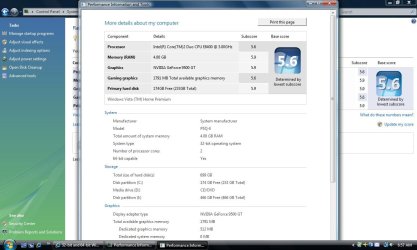
I see it say x64 ready on your pic might be special thing you need to do...
tried F6 andload the SATA drivers if you use Sata HDDs or
RAID drivers if you use Raid HDs. since x86 and x64 drivers are not the same.
Or wait 2 or 3 days and try 7127 Pre-RTM version - being leaked tonite. (rumors from Russia, china, and several US sites.)
I see it say x64 ready on your pic might be special thing you need to do...
tried F6 andload the SATA drivers if you use Sata HDDs or
RAID drivers if you use Raid HDs. since x86 and x64 drivers are not the same.
Or wait 2 or 3 days and try 7127 Pre-RTM version - being leaked tonite. (rumors from Russia, china, and several US sites.)