boot0: done and "Loading Operating System"

darksent21

New member
Local time
4:23 AM
Messages
16
Im using Windows 7 Ultimate x64.. I've recently installed hackintosh because of curiosity but I uninstall it immediately for making me frustrated..
now after the splash screen of my mobo.. it always shows up boot0: done and after that my windows boot screen will now appear.. it doesn't hang but its annoying..

and another one.. the "Loading Operating System..." message always shows up.. I just only want to see BIOS Splash Screen>Windows 7 Boot screen > done..

btw my mobo is Gigabyte H61m-S2-B3

can you please help me.. :cry:
 

My Computer

Computer Manufacturer/Model Number
Gigabyte
OS
Windows 7 Ultimate x64
CPU
Intel i5 2400
Motherboard
Gigabyte H61M-S2-B3
Memory
x2 2GB Transcend+Generic Memory
Graphics Card(s)
Palit GeForce 210 1G
Sound Card
On Board
Monitor(s) Displays
AOC e2243Fw
Screen Resolution
1920x1080
Hard Drives
500Gb Western Digital HD
PSU
generic 350W
Case
Generic Tower Case
Keyboard
Delkin PS/2 KeyBoard
Mouse
Discovery Optical Mouse
Internet Speed
1mbps
If you open up msconfig (in start bar)
and go to the boot tab is something listed there other than the windows install you are currently using?
If so, remove it.
Also you can tick the no gui boot if you really want to shorten it up.
 

My Computer

Computer Manufacturer/Model Number
Insane hobo technologies. ;-)
OS
Windows 7 x64
CPU
Intel i7 2600k
Motherboard
Asrock z68 extreme 4 gen 3
Memory
G.skill Ripjaw 16gigs @ 1866
Graphics Card(s)
Nvidia gtx580 (evga)
Sound Card
Integrated HD audio + hdmi
Monitor(s) Displays
24" ASUS widescreen + 42" insignia
Screen Resolution
1080p (1920x1080)
Hard Drives
128 Samsung 830
256 Samsung 840
3 x 1tb storage drive (various)
1 western digital 1tb (eSATA)
1 Seagate 1tb (eSATA)
PSU
1 kilowatt SLI/Crossfire rated Silverstone modular
Case
NZXT Phantom + additional 220 fan
Cooling
Zalmann
Keyboard
Microsoft wireless 3000 (v2)
Mouse
MS - wireless 5000 (bluetrack)
Internet Speed
depends on if you ask me or my provider.
Other Info
The above information is provided as is, and the author assumes no responsibility for issues it may cause with your sanity or fanboyism.
If you open up msconfig (in start bar)
and go to the boot tab is something listed there other than the windows install you are currently using?
If so, remove it.

it only says "Windows 7 Ultimate (recovered) (C:\Windows) : Current OS;Default OS"
I also provide a screenshot.. I want to get rid of this..
errordh.jpg
 

My Computer

Computer Manufacturer/Model Number
Gigabyte
OS
Windows 7 Ultimate x64
CPU
Intel i5 2400
Motherboard
Gigabyte H61M-S2-B3
Memory
x2 2GB Transcend+Generic Memory
Graphics Card(s)
Palit GeForce 210 1G
Sound Card
On Board
Monitor(s) Displays
AOC e2243Fw
Screen Resolution
1920x1080
Hard Drives
500Gb Western Digital HD
PSU
generic 350W
Case
Generic Tower Case
Keyboard
Delkin PS/2 KeyBoard
Mouse
Discovery Optical Mouse
Internet Speed
1mbps
okay I misunderstood you. I actually have never personally seen that exact message before, hopefully someone else will come by with hackintosh experience beyond mine, which honestly isn't much more than yours.
 

My Computer

Computer Manufacturer/Model Number
Insane hobo technologies. ;-)
OS
Windows 7 x64
CPU
Intel i7 2600k
Motherboard
Asrock z68 extreme 4 gen 3
Memory
G.skill Ripjaw 16gigs @ 1866
Graphics Card(s)
Nvidia gtx580 (evga)
Sound Card
Integrated HD audio + hdmi
Monitor(s) Displays
24" ASUS widescreen + 42" insignia
Screen Resolution
1080p (1920x1080)
Hard Drives
128 Samsung 830
256 Samsung 840
3 x 1tb storage drive (various)
1 western digital 1tb (eSATA)
1 Seagate 1tb (eSATA)
PSU
1 kilowatt SLI/Crossfire rated Silverstone modular
Case
NZXT Phantom + additional 220 fan
Cooling
Zalmann
Keyboard
Microsoft wireless 3000 (v2)
Mouse
MS - wireless 5000 (bluetrack)
Internet Speed
depends on if you ask me or my provider.
Other Info
The above information is provided as is, and the author assumes no responsibility for issues it may cause with your sanity or fanboyism.
Please post back a screenshot of your maximized Disk Management drive map and listings:

1. Type Disk Management in Start Search box.
2. Open Disk Mgmt. window and maximize it.
3. Type Snipping Tool in Start Search box.
4. Open Snipping Tool, choose Rectangular Snip, draw a box around full map and all listings.
5, Save Snip, attach using paper clip in Reply Box.

Tell us what is on each partition.

While we look at that run a few passes of Startup Repair - Run 3 Separate Times
 
Please post back a screenshot of your maximized Disk Management drive map and listings:

1. Type Disk Management in Start Search box.
2. Open Disk Mgmt. window and maximize it.
3. Type Snipping Tool in Start Search box.
4. Open Snipping Tool, choose Rectangular Snip, draw a box around full map and all listings.
5, Save Snip, attach using paper clip in Reply Box.

Tell us what is on each partition.

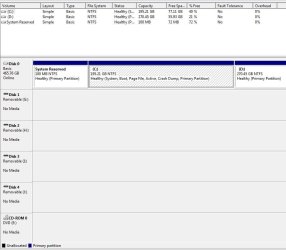
I did everything you told me.. so here it goes..
it has only 2 partition.. partition 1 where my window files and program files installed and partition 2 where my files(videos,pictures, musics and other media collection) save.. when I installed hackintosh before, I try to use dismgmt to shrink volumes at my partition 1 to provide another partition for my OSX files.. (20G only).. and then as I said.. I just uninstall OSX.. and it gave me a boot0: error but I manage to fix it by putting my Windows 7 ultimate DVD and select repair startup.. and then I manage to boot inside windows and again, I use disk mgmt to delete the partition where my OSX installed and it became unallocated space.. IIRC, I use extend volume to merge the unallocated space to my partition 1(primary partition).. and do a restart.. and that what happens.. I can login to my windows but it keeps on popping.. it's annoying and eats time to boot.. :cry::cry::cry:


While we look at that run a few passes of Startup Repair - Run 3 Separate Times
Im sorry I just post it today because we have diff time zone and I have to sleep.. I already did that.. but the message is still there.. :huh:
 

Attachments

  • hmmm.JPG
    hmmm.JPG
    63.1 KB · Views: 49

My Computer

Computer Manufacturer/Model Number
Gigabyte
OS
Windows 7 Ultimate x64
CPU
Intel i5 2400
Motherboard
Gigabyte H61M-S2-B3
Memory
x2 2GB Transcend+Generic Memory
Graphics Card(s)
Palit GeForce 210 1G
Sound Card
On Board
Monitor(s) Displays
AOC e2243Fw
Screen Resolution
1920x1080
Hard Drives
500Gb Western Digital HD
PSU
generic 350W
Case
Generic Tower Case
Keyboard
Delkin PS/2 KeyBoard
Mouse
Discovery Optical Mouse
Internet Speed
1mbps
The System Reserved partition is intended to boot Win7, but somehow the System boot files have been moved to C as signified by the System Active flags. It's possible to run this way but might be better to move them back as intended so that it might also sort out the boot loader issues caused by your misadventure.

To do this back up your files then in Disk Mgmt Mark Partition Active the System Reserved partition, boot into Win7 DVD or Repair CD to run Startup Repair - Run 3 Separate Times.

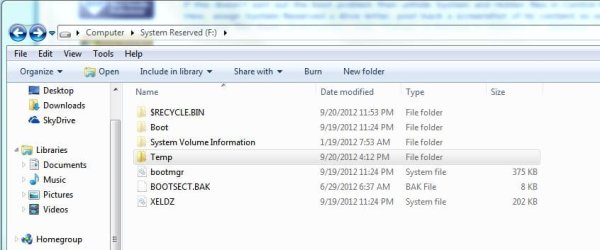
If this doesn't sort out the boot problem then unhide System and Hidden files in Control Panel>Folder Options, View, assign System Reserved a drive letter, post back a screenshot of its content so we can see if Hackintosh wrote any files there. Drive Letter - Add, Change, or Remove in Windows 7 - Windows 7 Forums
 
done making my system reserved partition active.. restart and run startup repair.. nothing happens... :(
btw, is this what you ask for??
 

Attachments

  • Capture.JPG
    Capture.JPG
    43.2 KB · Views: 27

My Computer

Computer Manufacturer/Model Number
Gigabyte
OS
Windows 7 Ultimate x64
CPU
Intel i5 2400
Motherboard
Gigabyte H61M-S2-B3
Memory
x2 2GB Transcend+Generic Memory
Graphics Card(s)
Palit GeForce 210 1G
Sound Card
On Board
Monitor(s) Displays
AOC e2243Fw
Screen Resolution
1920x1080
Hard Drives
500Gb Western Digital HD
PSU
generic 350W
Case
Generic Tower Case
Keyboard
Delkin PS/2 KeyBoard
Mouse
Discovery Optical Mouse
Internet Speed
1mbps
What do you mean "nothing happens?" Did you run Startup Repair 3 separate times with reboots and did it move the System and Active flags to System Reserved?
 
What do you mean "nothing happens?"
I run Startup Repair 3 seperate times and with reboots..
it ask me to do a system restore but I did'nt and it goes searching for errors.. about 2-3 minutes or longer.. and reboot.. I did it 3 times as you said..

Did you run Startup Repair 3 separate times with reboots and did it move the System and Active flags to System Reserved?
Yes! it move.. :)

I dont get it where the boot0: done is coming from.. Im sure I uninstall the chameleon (OSX bootloader) and replace my bootloader using my Windows 7 DVD.. O.o
 

My Computer

Computer Manufacturer/Model Number
Gigabyte
OS
Windows 7 Ultimate x64
CPU
Intel i5 2400
Motherboard
Gigabyte H61M-S2-B3
Memory
x2 2GB Transcend+Generic Memory
Graphics Card(s)
Palit GeForce 210 1G
Sound Card
On Board
Monitor(s) Displays
AOC e2243Fw
Screen Resolution
1920x1080
Hard Drives
500Gb Western Digital HD
PSU
generic 350W
Case
Generic Tower Case
Keyboard
Delkin PS/2 KeyBoard
Mouse
Discovery Optical Mouse
Internet Speed
1mbps
It may require waiting until you next Clean Reinstall - Factory OEM Windows 7 to wipe the HD of all boot code with Diskpart Clean Command since Hackintosh has some code remaining which is interfering with your boot.

Yes.. that would resolve my issue about "boot0: done" problems.. but I don't feel like doing that yet since my system is still working fine. I should let that boot message to pop out for a while, it's not causing any trouble.. it's just annoying though.

BTW Thanks for helping me.. until next time :D
 

Attachments

  • Capture.JPG
    Capture.JPG
    39.3 KB · Views: 7

My Computer

Computer Manufacturer/Model Number
Gigabyte
OS
Windows 7 Ultimate x64
CPU
Intel i5 2400
Motherboard
Gigabyte H61M-S2-B3
Memory
x2 2GB Transcend+Generic Memory
Graphics Card(s)
Palit GeForce 210 1G
Sound Card
On Board
Monitor(s) Displays
AOC e2243Fw
Screen Resolution
1920x1080
Hard Drives
500Gb Western Digital HD
PSU
generic 350W
Case
Generic Tower Case
Keyboard
Delkin PS/2 KeyBoard
Mouse
Discovery Optical Mouse
Internet Speed
1mbps
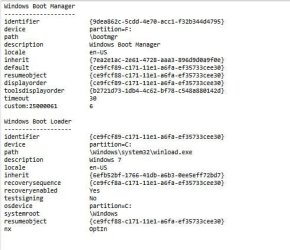
I notice the timeout for boot manager shows 30 seconds. Check that it is set to 0 on Easy's Edit OS tab or in msconfig>Boot. Then you've given no time to the boot manager.

You can also check in BIOS setup that Quickboot is Enabled which might cut the BIOS reveal time to eliminate the annoying listing.
 
Back
Top