Bootable Flash Drive

Roderunner

Exterminator
Guru
Gold Member
VIP
Local time
11:33 PM
Messages
2,362
Location
Scotland
Hi Folks,
I have a 4GB Flash Drive, if I make it bootable, will their be any trouble in storing other data at the same time. I intend using it for installing Win7 and as Acronis Recovery, but not both installed at the same time.
 

My Computer

Computer Manufacturer/Model Number
Look in my Signature.
OS
Win7 H.Prem. 32bit+SP1
With YUMI - Multiboot USB creator (Windows) http://www.pendrivelinux.com/yumi-multiboot-usb-creator/ one can pack as many bootable ISOs as can fit into the pendrive and one can also use any leftover space for storing any data.

But from a practical standpoint, it is preferable to have one pendrive exclusively for running bootable ISOs and other pendrives for data.

I periodically recreate my multiboot pendrive to make sure that it operates without any problems. Since the pendrive is formatted everytime I recreate it, I do not store any data on it.

Now I am thinking of using the USB Image Tool USB Image Tool | Portable USB Pen Drive Applications to image my multiboot pendrive. Instead of recreating the multiboot pendrive, I can simply restore tthe image should I encounter any problem with the multiboot pendrive.

If this starategy works fine, and if one periodically backs up the pendrive then one can store any data also safely on the bootable pendrive.
 

My Computer

OS
Windows 7 Home Premium 32 bit
Hi jumanji,
am I correct in saying, my flash drive should have the files it contains transferred to another location then make it bootable. Then add the files for whatever I intend using it for. When done, format it and replace the files it contained.
This is the method I found to make a flash drive bootable. View attachment How to format a USB memory key.pdf
 

My Computer

Computer Manufacturer/Model Number
Look in my Signature.
OS
Win7 H.Prem. 32bit+SP1
I am still not clear. Do you want to put the .iso on the pen drive so that you can install from the pen drive in lieu of a DVD -

or do you want to install a running Win7 system on the drive so that you can boot from it and run Win7 from the pen drive.

But in both cases, 4GB is too small. An iso may barely fit, but a running system needs a 16GB drive.
 

My Computer

Computer Manufacturer/Model Number
HP, Dell, Gateway, Toshiba - 4 laptops and 2 desktops
OS
Vista, Windows7, Mint Mate, Zorin, Windows 8
CPU
from 1.6GHz Duo to i7
Monitor(s) Displays
2x HP w2207
Hard Drives
5x HDD, 7x SSD, 12x Externals
Keyboard
with trackball - no mices
Mouse
Trackball mice
Internet Speed
DSL 6000
I intend using it for installing Win7 and as Acronis Recovery, but not both installed at the same time.

I am still not clear. Do you want to put the .iso on the pen drive so that you can install from the pen drive in lieu of a DVD -

or do you want to install a running Win7 system on the drive so that you can boot from it and run Win7 from the pen drive.
Just as in my first post.
 

My Computer

Computer Manufacturer/Model Number
Look in my Signature.
OS
Win7 H.Prem. 32bit+SP1
Well, " For installing Windows 7 " could mean that you want to install Windows 7 on it - or, you want to use it to install Windows 7.
 

My Computer

Computer Manufacturer/Model Number
HP, Dell, Gateway, Toshiba - 4 laptops and 2 desktops
OS
Vista, Windows7, Mint Mate, Zorin, Windows 8
CPU
from 1.6GHz Duo to i7
Monitor(s) Displays
2x HP w2207
Hard Drives
5x HDD, 7x SSD, 12x Externals
Keyboard
with trackball - no mices
Mouse
Trackball mice
Internet Speed
DSL 6000
Hi jumanji,
am I correct in saying, my flash drive should have the files it contains transferred to another location then make it bootable. Then add the files for whatever I intend using it for. When done, format it and replace the files it contained.
This is the method I found to make a flash drive bootable. View attachment 203390

The bootable pendrive you have referenced is a bootable DOS pendrive to boot into DOS and has only limited usage.

You can use it to run a bootable ISO but only one bootable ISO. For this you can use Rufus Rufus - Create bootable USB drives .The first time and then everytime you want to create it with another bootable ISO, it will format your pendrive. So naturally you have to backup any data you have stored on it before doing that.

YUMI is Linux based and you can run multiple bootable ISOs from a menu. You shall start with a FAT32 formatted pendrive the first time or the program itself checked to format it. And naturally you have to backup any data that you may already have on the pendrive or you will lose it while formatting..

No formatting needed for subsequent addition of bootable ISOs. So any data you have stored may remain there.

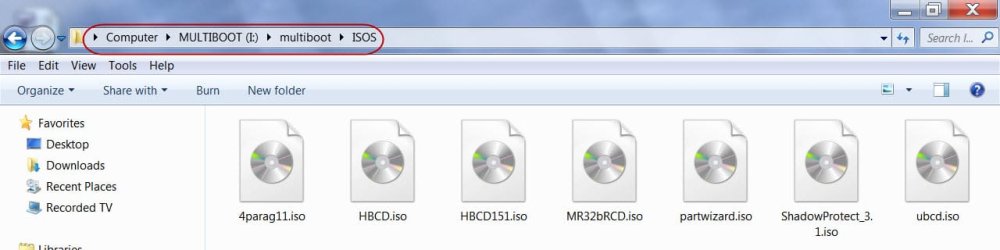
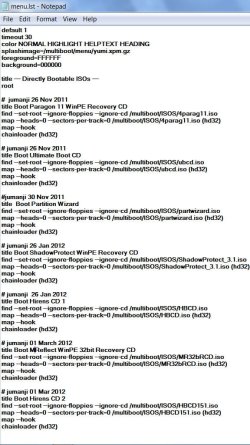
Screenshots of my YUMI pendrive:

MultibootISOs.jpg

menulist.jpg

Hope this clarifies your doubts.
 

My Computer

OS
Windows 7 Home Premium 32 bit
jumanji

I tried my method as in my previous post and did get Acronis to work but not Win7. I then reformatted my pendrive, returned my files. I then used your link to backup my pendrive. By this time it was 0300hrs so I went to bed and will try YUMI later today.
 

My Computer

Computer Manufacturer/Model Number
Look in my Signature.
OS
Win7 H.Prem. 32bit+SP1
Back
Top