Bootable ISO - Create from an Older ISO

How to Create a Bootable ISO from an Older ISO


   Information
This small how-to covers just the fundamentals....
  • Extract a Boot Sector file
  • Create a new ISO with the extracted Boot Sector file


Here's how:
   Note
I use UltraISO for this method, but the basics should be the same for most ISO editing software

Firstly, open/run UltraISO (or similar)
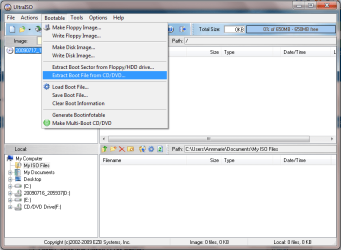
1. Insert a Bootable DVD (e.g. Windows 7) Click Bootable then Extract Boot File from CD/DVD...
Capture.PNG
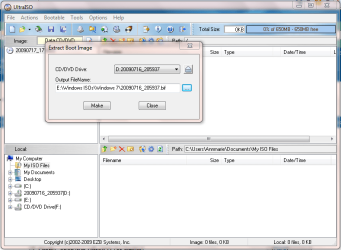
2. Select the drive and destination for the BIF file then click Make
Capture1.PNG
3. You will be presented with the following message. Click Ok then 'Close'.
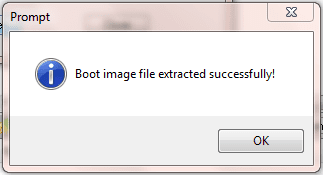
Capture2.PNG
4. Browse for the files you wish to have created into a Bootable ISO.
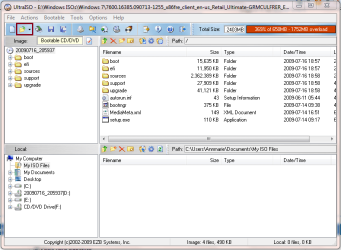
Capture3.PNG
5. Click Bootable and Load Boot File..., and browse for the file you just created.
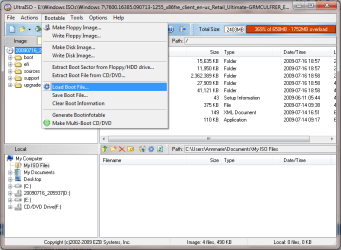
Capture4.PNG

You can type *.* into the filename bar to view the new file

Capture5.PNG

6. Click the Burn Icon to burn the new Image to disk, or Save As to save the newly Bootable ISO.
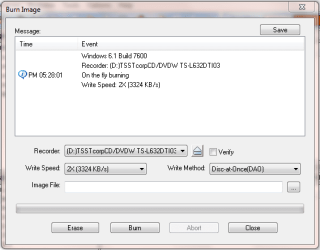
Capture6.PNG
Hope this answers a lot of people's questions :D


Last edited by a moderator:
very good post Shark!
people asking a lot about this
 

My Computer

Computer Manufacturer/Model Number
MasterB/Custom
OS
Windows 7 Professional x64
CPU
QuadCore AMD Phenom II X4 Black Edition 955 3.2 GHz
Motherboard
Asus M4A785TD-V Evo
Memory
8 GB Crucial DDR3
Graphics Card(s)
SAPPHIRE Radeon HD 4890 1GB HDMI New Edition
Sound Card
VIA VT1708S HD Audio 7.1 onboard/ ATI HDMI video card
Monitor(s) Displays
Acer H233H 23'' LCD HDMI
Screen Resolution
1920x1080
Hard Drives
1x 500GB and 1x 1TB 7200RPM 32MB Cache WD Caviar Black
PSU
CORSAIR CMPSU-620HX 620W
Case
COOLER MASTER Storm Scout SGC-2000
Cooling
2x 140mm and 1x 120mm case fans, Stock CPU fan
Keyboard
Logitech MX 3200
Mouse
Logitech MX 3200
Internet Speed
15 Mbps
Other Info
My first build!
First really thanks :)

Second i dont have DVD-RW so i will do bootable usb do yu know how ?

These steps ok for usb ?
 

My Computer

OS
Windows 7
should be moved to tutorial!!!
 

My Computer

Computer Manufacturer/Model Number
Custom Build
OS
win 7 build 7600.16385 x64
CPU
AMD Athlon Dual core 7750 2.7GHz
Motherboard
Gigabyte GA78MA s2h
Memory
4GB 800Mhz
Graphics Card(s)
ATI HD 3200 IGP
Monitor(s) Displays
Acer 15 inch
Screen Resolution
1280x720
Hard Drives
Seagate 1 TB
Keyboard
Logitech
Mouse
Logitech
Internet Speed
Airtel DSL 2Mbps

My Computer

OS
Windows 7 x64 RTM
CPU
Q6600 @ 3.2Ghz
Motherboard
Asus P5Q Deluxe
Memory
4GB G.Skill 1000Mhz
Graphics Card(s)
ATi 4850 512Mb
Monitor(s) Displays
19" Dell
Screen Resolution
1280*1024
Hard Drives
WD 1Tb Caviar Black
WD 320Gb Caviar Blue
WD 160Gb
PSU
Corsair 500 Watt
Case
Antec 300
Cooling
OCz Vendetta II
Internet Speed
16Mbps
Thanks for this Orbital Shark!
 

My Computer

Computer Manufacturer/Model Number
Self built PC
OS
Windows 7 x64 RTM
CPU
AMD Phenom II X4 965 Black Edition
Motherboard
MSI 790FX-GD70
Memory
OCZ Gold (3 x 2GB)
Graphics Card(s)
Powercolor AX 5970 2GB
Sound Card
Auzen XFi Prelude 7.1
Monitor(s) Displays
Asus VK191T 19"
Screen Resolution
1440x900 75HZ
Hard Drives
2x 1TB WD Black SATA
PSU
HEC XP1080 1080W
Case
Old but reliable Chieftec
Cooling
6 fans
Keyboard
Logitech EX100 Keyboard
Mouse
Logitech EX100 Mouse
Internet Speed
Crappy DSL connection :P
Other Info
www.tipidpc.com
Thanks a bunch Shark, just the info I needed!
Not just that, but the pictures simplified it even further...good job!
Simple & easy to follow instructions! :thumbsup:
Btw, this makes it even more simple for me as I already have & use UltraISO! :D
 
Last edited:

My Computer

Computer Manufacturer/Model Number
ABS Tech Ultimate X9
OS
Windows® 7 Ultimate x64 SP1
CPU
Intel Core 2 Duo E8400 (E0) @ 4.0GHz
Motherboard
ASUS P5Q Pro Turbo / 1780 FSB
Memory
G.SKILL-F2-8500CL5D-4GBPK (2x2Gbs) (5-5-5-15) @ 1067Mhz
Graphics Card(s)
EVGA GTX 470 SC (845/1690/2000) 160Gbs
Sound Card
VIA HD Audio / Boston Acoustics
Monitor(s) Displays
Acer X222W HD 22" LCD 2500:1 / 5ms
Screen Resolution
1680x1050
Hard Drives
Seagate Barracuda SATAII 2 x 320GB
Seagate Barracuda SATAII 1Tb
Intel® Rapid Storage Technology v10.1.0.1008
AHCI-NCQ Enabled
PSU
Silent Pro GOLD 80 PLUS 800w /95% efficiency / SLI-Crossfire
Case
ABS Stealth Black-Custom
Cooling
CoolerMaster V6GT 6 Heatpipe 200w CPU Cooler
Keyboard
Logitech G15 Gaming Keyboard (Old Style Blue!)
Mouse
Logitech MX518 Gaming Mouse
Internet Speed
1Mbs-up/ 6Mbs-down
Thanks for moving this Shawn. I wasn't too sure if I should post it as a tutorial based on what people can use the content for :p
 

My Computer

Computer Manufacturer/Model Number
Compaq Desktop
OS
Windows 7 Ultimate x64
CPU
AMD Sempron Dual Core
Memory
3GB
Graphics Card(s)
NVIDIA GeForce 6150SE nForce 430
Screen Resolution
1024x768
Hard Drives
150GB Sata
Nice tutorial Shark.

I assume that is for when you have the windows files and you want to make a bootable .iso.

Ultraiso is saving the bootimage file etfsboot.com , with a .bif extension.

If you don't have a paid version of PowerIso, Ultraiso, etc - pretty much any burning suite you have will make a bootable iso for you.

It will ask for the windows files - you know where they are - so browse to those, and it will also ask for the bootimage file .

It is called etfsboot.com and is inside the windows files in the boot folder here :

ETFSBOOT2009-03-04_025950.jpg

Very few app. can utilise etfsboot.com - so extract the boot image as per the tutorial, using the free versions of PowerIso, UltraIso, or MagicIso - and use that .bif or .img you extracted when asked.


Just browse to it when asked by your burning app.
 
Last edited:

My Computers

System One System Two

  • Computer type
    PC/Desktop
    OS
    7 X64
    CPU
    i5 8400
    Motherboard
    gigabyte b365m ds3h
    Memory
    2x8gb 3200mhz
    Hard Drives
    various
    PSU
    pure power 11 400w cm
    Case
    Coolermaster
    Cooling
    cryorig m9i
  • Computer type
    PC/Desktop
    OS
    7x64
    CPU
    g5400
    Motherboard
    ga b365m ds3h
    Memory
    8gb ddr4 2400
    PSU
    xfx pro 450w
I assume that is for when you have the windows files and you want to make a bootable .iso.

Ultraiso is saving the bootimage file etfsboot.com , with a .bif extension.

If you don't have a paid version of PowerIso, Ultraiso, etc - pretty much any burning suite you have will make a bootable iso for you.

It will ask for the windows files - you know where they are - so browse to those, and it will also ask for the bootimage file .

It is called etfsboot.com and is inside the windows files in the boot folder here :

View attachment 18700

Just browse to it when asked by your burning app.

Ah, cool, nice addition :D
 

My Computer

Computer Manufacturer/Model Number
Compaq Desktop
OS
Windows 7 Ultimate x64
CPU
AMD Sempron Dual Core
Memory
3GB
Graphics Card(s)
NVIDIA GeForce 6150SE nForce 430
Screen Resolution
1024x768
Hard Drives
150GB Sata
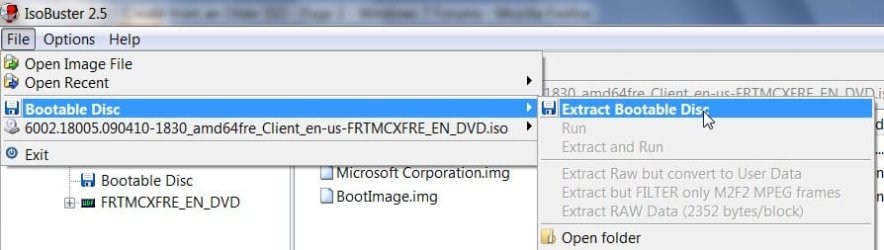
Isobuster extracts a .img file - your burning app.will probably happily pick that up.

ETFSBOOT-3-2009-07-17_184845.jpg

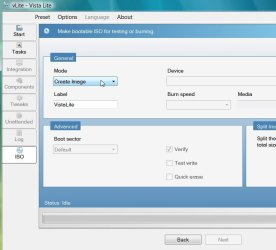
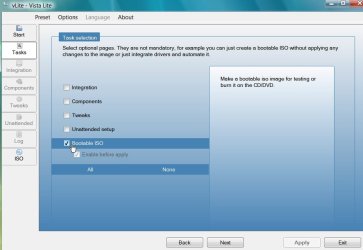
EDIT : Vlite is probably easiest method. Browse to the windows files, click Bootable .iso , create image

bootableiso2009-03-02_005050.jpg

Create Image2009-03-02_005215.jpg


These are the hashes ( it is a Vista .iso I have used here )

File: etfsboot.com
CRC-32: 7dad4ab5
MD4: a2e8717bfcfdc393a2ca86d895824755
MD5: 8e64dfb5944e55b8a200686037925bf6
SHA-1: 59fb660aad506285e69f34769acf57e9e3a4952c

File: bootimg.bif
CRC-32: 7dad4ab5
MD4: a2e8717bfcfdc393a2ca86d895824755
MD5: 8e64dfb5944e55b8a200686037925bf6
SHA-1: 59fb660aad506285e69f34769acf57e9e3a4952c

File: Microsoft Corporation.img
CRC-32: 7dad4ab5
MD4: a2e8717bfcfdc393a2ca86d895824755
MD5: 8e64dfb5944e55b8a200686037925bf6
SHA-1: 59fb660aad506285e69f34769acf57e9e3a4952c
 
Last edited:

My Computers

System One System Two

  • Computer type
    PC/Desktop
    OS
    7 X64
    CPU
    i5 8400
    Motherboard
    gigabyte b365m ds3h
    Memory
    2x8gb 3200mhz
    Hard Drives
    various
    PSU
    pure power 11 400w cm
    Case
    Coolermaster
    Cooling
    cryorig m9i
  • Computer type
    PC/Desktop
    OS
    7x64
    CPU
    g5400
    Motherboard
    ga b365m ds3h
    Memory
    8gb ddr4 2400
    PSU
    xfx pro 450w
With cdimage.exe ver.2.52(108 KB):

-Place your folder Windows 7 in your C:\ drive.
-Place your cdimage.exe in your C:\ drive.
-Run Command Prompt "as Administrator".
-When Command Prompt appear, type "cd\” without the quotes to change to C drive.
Type (copy/paste this) the command cdimage -m -u2 -bC:\Windows 7\boot\etfsboot.com C:\Windows 7 C:\Windows 7.iso and you will see that it’s creating Windows 7 ISO image.
 

My Computer

OS
Windows 7
Can i use another dvd like windows 7RC to extract boot sector and use it in windows 7RTM dvs.
 

My Computer

OS
Windows 7
Can i use another dvd like windows 7RC to extract boot sector and use it in windows 7RTM dvs.

Hi, welcome to the forums.

Yes you can, there's no tie to version numbers. The RTM if downloaded from MSDN or Technet will be bootable anyway ;)
 

My Computer

Computer Manufacturer/Model Number
Compaq Desktop
OS
Windows 7 Ultimate x64
CPU
AMD Sempron Dual Core
Memory
3GB
Graphics Card(s)
NVIDIA GeForce 6150SE nForce 430
Screen Resolution
1024x768
Hard Drives
150GB Sata
Back
Top