
I have a quad boot PC which has a very strange problem – when I boot directly into a logical partition, the other two logical partitions are recognised by windows as being primary. Let me explain. I didn’t want to use the MS boot manager, so I am using a 3rd party boot manager (OSL200), and what I did was to orignally make 3 primary partitions and an extended volume that contained 3 logical partitions.
I hid two of the 3 primary partitions, made the unhidden one active, and installed Windows on the active one. After installation, I unhid the next partition and did the same thing, so that each time I was installing windows into an active primary partition whereby the other two partitions were hidden. I installed XP into partition 1, and Windows7 Ultimate 64 bit into partitions 2 and 3. This worked absolutely fine. I set OSL2000 to hid the other primary partitions so when I booted into an OS I saw my boot drive as C: and three other drives, two of which were used for storing common data.
I then wanted to install a fourth OS, so I unhid partition 3, made it active and installed the fourth OS into partition 4 (a logical drive). However, the problem here was that to get into partition 4, I had to use the OSL2000 to boot into partition 3, and then use the MS boot manager to boot into partition 4. Even though I had OSL2000 hide the primary partitions, when booting into partition 4 partition 3 (the active partition) was still visible. (Other than this, there was no problem and when in partition 4 I still had access to the other two logical partitions.) As I didn’t want to see partition3, I copied over the boot files to partition 4 and modified them, so that I could boot directly into partition 4 using the boot manager. This worked, but something very strange happened. When I boot directly into partition 4, windows recognises the other two logical partitions as primary (!) and because of this, they are not visible as OSL2000 hides the primary partitions! If I use partition wizard to unhide these logical partitions, then windows correctly identifies them as logical.
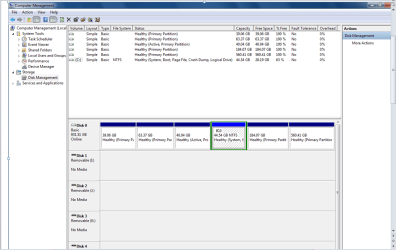
Below is a screen shot of disk management when I boot directly into partition 4.
The main question is - why is this happening and how can I change it so that the logical partitions show as logical partitions when I boot directly from partition 4?
I hid two of the 3 primary partitions, made the unhidden one active, and installed Windows on the active one. After installation, I unhid the next partition and did the same thing, so that each time I was installing windows into an active primary partition whereby the other two partitions were hidden. I installed XP into partition 1, and Windows7 Ultimate 64 bit into partitions 2 and 3. This worked absolutely fine. I set OSL2000 to hid the other primary partitions so when I booted into an OS I saw my boot drive as C: and three other drives, two of which were used for storing common data.
I then wanted to install a fourth OS, so I unhid partition 3, made it active and installed the fourth OS into partition 4 (a logical drive). However, the problem here was that to get into partition 4, I had to use the OSL2000 to boot into partition 3, and then use the MS boot manager to boot into partition 4. Even though I had OSL2000 hide the primary partitions, when booting into partition 4 partition 3 (the active partition) was still visible. (Other than this, there was no problem and when in partition 4 I still had access to the other two logical partitions.) As I didn’t want to see partition3, I copied over the boot files to partition 4 and modified them, so that I could boot directly into partition 4 using the boot manager. This worked, but something very strange happened. When I boot directly into partition 4, windows recognises the other two logical partitions as primary (!) and because of this, they are not visible as OSL2000 hides the primary partitions! If I use partition wizard to unhide these logical partitions, then windows correctly identifies them as logical.
Below is a screen shot of disk management when I boot directly into partition 4.
The main question is - why is this happening and how can I change it so that the logical partitions show as logical partitions when I boot directly from partition 4?
Attachments
My Computer
- Computer type
- PC/Desktop
- Computer Manufacturer/Model Number
- Dell
- OS
- Windows 7 Ultimate x64
- Memory
- 4GB
- Hard Drives
- 1TB WD Blue
- Antivirus
- Avast
- Browser
- Firefox
