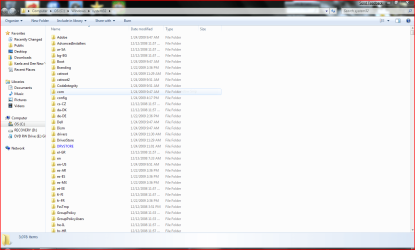
booting into desktop

ldhalleck

New member
Local time
8:23 PM
Messages
11
when booting up desktop a file opens: computer>os(cs:)windows>system32, :cry:I have searched everywhere to try and figure out how to stop this from happening but can't resolve it. It looks the same as if you opened a windows file and it listed the entire contents.
 

My Computer

OS
windows 7
Could you post a screen shot?
 

My Computer

Computer Manufacturer/Model Number
Built
OS
Windows 7 RTM
CPU
Intel I7 920 2.67 ghz
Motherboard
EVGA X58
Memory
6GB CORSAIR DOMINATOR
Graphics Card(s)
GeForce GTX 260 Core 216 896MB 448-bit GDDR3 PCI Express 2.0
Hit the Start button, type Regedit in the search bar. Navigate to HKEY_LOCAL_MACHINE\SOFTWARE\Microsoft\Windows\CurrentVersion\Run

Do you see that system32 there in the list?
 

My Computer

Computer Manufacturer/Model Number
Built
OS
Windows 7 RTM
CPU
Intel I7 920 2.67 ghz
Motherboard
EVGA X58
Memory
6GB CORSAIR DOMINATOR
Graphics Card(s)
GeForce GTX 260 Core 216 896MB 448-bit GDDR3 PCI Express 2.0
edit: You just beat me BucSox!

open regedit.

Navigate to HKEY_CURRENT_USER\SOFTWARE\Microsoft\Windows\Current Version\Run

and look on the right pane for any references to this program. If you find any, delete it.

Do the same for HKEY_LOCAL_MACHINE\SOFTWARE\Microsoft\Windows\Current Version\Run

and

HKEY_CURRENT_USER\SOFTWARE\Microsoft\Windows NT\Current Version\Winlogon

and

HKEY_CURRENT_USER\SOFTWARE\Microsoft\Windows NT\Current Version\Windows
 

My Computer

Computer Manufacturer/Model Number
ENIAC
OS
Windows 7 RC 7100 32bit/64bit
CPU
Intel Core2Duo E4500 2.20 GHz
Motherboard
ASUS P5LD2-X/1333
Memory
2x1GB Kinsgston DDR2 800MHz
Graphics Card(s)
Nvidia 8500GT
Sound Card
Onboard High Definition Audio Device
Monitor(s) Displays
Sony Bravia 42"
Case
LINKW 2222
Cooling
Standard Intel
Keyboard
Some cheap one
Mouse
Microsoft Intellimouse something
Internet Speed
24MBps ADSL
edit: You just beat me BucSox!

open regedit.

Navigate to HKEY_CURRENT_USER\SOFTWARE\Microsoft\Windows\Current Version\Run

and look on the right pane for any references to this program. If you find any, delete it.

Do the same for HKEY_LOCAL_MACHINE\SOFTWARE\Microsoft\Windows\Current Version\Run

and

HKEY_CURRENT_USER\SOFTWARE\Microsoft\Windows NT\Current Version\Winlogon

and

HKEY_CURRENT_USER\SOFTWARE\Microsoft\Windows NT\Current Version\Windows

Ive seen instances of this before and it turned out to be spyware/virus. Have you heard of that before?


Perhaps the poster should do a thorough scan as well, just to be safe.
 

My Computer

Computer Manufacturer/Model Number
Built
OS
Windows 7 RTM
CPU
Intel I7 920 2.67 ghz
Motherboard
EVGA X58
Memory
6GB CORSAIR DOMINATOR
Graphics Card(s)
GeForce GTX 260 Core 216 896MB 448-bit GDDR3 PCI Express 2.0
I found it in the second one mentioned and deleted it, it didn't help still booting to that screen right after if boots gadgets and clock
 

My Computer

OS
windows 7
I found it in the second one mentioned and deleted it, it didn't help still booting to that screen right after if boots gadgets and clock

Did that return to the Registry after you deleted it and rebooted?

If I were you, I would run a spyware/malware/virus scan. Also, run MSCONFIG and go to start up. Is there anywhere in the list that shows system32?
 

My Computer

Computer Manufacturer/Model Number
Built
OS
Windows 7 RTM
CPU
Intel I7 920 2.67 ghz
Motherboard
EVGA X58
Memory
6GB CORSAIR DOMINATOR
Graphics Card(s)
GeForce GTX 260 Core 216 896MB 448-bit GDDR3 PCI Express 2.0
already did msconfig and I will run virus scan but I do that regularly so I really don't think that is it and I'llcheck to see if it's back in
 

My Computer

OS
windows 7
You can post a screenshot using the snipping tool. Open start, type sn at the search box and press enter. Capture the screen area you want with your mouse, and save it as a jpg file. Then upload the file here using the "Manage attachements" button.

Please post a screenshot on what you see on the right pane of the Registry location mentioned above
 

My Computer

Computer Manufacturer/Model Number
ENIAC
OS
Windows 7 RC 7100 32bit/64bit
CPU
Intel Core2Duo E4500 2.20 GHz
Motherboard
ASUS P5LD2-X/1333
Memory
2x1GB Kinsgston DDR2 800MHz
Graphics Card(s)
Nvidia 8500GT
Sound Card
Onboard High Definition Audio Device
Monitor(s) Displays
Sony Bravia 42"
Case
LINKW 2222
Cooling
Standard Intel
Keyboard
Some cheap one
Mouse
Microsoft Intellimouse something
Internet Speed
24MBps ADSL
Did you ever figure this out?
 

My Computer

Computer Manufacturer/Model Number
Built
OS
Windows 7 RTM
CPU
Intel I7 920 2.67 ghz
Motherboard
EVGA X58
Memory
6GB CORSAIR DOMINATOR
Graphics Card(s)
GeForce GTX 260 Core 216 896MB 448-bit GDDR3 PCI Express 2.0
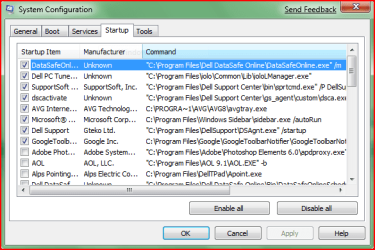
Could you use MSCONFIG and post a screenshot of the list under Startup?
 

My Computer

Computer Manufacturer/Model Number
Built
OS
Windows 7 RTM
CPU
Intel I7 920 2.67 ghz
Motherboard
EVGA X58
Memory
6GB CORSAIR DOMINATOR
Graphics Card(s)
GeForce GTX 260 Core 216 896MB 448-bit GDDR3 PCI Express 2.0
no I haven't, i will do a screen shot of msconfig and send it
 

My Computer

OS
windows 7
msconfig

:Dhere it is, hope you can figure this out
 

Attachments

  • msconfig.PNG
    msconfig.PNG
    18.6 KB · Views: 11

My Computer

OS
windows 7
Well I was hoping id see something there that would catch my eye. Everything marked for Start Up looks legit.

Its got to be something in the registry but Im at a loss as to what if you did those checks posted earlier.
Do you remember what changes you did (ie software install, etc) before you first saw this folder open on reboot?
 

My Computer

Computer Manufacturer/Model Number
Built
OS
Windows 7 RTM
CPU
Intel I7 920 2.67 ghz
Motherboard
EVGA X58
Memory
6GB CORSAIR DOMINATOR
Graphics Card(s)
GeForce GTX 260 Core 216 896MB 448-bit GDDR3 PCI Express 2.0
Here is something else to try if youd like.

If you dont already have it, download HijackThis, and install it. Reboot, your computer, and when the folder comes up, just leave it. Run HijackThis and select the first option to do a System Scan and Save Logfile. A log file will open after the quick scan. Then copy whats in the log file to a post in here.
 

My Computer

Computer Manufacturer/Model Number
Built
OS
Windows 7 RTM
CPU
Intel I7 920 2.67 ghz
Motherboard
EVGA X58
Memory
6GB CORSAIR DOMINATOR
Graphics Card(s)
GeForce GTX 260 Core 216 896MB 448-bit GDDR3 PCI Express 2.0
I was trying to delete an empty folder from the desktop that wouldn't uninstall so I reloaded the program and then uninstalled it and the folder went away, it's not affecting using the computer, I'm now on a mission to get rid of it, so keep thinking, Please, you're my only option left
 

My Computer

OS
windows 7
oh yeah, I even did a system restore to when I installed Windows 7 and that didn't get rid of it
 

My Computer

OS
windows 7
Back
Top