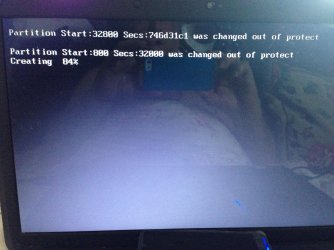
Booting problem creating partition ?

jstvj

New member
Local time
7:25 PM
Messages
6
Has anyone any idea why I am getting this on starting Windows7 ultimate x64 and more importantly how to fix it please ?
 

Attachments

  • image.jpg
    image.jpg
    940.5 KB · Views: 0

My Computer

Computer type
Laptop
Computer Manufacturer/Model Number
Lenovo G550
OS
Windows 7 Ultimate x64
Has anyone any idea why I am getting this on starting Windows7 ultimate x64 and more importantly how to fix it please ?

What program did you use to create the partition? Perhaps I should say "attempt" to create the partition.
 

My Computer

Computer type
PC/Desktop
Computer Manufacturer/Model Number
Custom Built
OS
Windows 7 Professional x64
CPU
Intel i5 quad processor
Motherboard
DP67BG
Memory
16 GB
Graphics Card(s)
Radeon HD 5770
Sound Card
Realtek High Definition Audio
Monitor(s) Displays
Samsung SyncMaster
Screen Resolution
1920X1080
Hard Drives
WD 2TB (SATA Internal)
WD 1TB (USB External)
PSU
Corsair GS800
Case
Tower (Generic)
Cooling
3 Internal Fans
Keyboard
MS Wireless
Mouse
MS Optical Wired
Internet Speed
54 mbps
Antivirus
Emsisoft
Browser
IE-Version 9, Palemoon-Version 24.2.0
Has anyone any idea why I am getting this on starting Windows7 ultimate x64 and more importantly how to fix it please ?

What program did you use to create the partition? Perhaps I should say "attempt" to create the partition.

I have EaseUS partition manager on my laptop
 

My Computer

Computer type
Laptop
Computer Manufacturer/Model Number
Lenovo G550
OS
Windows 7 Ultimate x64
Has anyone any idea why I am getting this on starting Windows7 ultimate x64 and more importantly how to fix it please ?

What program did you use to create the partition? Perhaps I should say "attempt" to create the partition.

I have EaseUS partition manager on my laptop

Sorry, I am not familiar with EaseUS partition software; I use MiniTool Partition Wizard. It may help to post your question on their forum.

HTH
 
Last edited:

My Computer

Computer type
PC/Desktop
Computer Manufacturer/Model Number
Custom Built
OS
Windows 7 Professional x64
CPU
Intel i5 quad processor
Motherboard
DP67BG
Memory
16 GB
Graphics Card(s)
Radeon HD 5770
Sound Card
Realtek High Definition Audio
Monitor(s) Displays
Samsung SyncMaster
Screen Resolution
1920X1080
Hard Drives
WD 2TB (SATA Internal)
WD 1TB (USB External)
PSU
Corsair GS800
Case
Tower (Generic)
Cooling
3 Internal Fans
Keyboard
MS Wireless
Mouse
MS Optical Wired
Internet Speed
54 mbps
Antivirus
Emsisoft
Browser
IE-Version 9, Palemoon-Version 24.2.0

My Computer

Computer type
Laptop
Computer Manufacturer/Model Number
Lenovo G550
OS
Windows 7 Ultimate x64
The only partition managers which will not fail are Partition Wizard bootable CD and Disk Mgmt. We've not had a failure with the PW boot disk in tens of thousands of operations helped with here, including some of the most complicated ever attempted.

Thankfully you were only creating a partition and not resizing WIndows or a data partition which could have lost all your data.

Now I'd boot into PW CD to delete and re-create the partition you were attempting with Easeus: Partition Wizard Create Partition - Video Help. Then run a Partition Wizard Partition surface test and Partition Wizard Check File System on all partitions.
 
The only partition managers which will not fail are Partition Wizard bootable CD and Disk Mgmt. We've not had a failure with the PW boot disk in tens of thousands of operations helped with here, including some of the most complicated ever attempted.

Thankfully you were only creating a partition and not resizing WIndows or a data partition which could have lost all your data.

Now I'd boot into PW CD to delete and re-create the partition you were attempting with Easeus: Partition Wizard Create Partition - Video Help. Then run a Partition Wizard Partition surface test and Partition Wizard Check File System on all partitions.


Thank you for your very helpful reply. I have downloaded PW and burnt the bootable CD. Once I boot with that, I open PW and delete the 100mb System Reserve partition. Can you tell me how I then re-create it please ?

Thank you
 

My Computer

Computer type
Laptop
Computer Manufacturer/Model Number
Lenovo G550
OS
Windows 7 Ultimate x64
You didn't say that you were creating the 100mb System Reserved partition. Why are you doing this? Did you delete it for some reason? There is a specific series of steps required to re-create it in that case.

If you are pre-partitioning before Win7 install to avoid the 100mb System Reserved partition then, yes, you can delete all partitions and create your target install partition. But you can just as easily boot the Win7 installer to do this, using the Drive Options pictured in Steps 7 and 8 of Clean Install Windows 7.

Please clarify exactly what you are doing and why.
 
Oh ! I have just re-read your original advice. You said "boot onto PW CD to delete and re-recreate the partition". So the very act of using the PW Disc does all that ? Sorry I misunderstood I thought I had to boot with the disk and THEN delete the partition and recreate it as seperate actions.

Sorry I'm not very familiar with all this. My knowledge is quite limited and being an oldy doesn't help lol.

EaseUS support couldn't help me and eventually referred me to Microsoft, so thank you very much for your help.
 

My Computer

Computer type
Laptop
Computer Manufacturer/Model Number
Lenovo G550
OS
Windows 7 Ultimate x64
Booted with PW CD which brought up PW screen. Ran surface test (3+ hours) and no errors. File check greyed out, so re-booted using local disc and problem still exists. Opened PW, file check still greyed out for System Reserve partition, so ran checking C and errors were found. Had to reboot (problem still exists) to run file check again with fix errors clicked. CHDSK ran, restarted and problem still exists, except only first line appears now with second line saying creating and the percentage count as before.
 

My Computer

Computer type
Laptop
Computer Manufacturer/Model Number
Lenovo G550
OS
Windows 7 Ultimate x64
Back
Top
