Booting up question?

HeadsUp

New member
Local time
4:33 PM
Messages
13
I just reinstalled windows 7 on my laptop to take all the junk (blot ware) off my pc Question while booting my laptop it states i have two windows 7? I thought by doing a fresh install it automatically erases the partition?
 

My Computer

OS
win 7 ultimate
This is generally true only if you install Windows 7 on the same partition as a previous installation of Windows 7. You can remove the second Windows 7 off the list with Easy BCD - Download EasyBCD 2.0.2 - NeoSmart Technologies.
 

My Computer

OS
Windows 7 Ultimate x64 SP1
CPU
Intel Core i3 530 2.93 Ghz Clarkdale
Motherboard
ASRock P55 PRO/USB3 LGA 1156
Memory
4 GB OCZ DDR3 1600 (PC12800) Low Voltage Desktop Memory
Graphics Card(s)
Nvidia GeForce GTX 550 Ti with 1 GB of RAM
Sound Card
Realtek HD ALC892
Monitor(s) Displays
20'' eMachines E202HDbmd Glare Panel Widescreen
Screen Resolution
1600 x 900
Hard Drives
Western Digital 1 TB Caviar Black Edition (7200 RPM) SATA
Hitachi Deskstar 500 GB (7200 RPM) SATA
Samsung SpinPoint 400 GB (7200 RPM) SATA
PSU
Rosewill Xtreme Series RX750-D-B ATX12V v2.2 & EPS12V (750W)
Case
Cooler Master Centurion 534 RC-534-KKN2-GP Mid-Tower
Cooling
Standard Case Fans and Stock CPU Heatsink
Keyboard
Microsoft Wireless Optical Desktop Elite
Mouse
Microsoft Wireless Optical Desktop Elite
Internet Speed
7.1 Mbps Verizon DSL
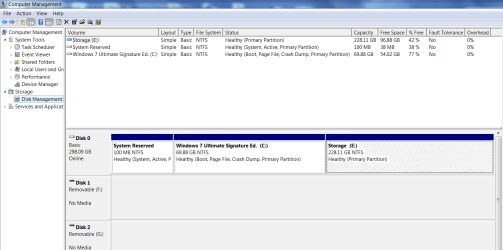
Just to be sure, please post back a screenshot of your maximized full Disk Mgmt drive map and listings. using Snipping Tool in Start Menu. Type Disk Management in Start Search box.
 
This is generally true only if you install Windows 7 on the same partition as a previous installation of Windows 7. You can remove the second Windows 7 off the list with Easy BCD - Download EasyBCD 2.0.2 - NeoSmart Technologies.

I wouldn't know what one to uninstall :cry:
It should be readily apparent in terms of the list because it's in the same order as when you boot into Windows. When you see the two Windows 7s listed there, one of them works and one either doesn't or takes you to a different install.
 

My Computer

OS
Windows 7 Ultimate x64 SP1
CPU
Intel Core i3 530 2.93 Ghz Clarkdale
Motherboard
ASRock P55 PRO/USB3 LGA 1156
Memory
4 GB OCZ DDR3 1600 (PC12800) Low Voltage Desktop Memory
Graphics Card(s)
Nvidia GeForce GTX 550 Ti with 1 GB of RAM
Sound Card
Realtek HD ALC892
Monitor(s) Displays
20'' eMachines E202HDbmd Glare Panel Widescreen
Screen Resolution
1600 x 900
Hard Drives
Western Digital 1 TB Caviar Black Edition (7200 RPM) SATA
Hitachi Deskstar 500 GB (7200 RPM) SATA
Samsung SpinPoint 400 GB (7200 RPM) SATA
PSU
Rosewill Xtreme Series RX750-D-B ATX12V v2.2 & EPS12V (750W)
Case
Cooler Master Centurion 534 RC-534-KKN2-GP Mid-Tower
Cooling
Standard Case Fans and Stock CPU Heatsink
Keyboard
Microsoft Wireless Optical Desktop Elite
Mouse
Microsoft Wireless Optical Desktop Elite
Internet Speed
7.1 Mbps Verizon DSL
I'm gonna check on that right now
 

My Computer

OS
win 7 ultimate
How would i get into map and listings I already screen shot dsk mgnt i'll post it in a few

It seems when i boot my pc up and chose either os they display the same content?
 

My Computer

OS
win 7 ultimate
Here's the screen shot


1zwcj0g.jpg
 

My Computer

OS
win 7 ultimate
This is Disk Mgmt screenshot we need:

Capture.PNG

Rightclick Computer>Manage>Disk Mgmt
Tell us what's on each partition.

It looks like you only have one Win7 installation on C.

Type msconfig in Start Search box, click on it, look on Boot tab for how many listings are there and report back.
 
Nvm i gparted and did a fresh install everything is up and running :D
 

My Computer

OS
win 7 ultimate
Back
Top