
You are using an out of date browser. It may not display this or other websites correctly.
You should upgrade or use an alternative browser.
You should upgrade or use an alternative browser.
Solved "Bootmgr is compressed" - problem
- Thread starter Lockex
- Start date

Sorry I missed this the first time around tho it has been answered since then.
Boot critical files are compressed. In order to fix this, boot the Windows 7 Repair CD or install DVD, select "Repair My Computer," on System Recovery Options click "Load Drivers," then OK Now when the mini-explorer opens up, click on Computer, then rightclick on Windows 7 drive, choose Properties, untick the box for compressing files on the drive. Click Apply, back out of the Repair console, Windows 7 should start on Reboot.
System Repair Disc - Create
BootMGR is Compressed.
If the above doesn't solve the problem then boot into Repair,
but after selecting the Windows 7-installation, press "Load Drivers" (Instead of "Next")
and use the mini Windows Explorer to right-click the boot-drive, select Properties,
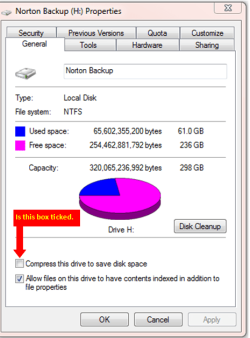
deselect "Compress this Drive" and choose Apply to sub-folders and files.
BootMGR Compressed Message at Boot Fix - Vista Forums
Copy & Paste in Windows Recovery Console.
http://www.sevenforums.com/tutorials/93347-copy-paste-windows-recovery-console.html
Have you tried this?
My Computer
- OS
- ME/XP/Vista/Win7
Sorry I missed this the first time around tho it has been answered since then.
Boot critical files are compressed. In order to fix this, boot the Windows 7 Repair CD or install DVD, select "Repair My Computer," on System Recovery Options click "Load Drivers," then OK Now when the mini-explorer opens up, click on Computer, then rightclick on Windows 7 drive, choose Properties, untick the box for compressing files on the drive. Click Apply, back out of the Repair console, Windows 7 should start on Reboot.
System Repair Disc - Create
BootMGR is Compressed.
If the above doesn't solve the problem then boot into Repair,
but after selecting the Windows 7-installation, press "Load Drivers" (Instead of "Next")
and use the mini Windows Explorer to right-click the boot-drive, select Properties,
deselect "Compress this Drive" and choose Apply to sub-folders and files.
BootMGR Compressed Message at Boot Fix - Vista Forums
Copy & Paste in Windows Recovery Console.
http://www.sevenforums.com/tutorials/93347-copy-paste-windows-recovery-console.html
Have you tried this?
yes
My Computer
- OS
- windows 7 ultimate 32 bit

- Local time
- 6:16 AM
- Messages
- 50,634
If the known fix doesn't work, boot into the System Recovery Options using DVD or Repair CD to run Startup Repair repeatedly.
My Computer
- OS
- windows 7 ultimate 32 bit

Compression was use a long time ago and in some cases needed. With todays prices for hard drive space to me it isn't needed. Searching through compressed files and folder is slower. Why that little box for the check mark is still there is beyond me. Now how does one get out of this mess. I'm not really sure because I have never been there. Saying that If it was my computer I would un-check that little box and reboot and see what happens. If that doesn't work I would do a Start up and Repair off the C/D. At this time you could also do another sfc /scannow.. These are just thoughts I have because I have never had to take this dog on a walk before.
My Computer
- Computer type
- PC/Desktop
- Computer Manufacturer/Model Number
- Home made Desktop
- OS
- Windows 10 Pro. 64/ version 1709 Windows 7 Pro/64
- CPU
- Intel i7-6800K @ 4.3
- Motherboard
- ASUS X-99 Deluxe II
- Memory
- Corsair Platinum 16 gig @2400
- Graphics Card(s)
- EVGA GTX 1070 OC
- Monitor(s) Displays
- Asus 27" LED LCD/VE278Q
- Screen Resolution
- 1920-1080 or 1280-720 HDMI
- Hard Drives
- INTEL SSD 730-240 Gb Sata 3.0/
- PSU
- EVGA Platium 1200W
- Case
- Phanteks Luxe Tempered Glass 8 fans/ one radiator
- Cooling
- XSPC/ Water Cooled CPU
- Keyboard
- Das 4 Professional
- Mouse
- Logitech M705/MX Anywhere 2-S
- Internet Speed
- 100 mbits
- Antivirus
- Microsoft Security Essentials/ Malwarebytes Premium 3.0/ SAS
- Browser
- I.E. 11 default/Firefox/ ISP Time Warner Cable/Spectrum
- Other Info
- LG BluRay Burner/
Sound system-KLipsch-THX/
Icy Dock ssd Hot Swap bays.

yes
UNtick it, apply, reboot.
My Computer
- Computer type
- PC/Desktop
- Computer Manufacturer/Model Number
- Home Built Desktop By DataTech
- OS
- Windows 7 Ultimate X64 SP1
- CPU
- Intel i5-2550K, Differing ~4.4-4.8GHz No built in GPU
- Motherboard
- ASUS P8Z68-V PRO/GEN3
- Memory
- 16GB G.Skill Sniper 1866MHz @ 2133MHz 2x8GB
- Graphics Card(s)
- ASUS GTX650TIB-DC2OC-2GD5, (650TI Boost)
- Sound Card
- Onboard Realtek 5-1
- Monitor(s) Displays
- Samsung P2570HD
- Screen Resolution
- 1920x1080
- Hard Drives
- Samsung 840 Pro 256GB SSD for OS, 500GB Seagate Constellation (Enterprise drive) for Data
- PSU
- Corsair HX650W
- Case
- Inwin Dragon Rider
- Cooling
- Hyper 212 EVO w/two Noctua fans, push-pull, @1300 RPM
- Keyboard
- E-Z Eyes, bright yellow keys with large characters
- Mouse
- steelseries SENSEI Laser Pro Gaming
- Internet Speed
- 48-51Mbs Mbs down, 11 Mbs up Xfinity Cable
- Antivirus
- Norton Internet Security 2013
- Browser
- IE 10, Opera, Pale Moon if needed
- Other Info
- 4 case fans, LG BluRay-RE, ASUS DVD-RW, Mr. Fusion power supply, 1.21 gigawatts.
- Local time
- 6:16 AM
- Messages
- 50,634
I explained the fix here:
Boot critical files are compressed. In order to fix this, boot the Windows 7 Repair CD or install DVD, select "Repair My Computer," on System Recovery Options click "Load Drivers," then OK. Now when the mini-explorer opens up, click on Computer, then rightclick on Windows 7 drive, choose Properties, untick the box for compressing files on the drive. Click Apply, back out of the Repair console, Windows 7 should start on Reboot.
System Repair Disc - Create
- Local time
- 6:16 AM
- Messages
- 50,634
You do not enter Windows to boot DVD/CD.
Either use the one-time BIOS Boot Menu key given on first screen, or enter BIOS setup to set DVD/CD drive to boot first in order, then look for prompt to "Press Any Key to Boot CD/DVD"
How to Boot your Computer from a Bootable CD or DVD - Boot to CD
Either use the one-time BIOS Boot Menu key given on first screen, or enter BIOS setup to set DVD/CD drive to boot first in order, then look for prompt to "Press Any Key to Boot CD/DVD"
How to Boot your Computer from a Bootable CD or DVD - Boot to CD
Sorry I missed this the first time around tho it has been answered since then.
Boot critical files are compressed. In order to fix this, boot the Windows 7 Repair CD or install DVD, select "Repair My Computer," on System Recovery Options click "Load Drivers," then OK Now when the mini-explorer opens up, click on Computer, then rightclick on Windows 7 drive, choose Properties, untick the box for compressing files on the drive. Click Apply, back out of the Repair console, Windows 7 should start on Reboot.
System Repair Disc - Create
Thanks guys created disc on my laptop and worked perfectly to repair wife's computer, spent more time trying to find a simple solution on the internet than your clear and simple fix.
Again many thanks for your time.
Drftr
My Computer
- Computer Manufacturer/Model Number
- Dell
- OS
- 32bit Win7 Ultimate
Sorry I missed this the first time around tho it has been answered since then.
Boot critical files are compressed. In order to fix this, boot the Windows 7 Repair CD or install DVD, select "Repair My Computer," on System Recovery Options click "Load Drivers," then OK Now when the mini-explorer opens up, click on Computer, then rightclick on Windows 7 drive, choose Properties, untick the box for compressing files on the drive. Click Apply, back out of the Repair console, Windows 7 should start on Reboot.
System Repair Disc - Create
Thanks guys created disc on my laptop and worked perfectly to repair wife's computer, spent more time trying to find a simple solution on the internet than your clear and simple fix.
Again many thanks for your time.
Drftr
Well done.

My Computer
- OS
- ME/XP/Vista/Win7
I had a win 7 boot manager compressed message issue, actually saw a thread on this site that had a how to video, followed that and it solved my problem. Just wanted to say thanks, this is a great site, extremely helpful and useful.
My Computer
- OS
- windows 7 ultimate 32bit
Good to hear and welcome to Seven forums neick.
My Computer
- Computer type
- PC/Desktop
- Computer Manufacturer/Model Number
- Home Built Desktop By DataTech
- OS
- Windows 7 Ultimate X64 SP1
- CPU
- Intel i5-2550K, Differing ~4.4-4.8GHz No built in GPU
- Motherboard
- ASUS P8Z68-V PRO/GEN3
- Memory
- 16GB G.Skill Sniper 1866MHz @ 2133MHz 2x8GB
- Graphics Card(s)
- ASUS GTX650TIB-DC2OC-2GD5, (650TI Boost)
- Sound Card
- Onboard Realtek 5-1
- Monitor(s) Displays
- Samsung P2570HD
- Screen Resolution
- 1920x1080
- Hard Drives
- Samsung 840 Pro 256GB SSD for OS, 500GB Seagate Constellation (Enterprise drive) for Data
- PSU
- Corsair HX650W
- Case
- Inwin Dragon Rider
- Cooling
- Hyper 212 EVO w/two Noctua fans, push-pull, @1300 RPM
- Keyboard
- E-Z Eyes, bright yellow keys with large characters
- Mouse
- steelseries SENSEI Laser Pro Gaming
- Internet Speed
- 48-51Mbs Mbs down, 11 Mbs up Xfinity Cable
- Antivirus
- Norton Internet Security 2013
- Browser
- IE 10, Opera, Pale Moon if needed
- Other Info
- 4 case fans, LG BluRay-RE, ASUS DVD-RW, Mr. Fusion power supply, 1.21 gigawatts.

Similar threads
- Replies
- 3
- Views
- 42K
- Replies
- 3
- Views
- 10K

- Replies
- 10
- Views
- 6K
