BOOTMGR is missing Error on brand new Sony Vaio - Drive letter issue

prashanth

New member
Local time
3:59 PM
Messages
4
Hi guys,

I hav a brand new Sony Vaio E-Series which is 2 months old. It runs Windows 7 Home Premuim edition. I deleted the Recovery partiotion and re-partioned c: drive into 3 drives - c:, d: and e:

Everything was fine for 2 months. Suddenly today when i boot, i got the BOOTMGR is missing Error.

I put in a Windows 7 installation dvd and tried to fix the startup. But it didnt help.. When i tried to explore command prompt and system restore options.. I noticed a wierd thing..

The drive assignment has been modified. My Windows partition which was originally c: is now shown as e:. And my original e: is being shown as c:.

So, If I manage to change the drive assignments, the problem should be fixed. But how can I do it? In command prompt or using Windows recovery options?

Thanks for all your help and guidance...
 

My Computer My Computer

At a glance

Windows 7 Home Premium
OS
Windows 7 Home Premium
Attached is a screenshot of bcdedit command..
Any help would be greatly appretiated..
 

My Computer My Computer

At a glance

Windows 7 Home Premium
OS
Windows 7 Home Premium
I am not sure that is the problem .

Drive letters in WinRe are allocated differently from the mounted devices in the installed o/s.

Do you have the liitle 100mb system partition?

Type:
diskpart
( then press enter )

lis vol
(then press enter)

( post a screenie if you can.)

Exi
(to leave diskpart)
 

My Computers My Computers

  • At a glance

    7 X64i5 84002x8gb 3200mhz
    Computer type
    PC/Desktop
    OS
    7 X64
    CPU
    i5 8400
    Motherboard
    gigabyte b365m ds3h
    Memory
    2x8gb 3200mhz
    Hard Drives
    various
    PSU
    pure power 11 400w cm
    Case
    Coolermaster
    Cooling
    cryorig m9i
  • At a glance

    7x64g54008gb ddr4 2400
    Computer type
    PC/Desktop
    OS
    7x64
    CPU
    g5400
    Motherboard
    ga b365m ds3h
    Memory
    8gb ddr4 2400
    PSU
    xfx pro 450w
Yes. I do have a 100 MB disk partition. It's mounted as d:

I can not post a screenshot.. Because I'm not able to boot my system..

In diskpart utility also, My Windows partition is shown as e:
 

My Computer My Computer

At a glance

Windows 7 Home Premium
OS
Windows 7 Home Premium
Ok.

Type :

Diskpart

sel vol d

act

exi

bcdboot e:\windows /s d:

bootsect /nt60 d: /mbr


( obviously, press enter after each command ).
 

My Computers My Computers

  • At a glance

    7 X64i5 84002x8gb 3200mhz
    Computer type
    PC/Desktop
    OS
    7 X64
    CPU
    i5 8400
    Motherboard
    gigabyte b365m ds3h
    Memory
    2x8gb 3200mhz
    Hard Drives
    various
    PSU
    pure power 11 400w cm
    Case
    Coolermaster
    Cooling
    cryorig m9i
  • At a glance

    7x64g54008gb ddr4 2400
    Computer type
    PC/Desktop
    OS
    7x64
    CPU
    g5400
    Motherboard
    ga b365m ds3h
    Memory
    8gb ddr4 2400
    PSU
    xfx pro 450w
Thats awesome.. Worked like magic!!
You are my life saver :)))))))))

Could you be kind enough to let me know what went wrong originally? And what are those commands that you had me try out. Apart from the diskpart utility, I have no idea abt any of those commands..

And would this happen again? Can I prevent it?
 

My Computer My Computer

At a glance

Windows 7 Home Premium
OS
Windows 7 Home Premium
Looks like the active flag got damaged/shifted. It's not likely you will get the same issue again.

You will almost certainly get other little stumbles.

Best thing you can do is make regular backup images - you can restore it in a few mins if you get a prob.

There are some good free apps. for that .

It's worth installing these two freebies:

Free Backup Software: Paragon Backup & Recovery Free Edition ...

[EXCLUSIVE GIVEAWAY] Unlimited Free Licenses Of EASEUS Data ... (use the rapidshare download for easeus )


You also need a decent boot disc, it will fix most things:

Put 32 bit win 7 dvd/recovery disc in the dvd drive, rt click the dvd drive select COPY.

Rt click your HD ( e.g. C ) and PASTE.

D/L this special app. Unless you got the link already, you need to go to your user cp and enable Private messaging so I can link you to it. ( as usual rt click it >properties>unblock>apply>ok ) Unzip it , run the self extractor.

Then rt click and run as admin on 7pecreator.cmd.

Browse to the wim ( it explains where that is ).

N to add PM.

Y to add BR - browse to the launcher (it tells you where it is )

Y to add Easeus - (it tells you where to browse to.)

Y to make an iso

Y to burn the iso ( put a blank cd-r in the drive , don't format it )
 

My Computers My Computers

  • At a glance

    7 X64i5 84002x8gb 3200mhz
    Computer type
    PC/Desktop
    OS
    7 X64
    CPU
    i5 8400
    Motherboard
    gigabyte b365m ds3h
    Memory
    2x8gb 3200mhz
    Hard Drives
    various
    PSU
    pure power 11 400w cm
    Case
    Coolermaster
    Cooling
    cryorig m9i
  • At a glance

    7x64g54008gb ddr4 2400
    Computer type
    PC/Desktop
    OS
    7x64
    CPU
    g5400
    Motherboard
    ga b365m ds3h
    Memory
    8gb ddr4 2400
    PSU
    xfx pro 450w
SIW2 you're the man, these simple commands saved me from going crazy.

well, and as the first post in this forum I take to work with something to do next. because after using siw commands when Windows 7 will appear with the boot splash of vista instead of Windows 7. As to repair fully, then to log in to your account in Windows 7 to run the following commands in the console as an administrator:

bcdedit / set {current} locale en-US

or

BCDboot %WinDir% /l en-US


The en-US Change to the installed language version of the Windows 7 s, such as ja-JP, de-DE, es-ES, pt-BR, zh-CN, zh-TW, fr-FR, fi-FI and etc. .

Restart the computer
after running the command boot to see the new UI (user interface) be Used again. To check if the locale has Been Entered Properly setting, just run the command in command prompt bceedit That runs as administrator.

source
Fix and Restore Windows 7 Boot Screen That Changes to Vista Style » My Digital Life

in my case I went the bootmgr missing, but these commands are very useful when you want to dual boot between windows xp and 7, when you can not start Windows 7 this is the only way that has not failed me so far.
 

My Computer My Computer

At a glance

Windows 7 Ultimate x64
OS
Windows 7 Ultimate x64
Hi aub,

Glad it worked for you, thanks for the feedback.
 

My Computers My Computers

  • At a glance

    7 X64i5 84002x8gb 3200mhz
    Computer type
    PC/Desktop
    OS
    7 X64
    CPU
    i5 8400
    Motherboard
    gigabyte b365m ds3h
    Memory
    2x8gb 3200mhz
    Hard Drives
    various
    PSU
    pure power 11 400w cm
    Case
    Coolermaster
    Cooling
    cryorig m9i
  • At a glance

    7x64g54008gb ddr4 2400
    Computer type
    PC/Desktop
    OS
    7x64
    CPU
    g5400
    Motherboard
    ga b365m ds3h
    Memory
    8gb ddr4 2400
    PSU
    xfx pro 450w
hi i also had a simaliar problem :(

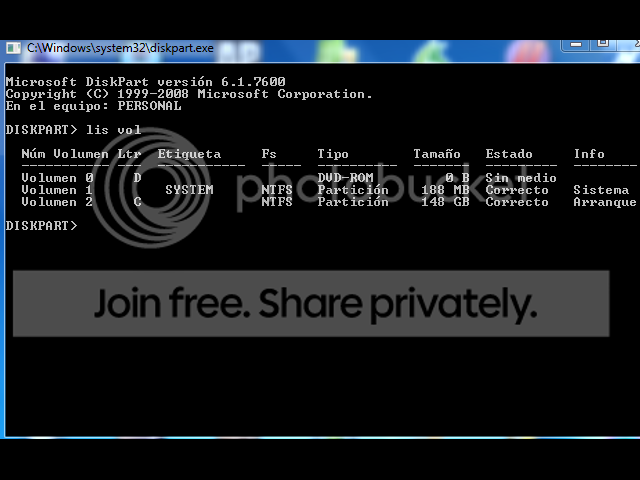
i did the diskpart and typed merge now it works and starts up but my drives are still all wierd here is a screen shot of diskpart lis vol
101119-034028.png
 

My Computer My Computer

At a glance

32 bit window 7
OS
32 bit window 7
is there something i can do or should i just leave it be :confused: if its set like that will is do damage to my comp ? thank you for anyhelp or info
 

My Computer My Computer

At a glance

32 bit window 7
OS
32 bit window 7
hi i also had a simaliar problem :(

i did the diskpart and typed merge now it works and starts up but my drives are still all wierd here is a screen shot of diskpart lis vol
101119-034028.png
is there a way to put everything back in order ?
 

My Computer My Computer

At a glance

32 bit window 7
OS
32 bit window 7
Back
Top