
Solved BOOTMGR is Missing; Press Ctrl+Alt+del to restart

st1led

New member
Local time
4:23 AM
Messages
12
Hi everybody, I think I made some huge mistake by messing around with partitions in my system. Specifically, I'm quite sure I deleted by mistake the 100 MB system reserved partition that contained the boot files and now Windows 7 shows this error at boot time.

It shouldn't be dramatic since I may have to just write new boot files. I googled a bit around, and this is what I did (with no success). Booting from the installation disk, I entered the command prompt via Shift+F10 and:


  1. I set the windows partition (the one where windows is installed, i.e., the one that has the c:\windows folder) as active via diskpart, and then I run the system recovery for 3-4-5 times with no success. Every time the log reports that "The partition table does not have a valid System Partition. Repair action: Partition Table Repair Result: Completed successfully. Error code = 0x0 Time taken = 7322 ms". It may look like the problem is fixed, but in the end the BOOTMGR error continues to appear, so I'm wondering whether this is doing something at all. I've read it may take 3-4 times for it to work, but since it didn't I guess we have to try something else. Mind that however, the system recovery is never able to find the windows 7 installation (the list of installations found is empty).
  2. After setting the windows partition as active, "bootrec /FixMbr" returns "Operation completed successfully"
  3. After setting the windows partition as active, "bootrec /FixBoot" returns "Element not found"
  4. After setting the windows partition as active, "bootrec /RebuildBcd" finds one windows installation in C:\Windows, but when adding it it returns "Element not found"
  5. After setting the windows partition as active, "bcdboot c:\windows /v" returns "BFSVC: Failed to get system partition! Last error = 0x3bc3"
  6. After setting the windows partition as active, "bcdedit" returns "The boot configuration data store could not be opened. The requested system device cannot be found."
I think I'm missing some crucial step, but I explicitly set via diskpart the windows partition to be active. It looks like this setting isn't saved, because everywhere on the internet whoever had a problem similar to mine fixed it by setting the windows partition as active, which I did.


Ideas?


Regards,
Stefano
 

My Computer My Computer

Computer Manufacturer/Model Number
Apple MacBook Pro
OS
MS Windows 7 Ultimate 64-bit SP1
CPU
Intel Core i7 @ 2.00GHz
Motherboard
Apple Inc. Mac-94245A3940C91C80 (U2E1)
Memory
8.00 GB
Graphics Card(s)
AMD Radeon HD 6490M
Sound Card
High Definition Audio Device
Monitor(s) Displays
LED Cinema (2560x1440@60Hz)
Hard Drives
488GB Hitachi Hitachi HTS725050A9A362 ATA Device (SATA)
If you have a recovery disk or your Win 7 installation disk boot from it and get into the recovery mode and enter:

C:\ bootrec /fixmbr
C:\ bootrec /fixboot

This should fix your boot mgr.

I just noticed that you have done this already.

OK you might want to try this:

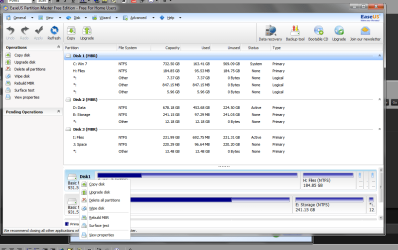
EASEUS Partition Master Home Edition 9.2.2

It has an option that will fix your MBR Se the attached.
 

Attachments

  • eas.png
    eas.png
    52 KB · Views: 3

My Computer My Computer

Computer type
PC/Desktop
Computer Manufacturer/Model Number
Custom Build
OS
Win 10 Pro 64
CPU
Intel Core i7 960 @3.20 GHz
Motherboard
MSI MS7522
Memory
24.0 GB DDR3
Graphics Card(s)
EVGA GTX 750Ti
Monitor(s) Displays
LG E2341 23 Inch
Screen Resolution
1920x1080
Hard Drives
1TB Western Dgital 1002FAEX-00Y9A0
1TB Hitachi HDS721010CLA322
PSU
700 Watt
Case
Haf 912
Cooling
Fans
Keyboard
Logitech MK710
Mouse
Logitech M705
Internet Speed
Cable
Antivirus
AIS 2015 .10.0.2225
Browser
Firefox 49
Other Info
MalwareBytes Anti-Rootkit utility
Unfortunately I don't have any recovery disk: I'm entering the command prompt from the windows installation disk.

Both the bootrec commands seem to be ineffective, like I said in the first post, even though "bootrec /fixmbr" returns "operation completed successfully".

Regards,
Stefano

Edit: I just noticed you noticed I already did :)
 

My Computer My Computer

Computer Manufacturer/Model Number
Apple MacBook Pro
OS
MS Windows 7 Ultimate 64-bit SP1
CPU
Intel Core i7 @ 2.00GHz
Motherboard
Apple Inc. Mac-94245A3940C91C80 (U2E1)
Memory
8.00 GB
Graphics Card(s)
AMD Radeon HD 6490M
Sound Card
High Definition Audio Device
Monitor(s) Displays
LED Cinema (2560x1440@60Hz)
Hard Drives
488GB Hitachi Hitachi HTS725050A9A362 ATA Device (SATA)
look at my edited post
 

My Computer My Computer

Computer type
PC/Desktop
Computer Manufacturer/Model Number
Custom Build
OS
Win 10 Pro 64
CPU
Intel Core i7 960 @3.20 GHz
Motherboard
MSI MS7522
Memory
24.0 GB DDR3
Graphics Card(s)
EVGA GTX 750Ti
Monitor(s) Displays
LG E2341 23 Inch
Screen Resolution
1920x1080
Hard Drives
1TB Western Dgital 1002FAEX-00Y9A0
1TB Hitachi HDS721010CLA322
PSU
700 Watt
Case
Haf 912
Cooling
Fans
Keyboard
Logitech MK710
Mouse
Logitech M705
Internet Speed
Cable
Antivirus
AIS 2015 .10.0.2225
Browser
Firefox 49
Other Info
MalwareBytes Anti-Rootkit utility
I see, thank you for the hint. Lucky enough that I already have the program installed. How can I rebuild the MBR from command line? I was able to open epmConsole.exe, but it seems to just list/create/resize/delete partitions. Or at least I couldn't find any appropriate command in the help.

If I open Main.exe (I guess the same GUI executable that you regularly open from the start menu) it says: "Disk device not detected by EaseUS Partition Master, please reinstall the program and make sure you don't forbid its driver installing or related registry writing in the Anti-virus program's pop-up window.". It's a bit cryptic, since the program was working fine in Windows before I made this mess with the boot partition. After this error the program loads, but in the GUI everything (menus, icons...) is grayed out and I can only close it.

Regards,
Stefano
 

My Computer My Computer

Computer Manufacturer/Model Number
Apple MacBook Pro
OS
MS Windows 7 Ultimate 64-bit SP1
CPU
Intel Core i7 @ 2.00GHz
Motherboard
Apple Inc. Mac-94245A3940C91C80 (U2E1)
Memory
8.00 GB
Graphics Card(s)
AMD Radeon HD 6490M
Sound Card
High Definition Audio Device
Monitor(s) Displays
LED Cinema (2560x1440@60Hz)
Hard Drives
488GB Hitachi Hitachi HTS725050A9A362 ATA Device (SATA)
Just right click on the C: drive or your boot drive and choose rebuild mbr
 

My Computer My Computer

Computer type
PC/Desktop
Computer Manufacturer/Model Number
Custom Build
OS
Win 10 Pro 64
CPU
Intel Core i7 960 @3.20 GHz
Motherboard
MSI MS7522
Memory
24.0 GB DDR3
Graphics Card(s)
EVGA GTX 750Ti
Monitor(s) Displays
LG E2341 23 Inch
Screen Resolution
1920x1080
Hard Drives
1TB Western Dgital 1002FAEX-00Y9A0
1TB Hitachi HDS721010CLA322
PSU
700 Watt
Case
Haf 912
Cooling
Fans
Keyboard
Logitech MK710
Mouse
Logitech M705
Internet Speed
Cable
Antivirus
AIS 2015 .10.0.2225
Browser
Firefox 49
Other Info
MalwareBytes Anti-Rootkit utility
The problem is I can't select anything, because everything in the GUI is grayed out, and however EaseUS doesn't detect any disk (weird, because I can access files via command prompt).

Regards,
Stefano
 

My Computer My Computer

Computer Manufacturer/Model Number
Apple MacBook Pro
OS
MS Windows 7 Ultimate 64-bit SP1
CPU
Intel Core i7 @ 2.00GHz
Motherboard
Apple Inc. Mac-94245A3940C91C80 (U2E1)
Memory
8.00 GB
Graphics Card(s)
AMD Radeon HD 6490M
Sound Card
High Definition Audio Device
Monitor(s) Displays
LED Cinema (2560x1440@60Hz)
Hard Drives
488GB Hitachi Hitachi HTS725050A9A362 ATA Device (SATA)
In the end, I was able to burn a boot disc of EaseUS (by installing it on another computer). I booted with such disc that performed some operations in a couple of minutes. Nothing printed on the screen, as there was just the cursor blinking. However, it should have repaired the boot sector as now Windows regularly boots. I guess I'll never travel around without that disc :)

Thank you for your support gary, I'm not sure I would have made it without your suggestion of trying Partition Master.

Regards,
Stefano
 

My Computer My Computer

Computer Manufacturer/Model Number
Apple MacBook Pro
OS
MS Windows 7 Ultimate 64-bit SP1
CPU
Intel Core i7 @ 2.00GHz
Motherboard
Apple Inc. Mac-94245A3940C91C80 (U2E1)
Memory
8.00 GB
Graphics Card(s)
AMD Radeon HD 6490M
Sound Card
High Definition Audio Device
Monitor(s) Displays
LED Cinema (2560x1440@60Hz)
Hard Drives
488GB Hitachi Hitachi HTS725050A9A362 ATA Device (SATA)
Back
Top