Solved bootmgr is missing windows 7

BuzzFuzz

New member
Local time
12:56 AM
Messages
69
Location
Slovenia
Hello, after reading all the posts about my problem still need your help :shock:

-Asus eee 1005
-Windows 7 USB

problem: bootmgr is missing

Asus hdd is ntfs, usb key with windows works on another computers without any problems. Asus bios has been set to IDE, AHCI, compatibile/enhanced and still can't load from USB. Sure, first boot is Removable Device! I also tried even with other settings.

I would not write about problem like "bootmgr..." but this is strange.

I hope ext CD/DVD will help but it comes next week. And i would like to know why USB boot fail, would like to learn something new..
 

My Computer

Computer type
PC/Desktop
OS
Windows 7 Home Basix x64
CPU
Intel i7 4770K
Motherboard
Asrock
Memory
8 Gb ram
Graphics Card(s)
ATI R9 290
Monitor(s) Displays
Samsung
Screen Resolution
1680x1050
Keyboard
Corsair
Mouse
Microsoft Sidewinder X8

My Computer

Computer Manufacturer/Model Number
HP Pavilion Elite 495UK
OS
Windows 7 Ultimate SP1 64-Bit
CPU
Intel Core i7 870 @ 2.93GHz
Motherboard
MSI 2A9C (CPU1)
Memory
8Gb Dual-Channel DDR3 @ 664MHz
Graphics Card(s)
nVidia GeForce GTX 460 1024MB dedicated RAM
Sound Card
Realtek HD Audio
Monitor(s) Displays
HP2310i
Screen Resolution
1920 x 1080
Hard Drives
1x1954GB Hitachi HDS22020ALA 330 (RAID), 1x1954GB Hitachi External for backup and storage
PSU
460W
Case
HP Elite
Cooling
Air cooled
Keyboard
Logitech K750 solar-powered keyboard
Mouse
Logitech Wireless M180 mouse
Internet Speed
2Mb
Other Info
Pure Avanti Flow Internet Radio with iPod Dock, 64Gb iPod, HP USB Speakers, Sony MDR-V500 Headphones, Sony Vaio F-Series Laptop
Last edited:

My Computer

OS
ME/XP/Vista/Win7
my bios is without Boot Booster...
I can't set Startup Rep guys coz my usb doesn't boot...
 

My Computer

Computer type
PC/Desktop
OS
Windows 7 Home Basix x64
CPU
Intel i7 4770K
Motherboard
Asrock
Memory
8 Gb ram
Graphics Card(s)
ATI R9 290
Monitor(s) Displays
Samsung
Screen Resolution
1680x1050
Keyboard
Corsair
Mouse
Microsoft Sidewinder X8
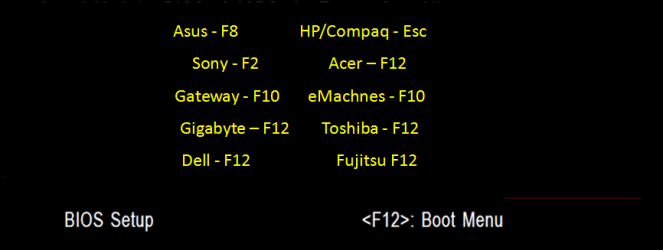
Have tried the one time boot menu at boot post?

GA BIOS-12.PNG
 

My Computer

OS
ME/XP/Vista/Win7
Yes, doesn't work.
Work only F2 - bios and ESC for boot device select.

Damn...
 

My Computer

Computer type
PC/Desktop
OS
Windows 7 Home Basix x64
CPU
Intel i7 4770K
Motherboard
Asrock
Memory
8 Gb ram
Graphics Card(s)
ATI R9 290
Monitor(s) Displays
Samsung
Screen Resolution
1680x1050
Keyboard
Corsair
Mouse
Microsoft Sidewinder X8
Tested with all windows usb versions and same problem all the time. I will wait for external CD/DVD, maybe it will help... :confused:

Thanks guys, cheers
 

My Computer

Computer type
PC/Desktop
OS
Windows 7 Home Basix x64
CPU
Intel i7 4770K
Motherboard
Asrock
Memory
8 Gb ram
Graphics Card(s)
ATI R9 290
Monitor(s) Displays
Samsung
Screen Resolution
1680x1050
Keyboard
Corsair
Mouse
Microsoft Sidewinder X8
Check the ISO integrity or download another, write to stick using this tool with Win7 in dropdown menu: Universal USB Installer

If this is a clean reinstall anyway, you can always wipe the HD using free Partition Wizard bootable CD which autostarts on its own, which will then force the installer to do the same.
 
Doesn't work, nothing.

Edit:
if i take out hhd and formatted by PC, would help?
Can i just NTFS format hdd?

or there is any special procedure?
 
Last edited:

My Computer

Computer type
PC/Desktop
OS
Windows 7 Home Basix x64
CPU
Intel i7 4770K
Motherboard
Asrock
Memory
8 Gb ram
Graphics Card(s)
ATI R9 290
Monitor(s) Displays
Samsung
Screen Resolution
1680x1050
Keyboard
Corsair
Mouse
Microsoft Sidewinder X8
I would wait for external CD drive to run Repairs first.

Run at least 3 Startup Repairs after confirming Win7 partition or its SysReserved partition (preferred) are set Active: Partition - Mark as Active (Method Two)
Startup Repair - Run 3 Separate Times

If this fails you can copy out your files using Repair CD: Copy & Paste - in Windows Recovery Console

Then run Factory Recovery from its partition at boot by tapping the Asus F9 key, once you've disabled Boot Booster in BIOS. Or boot the Win7 DVD and follow these steps for Reinstalling Windows 7
 
Guys, i was removed hdd from netbook, format with pc and now is OK. :cool:
Installing Windowns right now.

Thanks for your time and help.

Regards
 

My Computer

Computer type
PC/Desktop
OS
Windows 7 Home Basix x64
CPU
Intel i7 4770K
Motherboard
Asrock
Memory
8 Gb ram
Graphics Card(s)
ATI R9 290
Monitor(s) Displays
Samsung
Screen Resolution
1680x1050
Keyboard
Corsair
Mouse
Microsoft Sidewinder X8
Glad to hear it and thanks for the update.
 

My Computer

Computer Manufacturer/Model Number
HP Pavilion Elite 495UK
OS
Windows 7 Ultimate SP1 64-Bit
CPU
Intel Core i7 870 @ 2.93GHz
Motherboard
MSI 2A9C (CPU1)
Memory
8Gb Dual-Channel DDR3 @ 664MHz
Graphics Card(s)
nVidia GeForce GTX 460 1024MB dedicated RAM
Sound Card
Realtek HD Audio
Monitor(s) Displays
HP2310i
Screen Resolution
1920 x 1080
Hard Drives
1x1954GB Hitachi HDS22020ALA 330 (RAID), 1x1954GB Hitachi External for backup and storage
PSU
460W
Case
HP Elite
Cooling
Air cooled
Keyboard
Logitech K750 solar-powered keyboard
Mouse
Logitech Wireless M180 mouse
Internet Speed
2Mb
Other Info
Pure Avanti Flow Internet Radio with iPod Dock, 64Gb iPod, HP USB Speakers, Sony MDR-V500 Headphones, Sony Vaio F-Series Laptop
Back
Top