Solved BOOTMGR is Missing

knouroozi

New member
Local time
3:33 PM
Messages
8
Location
Toronto, Canada
At first glance this may seem like a simple bootmgr issue. Run Startup Repair with a Windows install disc, use bootrec.exe, etc. But these don't work. Startup Repair complains that its version is not compatible with the version of the Windows installed. I do not know why, but here is how I got here. I am preferably looking for a way that does not require a download of over 25MB (we have a low bandwidth cap). I am also in possession of multiple Linux LiveCDs (Linux Mint 12, Ubuntu 11.10, ArchBang, Fedora 15) if they are of any use.

Computer Specs
  • Intel Core i5-750 Processor
  • Gigabyte P55A-UD3 Rev 1.0 (Bios version F11)
  • 4GB (2x2GB) G.Skill Ripjaws DDR3-1333 RAM
  • 2 x 500GB Western Digital Caviar Black
  • LG GH-22LS50 DVD Burner/Reader

Step 1
I had an empty 500GB hard drive. Used the Windows 7 Home Premium SP1 disc to partition it into 3 partitions (4 if you count the automatically-created System Reserved partition) - A 200GB for Windows 7, a 275GB for Data, and a 25GB Restore partition.

Step 2
Home Premium SP1 installs without a hitch. When it asks for the serial I enter a genuine serial but uncheck the box that says "activate Windows 7 when I'm online" (I'll tell why in the next step). Computer restarts and loads the desktop.

Step 3
I install VLC, MSE, Chrome, the ATI Drivers, and a couple other things from the Lifehacker Ninite pack. Here I run Windows Anytime Upgrade and upgrade to Professional. The last two times I had installed Windows 7 from my Professional disc it would always give an error when trying upgrade to SP1 and the solutions did not work at all. That's why I used the Home Premium SP1 disc to install. I restart and am greeted to a fully-working Windows 7 install.

Step 4
This is probably trivial, but I'll include it anyway. Chrome Beta acted up by forgetting where its icon was, and two uninstalls and reinstalls didn't fix it. I googled it and found a solution that required you to uninstall Chrome, restart, then install it again. I said why not and followed the first two steps. My computer restarted, and I was greeted by this error:
Code:
BOOTMGR is missing, Press CTRL + ALT + DELETE to restart

Step 5
I had experienced this once before and knew to run startup repair. So I insert my Professional disc. I pick my keyboard type, then click on "Repair this computer". Startup Repair complains that it is not compatible with this install. Thinking this was because of SP1, I try to load Startup Repair with my Home Premium SP1 disc. Same error.
 
Last edited:

My Computer

OS
Windows 7 Professional 64-bit

My Computer

Computer Manufacturer/Model Number
Custom
OS
Windows 7 Pro x64 -- PCLinuxOS KDE4 FullMonty 2011
CPU
i7-875k @ Turbo - 7,6,5,5 - 3.6ghz
Motherboard
Asus P7P55D-E Deluxe
Memory
Corsair CMD8GX3M4A1600C8 8gb
Graphics Card(s)
Asus EAH5850 DirectCU/2DIS/1GD5
Sound Card
On Board
Monitor(s) Displays
Samsung SyncMaster T220 - Panasonic VT30a 50"
Screen Resolution
1680x1050 -
Hard Drives
Corsair Force 3 SSD 120GB x 2 ::
WD VelociRaptor 150GB WD1500HLFS x 2
PSU
Corsair HX-850 Power Supply
Case
Coolmaster HAF 932
Cooling
Corsair H50
Keyboard
Logitech Wireless MK700
Mouse
Logitech Wireless MX620
Internet Speed
Good enough for now
Other Info
Voip. Insanely cheap phone calls.

I can't even get to Windows Startup Repair, as stated in the original post. This leaves out anything that requires command prompt, system restore, or automatic startup repair.

Would installing Windows on another partition then using the new Windows' command prompt to repair the original Windows' Master Boot Record then formatting the new Windows' drive help?
 

My Computer

OS
Windows 7 Professional 64-bit
Did you try using the F8 System Recovery Options?

Make sure Win7 is still marked Active then run Startup REpair repeatedly.

Have you tried install using Professional with SP1 DVD since you said installing SP1 caused problems? I would get Pro install sorted to avoid compatibility issues with Repair from DVD.

If Chrome beta destroyed your boot, I would avoid it like the spyware plague that Google software has become, tracking your shopping habits then pasting ads everywhere you go like creepy Big Brother. Use the stable Google search bar built into Firefox or IE9 which won't allow them to spy.
 
Did you try using the F8 System Recovery Options?

Make sure Win7 is still marked Active then run Startup REpair repeatedly.

Have you tried install using Professional with SP1 DVD since you said installing SP1 caused problems? I would get Pro install sorted to avoid compatibility issues with Repair from DVD.

If Chrome beta destroyed your boot, I would avoid it like the spyware plague that Google software has become, tracking your shopping habits then pasting ads everywhere you go like creepy Big Brother. Use the stable Google search bar built into Firefox or IE9 which won't allow them to spy.

I do not have a Pro + SP1 DVD, only a Home Premium + SP1 and a Pro (without SP1). Computer is custom-built, so no OEM system recovery. As mentioned in original post I cannot get system repair going with the installation media I currently have.

I will take your advice and install Firefox 10.0b2 as soon as my system works again.

Here is a detail I left out in the original post:
The other 500GB hard drive has Mac OS X Lion on it (Hackintosh) and I use its boot manager to get into my Windows partition. Booting straight from the Windows drive and using the default Windows boot manager also gave me the BOOTMGR problem.
 

My Computer

OS
Windows 7 Professional 64-bit
It is interesting to note that the maximum trouble during booting takes place in dual-boot and multi-boot computers.

Why not create a Windows 7 DVD slip streamed with SP1 that has been downloaded separately and then re-install Windows 7 Pro? The procedure to create a slip-streamed DVD is given in the Tutorials at "Windows 7 Forums > Windows 7 help and support > Tutorials » Slipstream Windows 7 SP1 into a Installation DVD or ISO File" and is not very difficult to follow.

I think it shall put an end to all your problems in the future.
 

My Computer

Computer Manufacturer/Model Number
Custom Built
OS
Windows 7 Pro with SP1 32bit
Motherboard
Intel D845GVS1 X86-based PC
Memory
2 gigs of RAM
Graphics Card(s)
Intel(R) 82845G/GL/GE/PE/GV Graphics Controller
Sound Card
Realtek AC'97 Audio
Monitor(s) Displays
Samsung SyncMaster 931BF Black 19" LCD Monitor
Screen Resolution
1280X960
Hard Drives
1. SAMSUNG SP0822N ATA Device ~ 80 GigaBytes

2. Seagate FreeAgent Go USB Device ~ 500 GigaBytes
Keyboard
COMPAQ Standard PS/2 Keyboard
Mouse
iBall Laser Precise Speedster
Internet Speed
4 mb/sec
I had also asked you about using the Repair console which is often on the F8 Advanced Boot Options.

I'd unplug the other HD during any repair or reinstall. Boot your choice of OS/HD via the BIOS boot order or one-time BIOS Boot menu key to avoid any other OS's boot manager interfering with Win7.

Here is the ISO for Pro with SP1. Use the tool to burn to DVD or write to stick to use for Repairs as the lack of SP1 is likely what's generating the error, plus installing Home Premium then Anytime Upgrading to Pro is a unnecessary trouble.
Win7 Professional w/SP1 x64 English Official ISO Download
Windows 7 USB-DVD Download Tool

Adapt these tips to get a perfect reinstall: Reinstalling Windows 7
 
Tidbit

Unhook all disks except the one with Win 7 on it and then try to repair the MBR.
 

My Computer

Computer Manufacturer/Model Number
BGC (Bob's Garage Crew)
OS
win 7 X64 Ultimate SP1
CPU
I3770K
Motherboard
Asus P8Z77-V Deluxe
Memory
G Skill F3-14900CL9-4GBXL x 4
Graphics Card(s)
NVIDIA GeForce GTX670 + Intel 4000
Sound Card
Realtek HD 5.1 (MOB)
Monitor(s) Displays
Asus VW224T (1)
Screen Resolution
1920 x 1080
Hard Drives
SATA Corsair Force GT 2.5" 180GB (System) Sata 3
OCZ Vertex3 120GB
OCZ Vertex 2 120GB 2.5" SATA II
ST31000524AS 1000.2GB
WD15EARS (External)
PSU
CoolerMaster 1000 Watt
Case
CoolerMaster HAF X
Cooling
CPU -- CoolerMaster 520N
Keyboard
MS Wireless 3000 V2
Mouse
MS Wireless 3000 V2
Internet Speed
Cable
Antivirus
Norton Internet Security
Browser
IE9
Other Info
AMI Bios 1805
OC'd 3%
I'm very sorry to have wasted your time on an issue as small as this.
The solution seemed to be to boot from the "System Reserved" partition instead of the Windows 7 partition.

The other times I had installed Windows 7 the System Reserved partition was not created for reasons unknown so I had happily booted from the drive I had selected in the installer.
 

My Computer

OS
Windows 7 Professional 64-bit
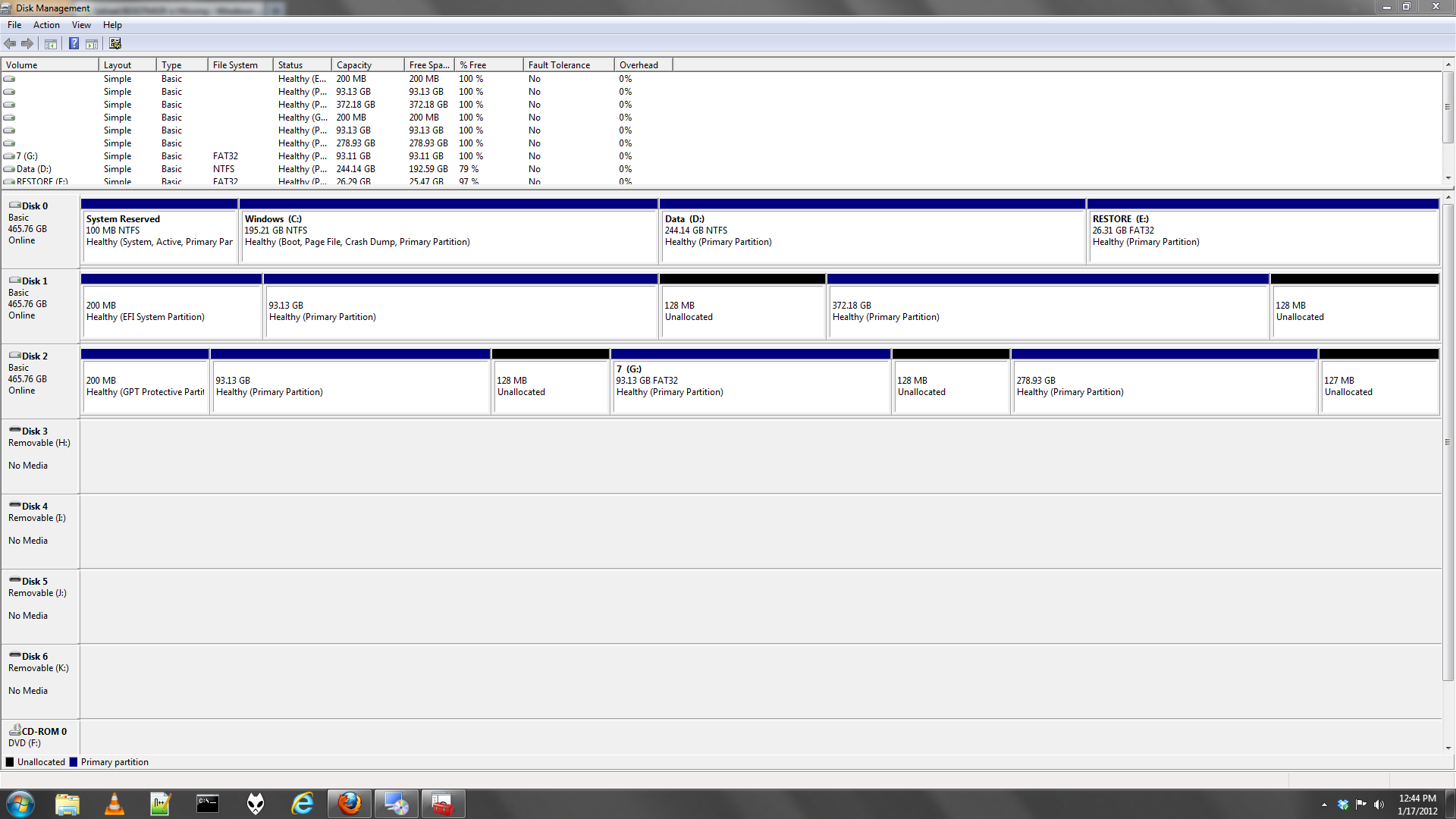
Is the System reserved partition on another HD? Why was it that it wasn't being booted?

If you'll post back a screenshot of your maximized Disk Management drive map we can look it over for you. Use the Snipping Tool in Start menu.
 
Is the System reserved partition on another HD? Why was it that it wasn't being booted?

If you'll post back a screenshot of your maximized Disk Management drive map we can look it over for you. Use the Snipping Tool in Start menu.

This is more of an issue with the bootloader I use. This is what Grub looks for:

  • Mac Partitions
  • Linux Partitions with a /boot, but if a /boot exists then this partition is hidden
  • Windows Partitions, but if there is a System Reserved partition than this is hidden


My (and most Hackintosher's) bootloader of choice is Chimera, which uses this rule:

  • Mac Partitions
  • Linux /boot partitions
  • NTFS partitions
That's why I saw the option to boot to System Reserved and to Windows (the partition name), and I edited the bootloader files to hide the System Reserved partition on startup (not unmount).


Last night I edited the bootloader again to hide the Windows partition, show the System Reserved partition, but rename the System Reserved to "Windows".


Otherwise, there is no issue with the location of System Reserved (if image doesn't display properly, original):
wyEuK.png
 
Last edited:

My Computer

OS
Windows 7 Professional 64-bit
Hello , i have a HP laptop that had a 640gb Toshiba Sata 2.5" hd and the Hard Drive was only 6 months old and it started giving me Error 301 message telling me to copy my hard drive because it was starting to Fail !!

It was a Reconditioned Laptop that looks New !

So I bought a Aluratec Hard Drive Duplicator that is supposed to copy byte by byte 100% from one drive to the other Drive .

So i used a New blank HD and copied everything from the Toshiba drive to the NEW drive .

Now when it starts to boot i get a message saying MBR boot missing .

Is there any EASY way to FIX my problem ???

I am NOT a computer Wiz ... I am age 64 and just get by mostly . HELP !!
 

My Computer

OS
win 7 ultimate
Hello , i have a HP laptop that had a 640gb Toshiba Sata 2.5" hd and the Hard Drive was only 6 months old and it started giving me Error 301 message telling me to copy my hard drive because it was starting to Fail !!

It was a Reconditioned Laptop that looks New !

So I bought a Aluratec Hard Drive Duplicator that is supposed to copy byte by byte 100% from one drive to the other Drive .

So i used a New blank HD and copied everything from the Toshiba drive to the NEW drive .

Now when it starts to boot i get a message saying MBR boot missing .

Is there any EASY way to FIX my problem ???

I am NOT a computer Wiz ... I am age 64 and just get by mostly . HELP !!


   Information
Boot up using the Startup Repair CD or Windows 7 DVD. (not the OEM manufacturer's Recovery Disk) If you have a Netbook, you will need a CD/DVD drive.
NOTE: Make sure no USB drives are plugged in.
Do not use a USB Pendrive for Startup Repair.
startup repair disc-create


Do a Strartup Repair:
http://www.sevenforums.com/tutorials/681-startup-repair.html?ltr=S
Note: You may need to do startup repair 3 to 4 times.
http://www.sevenforums.com/tutorials/105541-startup-repair-run-3-separate-times.html

   Information
We always assume you have made your Recovery Disks using the OEM manufacturer's Recovery Media Creator app the first day you had your new PC.
& made the Startup Repair CD.
startup repair disc-create


Did you make the OEM manufacturer's Recovery Disks?
 

My Computer

OS
ME/XP/Vista/Win7
If I ever made a Repair-Restore CD , i don't know where it is because i am so Damed Forgetfull Now a Days . Also it seems that NONE !! of the Home made Win 7 Pro files that i got from places on the Net will not do a Complete Win 7 Install.
When it get to part 2 of the Install process it keeps asking me for some type of Drivers ,, and it never tells me what Drivers nor where i can find them , DARN !!!
 

My Computer

OS
win 7 ultimate
I finally installed win 7 pro but still a bad mbr

Hello ;

Well I FINALLY INSTALLED WIN 7 PRO BUT STILL get a Message saying I have A BAD or a Missing MBR . DARN !!!!!!!!!!!!!!!!!

I got a Newer Version of Win 7 Pro Installed and it was asking for a Product Key Number and I skipped that because it is supposed to work for 30 Days .

My biggest Problem now is a Missing MBR and I also need to get the Wireless WiFi System to connect to my Router .

Well its 5am and my Eyes are closing ,, goodnight !! :)
 

My Computer

OS
win 7 ultimate
I had already Wiped my NEW Hard Drive ,, so there was no reason for a message saying "Missing MBR" , but Today I ordered a New Win 7 Pro Recovery CD from Microsoft and I hope that will FIX the MBR problems .
 

My Computer

OS
win 7 ultimate
i also checked ,, http://www.sevenforums.com/tutorials/1649-clean-install-windows-7-a.html and i think i did everything correctlt except no product # for win 7 pro ,, but i did select 30 free install ,, then it started to install all of win 7 pro for almost 30 minuets + .. So i thought it was a Normal Clean install . Now all i can do is wait for my new Recovery CD thats coming from MZicrosoft/HP ..
 

My Computer

OS
win 7 ultimate
Where did you get the installer you used? Did the installation ever start up correctly?

Let us know how it goes with the replacement media. A bad MBR should be wiped first with Diskpart Clean Command.
 
Back
Top