Solved Bootmgr is missing...

Luciak

New member
Local time
11:12 PM
Messages
15
Hi.

My problem is similar, yet different.
I also have message "Bootmgr is missing ..." but:

Let me start from the beginning:

I work on Dell Inspiron 14z which has 500GB HDD + 32GB SSD and they work in some kind of RAID or sth like that with DELL's software which moves mostly used software to that SDD.

Yesterday I wanted to install Linux Mint 16 to take a look at it.

I went into Manage Drives in Windows 7 resized my partition to get around 30 GB of unallocated space (I had a bit over 100GB of free space) and saved it. Than I clicked few other things there after not being able to see the unallocated space under Linux installation. One of things I remember clicking on was Set as Active my main partition (C: ).

After that:
- I get the "Bootmgr is missing..." message
- in BIOS I can see both drives with correct sizes (HDD and SDD)
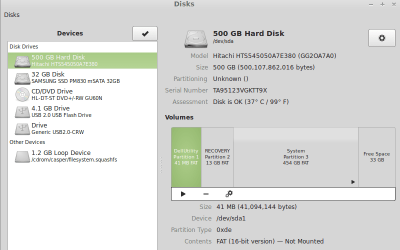
- under Linux Live CD I see those drives as well, although I can only access the HDD (but I see 3 partitions there: DellUtility, RECOVERY, System)
- when I run Windows 7 x64 from bootable USB I do not see any drives - not when I enter Repair mode and not when I enter Install mode
- when I run Diskpart it can not see any drive neither

Any ideas?

EDIT:
Here's how the drives look like under linux (attachments)
 

Attachments

  • 32GB.png
    32GB.png
    22.9 KB · Views: 1
  • 500GB.png
    500GB.png
    23.7 KB · Views: 1
Last edited:

My Computer

Computer type
Laptop
Computer Manufacturer/Model Number
Dell Inspiron 14z
OS
Windows 7 Home Premium x64
CPU
N/A
Motherboard
N/A
Memory
N/A
Graphics Card(s)
N/A
Monitor(s) Displays
N/A
Screen Resolution
N/A
Hard Drives
N/A
Your system reserved partition has to be set active, when you made c active, you botched it.
 

My Computer

Computer type
PC/Desktop
Computer Manufacturer/Model Number
Skylake Special #666
OS
Windows 10 Pro x64
CPU
Intel Core i7 6700K
Motherboard
Asus Sabertooth Z170 Mark 1
Memory
GSkill TridentZ RGB 16GB 3600 16-16-16-36
Graphics Card(s)
EVGA GTX 980 Ti SC x2
Sound Card
Realtek High Definition
Monitor(s) Displays
AOC G2460PG
Screen Resolution
1920 x 1080 144Hz
Hard Drives
Samsung 860 Pro 256GB, Seagate Barracuda 4TB x2
PSU
EVGA 1000 P2, EVGA White Custom Braided Cables
Case
Corsair Vengeance C70 Gunmetal Black
Cooling
Corsair H100i v2, Corsair ML120 x2, Thermal Grizzly Kryonaut
Keyboard
Logitech G910 Orion Spectrum
Mouse
Logitech G700s
Internet Speed
Verizon Fios Quantum Gateway 75/75
Antivirus
Windows Defender, Malwarebytes Free 3.8.3
Browser
Chrome
Other Info
Corsair SP120 x4, LG Blu-ray Drive, Durabrand HT-395 100 Watt Dolby Digital Amp, Corsair H2100 Wireless 7.1 Headset
On Dells, the recovery partition is usually the active partition. That is a bit strange, but that's how all Dell systems I ever saw were set up.

However, your matter is complicared by Linux. The Linux bootloader (Grub) usually takes over and controls the Windows booting also. That has apparently not happened in your case.

Next time you want to test Mint, install it in a virtual partition. That is a lot easier, nothing bad can happen and it is a lot more fun to operate - see here.

In order to get you going again I suggest you set the recovery patrition as 'active'. For that you need the bootable CD of Partition Wizard.

Free download Magic Partition Manager Software, partition magic alternative, free partition magic, partition magic Windows 7 and server partition software - Partition Wizard Online (Last box on the webpage)

How to Set Active/Inactive partition with partition magic? Partition Wizard Video Help.

Then get rid of Linux in the bootloader. You may try this but I am not sure whether that will remove the Grub in your case.

http://www.sevenforums.com/tutorials/210983-dual-boot-delete-os.html

You can assume that your bootmgr is on the recovery partition.
 

My Computer

Computer Manufacturer/Model Number
HP, Dell, Gateway, Toshiba - 4 laptops and 2 desktops
OS
Vista, Windows7, Mint Mate, Zorin, Windows 8
CPU
from 1.6GHz Duo to i7
Monitor(s) Displays
2x HP w2207
Hard Drives
5x HDD, 7x SSD, 12x Externals
Keyboard
with trackball - no mices
Mouse
Trackball mice
Internet Speed
DSL 6000
I don`t think he ever got the chance to install Linux Wolfgang, he`s running off the cd there.
 

My Computer

Computer type
PC/Desktop
Computer Manufacturer/Model Number
Skylake Special #666
OS
Windows 10 Pro x64
CPU
Intel Core i7 6700K
Motherboard
Asus Sabertooth Z170 Mark 1
Memory
GSkill TridentZ RGB 16GB 3600 16-16-16-36
Graphics Card(s)
EVGA GTX 980 Ti SC x2
Sound Card
Realtek High Definition
Monitor(s) Displays
AOC G2460PG
Screen Resolution
1920 x 1080 144Hz
Hard Drives
Samsung 860 Pro 256GB, Seagate Barracuda 4TB x2
PSU
EVGA 1000 P2, EVGA White Custom Braided Cables
Case
Corsair Vengeance C70 Gunmetal Black
Cooling
Corsair H100i v2, Corsair ML120 x2, Thermal Grizzly Kryonaut
Keyboard
Logitech G910 Orion Spectrum
Mouse
Logitech G700s
Internet Speed
Verizon Fios Quantum Gateway 75/75
Antivirus
Windows Defender, Malwarebytes Free 3.8.3
Browser
Chrome
Other Info
Corsair SP120 x4, LG Blu-ray Drive, Durabrand HT-395 100 Watt Dolby Digital Amp, Corsair H2100 Wireless 7.1 Headset
I don`t think he ever got the chance to install Linux Wolfgang, he`s running off the cd there.
But something messed his bootloader up. I wonder from where he got that message to set the C partition active. That is his main problem. It has to be the recovery partition. Dell is odd.
 

My Computer

Computer Manufacturer/Model Number
HP, Dell, Gateway, Toshiba - 4 laptops and 2 desktops
OS
Vista, Windows7, Mint Mate, Zorin, Windows 8
CPU
from 1.6GHz Duo to i7
Monitor(s) Displays
2x HP w2207
Hard Drives
5x HDD, 7x SSD, 12x Externals
Keyboard
with trackball - no mices
Mouse
Trackball mice
Internet Speed
DSL 6000
Well If his recovery partition is supposed to be set active instead of C, as you said, wouldn`t it cause the message, or would he just have to run startup repair ?
 

My Computer

Computer type
PC/Desktop
Computer Manufacturer/Model Number
Skylake Special #666
OS
Windows 10 Pro x64
CPU
Intel Core i7 6700K
Motherboard
Asus Sabertooth Z170 Mark 1
Memory
GSkill TridentZ RGB 16GB 3600 16-16-16-36
Graphics Card(s)
EVGA GTX 980 Ti SC x2
Sound Card
Realtek High Definition
Monitor(s) Displays
AOC G2460PG
Screen Resolution
1920 x 1080 144Hz
Hard Drives
Samsung 860 Pro 256GB, Seagate Barracuda 4TB x2
PSU
EVGA 1000 P2, EVGA White Custom Braided Cables
Case
Corsair Vengeance C70 Gunmetal Black
Cooling
Corsair H100i v2, Corsair ML120 x2, Thermal Grizzly Kryonaut
Keyboard
Logitech G910 Orion Spectrum
Mouse
Logitech G700s
Internet Speed
Verizon Fios Quantum Gateway 75/75
Antivirus
Windows Defender, Malwarebytes Free 3.8.3
Browser
Chrome
Other Info
Corsair SP120 x4, LG Blu-ray Drive, Durabrand HT-395 100 Watt Dolby Digital Amp, Corsair H2100 Wireless 7.1 Headset
He can set it active with the Partition Wizard CD. But if the bootmgr is defunct, he has to run startup/repair 3 times and reboot each time. First though I would see whether the system boots after activating the recovery partition.
 

My Computer

Computer Manufacturer/Model Number
HP, Dell, Gateway, Toshiba - 4 laptops and 2 desktops
OS
Vista, Windows7, Mint Mate, Zorin, Windows 8
CPU
from 1.6GHz Duo to i7
Monitor(s) Displays
2x HP w2207
Hard Drives
5x HDD, 7x SSD, 12x Externals
Keyboard
with trackball - no mices
Mouse
Trackball mice
Internet Speed
DSL 6000
You set C Active without moving the System boot files there by running Startup Repair - Run 3 Separate Times. Hence the "Bootmgr is missing."

I would move the Active flag back to Recovery and see if it starts. If not run the 3 Startup Repairs with reboots until it starts.

I had a post here earlier this evening which seems to have disappeared. Does anyone remember seeing it?
 
Greg, this is a Dell. The bootmgr is on the recovery partition.
 

My Computer

Computer Manufacturer/Model Number
HP, Dell, Gateway, Toshiba - 4 laptops and 2 desktops
OS
Vista, Windows7, Mint Mate, Zorin, Windows 8
CPU
from 1.6GHz Duo to i7
Monitor(s) Displays
2x HP w2207
Hard Drives
5x HDD, 7x SSD, 12x Externals
Keyboard
with trackball - no mices
Mouse
Trackball mice
Internet Speed
DSL 6000
Hi guys, thanks for Your input.

@whs
I will try today evening (I have a long day today -> work+school) with Partition Wizard as You had suggested and come back with feedback how it went.

@gregrocker
I was trying to do this 3 times repair thingy yesterday but the funny stuff is when I enter Diskpart and go with "list disk", I get message saing that there are no fixed disks or sth like that.

EDIT: I came back home so late yesterday that I didn't have any energy left to fight with this problem ;-)
I'll try it out today.
 
Last edited:

My Computer

Computer type
Laptop
Computer Manufacturer/Model Number
Dell Inspiron 14z
OS
Windows 7 Home Premium x64
CPU
N/A
Motherboard
N/A
Memory
N/A
Graphics Card(s)
N/A
Monitor(s) Displays
N/A
Screen Resolution
N/A
Hard Drives
N/A
Wolfgang I had a post on this thead earlier yesterday which appears to be removed. Did you see it?
No, I do not recall that. But don't go by my miserable memory. But why would anybody remove a post.

Regarding the OP's problem: I was hoping that setting the recovery partition active would fix the problem because the bootmgr should be there anyhow (it's a Dell). Now if that does not help, then he has to do the 3 times startup/repair - on the active recovery partition or the active C, does not really matter then. He can use either partition.
 

My Computer

Computer Manufacturer/Model Number
HP, Dell, Gateway, Toshiba - 4 laptops and 2 desktops
OS
Vista, Windows7, Mint Mate, Zorin, Windows 8
CPU
from 1.6GHz Duo to i7
Monitor(s) Displays
2x HP w2207
Hard Drives
5x HDD, 7x SSD, 12x Externals
Keyboard
with trackball - no mices
Mouse
Trackball mice
Internet Speed
DSL 6000
Yes, that's exactly what I said: Try Active on Recovery first which may start since Recovery should already have the boot files.

If that fails run 3 Startup Repairs to repair or rewrite the Boot files to Recovery.

If that fails move Active flag to C to run 3 Repairs to write the boot files there and make the partition bootable.
 
Sounds like a plan.
 

My Computer

Computer Manufacturer/Model Number
HP, Dell, Gateway, Toshiba - 4 laptops and 2 desktops
OS
Vista, Windows7, Mint Mate, Zorin, Windows 8
CPU
from 1.6GHz Duo to i7
Monitor(s) Displays
2x HP w2207
Hard Drives
5x HDD, 7x SSD, 12x Externals
Keyboard
with trackball - no mices
Mouse
Trackball mice
Internet Speed
DSL 6000
Hi.

Happily I am writing this post from W7 :)

Partition Wizard did help because with all that playing of mine I had all 3 partitions set on Active.
I set only Recovery partition as You suggested but it didn't help.
Than I tried setting each partition as Active and restarting but this didn't do any good as well, so I came back to Active on Recovery partition.

The solution to my problem was kind'a strange, I think. Well, maybe the problem was strange.
Anyway, I have found "BOOTMGR - multi-BOOT ManaGeR" on Ultimate Boot CD and I used it to edit MBR.
When I moved Recovery partition to the first place on the list, I could finally say "It's alive, ALIVE!" ;)

I have no idea why, but while creating this unallocated space on my drive (via W7 Disk Management), it had moved this DellUtility Partition to the first position and this was messing things up. Even though only the Recovery partition was set as Active...

Anyway, thanks for Your help :D Next time I'll remember to use virtual partition for my Linux adventures ;)
 

My Computer

Computer type
Laptop
Computer Manufacturer/Model Number
Dell Inspiron 14z
OS
Windows 7 Home Premium x64
CPU
N/A
Motherboard
N/A
Memory
N/A
Graphics Card(s)
N/A
Monitor(s) Displays
N/A
Screen Resolution
N/A
Hard Drives
N/A
Did you miss the critical step to run three Startup Repairs on the Active partition ? Why?

Had you reported back you were using PW we could have also advised to try Rebuild MBR from Disk tab to possibly avoid the 3 Repairs. And with 3 Active partitions you'd have multiple HDs so would need to unplug other HDs for repairs to work.

Why ask for help at the top tech forums and then ignore steps that have worked for tens of thousands of others?
 
Last edited:
Well - I was trying this before and it didn't help, so it was just hooked-up in my mind as "used/didn't work". But I guess it was when I had more than one partitions set as active, so now it would probably do the trick.

I also had pepared UBCD together with Partition Manager (on separate pendrives) when I had access to other W7 PC (I am not that good with linux yet and feel more comfortable in windows). So as long as it was ready I decided to give it a try :)

You sound disappointed that I didn't try it. Why?

EDIT: I've just read Your edit ;)

Disconnecting drives would take much more time (removing keyboard, finding all the screws and latches, etc.) so I am happy I didn't have to do it.
And the Rebuild MBR in PM didn't work - tried it after setting only Recovery partition as active.

Now about my question and ignoring guidance. I had no idae what to do more when I asked here and Your and whs' helped a lot. I have moved forward. I thought forums like this are about finding solutions and not only following all instructions blindly, aren't they?
 

My Computer

Computer type
Laptop
Computer Manufacturer/Model Number
Dell Inspiron 14z
OS
Windows 7 Home Premium x64
CPU
N/A
Motherboard
N/A
Memory
N/A
Graphics Card(s)
N/A
Monitor(s) Displays
N/A
Screen Resolution
N/A
Hard Drives
N/A
What many visitors here don't know is that many of these fixes for Win7 were mostly developed here during beta and have worked for tens of thousands of users or more.

So when we give them it is with this in mind. But we understand that you may not know this. So it can be frustrating when steps are ignored.

We also write for countless others who will find these threads in searches for their own problem. So I was mainly correcting the record for them.

Enjoy Win7 and come back to visit us here at its home.
 
It's highly appriciated what You do here - for sure by me. I created this thread because nothing I googled had worked for me (including things from this forum).

Maybe because of this thread, someone with problem like mine will spend a little bit less time to restore the system and will not have to open the laptop (which is not a nice action - at least for me).

So, thank You again and I'll surely stop by in the future ;)
 

My Computer

Computer type
Laptop
Computer Manufacturer/Model Number
Dell Inspiron 14z
OS
Windows 7 Home Premium x64
CPU
N/A
Motherboard
N/A
Memory
N/A
Graphics Card(s)
N/A
Monitor(s) Displays
N/A
Screen Resolution
N/A
Hard Drives
N/A
You don`t even need to use a VM for your Linux adventures, just run Linux off a cd or a flash drive ;)
 

My Computer

Computer type
PC/Desktop
Computer Manufacturer/Model Number
Skylake Special #666
OS
Windows 10 Pro x64
CPU
Intel Core i7 6700K
Motherboard
Asus Sabertooth Z170 Mark 1
Memory
GSkill TridentZ RGB 16GB 3600 16-16-16-36
Graphics Card(s)
EVGA GTX 980 Ti SC x2
Sound Card
Realtek High Definition
Monitor(s) Displays
AOC G2460PG
Screen Resolution
1920 x 1080 144Hz
Hard Drives
Samsung 860 Pro 256GB, Seagate Barracuda 4TB x2
PSU
EVGA 1000 P2, EVGA White Custom Braided Cables
Case
Corsair Vengeance C70 Gunmetal Black
Cooling
Corsair H100i v2, Corsair ML120 x2, Thermal Grizzly Kryonaut
Keyboard
Logitech G910 Orion Spectrum
Mouse
Logitech G700s
Internet Speed
Verizon Fios Quantum Gateway 75/75
Antivirus
Windows Defender, Malwarebytes Free 3.8.3
Browser
Chrome
Other Info
Corsair SP120 x4, LG Blu-ray Drive, Durabrand HT-395 100 Watt Dolby Digital Amp, Corsair H2100 Wireless 7.1 Headset
Back
Top