Solved BOOTMGR is not found

Luigi2012SM64DS

New member
Local time
2:39 PM
Messages
13
Heres the story: I had a windows XP installation. Soon after I dual-booted it with Windows 7. After being impressed with it I booted into Parted Magic and deleted XP and increased partition size with GParted (I hate that program but it was my only choice.) I then loaded up my Win7 recovery disk and did startup repair 4 times. It didn't help. I rewrote MBR with bootrec (/fixmbr /fixboot /rebuildbcd) and had no luck. I am still able to boot into this OS using Hiren's BootCD and the boot Windows Vista/7 option. I even tried manually copying the bootmgr file from \windows\boot but it doesn't help.

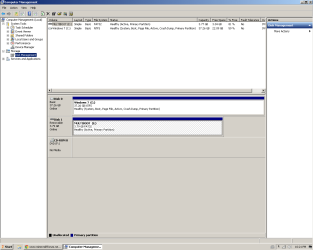
Attached is compmgmt
 

Attachments

  • Untitled.png
    Untitled.png
    20.2 KB · Views: 7

My Computer My Computer

At a glance

7 Performance Edition x86 Prince NRVLAMD Mobile Sempron 3300+2.00 GBATI Mobility Radeon Xpress 200M
Computer Manufacturer/Model Number
eMachines MX4624
OS
7 Performance Edition x86 Prince NRVL
CPU
AMD Mobile Sempron 3300+
Motherboard
N/A
Memory
2.00 GB
Graphics Card(s)
ATI Mobility Radeon Xpress 200M
Sound Card
N/A
Monitor(s) Displays
Samsung SyncMaster 760V TFT
Screen Resolution
1280x1024
Hard Drives
N/A
PSU
N/A
Cooling
Fan?
Antivirus
No Antivirus
Browser
Google Chrome

My Computer My Computer

At a glance

Windows 7 Ultimate x64
Computer type
PC/Desktop
OS
Windows 7 Ultimate x64
Hi

Please boot from "Windows 7" install DVD and run "Startup" repair up to three time separately. This will eventually create the missing boot files on the root of "C" partition.

http://www.sevenforums.com/tutorials/681-startup-repair.html

http://www.sevenforums.com/tutorials/105541-startup-repair-run-3-separate-times.html

Make sure to disconnect every other disks including the USB flash drives when running "Startup Repair".

I then loaded up my Win7 recovery disk and did startup repair 4 times.

I said I already tried this but it didn't work.


Now as a side note, I tried to load my computer iwth hiren again this morning but it decided to say the bcd is messed up. I ran startup repair twice and the first time fixed the bcd but then when i ran it a second time it said "Windows cannot automatically fix your computer" or something along those lines. Now if I load the computer without Hirens I get stuck at a blinking underscore (Whatever its called) and it continues to refuse to boot.

I'm gonna give up soon and reformat my hard drive.
 
Last edited:

My Computer My Computer

At a glance

7 Performance Edition x86 Prince NRVLAMD Mobile Sempron 3300+2.00 GBATI Mobility Radeon Xpress 200M
Computer Manufacturer/Model Number
eMachines MX4624
OS
7 Performance Edition x86 Prince NRVL
CPU
AMD Mobile Sempron 3300+
Motherboard
N/A
Memory
2.00 GB
Graphics Card(s)
ATI Mobility Radeon Xpress 200M
Sound Card
N/A
Monitor(s) Displays
Samsung SyncMaster 760V TFT
Screen Resolution
1280x1024
Hard Drives
N/A
PSU
N/A
Cooling
Fan?
Antivirus
No Antivirus
Browser
Google Chrome
I am still able to boot into this OS using Hiren's BootCD and the boot Windows Vista/7 option.

That option will simply call the "Bootmgr" on the root of "Active" partition ( chain-load BOOTMGR from GRUB4DOS). Since you can boot using that option, it means all boot critical files including "Bootmgr" and a valid BCD store is present. A blinking cursor indicates usually a faulty MBR code. Try updating it with "Bootsect" instead of "Bootrec". Below codes will do the job.

Bootsect /nt60 all

bootsect /nt60 all /force /mbr


After that, Enter Bcdboot C:\Windows ( renaming or old BCD is recommended ).
 

My Computer My Computer

At a glance

Windows 7 Ultimate x64
Computer type
PC/Desktop
OS
Windows 7 Ultimate x64

My Computer My Computer

At a glance

Windows 10 ProAMD Ryzen 5 2400G Processor with Radeon RX Ve...G.SKILL Ripjaws V Series 16GB (2 x 8GB) 288-P...2047MB NVIDIA GeForce GTX 1060 6GB (EVGA)
Computer type
PC/Desktop
Computer Manufacturer/Model Number
Custom Built
OS
Windows 10 Pro
CPU
AMD Ryzen 5 2400G Processor with Radeon RX Vega 11 Graphics
Motherboard
ASRock X470 Master SLI/AC AM4 AMD Promontory X470 SATA 6Gb/s
Memory
G.SKILL Ripjaws V Series 16GB (2 x 8GB) 288-Pin DDR4 SDRAM D
Graphics Card(s)
2047MB NVIDIA GeForce GTX 1060 6GB (EVGA)
Sound Card
Motherboard Built in
Monitor(s) Displays
Acer R240HY bidx 23.8-Inch IPS HDMI DVI VGA (1920 x 1080) Wi
Screen Resolution
1920 x 1080
Hard Drives
1TB Sandisk SSD PLUS (Main drive)
500 GB Seagate 7200 RPM (Games)
500 GB Western Digital 7200 RPM (Virtual Machines)
PSU
CORSAIR TX Series TX650M 650W 80+ Gold Modular Power Supply
Case
CORSAIR CARBIDE SPEC-02 Mid-Tower Gaming Case, Red LED Fan
Cooling
220mm, two 120mm, and four 60mm fans
Keyboard
Wired Dell keyboard
Mouse
Wireless Logitech mouse
Internet Speed
250mb down, 30mb up
Antivirus
Panda Cloud Antivirus
Browser
Chrome-ish x64
Other Info
Your awesome for reading this.
Edit that comment from your post or you could be banned. We're going to assume you were joking.


Anshad just gave you the way to fix this. Unplug your stick or whatever else is in the drive before running the Command from the Win7 installer's Command Line.
 
Edit that comment from your post or you could be banned. We're going to assume you were joking.


Anshad just gave you the way to fix this. Unplug your stick or whatever else is in the drive before running the Command from the Win7 installer's Command Line.

Removed. Apologies for that.

I am still able to boot into this OS using Hiren's BootCD and the boot Windows Vista/7 option.

That option will simply call the "Bootmgr" on the root of "Active" partition ( chain-load BOOTMGR from GRUB4DOS). Since you can boot using that option, it means all boot critical files including "Bootmgr" and a valid BCD store is present. A blinking cursor indicates usually a faulty MBR code. Try updating it with "Bootsect" instead of "Bootrec". Below codes will do the job.

Bootsect /nt60 all

bootsect /nt60 all /force /mbr


After that, Enter Bcdboot C:\Windows ( renaming or old BCD is recommended ).

Tried but unfortunately I am still stuck at blinking cursor (Thats the word!) when I boot.
 

My Computer My Computer

At a glance

7 Performance Edition x86 Prince NRVLAMD Mobile Sempron 3300+2.00 GBATI Mobility Radeon Xpress 200M
Computer Manufacturer/Model Number
eMachines MX4624
OS
7 Performance Edition x86 Prince NRVL
CPU
AMD Mobile Sempron 3300+
Motherboard
N/A
Memory
2.00 GB
Graphics Card(s)
ATI Mobility Radeon Xpress 200M
Sound Card
N/A
Monitor(s) Displays
Samsung SyncMaster 760V TFT
Screen Resolution
1280x1024
Hard Drives
N/A
PSU
N/A
Cooling
Fan?
Antivirus
No Antivirus
Browser
Google Chrome
Back
Top