Solved bootmgr missing after acer system restore

luckyc1p9

New member
Local time
6:12 AM
Messages
2
computer specs:
acer aspire one 721 series
windows 7 home premium 64 bit
amd athlon II neo processor k 125 (1.7 ghz)
2 gb ddr3 memory
6-cell li-ion battery
(that's pretty much all i can get off the back of the laptop, sorry)

so, this morning, i woke up one of our laptops from sleep mode and was met with a blue screen. so, after starting it back up (i tried to check the dump files, but my access was denied), i decided to do a system restore, retaining the user files- something i'd done several times before on that pc without any issues. however, partway through backing up the files, the computer suddenly shut off, and when i started it back up, the only text on the screen was 'bootmgr missing. press ctrl+alt+delete to restart.' i tried that a few times, but nothing changed. i was able to get into bios by pressing f2, but i'm not sure what the password is, as i wasn't the one who set up this computer originally.
right now, my priority is seeing if i can get the files off the hard disk (i think i have a hard drive interface somewhere, if i can find it) but i'd really appreciate help getting windows 7 at least functioning again. thanks!
 

My Computer

Computer type
PC/Desktop
OS
Windows 7 64 bit
Hello and welcome Lucky mate if getting the data back is the priority try this
BOOTABLE UBUNTU
Make a bootable Ubuntu disk Get Ubuntu | Download | Ubuntu
Set the BIOS to boot from the optical when the machine boots it will show you a screen with TRY or INSTALL > select TRY not INSTALL
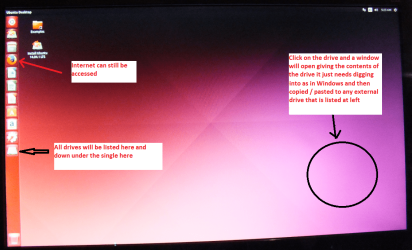
When it is finished - it takes very little time you will get a screen like in the pic .
Open the drive you want > User and dig down until you get to the data / settings you may be able to copy / paste the material you want to an external source or other installed drive doing this.
I am not sure if it will but I have recovered tons of data etc using this method both on "dead" or just plain drives that you cannot get data from using Windows.


This does not involve Windows as it runs in the Ubuntu OS but remember use TRY not RUN. By the by there is a Linux Mint bootable stick that will do the same sort of job but for what it is worth making a disk/CD is easier and simpler to do (my opinion).

Get the data back and we can carry on from there.
 

Attachments

  • UBUNTU SCREEN X2.PNG
    UBUNTU SCREEN X2.PNG
    272.7 KB · Views: 0

My Computer

Computer type
PC/Desktop
Computer Manufacturer/Model Number
Own build (new) Desk1 / Asus ROG Win 7 / Desk2 1st build
OS
Desk1 7 Home Prem / Desk2 10 Pro / Main lap Asus ROG 10 Pro 2 laptop Toshiba 7 Pro Asus P2520 7 & 10
CPU
Desk1 i5 3750K / Laptop i7 GTX 860M / Desk2 i5 2500
Motherboard
Desk1 Asus P877-V / Desk2 Gigabyte H67 UD3H / Laptop ?
Memory
Desk1 8GB (1866) / Desk2 16GB (1333) / Laptop 8Gb DDR3
Graphics Card(s)
Desk 1& 2NVidia GTX 650 & Laptops on board Intel
Sound Card
Desk 1 & 2 -XONAR DG Realtek High Def audio Laptop
Monitor(s) Displays
Desk 1 Benq HD 2450 / Desk2 Philips 24" / Laptop 17.5"
Screen Resolution
1920x1080 D1 & D2 & Laptop 1
Hard Drives
Desk1 Samsung 120GB 830 SSD
Asus ROG 256GB 850 Pro SSD
Desk2 Samsung 840 256 SSD
Toshiba 120GB EVO
PSU
Desk 1 Corsair HX 1050/ Laptop ? / Desk 2 Corsair HX 650
Case
Desk 1 Cooler HAF XM ? Toshiba laptop / Desk2 Coolermaster
Cooling
Fans on all Desk1 -2 Desk2 - all Coolermasters 5 Laptop ?
Keyboard
Desk 1 MS Sidewinder X6 Desk 2 MS Sidewinder X 4
Mouse
Desk 1&2 - Gigabyte MS 900 gamer - laptop - Logitec wireless
Internet Speed
ADSL2+
Other Info
One other Desktop (tester) and spare Toshba laptop both with SSD's
Running Kaspersky 2016 ISS on all machines config'd identically
Logitec audio stereo systems on each machine (x3)
Canon MG5250MFC
Router/modem TP-Link running WPA2SK
thanks for the info. i made a bootable usb since the laptop doesn't have a disc slot, and dug around and found the backdoor password for bios, and was able to get ubuntu up and running and copy all the files i needed onto another usb. oddly enough, while poking around the computer, i found the bootmgr file still intact. any ideas for getting windows 7 up and running again? thanks again.
edit: hold on, i might actually try making a bootable usb for windows- i've had quite a few issues with this pc in the past and i believe that that worked once.
edit 2: well, suffice it to say that i'm feeling a little dumb right now. i tried opening the recovery options again on a whim, this time picking the option that would wipe the disk, and it's working so far. welp, i guess i'll have no way to know if everything i did was useless or not, but at least if this happens again i'll know how to salvage the files, at least. thanks for the help, though!
 
Last edited:

My Computer

Computer type
PC/Desktop
OS
Windows 7 64 bit
Ok Lucky I wioll have a think about it still though it is good to know that you can get at that data.:)
 

My Computer

Computer type
PC/Desktop
Computer Manufacturer/Model Number
Own build (new) Desk1 / Asus ROG Win 7 / Desk2 1st build
OS
Desk1 7 Home Prem / Desk2 10 Pro / Main lap Asus ROG 10 Pro 2 laptop Toshiba 7 Pro Asus P2520 7 & 10
CPU
Desk1 i5 3750K / Laptop i7 GTX 860M / Desk2 i5 2500
Motherboard
Desk1 Asus P877-V / Desk2 Gigabyte H67 UD3H / Laptop ?
Memory
Desk1 8GB (1866) / Desk2 16GB (1333) / Laptop 8Gb DDR3
Graphics Card(s)
Desk 1& 2NVidia GTX 650 & Laptops on board Intel
Sound Card
Desk 1 & 2 -XONAR DG Realtek High Def audio Laptop
Monitor(s) Displays
Desk 1 Benq HD 2450 / Desk2 Philips 24" / Laptop 17.5"
Screen Resolution
1920x1080 D1 & D2 & Laptop 1
Hard Drives
Desk1 Samsung 120GB 830 SSD
Asus ROG 256GB 850 Pro SSD
Desk2 Samsung 840 256 SSD
Toshiba 120GB EVO
PSU
Desk 1 Corsair HX 1050/ Laptop ? / Desk 2 Corsair HX 650
Case
Desk 1 Cooler HAF XM ? Toshiba laptop / Desk2 Coolermaster
Cooling
Fans on all Desk1 -2 Desk2 - all Coolermasters 5 Laptop ?
Keyboard
Desk 1 MS Sidewinder X6 Desk 2 MS Sidewinder X 4
Mouse
Desk 1&2 - Gigabyte MS 900 gamer - laptop - Logitec wireless
Internet Speed
ADSL2+
Other Info
One other Desktop (tester) and spare Toshba laptop both with SSD's
Running Kaspersky 2016 ISS on all machines config'd identically
Logitec audio stereo systems on each machine (x3)
Canon MG5250MFC
Router/modem TP-Link running WPA2SK
Back
Top