BOOTMGR missing after GRUB install

Name not found

New member
Local time
8:10 AM
Messages
3
Hello,
My HP Mini 110 (w/o CD player) gives some error about BOOTMGR after installing Android-x86 2.2 with GRUB on the second ('data' part) partition (Please note that Ubuntu is installed too, but it does not list it. Cannot get into the Ubuntu 'GRUB' loader too.).
Now, the drive letters suddenly changed to D:\ (data) = C:\ and C:\ = D:\ (Windows 7).
Tried a recovery (Windows 7 setup via USB, recovery part only), but told me after finding problems with the boot "There was no problem to be found".
So, tried the command prompt, and tried to copy the files manually that required to boot.
Now when I boot, I get the GRUB bootloader with an option for Windows by default.
After selecting 'Windows' I get another error: 'Windows failed to start [...] File: \Boot\BCD\'.
The HDD is not broken, if I do a cd D:\Windows and execute notepad.exe for example, it works in the recovery environment. I'm stuck now, because I cannot afford it to lose any data. And also tried fixmbr, and all other options available.
I really think this should be a problem with the partition order.
All the files are still available, and since I can't boot from CD (no, I do not have any external options.) please do not post options that are irrelevant to this.
 

My Computer

Computer Manufacturer/Model Number
HP Mini 110-1150ED
OS
Windows 7 Ultimate, Android x86, Ubuntu 11.04, Windows XP
CPU
Intel Atom
Motherboard
Generic/HP
Memory
1GB
Graphics Card(s)
Build-In Intel Graphics
Sound Card
Generic/HP build-in
Monitor(s) Displays
Build-In/ACER X193W external VGA
Hard Drives
Toshiba/build-in (320GB)
PSU
Unknown/ N/A
Case
Standard HP Mini Laptop
Cooling
Build-In/USB
Boot the Repair console you wrote to bootable to copy out your files: Copy & Paste - in Windows Recovery Console

Does the Repair console find an installation to Repair?
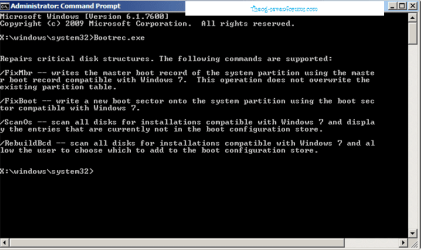
If not open Command Line from Options list to run:
bootrec /fixboot
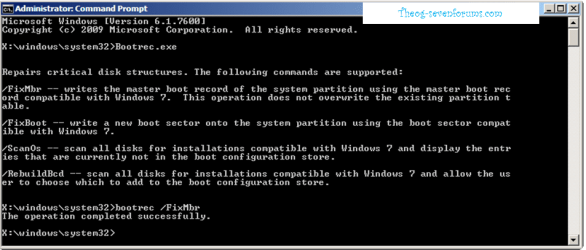
bootrec /fixmbr
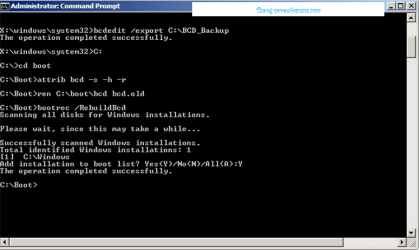
bootrec /rebuildbcd

If Win7 doesn't then start, see if it finds an installation to repair now. Run Startup Repair repeatedly anyway.

We have a lot of cases where GRUB on the same HD as Win7 renders it irreparable.

Report back results for more steps, or try running full Factory recovery from its partition or disks if you have or made them: HP Backup and Recovery Manager
Creating a Recovery Disk on a USB Flash Disk - HP technical support (Finland - English) HP Recov DIsks - make another set Extract HP 3rd Party Software from RecovCD
Or find a Win7 installer for your version to clean reinstall with the Product Key on COA sticker: Reinstalling Windows 7
Universal USB Installer – Easy as 1 2 3
 
Boot up using the Startup disk CD or Windows 7 DVD. (not the OEM manufacturer's Recovery Disk) If you have a Netbook, you will need a CD/DVD drive.
Make sure no USB drives are plugged in.

1) Use the Rebuild BCD in this tutorial:
How to use the Bootrec.exe tool in the Windows Recovery Environment to troubleshoot and repair startup issues in Windows

Startup Repair 4.PNG Startup Repair 5.PNG


2) Rebuild MBR.

Startup Repair 6.PNG

If you have not made your Startup Repair
http://www.sevenforums.com/tutorials/2083-system-repair-disc-create.html
Do you have a mate with Windows 7 & CD/DVD RW Drive, how could burn one off.
 

My Computer

OS
ME/XP/Vista/Win7
I already tried all those things before this was even posted, and I have the W7 install disk on USB as I said before.
Also, it is only some issue with the bootloader AND the partitions (so D: = C: and so on.).
If I restore the bootloader and the other files required to boot, it tries to boot from C:/WINDOWS, but because C:\ = D:\ now, it gives the error because C:\Windows and C:\Boot\BCD not exist on the partition. Also, when I copy the bootloader manually on C:\ (former D:\ partition), it still won't boot. Reinstalling for a broken bootloader/misconfigured partitions is not an option.
Remember that I don't have an external HD to copy things on, and I can boot only from USB(which works perfect with any software and OS's).
So, the question is: How do I make from C:\ to D:\ again and D:\ to C:\ w/o formatting things?
Really, if you don't know how to do that w/o formatting, how did this happen then?
If you have a Netbook, you will need a CD/DVD drive.
Now, why? I got all the options available that a normal w7 CD has on my little 4GB drive.
So that's not an option, since it does not help at all because I can read all files etc., basically just the same as a CD.
And no, this isn't the OEM disk. A store bought Windows 7 Ultimate disk copied to USB.
 

My Computer

Computer Manufacturer/Model Number
HP Mini 110-1150ED
OS
Windows 7 Ultimate, Android x86, Ubuntu 11.04, Windows XP
CPU
Intel Atom
Motherboard
Generic/HP
Memory
1GB
Graphics Card(s)
Build-In Intel Graphics
Sound Card
Generic/HP build-in
Monitor(s) Displays
Build-In/ACER X193W external VGA
Hard Drives
Toshiba/build-in (320GB)
PSU
Unknown/ N/A
Case
Standard HP Mini Laptop
Cooling
Build-In/USB
NOTE:
Boot up using the Startup disk CD or Windows 7 DVD. (not the OEM manufacturer's Recovery Disk) If you have a Netbook, you will need a CD/DVD drive.
Make sure no USB drives are plugged in.
 

My Computer

OS
ME/XP/Vista/Win7

My Computer

Computer Manufacturer/Model Number
packard bell IXTREME M5722
OS
Operating System : Windows 7 Home Premium Edition 6.01.7600 SP1 (x64)
CPU
Processor : Intel Core 2 Quad Q8300 @ 2500 MHz
Motherboard
Mainboard : Packard Bell (Acer EG43M )
Memory
Physical Memory :8GB Corsair4x 2GB 800MHz C5 DDR2
Graphics Card(s)
Video Card : XFX 6700 AMD
Monitor(s) Displays
Maestro 234DL - BenQ V2220 - BenQ VW2420H
Screen Resolution
Current Display :1920x1080p pixels at 60 Hz in HD LED
Hard Drives
Hard Disks : WDC (1000 GB)
Drive C: (Hard Disk) : 428 GB available on 491 GB
Drive D: (Hard Disk) : 426 GB available on 492 GB
SAMSUNG spinpoint HD103SJ 1000.2 GB
(X 2) KINGSTON SSD NOW V 30GB
PSU
XFX ProSeries 550W PSU
Case
PACKARD BELL IXTREME
Cooling
System Blower Current: 150mA Air Flow16CFM ;Akasa 90mm rear
Keyboard
Gigabyte Aivia K8100
Mouse
TRUST-Wireless Laser Mouse - Carbon edition MI-7770C
Internet Speed
TP-LINK > TL-WN951N / AV500 Gigabit Powerline Adapters
Browser
chrome dev
Other Info
EXTRA COOLING>(FAN CONTROLLER) PC Bay Cooler 3 x 40mm fans; Akasa AK-HD-BL Blue hard drive cooler 2 x 40 mm fan 4500 rpm 29.7 dBA
Bios> American Megatrends Inc.
Version : P01-A1
Date : 08/31/2009
The tool used when drive letters slip in registry is Paragon Rescue CD: Rescue Kit Free Edition | PARAGON Software Group - free partition software, hard disk partitioning

Boot the Paragon cd - select Normal Mode , then Boot Corrector.

Correct drive letters in the system registry.

However in the past this error has only manifested with black screen lockout. As you seem sure this is the problem, that is the tool.

You can most certainly clean reinstall with such an error. I would wipe the HD first against possible boot sector corruption: SSD - HDD Optimize for Windows Reinstallation

Tips for getting a perfect reinstall - use the ones which apply: Reinstalling Windows 7
 
If you have the HP Recovery Partition still in place, Windows partition will be D:, as seen from Recovery Console.
 

My Computer

OS
ME/XP/Vista/Win7
Back
Top